

6sense vs ZoomInfo: A Practical B2B Buyer Guide
6sense vs ZoomInfo compared for B2B SaaS, SDR teams, and agencies. See intent data, pricing models, CRM fit, and the checklist to pick with confidence.
You're staring at two enterprise quotes, a HubSpot stack, and a sales team that wants answers this month, not next quarter. One vendor promises better timing. The other promises better reach. The wrong choice turns into a year of duplicate records, shaky routing rules, and reps ignoring yet another dashboard.
| Decision area | 6sense | ZoomInfo | Lean recommendation |
|---|---|---|---|
| Core job | Predictive account intelligence and orchestration | Contact and company data at scale | Pick the one that matches the bottleneck |
| Best user | Marketing ops, ABM, revenue ops | SDRs, BDRs, outbound teams | Match the buyer to the workflow |
| Strength | Buying-stage prioritization | Reachable humans and list building | Don't force one tool to do both |
| Main risk | Paying for scores you can't operationalize | Paying for data you don't fully use | Buy for completed workflows, not features |
| If budget only covers one | Better when timing matters more than volume | Better when outbound volume is the problem | Start with the binding constraint |
Table of Contents
- The Choice Most B2B Teams Actually Face
- What Each Platform Was Built to Do
- Intent Signals, Data Freshness, and Where Each Wins
- How Each Platform Fits HubSpot, Pipedrive, and Attio
- Pricing and Licensing Models Compared
- Where Each Platform Shines for B2B SaaS and Local Agencies
- The Live-Web Signal Alternative Most Comparisons Skip
- Decision Framework, POC Checklist, and Migration Path
The Choice Most B2B Teams Actually Face
The decision usually lands in a meeting like this. A head of revenue at a Series B SaaS company already has HubSpot running, outbound sequences live, and a pipeline target that won't move. The team can afford one more platform, maybe not both, and the question is simple: do you buy timing or do you buy reach?
That's why the usual 6sense vs ZoomInfo checklist falls apart. A feature grid tells you who has more objects, more filters, or more intent labels. It doesn't tell you whether your reps can turn a signal into a call, whether marketing can route the account fast enough, or whether the CRM will get cleaner or messier after rollout.
Start with the completed workflow
The better test is this, can the team go from account discovery to a usable next action without manual cleanup? If the answer is no, the platform is just producing more work. If the answer is yes, then the choice is about which kind of work matters most, account prioritization or contact discovery.
Practical rule: buy the platform that completes the step your team fails on most often, not the one with the longest feature list.
That framing matters because the two tools were built for different jobs. One helps you decide which accounts deserve attention now. The other helps you find who inside that account you can reach. If your budget only covers one, you need to know which part of the motion is broken today.
For teams under pressure, that usually means looking at six things in order, contact depth, intent quality, signal provenance, integration fit, total cost, and migration risk. If you skip those and chase brand recognition, you'll end up paying for a suite that looks strong in a demo and weak in the CRM.
What Each Platform Was Built to Do
6sense and ZoomInfo solve adjacent problems, but they were not built from the same DNA. 6sense was shaped around predictive account intelligence, buying-stage identification, and revenue orchestration across marketing and sales. ZoomInfo was built around business contact and company data at scale, then layered execution tools on top.
6sense is an account prioritization engine first
6sense's historical positioning has always centered on identifying in-market accounts and ranking them for action. That matters because the platform is optimized for account-level decisions, not just record retrieval. In practice, that means marketing and sales teams use it to decide where to spend attention, not just who to email next.
The strategic upside is obvious. If your team already knows the target market and wants better timing, 6sense fits the motion. It's strongest when the buying cycle is long enough for predictive scoring to matter and when multiple stakeholders need the same account view.
ZoomInfo is a contact data engine first
ZoomInfo's core value is different. It's built to give sellers names, emails, direct dials, and company context at scale. Its strength is breadth, coverage, and the ability to turn a selected account into a working prospect list quickly.
That makes ZoomInfo the more natural fit when outbound volume is the constraint. If your SDRs need people to call today, the platform is designed for that. If your team already has an ABM engine and just needs contacts inside those accounts, ZoomInfo plugs into that gap cleanly.
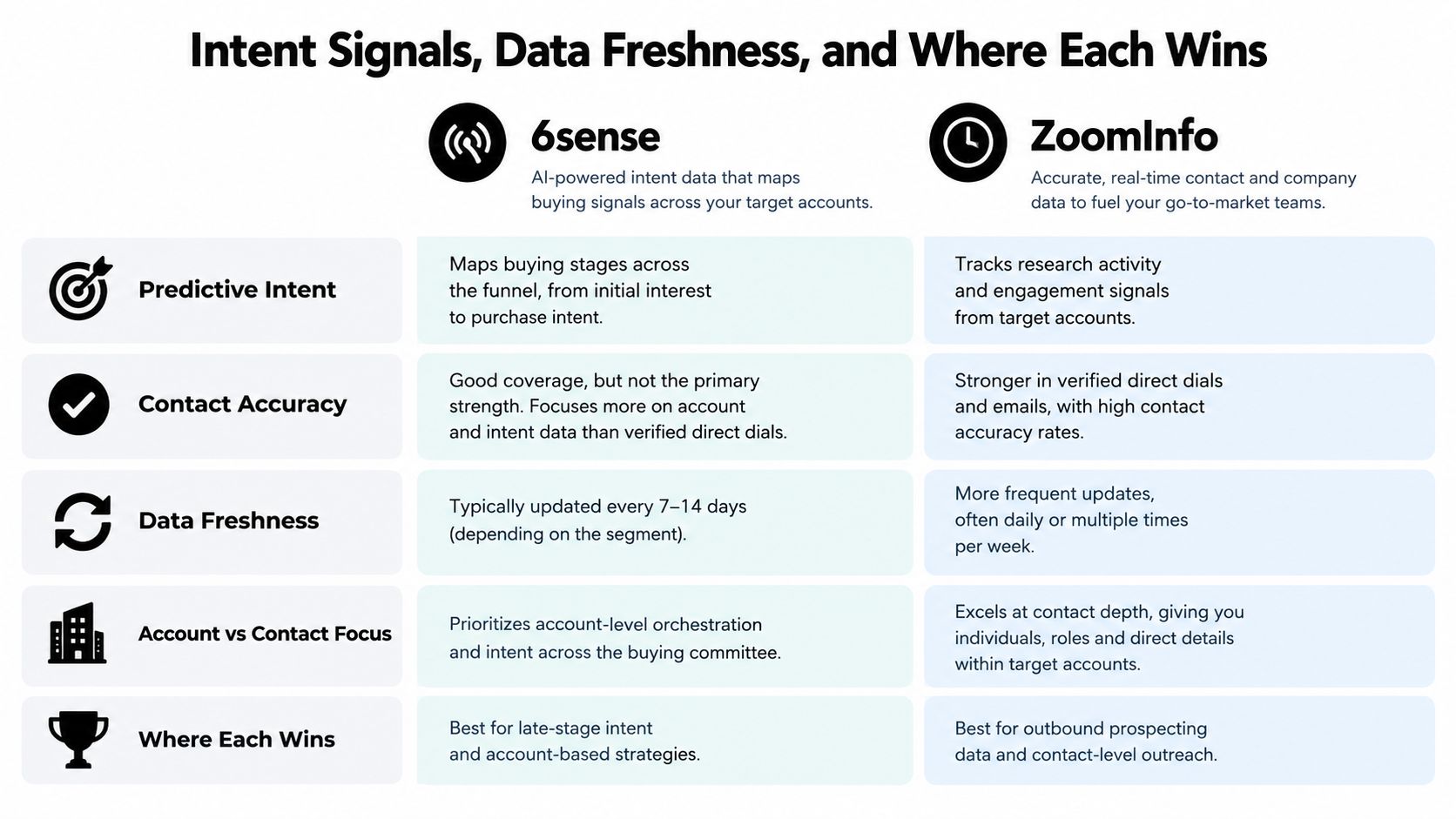
The shortest honest summary is this, 6sense prioritizes accounts, ZoomInfo supplies contacts. If your team confuses those jobs, the evaluation gets messy fast. If you separate them, the buying decision becomes much clearer.
Intent Signals, Data Freshness, and Where Each Wins
The strongest public scale claim in this category belongs to ZoomInfo. It reports 500 million contacts, more than 135 million verified phone numbers, over 200 million verified business emails, and a pipeline processing more than 1.5 billion data points daily ZoomInfo comparison page. By contrast, 6sense is described there as having more than 100 million business emails, which tells you where each platform leans.
Predictive intent versus contact reach
6sense is better thought of as a signal-and-orchestration system. It aggregates account behavior and tries to identify who is moving through a buying journey. ZoomInfo is better thought of as a data-access system. It helps you find the person after you've already decided the account deserves attention.
That distinction is why buyers keep talking past each other. One camp cares about timing. The other cares about reachability. If you're running a signal-first motion, a guide to signal based prospecting is a useful mental model because it forces you to ask what proof comes before outreach. For a deeper primer on the category itself, the article on what intent data means in B2B gives the right baseline.
What to trust, and what to question
Vendor-reported accuracy claims are not the same as independent validation. An external comparison reports approximate email deliverability of 82% for 6sense versus 88% for ZoomInfo and direct-dial accuracy of roughly 65% versus 72%, but that comparison does not present controlled lab methodology HG Insights benchmark. Treat those figures as directional, not final.
A better buyer test is to verify the workflow yourself. Pick target accounts, check whether the signal appears early enough to matter, then see whether the contact data is usable enough to produce outreach that doesn't bounce or stall. That's the question that matters: which platform gives you better-timed outreach signals, and which gives you more reachable humans.
If your team wants to build around timing, source-cited account changes, and “why now” logic, that's where signal-first tools win. If your team wants a bigger bench of names and numbers, ZoomInfo is the stronger fit.
How Each Platform Fits HubSpot, Pipedrive, and Attio
The CRM question is where a lot of evaluations get real. A platform can look strong in product screenshots and still create a mess in HubSpot, Pipedrive, or Attio if the write-back model is clunky. The difference shows up in how records refresh, which objects get touched, and whether you end up with duplicate company rows.
What 6sense usually writes back
6sense is built to score accounts, so the main write-back pattern is account-level. That usually means intent tags, account stage, and scoring fields land on company records rather than on individual contacts. That's useful if your sales process is organized around territory or target-account ownership.
It also means the CRM needs to be clean before the model is useful. If the company mapping is weak, account scoring won't feel trustworthy, and your team will spend time arguing over which record is accurate. In a HubSpot setup, that often shows up as company-property clutter and inconsistent routing if ops hasn't standardized naming and lifecycle logic.
What ZoomInfo usually writes back
ZoomInfo's natural home is the contact record. It enriches contacts and pushes firmographics into both company and contact objects, which works well for outbound teams that live inside lists and sequences. The upside is speed, the downside is that contact-heavy enrichment can create overlap if your CRM already contains partial records.
That's especially noticeable in Pipedrive and Attio, where teams often run lighter data hygiene processes than larger RevOps orgs. If you're using several sources, duplicates show up fast, and custom-object mismatches can make the data feel fragmented instead of helpful.
For teams that want a live-web layer instead of a static database layer, the CapyScout HubSpot integration is relevant because it writes firmographics, ICP grade, and source-backed “why now” notes into company records daily with bi-directional sync. If you're managing Attio specifically, the Croft guide to hosting Attio connector apps is also worth a look because connector hygiene matters more than feature depth once the workflow gets busy.
Operational check: if the sync creates more cleanup than prioritization, the integration is failing, even if the demo looked smooth.
The key is not whether a platform “integrates.” It's whether the data lands in the right object, at the right cadence, without forcing your ops team to become a full-time janitor.
Pricing and Licensing Models Compared
Neither vendor makes pricing simple. Both sell custom contracts, and both push buyers toward sales conversations instead of transparent rate cards. That alone tells you where the power sits.
What the money usually buys
With 6sense, the economic risk is that advanced intent and orchestration capabilities get tied to higher-tier packages and the operational overhead of maintaining the model. You are not just buying software. You're buying a system that needs someone to keep the underlying account logic aligned with the CRM.
ZoomInfo often feels cheaper at the entry point, but the cost can climb fast once credits, advanced search, and adjacent features enter the discussion. The platform's public scale also shows why it wins many procurement battles: it's a broader commercial machine, with revenue reported at about $1.10 billion in 2022, $1.24 billion in 2023, $1.21 billion in 2024, and $1.25 billion in 2025 industry reporting. That same source notes that its 2022 revenue was roughly ten times 6sense's approximately $110 million annualized run rate at the start of that year.
What to ask before signing
| Procurement question | Why it matters |
|---|---|
| What exactly is included in the base package? | Prevents surprise gating on intent or exports |
| How are credits, seats, or usage limits counted? | Stops you from overbuying for a team that won't use it |
| What happens at renewal? | Avoids a contract that grows faster than usage |
| What is the admin burden after go-live? | Reveals the real cost of ownership |
| What objects get refreshed in the CRM? | Prevents enrichment from breaking your reporting |
The practical read is blunt. 6sense tends to be the heavier strategic bet, especially if you need predictive orchestration. ZoomInfo tends to be the easier commercial sell, especially if the team wants contact volume and a cleaner outbound workflow. Neither is cheap once you include internal admin time, and that's the part most purchase decks leave out.
Where Each Platform Shines for B2B SaaS and Local Agencies
For B2B SaaS, the fit is usually pretty obvious once you look at the sales motion. 6sense works best when marketing, SDRs, and AEs all touch the same account journey and the buying cycle is long enough for account scoring to matter. ZoomInfo works best when the SDR team needs a lot of names quickly and territory lists need to turn into calls without much fuss.
B2B SaaS teams
If you run ABM, 6sense is the cleaner fit. It gives marketing a way to prioritize target accounts and gives sales a common language around buying stage. That's especially useful when the organization already has sales engineers, campaign owners, and RevOps support in place.
ZoomInfo is the more practical choice when outbound is the engine and the team lives inside prospecting lists. If the job is to find the right person at the right company and move quickly, ZoomInfo is easier to operationalize. It's not as elegant for orchestration, but it's often better for motion.
Local agencies and service businesses
Local marketing and reputation management agencies are a different story. Neither platform is naturally built around service-business monitoring or local-market outreach, so both can feel like enterprise hammers for smaller operational nails. The mismatch shows up fast when the goal is freshness and timing, not massive contact databases.
That's why the question often becomes whether a live-web signal workflow is a better fit than either incumbent. For teams serving service businesses or working in narrow geographies, the better input is usually a fresh change event, not a large precompiled contact graph. The Chartsy guide to B2B SaaS attribution is helpful here because it keeps the conversation grounded in what creates revenue visibility, not just what fills a CRM.
The blunt recommendation is simple. B2B SaaS with a mature ABM motion should lean toward 6sense. SDR-led teams that need contact depth should lean toward ZoomInfo. Agencies and local-market teams should be suspicious of both if the workflow is mostly about recent change, not database scale.
The Live-Web Signal Alternative Most Comparisons Skip
This is the part most buyers never test properly. A live-web signal layer can be a better fit than either incumbent when the core problem is not “find more contacts,” but “find timely accounts with proof.” That's where platforms like CapyScout come in, because they search the live web for fitting companies, monitor accounts for buying signals, and write source-backed context into the CRM instead of just more rows.
Why live-web timing can beat static database scale
The advantage is freshness. A live-web workflow can surface hiring changes, funding news, leadership moves, website behavior, reviews, and other account events without waiting on a database refresh. It also gives you provenance, which matters when sales wants to know why now before they send an email.
That can make it a stronger fit for lean teams that don't want two enterprise contracts. If you can get a source-backed reason to contact, plus a clean CRM update, you may not need the full weight of a predictive orchestration suite and a separate contact database. You need fewer false positives, less duplication, and less time spent reconciling systems.
Strong rule: if your team cares more about verified timing than about the biggest possible contact graph, start with live signals.
Where it doesn't replace the incumbents
CapyScout-style workflows don't try to pretend they replace everything. They won't give you the same direct-dial footprint as ZoomInfo, and they're not trying to mimic 6sense's account orchestration model. What they can do is sit closer to the moment a buyer changes, which is often where small and mid-market teams win.
For people who want to compare the timing layer directly, the top buying signals guide is useful because it separates real events from noisy ones. That's the core difference here. A database tells you who exists. A live-web signal workflow tells you who just became worth your time.
If your team is lean, the math is often better on the third option. Not because it's more fashionable, but because the total cost per qualified timely account is lower when the workflow starts with a real event and ends with a usable next step.
Decision Framework, POC Checklist, and Migration Path
Use the buying decision like an operator, not a shopper. If the team's biggest problem is account timing, start with 6sense. If the biggest problem is outbound reach, start with ZoomInfo. If the biggest problem is finding timely accounts without paying for two enterprise contracts, test a live-web signal layer first and see whether it covers enough of the motion.
A simple decision matrix
- Choose 6sense first when marketing and sales share the motion, accounts are already defined, and you need predictive prioritization.
- Choose ZoomInfo first when SDRs need contact depth, quick list building, and direct outreach at volume.
- Choose a live-web alternative first when your team needs fresh account evidence, CRM updates, and source-backed timing more than maximum record count.
- Run both only when the workflow is mature enough to justify duplicate spend and duplicate administration.
Two-week POC checklist
- Verify contact quality early. Pull a sample of target accounts and check whether the returned emails and phone numbers are usable in your live CRM, not just in the vendor UI.
- Measure signal freshness. Look at how fast an account event becomes visible to the rep who needs it.
- Score intent precision. Separate “interesting” activity from activity that looks ready to buy.
- Test CRM round-trip. Confirm what lands in HubSpot, Pipedrive, or Attio, and whether the write-back makes reporting cleaner or messier.
- Run an outreach sample. Ask reps to contact the accounts and record how many signals produce a credible, timely first message.
How to migrate without breaking the stack
Start by freezing the old scoring logic before you introduce the new one. Keep historical fields intact, map the new fields deliberately, and don't let two tools fight over the same lifecycle property. If you switch providers, preserve the account history in the CRM and archive the old signal source so reps can still see where a target came from.
The metric that matters is cost per qualified, timely account with a usable next action. Not records. Not features. Not the prettiest dashboard.
If you want a leaner stack that starts from live account signals, source-backed context, and CRM write-back built for action, take a look at CapyScout. It's designed to help teams find timely companies, monitor buying signals, and decide who to contact without paying for a second heavy platform. If you're weighing 6sense vs ZoomInfo and want a signal-first workflow to test against both, CapyScout is a practical place to start.