

HubSpot vs Salesforce: An Honest 2026 CRM Comparison
HubSpot vs Salesforce compared for 2026: features, pricing, TCO, implementation time, integrations, and best-fit use cases to help you choose wisely.
The popular advice on HubSpot vs. Salesforce is to compare features, then pick the platform with the right price and capabilities. That's the wrong starting point. The expensive mistake usually isn't missing a button. It's choosing a system your team can't implement, maintain, or act on without constant cleanup and rework.
A better test is how quickly the CRM helps your team take the right next action, and what it costs in administration, integrations, and adoption to get there. HubSpot tends to favor connected go-to-market workflows with less setup friction. Salesforce earns its place when the business needs deeper customization and governance. Neither choice fixes stale records or weak lead prioritization on its own.
| Criterion | HubSpot | Salesforce |
|---|---|---|
| Best fit | Growing teams that want connected marketing, sales, and service workflows | Organizations with complex sales processes and extensive customization needs |
| Setup approach | Generally easier to configure and adopt | Often calls for more planning, specialist administration, and testing |
| Customization | Strong for standard CRM workflows | Deeper options for custom objects, automation, analytics, and governance |
| Ecosystem | Broad marketplace for common integrations | Larger AppExchange ecosystem for varied enterprise requirements |
| API model | Short-window limits and daily allowances require thoughtful batching | Daily capacity is tied to license allocation and should be monitored |
| Main implementation risk | Outgrowing a simpler model or adding paid capabilities later | Building more complexity than the team can govern |
Table of Contents
- Why the HubSpot vs Salesforce Question Is Really About Implementation Risk
- The Origins and Scale Difference Between HubSpot and Salesforce
- Side-by-Side Comparison Across the Criteria That Matter
- Pricing and Total Cost of Ownership Beyond the Sticker Price
- Implementation, Migration, and What Happens After Go-Live
- Best-Fit Use Cases and How Each Platform Performs With Enrichment
- Tailored Recommendations and Your Next Steps
Why the HubSpot vs Salesforce Question Is Really About Implementation Risk
A feature checklist tells you what a CRM can do. It doesn't tell you how much work it takes to make those features useful, whether your team will adopt them, or how much rework you'll face when your sales process changes.
Judge the decision through three lenses: time-to-action, total cost of ownership, and operating-model fit. Time-to-action means how soon your team can reliably move from a new signup or account signal to a useful next step. Total cost includes more than licenses. It also includes data cleanup, implementation help, administration, integrations, training, and the ongoing work of keeping records dependable.
Start with the work, not the feature list
A marketing-led startup may need a shared view of forms, campaigns, leads, and deals before it needs a complex data model. A multi-region enterprise may need detailed access controls, custom account relationships, and a governed way to support different sales processes. Equal headcount doesn't mean equal CRM requirements.
This is why “more features” isn't a recommendation. A platform can be technically powerful and still be the wrong choice if the team can't maintain its configuration or if routine changes require a specialist. A simpler setup can also create future rework if the business quickly needs objects, reporting, or rules its CRM can't support cleanly.
Practical rule: Don't ask which CRM has more features. Ask which one your team can operate well, and what it'll take to change it when the process evolves.
Measure the path from signal to action
Go-live isn't the finish line. A CRM can be live while account records are stale, inbound signups sit unrouted, and reps still research prospects outside the system. The useful measure is whether relevant information reaches the right person with enough context to act, without adding a manual chore to every handoff.
An enrichment layer can help close that gap by identifying relevant account changes, refreshing CRM fields, and giving reps source-backed context for outreach. That doesn't erase the differences between HubSpot and Salesforce. It makes the post-deployment workflow a more important part of the evaluation: choose the CRM that fits your operating model, then design how intelligence will enter it, remain trustworthy, and prompt action.
The Origins and Scale Difference Between HubSpot and Salesforce
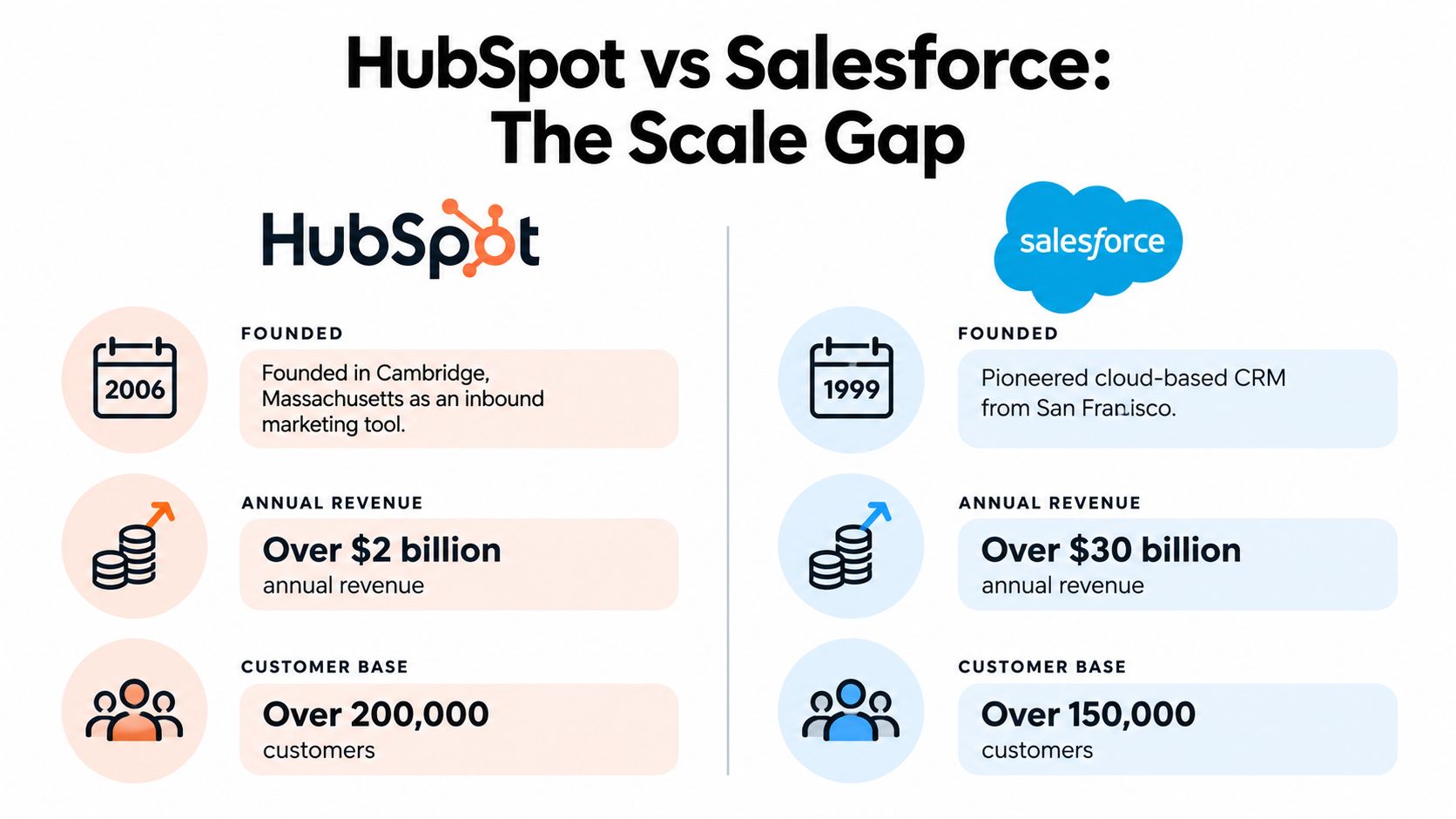
A seven-year head start and a different founding idea explain most of what frustrates buyers during implementation. Salesforce launched in 1999 as an early cloud-CRM provider and grew into a broad enterprise software company spanning Sales Cloud, Service Cloud, Marketing Cloud, and platform services. HubSpot was founded in June 2006 around inbound marketing, then expanded into sales and customer service on top of that marketing-first data model. HubSpot's company history and profile show how those starting points produced two very different architectures.
The revenue gap looks decisive on paper. Salesforce reported approximately $34.86 billion in fiscal-2024 revenue against HubSpot's roughly $2.63 billion for full-year 2024, putting HubSpot at about 7.5% of Salesforce's figure. HubSpot ended 2024 with 247,939 customers, up 21% year over year, and approximately $2.57 billion in subscription revenue. That trajectory shows a company outgrowing its marketing-tool label.
Different origins, different expectations
Salesforce's revenue base reflects a longer operating history and a portfolio built for large, varied enterprise deployments. HubSpot's customer count reflects a company scaling fast from one category into a wider platform. Neither fact tells you which implementation will go well for your team.
Origins show up in the admin experience. Salesforce assumes dedicated administrators, consultants, and often developers, because that is who its earliest enterprise buyers employed. HubSpot assumes a RevOps generalist or marketing lead will own configuration, because that is who bought it first. When teams pick a platform whose staffing assumptions they can't meet, go-live slips and rework follows.
I've watched both directions fail. A 40-person startup bought Salesforce for its extensibility, then spent six months paying a consultant for changes HubSpot would have handled in a day. A 500-person sales org chose HubSpot for speed, then rebuilt its data model inside Salesforce a year later when account hierarchies and territory rules exceeded what HubSpot could express cleanly.
Treat the founding story as a staffing and governance question. A CRM is a model of how your company qualifies demand, assigns ownership, and governs data, so pick the platform whose operating assumptions your headcount can sustain.
Side-by-Side Comparison Across the Criteria That Matter
Row-by-row feature checklists flatter both vendors. The question that matters is narrower: which platform lets your team act on dependable data fastest, and what will it cost to keep that data trustworthy after go-live.
| Criterion | HubSpot | Salesforce |
|---|---|---|
| CRM core | Connected sales, marketing, and service workflows | Broad CRM foundation suited to complex processes |
| Automation | Accessible workflow setup for common go-to-market needs | More configurable automation for complex, multi-step requirements |
| Reporting | Practical reporting for teams using standard models | Advanced analytics and forecasting options for custom reporting models |
| Customization | Easier to configure, with limits on deeper customization | Custom objects, complex automation, and sandboxes support deep configuration |
| Integrations | Marketplace breadth for common business workflows | AppExchange breadth for varied enterprise and industry needs |
| API limits | Approximately 190 requests per 10 seconds; daily allowances vary by edition | License-based daily allocations, not an equivalent short-window throttle |
Core workflows and customization
HubSpot fits when marketing and sales need a shared operating picture without a heavily customized data model. It's also the easier target for an enrichment layer: writing normalized company and deal fields from a tool like CapyScout, such as fit grades, timestamps, source references, and recommended actions, rarely requires a developer. Salesforce earns its complexity when the CRM needs custom account hierarchies, multi-object workflows, granular permissions, sandboxes, or advanced forecasting.
Someone has to design and maintain that depth. Salesforce flexibility pays off when a real operating requirement justifies it. When teams build fields and automations with no clear owner, it becomes rework you pay for twice.
Integrations and API capacity
Marketplace counts describe ecosystem breadth. They say little about whether an integration fits your workflow or how much maintenance it needs. The technical HubSpot and Salesforce comparison reports roughly 2,000-plus HubSpot Marketplace apps and 7,000-plus Salesforce AppExchange apps. Salesforce's larger catalog matters when your architecture depends on specialist or industry-specific applications; it's less persuasive if your team needs a few well-supported connections. For another editorial take on the platform choice, Machine Marketing on Salesforce vs HubSpot collects related comparisons.
API limits deserve attention before you commit to an enrichment or monitoring workflow. The same comparison lists HubSpot at approximately 190 requests per 10 seconds, with daily allowances of 625,000 requests for Professional and 1,000,000 for Enterprise, and describes Salesforce allocations as license-based: 100,000 requests plus 1,000 per license on Enterprise and 5,000 per license on Unlimited. Confirm these figures against your edition, contract, and current vendor documentation before making an architecture or pricing commitment.
For HubSpot, queue writes and back off during larger refreshes. For either CRM, prefer incremental updates, idempotent upserts, and change-triggered workflows over repeatedly rewriting full records. Monitor Salesforce daily consumption too: its allocation model differs, but frequent signal ingestion still eats available capacity.
Pricing and Total Cost of Ownership Beyond the Sticker Price
A per-seat quote is easy to compare. The actual cost of getting reliable CRM workflows is harder. Budget for licenses, implementation support, internal admin time, integrations, training, data cleanup, and ongoing maintenance. A lower entry price doesn't help if the team needs paid capabilities or a costly workaround to run its core process.
Survey evidence cited in a total-cost comparison found that 64% of HubSpot users reported implementing their CRM within three months, compared with 51% of Salesforce users. That difference is a useful signal about reported implementation experience, not proof that HubSpot is always faster or cheaper. Company size, complexity, existing systems, and customization all affect the outcome. The HubSpot versus Salesforce total cost of ownership report.pdf) supports a more useful question: what internal capacity will your rollout consume, and when will the team be able to act on dependable data?

Budget for the work behind the license
For a smaller team with standard sales stages, HubSpot may reduce the need for specialist implementation work. But don't assume the initial plan will cover every future requirement. As teams grow, they may need higher-tier capabilities, added tools, or a more deliberate data model. Price the workflows you intend to use, not just the CRM access you need at signup.
Salesforce can look like the more expensive option when you add implementation and administration. At enterprise scale, its flexibility may justify that investment if the organization needs custom data structures, complex governance, and integrated processes. The waste comes from paying for that complexity before the operating model is clear, then funding rework when teams disagree about what the system should enforce.
Make procurement evaluate the whole deployment
Ask vendors and implementation partners to describe the work required for your data, integrations, permission model, and reporting needs. Separate one-time setup from ongoing administration. A procurement review should also consider contract terms, ownership of configuration, and how changes will be handled after the initial rollout. MR2 Solutions' IT procurement best practices can help structure those questions.
Data integrity belongs in the cost discussion too. Poor imports and duplicate records create cleanup work that can undermine reporting and trust, regardless of CRM choice. Use a defined process for validating records before and after migration, as outlined in this guide to data integrity checks for CRMs and customer databases.
Implementation, Migration, and What Happens After Go-Live
Implementation problems often start before anyone configures a pipeline. Teams move bad data into a new system, reproduce old processes without asking whether they still work, or customize before agreeing on definitions. Fix those decisions first. The CRM can't compensate for unclear ownership, inconsistent stages, or fields that mean different things to different teams.
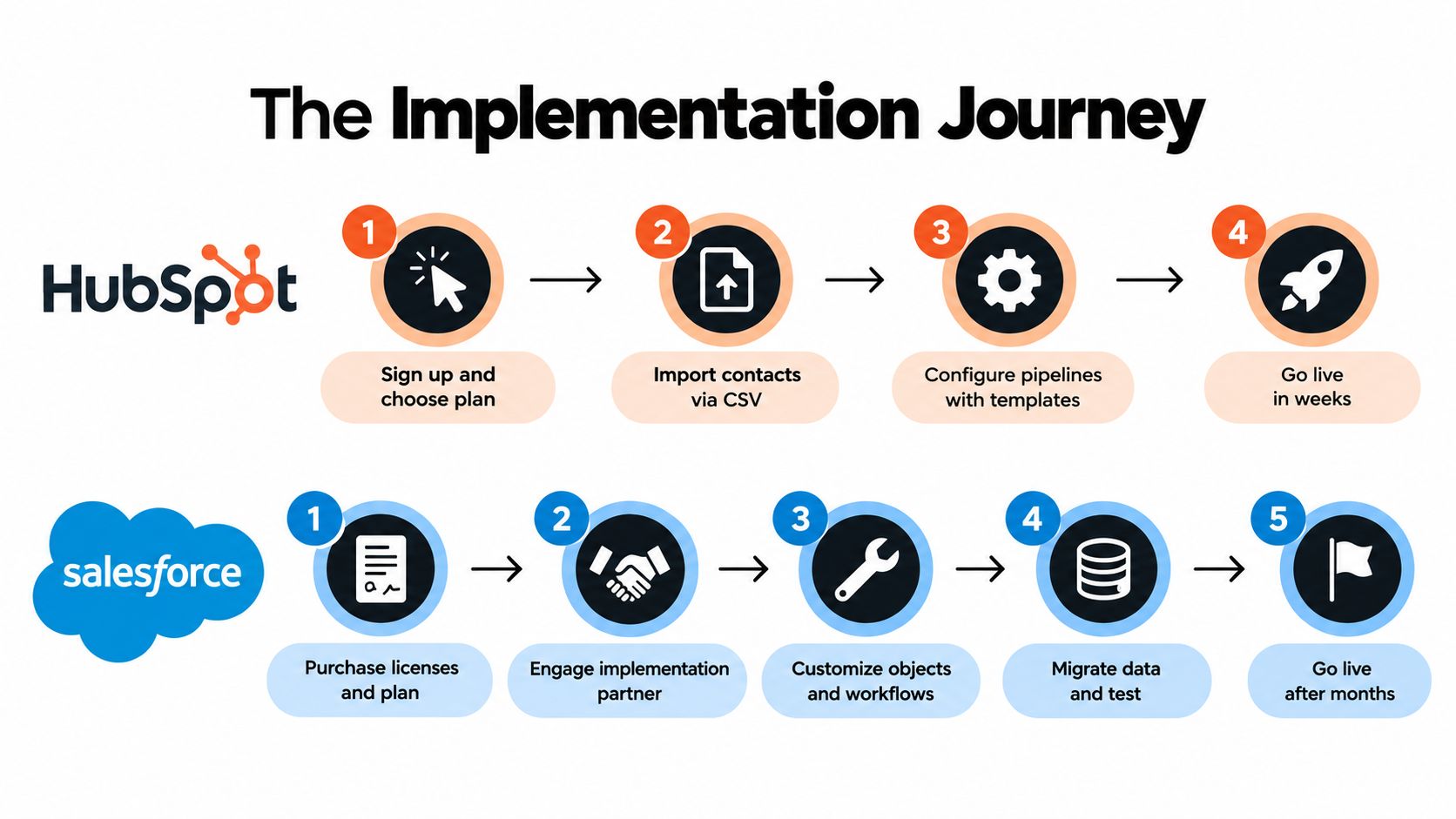
A HubSpot rollout can be more self-serve when requirements are standard and the team has a clear process. Salesforce more often benefits from deliberate solution design, sandbox testing, and specialist support when the organization needs complex objects, automation, and permissions. The right amount of planning depends on the configuration, not just the vendor.
Clean the data before you map it
Start by identifying which records are still useful, who owns them, and which fields the team needs. Deduplicate contacts and companies, standardize key values, and agree on the definitions for lifecycle stages, qualification, and ownership. If the team can't explain why a field matters, don't migrate it.
Then map the source data to the destination. In HubSpot, prioritize a manageable set of standard properties and workflows before adding complexity. In Salesforce, define object relationships and permissions before building automations on top of them. Test imports and workflows in a controlled environment, and get users to validate the records they'll rely on.
For teams planning a HubSpot connection, Purple Engage's HubSpot setup information provides an example of the integration considerations to review. A HubSpot integration overview can also help teams think through how enrichment might fit into their CRM workflow.
Treat go-live as the start of operations
After launch, assign ownership for field definitions, data quality, integration monitoring, and workflow changes. Without that ownership, each team may create its own workaround, and reports lose credibility. Keep a record of what the integration writes, when it updates a field, and what source supports the information.
A safer enrichment pattern is to maintain a canonical signal schema outside the CRM, then send normalized scores, timestamps, source references, and recommended actions into the fields each platform can support. That keeps the external evidence model separate from CRM-specific objects and makes updates easier to reason about. Use incremental changes rather than full-record rewrites, and test how duplicates, failed writes, and revised signals are handled.
The post-launch question is simple: can a rep see why an account matters, trust the information, and act without recreating the research? If the answer is no, more CRM customization won't necessarily solve the problem. Improve the data flow and ownership first.
Best-Fit Use Cases and How Each Platform Performs With Enrichment
A small outbound team and a global enterprise shouldn't be forced into the same CRM decision. The right fit depends on how much process variation, governance, and integration work the organization needs to support.
Where HubSpot fits
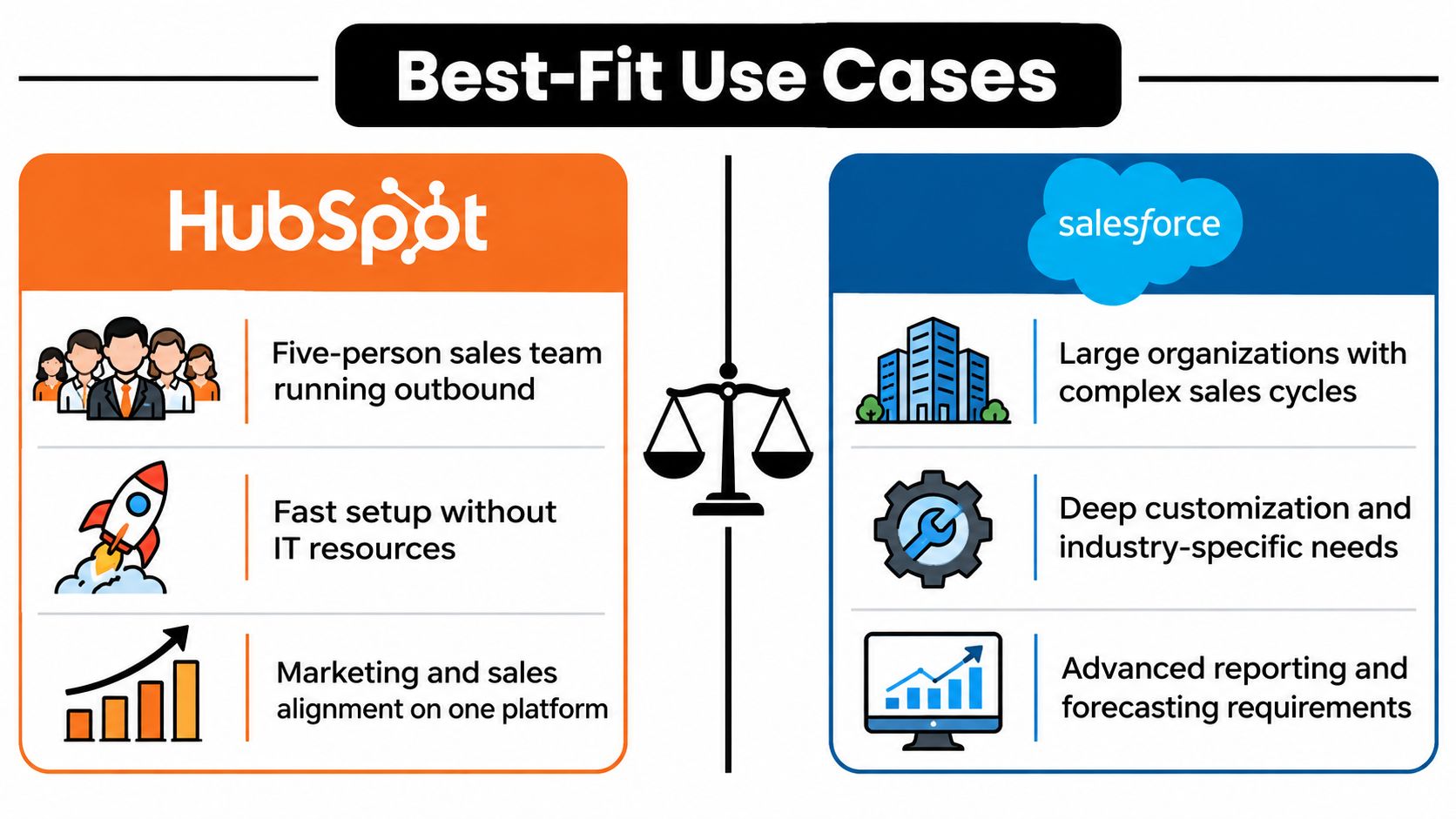
A small sales team running outbound can start with standard company and deal records, then use enrichment to prioritize accounts and give reps context for outreach. A scaling company that depends on marketing and sales sharing the same view of inbound demand may also prefer HubSpot's connected workflows. The trade-off is accepting a less elaborate data model than Salesforce offers.
Agencies and local-service teams can benefit from bringing marketing and customer-facing activity together in one operating view. For local-business prospecting, reputation changes can provide timely context for outreach. Keep the CRM record focused on useful actions and supporting evidence rather than turning it into a dumping ground for every observed signal.
Where Salesforce fits
A scaling SaaS business with custom account relationships, advanced forecasting, and multi-object workflows may have good reason to choose Salesforce. The same is true for a multi-region enterprise that needs careful control over permissions, testing, and different sales processes. In these settings, the cost of deeper implementation can be justified if the company has people responsible for governing the system.
Enrichment still needs discipline. Define where scores, source references, and recommended actions belong before sending data into Salesforce. If every signal gets its own object or field without a clear reporting or operational need, the CRM becomes harder to maintain.
For a hands-on perspective on putting account enrichment into practice, use this HubSpot data enrichment implementation guide to assess the workflow and data decisions involved.
Teams comparing integration approaches can also use this overview as a visual prompt for discussion:
Tailored Recommendations and Your Next Steps
There isn't one winner for every team. Choose HubSpot if you need a connected, relatively low-friction CRM for standard sales and marketing workflows. Choose Salesforce if custom data structures, complex governance, and enterprise process depth are requirements you're prepared to own.
For founders and small sales teams, start with HubSpot and keep the initial data model lean. For a scaling SaaS company, build and document the operating model before deciding whether customization needs justify moving to Salesforce. For an enterprise with complex hierarchies, plan around Salesforce's governance and testing needs from the outset instead of treating administration as an afterthought.
Use this action list before committing:
- Map the workflow: Follow a lead from signup or discovery to its next meaningful sales action.
- Audit the data: Identify duplicates, unreliable fields, and unclear ownership before migration.
- Check integration demands: Estimate the data updates and signal volume your CRM connection must handle, then confirm available capacity with the vendor.
- Prove the model: Test the configuration and user workflow before signing a long-term commitment or building extensive customization.
- Assign ownership: Name the people responsible for data quality, permissions, integrations, and future changes.
If neither platform fits the process without extensive workarounds, pause and evaluate alternatives rather than choosing based on brand recognition. A CRM decision should support an operating model your team can explain, maintain, and improve.
CapyScout helps teams discover and score prospects, enrich CRM records, and monitor account signals with source-backed briefs and alerts. If you're comparing HubSpot and Salesforce, visit CapyScout to see how an account intelligence layer can help turn CRM data into timely next actions.