

Improving Sales Productivity in 2026: A Practical Guide
A practical guide to improving sales productivity with workflows, automation, Today queues, and measurement tactics that boost selling time.
McKinsey's analysis of nearly 500 B2B companies found that non-selling work consumes about two-thirds of the average sales team's time, leaving less than half of a typical representative's working time for actual selling (McKinsey's sales productivity analysis). That's not a motivation problem. It's a systems problem: research, data retrieval, internal handoffs, and repetitive administration take time away from buyers.
Improving sales productivity means redesigning those workflows so reps spend more time on useful customer conversations, not just asking them to make more calls. The practical test is whether a change frees up time and helps sellers make better decisions, without burying them in another tool or stream of alerts.
Table of Contents
- The Selling Time Ceiling and Why Habits Alone Won't Fix It
- Designing a Research Workflow That Earns Back Selling Time
- Building the Today Queue That Decides What Gets Touched
- Multistep Sequences That Add Value at Every Touch
- Coaching Around Evidence, Not Activity Volume
- Selling to Buyers Who Have Already Done Their Homework
- Measurement Stack and the 30-Day Baseline That Proves Lift
The Selling Time Ceiling and Why Habits Alone Won't Fix It
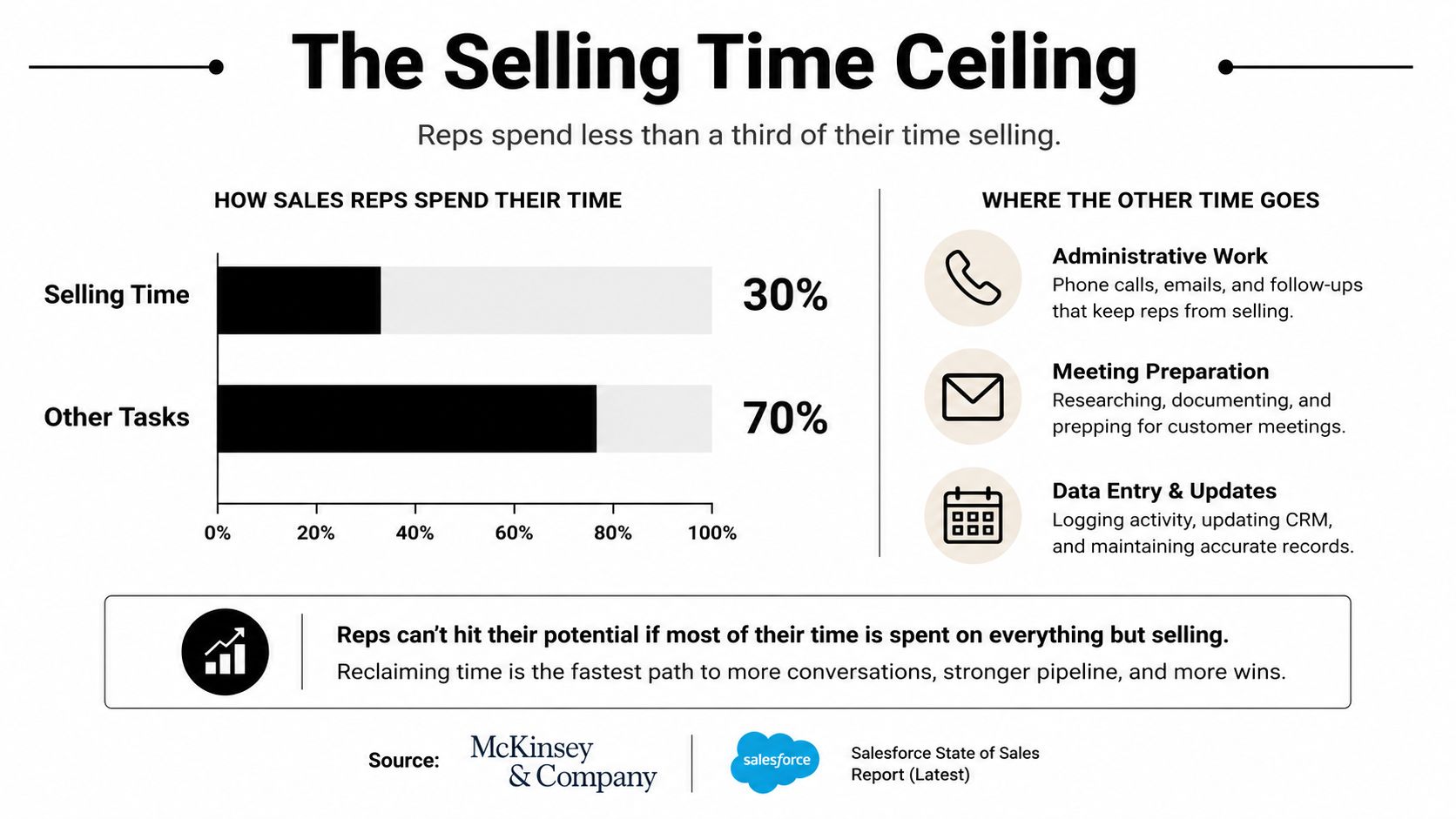
Selling still takes up about 30% of sellers' time, with roughly 70% spent on nonselling work, according to survey data summarized in the 2025 Salesforce State of Sales report, a split nearly unchanged from the 2022 survey. That persistence matters: better calendar habits have limited room to help when the work surrounding each conversation stays the same. Definitions of selling vary, so use the figure as a reason to examine your workflow, rather than a target every team must match.
The overhead hides inside ordinary tasks. A rep checks company news, searches internal messages, chases missing information, updates records, and assembles a proposal. Each step may be reasonable; repeating it because the previous work is inaccessible is waste. McKinsey's examples of a global manufacturer and a logistics company show how preparation and administration can crowd out customer contact; the same analysis reports that structured shared services and automation can improve sales productivity by as much as 30% (McKinsey's sales productivity analysis).
Treat the constraint as a workflow problem
Calendar discipline helps protect time already available. It cannot resolve unclear routing or remove CRM updates required by the process. Another dashboard may add checking work without making account selection easier. Shared services and automation also require clear ownership; the reported productivity gain is no guarantee for an individual tool.
Start with the work surrounding a buyer conversation. Separate tasks that require seller judgment from tasks caused by scattered information, stale records, or ambiguous handoffs. Examine research, prioritization, sequences, and CRM hygiene together: saving preparation time has little value if reps then spend it sorting an unreliable queue.
Measure where the reclaimed time goes.
More calls alone do not establish that the workflow improved. Look for time spent validating buyer fit, testing whether a need exists, and agreeing on a useful next step. Keep enough recordkeeping to support those decisions without making reps document the same evidence repeatedly.
Practical rule: Don't automate a broken workflow before you understand why it's broken. First remove duplicate steps and clarify ownership. Then automate the repeatable work that remains.
Dormant opportunities need the same discipline. Use how to revive stalled sales conversations as a reference, then check whether each stalled conversation has an owner, a credible reason to reconnect, and a defined next action. An occasional “follow up” reminder leaves those decisions unresolved.
Designing a Research Workflow That Earns Back Selling Time
A rep opens the day with a target account and a call later that morning. The CRM has a company name and an old note. To prepare, the rep checks LinkedIn, company news, job listings, review sites, and previous activity, then tries to turn the findings into an opener. The research isn't the problem. The repeated tab-hopping and rebuilding of the same account context are.
A better workflow creates one usable account brief. It should surface relevant company changes, buying signals, and fit evidence, with a source attached to each claim. If hiring activity matters to the product, show the relevant signal. If a technology shift or reputation change could make a conversation timely, capture that alongside the reason it matters. Reps shouldn't have to trust an unexplained score or hunt through a list of links to figure out whether a signal is real.

Make the account record research-complete
A research-complete record gives the rep enough context to make a sound next-step decision without repeating the same discovery work. That means a clear fit rationale, current evidence for why outreach might be relevant, the source for each claim, and a concise next action. It also means recording what was learned so the next seller doesn't start over.
Daily CRM enrichment can help keep records current, but freshness alone isn't the goal. If a system refreshes fields without explaining why the account merits attention, it may improve data coverage while leaving the rep with the same prioritization problem. A useful guide to the mechanics is CRM data enrichment in 2026, especially when defining which account facts should be maintained and how they support outreach.
The process should also make the boundary between evidence and inference visible. A company's hiring activity might suggest a new need, but it doesn't prove the company is buying. Give the rep the source, date, and a short explanation of the possible relevance, then let them decide how to use it.
For teams mapping the wider flow of work, Fluidwave's workflow optimization article offers a useful perspective on reducing friction between steps. Apply that thinking to research by asking where the same information is gathered, rewritten, or entered more than once. The best brief isn't the longest one. It's the one that lets a rep act with confidence without spending the morning assembling context.
Building the Today Queue That Decides What Gets Touched
A prioritized queue is more useful than a flood of notifications. Its job is to tell a rep what deserves attention today, why it matters, and what action to take. That requires more than a fit score: account fit, signal freshness, and confidence in the evidence should all influence whether an item is routed, held, or surfaced for review.
Set the rules before the alerts arrive
Begin with a few clear decisions. A strong-fit account with a current buying signal may warrant a draft for rep review. A good-fit account without a timely reason to contact can remain in a monitored list. A weak-fit account should be suppressed rather than promoted because it produced an alert. If the source is ambiguous, show the uncertainty instead of presenting an inference as fact.
A practical way to define those decisions is to map each trigger to one action and one output:
Today Queue Decision Matrix
| Trigger | What It Means | Suggested Action | Output |
|---|---|---|---|
| New signup | An inbound account needs a fit and risk review | Route, nurture, or hold based on evidence | Owner, rationale, and next step |
| Buying signal | A watched account has a potentially relevant change | Draft for review if fit and source quality are adequate | Source-backed outreach context |
| ICP drift | Current account evidence no longer supports the original fit | Hold or suppress from active outreach | Updated fit status |
| Reputation change | A local business has a change in review sentiment or rating | Alert the relevant owner for evaluation | Signal summary and source |
Keep the queue actionable
A notification dump transfers the prioritization burden from the system to the rep. A ranked queue should instead put the strongest, clearest opportunities near the top, explain why they're there, and make the next step explicit. Set stopping rules too: no outreach when the account falls below fit requirements, when the source can't be verified, or when the team has already contacted the prospect and is waiting for a response.
Nightly scoring can prepare this list before the rep begins work, but a suggested next action should remain a recommendation, not a substitute for judgment. CapyScout is one option for this workflow: it searches the live web, scores signups, monitors account signals, enriches CRM records, and can build a Today queue with source-backed briefs and outreach drafts. Reps should still be able to inspect the evidence and decide whether the suggested action makes sense.
Teams developing their own scoring logic can use this B2B lead-scoring framework to define what counts as fit and how evidence should inform routing. Then deliver the queue where reps already work, such as the CRM or a Slack channel. The point isn't to add another place to monitor; it's to make the first priority of the day easy to find and defend.
Multistep Sequences That Add Value at Every Touch
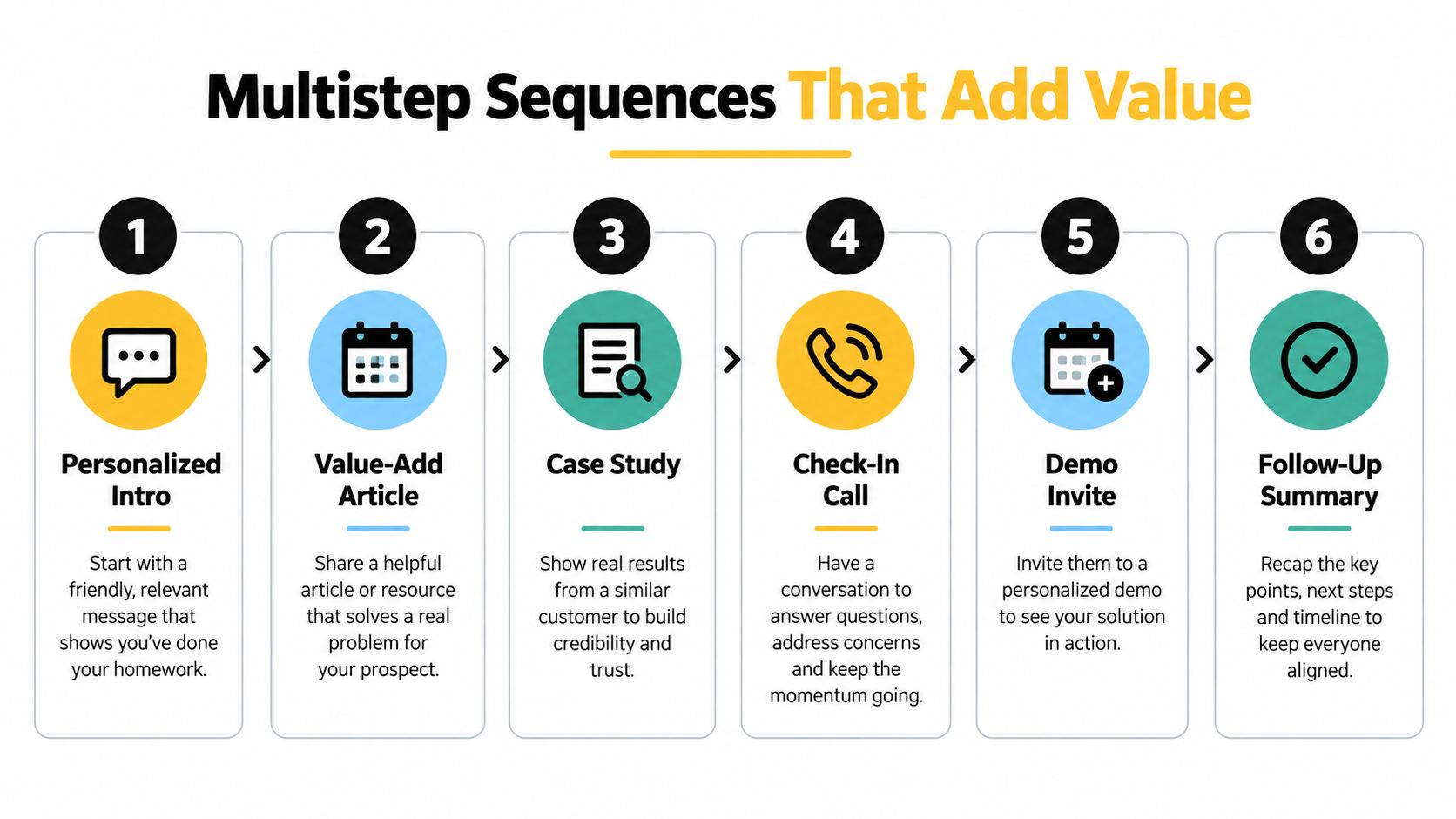
A sequence earns its place when each touch gives the buyer a reason to engage. Repeated nudges consume sending capacity and rep attention without helping the buyer evaluate anything. Build a bounded cadence with a distinct purpose for each message, then pause as soon as the prospect responds.
Compiled sales research reports that sequences containing 4–7 messages achieved about a 27% reply rate, compared with roughly 9% for sequences containing 1–3 messages; it also reports about eight touchpoints to secure a first meeting or comparable conversion (Cirrus Insight's follow-up analysis). These are directional benchmarks. Audience, channel, list quality, and the definition of a reply all affect results. A longer sequence still wastes time when its messages lack relevance.
Give every touch a job
Design the sequence around buyer-validation work. The opening note should connect an observed account situation to a problem worth checking. A later message can offer evidence or a concise example that helps the buyer assess that problem. Use a call to test the assumption, and ask for a meeting when there is enough context to justify the buyer's time.
Each touch should advance the buyer's understanding.
Build response handling into the workflow before launch: pause scheduled messages on a reply, stop when fit fails, and revise pending copy when new evidence changes the premise. A source-backed account brief gives the rep context, but the message must distinguish observed facts from hypotheses. Otherwise, personalization becomes a confident-sounding guess.
Before launching a sequence, check: Does each touch add relevant information? Is there a clear stop rule? Can the rep explain why this account is being contacted now?
Automation should reclaim time across preparation, scheduling, and CRM updates. The administrative automation discussed in McKinsey's sales productivity analysis provides context for that principle, rather than evidence of sequence performance. For outreach, a practical workflow could draft a follow-up from a verified account signal, attach the source for rep review, and record the approved touch in the CRM. Keep approval with the rep. Faster drafting underdelivers if checking and repairing the copy takes longer than writing it.
Use the B2B outreach email examples for message structure and tone, then adapt each message to the buyer's situation. Judge the workflow by reclaimed selling time and useful buyer responses, including responses that disprove the original hypothesis.
Coaching Around Evidence, Not Activity Volume
A weekly coaching meeting should improve one specific part of a rep's selling process. Use activity counts to spot possible gaps, then inspect the work behind them: account choice, buyer understanding, and progress toward a decision. A high message count can hide weak qualification or a stalled opportunity.
Set observable behaviors for each funnel stage. In early outreach, review whether the rep used current evidence and can explain the account's fit. During discovery, check whether they confirmed a business problem and identified relevant stakeholders. Later, assess how they addressed decision risk and agreed on a next step that advances the deal.
Make CRM evidence useful in coaching
Use CRM records to ground a regular coaching cadence. Review activity and deal evidence, choose one skill gap for each rep, then practice it through role-play or a deal strategy discussion. For example, examine whether the rep acted on a scored signup, used a current buying signal, recorded a defensible fit rationale, and moved the account forward after the last touch. If the record is thin, coach the rep to capture evidence that makes the next decision clearer.
Research summaries report that organizations with consistent, integrated coaching achieve approximately 32% higher win rates and 28% higher quota attainment than organizations without it (sales training and coaching statistics). Treat these figures as benchmarks, not promised outcomes, since published summaries may combine different populations and methods. The same research reports that nearly 70% of organizations rely on informal or manager-discretion coaching rather than a dynamic process integrated with CRM evidence.
Coach a decision or skill the rep can change. Don't ask for more activity when the gap is weak qualification, stale evidence, or an unclear next step.
Test whether a coaching change helps. Establish a baseline, compare coached and uncoached groups where possible, and assess results over a fixed period. Account for territory, segment, and lead-source differences before connecting outcomes to coaching. This keeps the process focused on observable changes in selling work, rather than a manager's impression alone.
Selling to Buyers Who Have Already Done Their Homework
61% of B2B buyers prefer a rep-free experience for general information and initial learning, according to Gartner's B2B buying survey. Buyers still turn to sellers to validate conclusions and reduce decision risk. When prospects have researched the category, repeating basic product information wastes time on both sides.
The rep's job is to connect available facts to the buyer's specific situation. Challenge assumptions, verify the operational problem, clarify who needs to agree, and address implementation risk. A concise account brief that explains why a company change may matter gives a seller a stronger starting point than an opening line that repeats public information.

Measure progress the buyer can feel
Meetings booked show activity, not necessarily buyer progress. In complex opportunities, track whether stakeholders agree on the problem, whether the business impact is verified, and whether key uncertainties or implementation concerns have been resolved. These signals help managers see whether a pipeline is advancing or just staying busy.
Gartner predicts that 95% of seller research workflows will begin with AI by 2027, up from less than 20% in 2024. That is a forecast, not a description of current practice. For sales leaders, the practical test is whether research tools help reps bring stronger evidence and ask more useful questions, rather than produce more outreach.
A rep who contacts fewer accounts with a credible reason, a verified problem, and a clear way to reduce decision risk can create more buyer progress than one relying on a high-volume template. Productivity depends on the system behind the conversation: research, prioritization, outreach, and CRM records should help sellers validate what buyers know and resolve what remains uncertain. The measure is not raw seller motion, but whether the buyer is better equipped to make a decision.
Measurement Stack and the 30-Day Baseline That Proves Lift
You can't tell whether a workflow improved productivity if you never recorded how the team worked before it changed. Set a 30-day baseline, then group measures into inputs, throughput, and outcomes. Keep the definitions consistent so teams don't mistake a change in logging for a real change in performance.
| Measurement layer | What to track | What it helps diagnose |
|---|---|---|
| Inputs | Research time per account, CRM records refreshed, alert-to-action rate | Whether the system is reducing friction and helping reps act |
| Throughput | Positive replies and qualified meetings by touch number | Whether outreach is relevant and sequences are working |
| Outcomes | Win rate, cycle time, reclaimed selling hours | Whether workflow changes affect selling capacity and deal progress |
Start with a short measurement plan: document existing workflow steps, agree on metric definitions, and identify which changes you're testing. Where possible, use a holdout or comparison group. If one team gets new routing and another doesn't, compare them carefully and account for differences in territory, segment, and lead source. A measurement framework such as this B2B marketing measurement blueprint can help teams connect activity data to business outcomes.
Watch for cognitive-load creep. A tool that creates more alerts than reps can act on hasn't improved productivity, even if it automates research or drafts messages. Review whether the queue leads to sensible actions, whether CRM records stay current, and whether reps have more time for useful buyer conversations. If the system adds clicks and interruptions, simplify it before adding another feature.
The strongest measurement plan reflects the whole workflow, from account discovery and prioritization to follow-up and CRM execution. Don't declare success because one activity metric moved. Look for evidence that the team reclaimed time and that buyers advanced through clearer, more useful conversations.
CapyScout searches the live web for fitting companies, scores inbound signups, enriches CRM records, and monitors accounts for buying signals, with source-backed briefs and alerts to support timely outreach. If you're rebuilding your prospecting and research workflow, visit CapyScout to see whether it fits the way your team works.