

B2B Data Enrichment: What It Is and How It Works
Learn how B2B data enrichment keeps your CRM accurate with firmographics, technographics, and intent signals. Discover sources, methods, and vendor selection
You open a promising account, find the champion you emailed last quarter, and hit dial. The number's dead. A quick search shows she left months ago, the company moved, and your notes describe a business that doesn't quite exist anymore. That's not a rep problem. It's a data problem, and it's the everyday reason teams invest in B2B data enrichment.
Table of Contents
- What Is B2B Data Enrichment
- The Enrichment Fields That Matter Most
- Live Web Data vs Stale Databases
- How Enrichment Improves Sales and CRM
- Integration Patterns That Keep Data Fresh
- Quality, Privacy, and Implementation Checklist
- Choosing an Enrichment Vendor
What Is B2B Data Enrichment
A sales rep I'll call Maya once spent a morning personalizing outreach for a VP of Sales. She referenced his team, his territory, and a recent expansion. The reply came from an auto responder. He'd changed companies, and the CRM still treated the old record as true.
B2B data enrichment is the process of appending, correcting, and refreshing company and contact records with external information. A name and email become a usable record with a current title, employer, location, company size, and relevant account context. It resembles updating a map while roads are moving, not redrawing it once a year.
Enrichment Versus a Simple Append
A data append fills blanks. If phone is empty, it adds a phone. Enrichment does more. It checks whether the phone, title, and employer you already have are still correct, then updates them when they've changed.
That distinction matters because records decay continuously. In an analysis of 140,284 U.S. sales vice presidents and C-suite leaders, 12.25% changed jobs over 12 months and 25.67% over 24 months, while U.S. Census data showed 9.4% of business locations closed in 2023. A record can look complete and still be wrong.
- Append thinking: "We cleaned the CRM in January, so we're set."
- Enrichment thinking: "People and companies change weekly, so verification never stops."
- Cleansing: Removes duplicates and fixes formatting before you add anything new.
Enrichment isn't a spring cleaning project. It's an ongoing verification habit.
Different industries apply the same idea to their own records. Financial teams, for example, can study how Visbanking data enrichment services structure institution level data. The underlying lesson transfers to sales. Don't just add fields. Keep proving they're still true.
The Enrichment Fields That Matter Most
Not every field deserves your attention. Enrich for decisions. If a field won't change who you contact, what you say, or when you act, it's decoration.
Firmographics and Contact Data
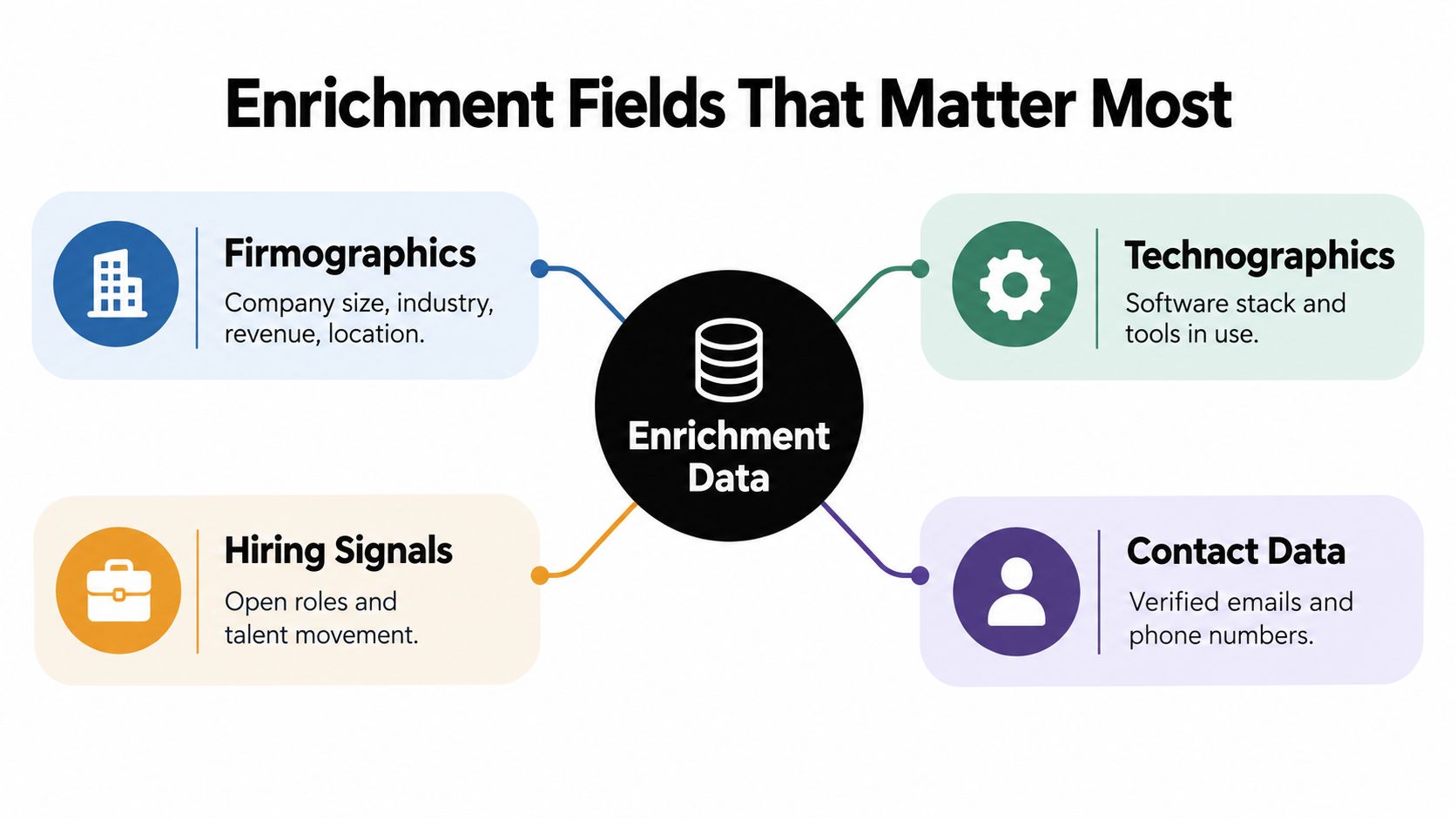
Firmographics describe the company. Industry, employee count, revenue band, headquarters, and locations tell you whether an account fits your ideal customer profile and which rep should own it. A 30 person agency and a 3,000 person manufacturer may share a name pattern, but they need different routes, pricing conversations, and proof points.
Contact data describes the person. Verified email, phone, title, seniority, and department tell you whether you're reaching an evaluator, a budget owner, or someone who left last spring. These person level fields change fastest, so they need the shortest refresh cycle.
Technographics, Hiring, Funding, and Intent
Technographics reveal the tools a company uses, such as its CRM, data warehouse, or support platform. If your product integrates with HubSpot, knowing a prospect runs HubSpot turns a generic pitch into a specific workflow conversation. Choosing sources for that layer deserves care, so many teams compare options in a guide to technographic data provider options for 2026.
Hiring signals show where a company is investing. Several open SDR roles suggest an outbound buildout. A first RevOps hire suggests process pain you can speak to directly.
Funding events and leadership changes work similarly. New capital or a new VP often precedes new tooling decisions, because new leaders review inherited systems early.
Intent signals are behavioral. Pricing page visits, demo page returns, and content engagement don't prove a purchase, but they suggest timing. Treat them as a reason to prioritize, not as proof of a deal.
| Field type | What it answers | Typical stability |
|---|---|---|
| Firmographics | Does this account fit? | Slower changing |
| Contact data | Who do I contact? | Fast changing |
| Technographics | Will this fit their stack? | Moderate |
| Hiring and funding | Why would they act now? | Event driven |
| Intent | Are they showing interest? | Short lived |
Start with fit, then reachability, then timing. That order keeps reps from chasing exciting signals at accounts that were never a fit.
Live Web Data vs Stale Databases
Every enrichment program draws from two broad sources. They solve different problems, and confusing them creates false confidence.
What Precompiled Databases Do Well
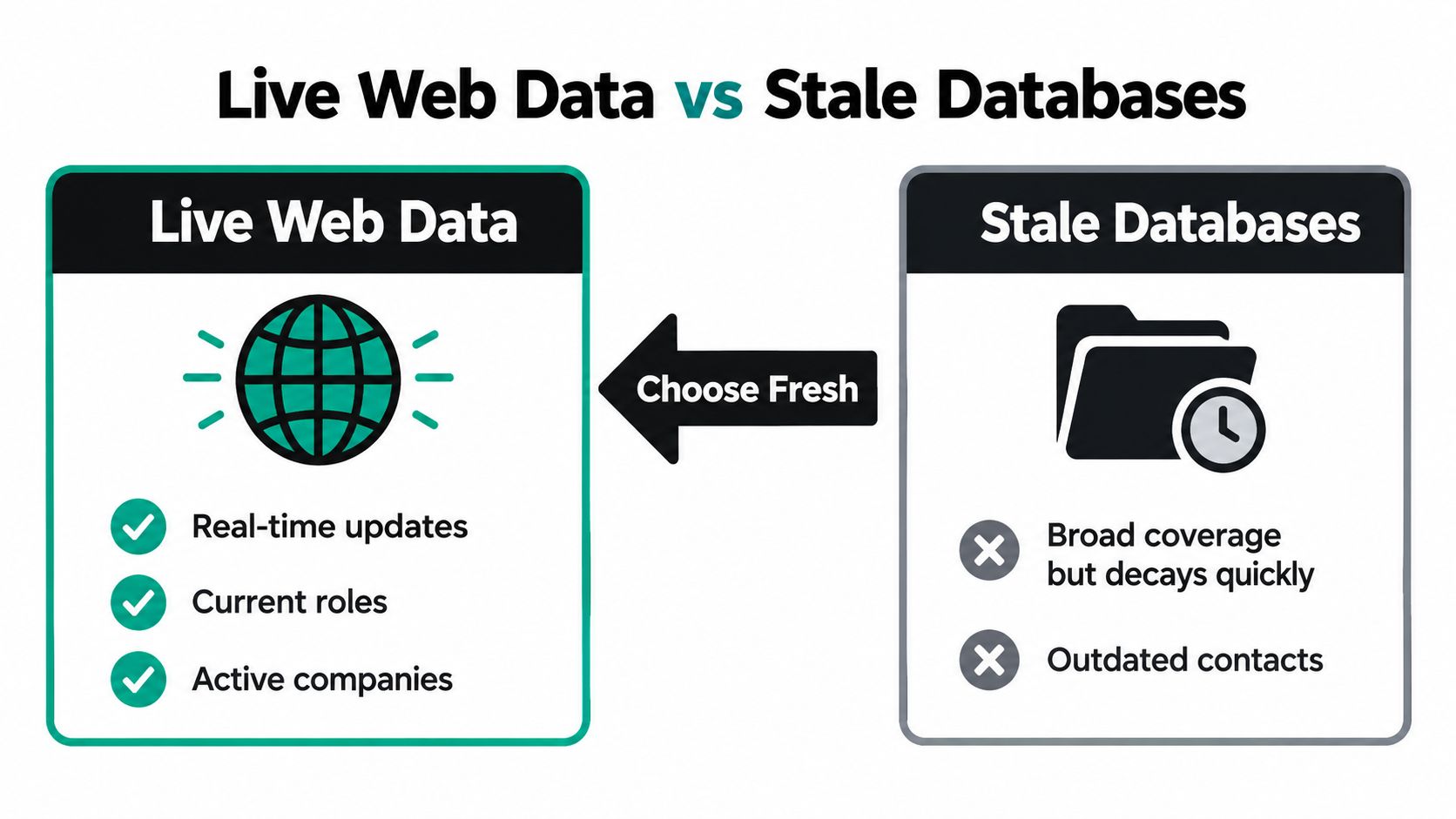
Precompiled databases aggregate records in advance and sell access at scale. They're convenient for breadth. You can pull large lists by industry, title, or geography in minutes, which helps with territory planning and initial market mapping.
The weakness is age. A database is a snapshot, and snapshots age from the moment they're taken. Industry estimates of aggregate B2B contact data decay place it at approximately 2.1% per month, equivalent to about 22.5% annually when compounded, with email addresses and job titles becoming obsolete faster than stable company location fields. In plain terms, a list you bought last year has lost a meaningful share of its usable contacts.
What Live Web Sourcing Does Differently
Live web sourcing checks current public sources at the moment you need them. Company websites, job boards, funding announcements, news, filings, and review platforms show what's true now. Did the VP change? Is the location still open? Are they hiring for the role your product supports?
That freshness is most valuable for timing. A database can tell you a company has 200 employees. A live check can tell you it posted five support roles this week and just moved its headquarters. The first fact helps segmentation. The second gives a rep a reason to call today.
Practical rule: Use databases for coverage and planning, then verify priority accounts against live sources before a rep invests time.
Live data isn't automatically better in every case. It can be slower to gather, coverage varies by market, and public pages sometimes lag internal changes. The honest trade off looks like this.
- Breadth: Precompiled databases usually win for raw volume and speed of list building.
- Freshness: Live web data wins for current roles, active locations, and recent events.
- Traceability: Live sources can show the page behind a claim, while database records often hide their origin.
- Cost control: Databases tempt teams to buy volume they'll never verify, while live checks focus spend on accounts that matter.
Most mature teams blend both. They build a broad market view, then apply live verification to the accounts entering sequences, routing queues, or forecasts. Freshness matters most where a human is about to act.
How Enrichment Improves Sales and CRM
Cleaner records aren't the goal. Better decisions are. Enrichment earns its budget when it changes routing, prioritization, and conversations.

Where the Revenue Impact Shows Up
Accurate firmographics improve segmentation and ICP matching, so enterprise accounts stop landing in SMB queues. Current titles improve routing, because a lead goes to the rep who covers that function today, not the one who covered a predecessor. Technographics improve product fit conversations, since reps can reference the actual stack instead of asking discovery questions the data already answers.
The cost of getting this wrong is not abstract. Gartner research cited in industry reporting on B2B data decay estimates organizations lose approximately $12.9 million to $15 million per year because of inaccurate or incomplete data. A separate 2025 Validity survey of 602 CRM users found 37% had lost revenue directly because of poor data quality, with companies losing an average of 16 sales opportunities per quarter.
Those losses rarely look dramatic in the moment. They look like a misrouted lead nobody follows up, a sequence sent to a closed location, or a forecast built on accounts that no longer match the ICP. Small errors, repeated daily, become missed pipeline.
Scoring is where these fields come together. Fit data says whether an account belongs in the queue, and behavioral signals suggest urgency. Teams designing that layer often study examples like a live lead scoring system to see how enriched attributes can feed a score at the moment a lead arrives, rather than hours later in a batch job.
The short video below walks through how enrichment connects to everyday CRM workflows, which helps if you're explaining the value to a founder or a new SDR.
One caution. Enrichment improves sales only when reps trust it. If they can't see where a field came from or when it was checked, they'll ignore it and do manual research anyway. Trust is a feature, not a byproduct.
Integration Patterns That Keep Data Fresh
You don't need a complex architecture to keep records current. Two patterns cover teams generally, and they work best together.
Pattern One Real Time Signup Screening
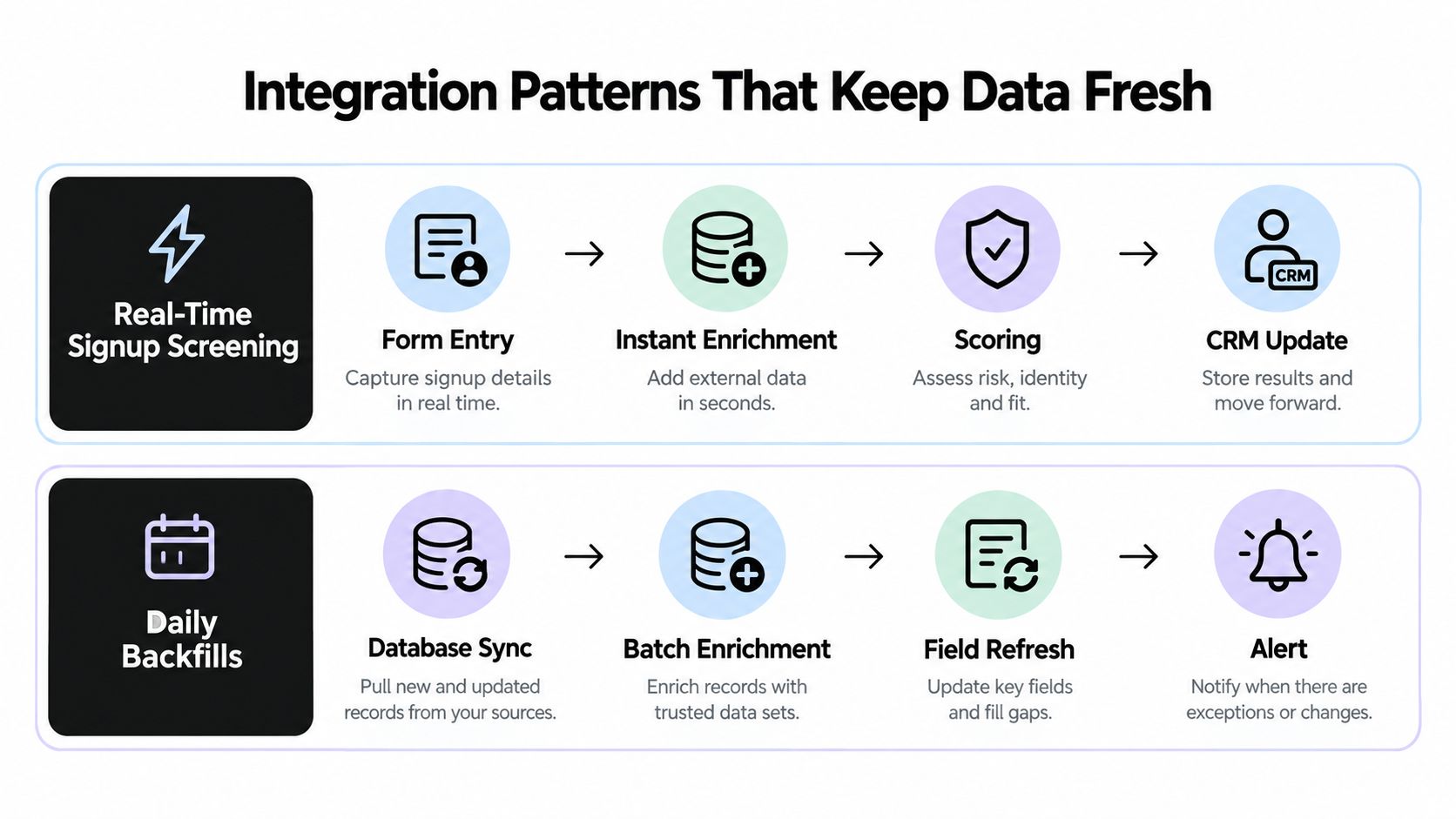
When someone submits a form or starts a trial, enrichment runs immediately. The system resolves the company from the email domain, adds firmographics, checks fit and risk, and suggests a next action. Route to sales, send to nurture, or hold for review.
Here's a concrete flow. A signup arrives from a company domain. Enrichment confirms industry and size, grades ICP fit, and flags a disposable or mismatched email if present. A strong fit reaches an SDR within minutes with context attached. A weak fit enters nurture without consuming rep time. Speed matters here because buyer interest cools quickly, and manual research is where that speed usually dies.
Property teams face a similar timing problem with owner and parcel records, which is why examples of real-time CRM enrichment for property teams can be instructive even outside real estate. The pattern is identical. Enrich at capture, decide, then route.
Pattern Two Daily Backfills
Backfills handle records you already own. On a schedule, the system rechecks existing accounts and contacts, updates changed fields, and surfaces new signals. This is the maintenance engine that stops last quarter's good data from becoming next quarter's embarrassment.
Match refresh frequency to volatility.
- Check often: Employment, title, email deliverability, and buying role status.
- Check on a slower cycle: Headquarters, industry, and organizational structure.
- Check immediately on events: Job changes, funding, acquisitions, leadership moves, or domain migrations.
Never overwrite a field silently. Store the prior value, new value, timestamp, source, and confidence score, so a rep can see what changed and why.
That provenance habit prevents a common failure. A rep notices a title changed, doesn't know why, and stops trusting every field on the record. With a visible history, one questionable update stays isolated instead of poisoning the whole CRM.
Before you build either pattern, confirm how your CRM handles sync direction, field ownership, and conflict rules. The CRM integrations guidance for HubSpot, Pipedrive, and Attio is a useful reference for those mechanics. Decide in advance which system wins when a rep's manual entry disagrees with an enrichment update. Ambiguity there creates overwrite wars.
Finally, measure freshness, not just coverage. Track the share of priority accounts whose critical fields were verified inside your chosen window. That metric tells you whether routing decisions rest on current evidence.
Quality, Privacy, and Implementation Checklist
Enrichment can damage a CRM faster than neglect if it merges the wrong companies or writes guesses as facts. Quality controls aren't bureaucracy. They're what make automation safe.
Entity Resolution Comes First
Entity resolution means deciding whether an incoming record refers to an existing company, a subsidiary, a location, or a different organization entirely. Matching on company name alone fails because names vary by punctuation, legal suffix, language, and branch. Matching on domain alone fails when firms use brand domains, regional sites, or a parent company's website.
A safer pipeline normalizes names and domains, compares addresses and phone numbers, and uses legal identifiers where available. It then applies thresholds. High confidence matches merge automatically, uncertain matches go to human review, and weak matches get rejected.
The difficulty grows across borders. A published machine learning entity resolution study reported 96.8% precision and 93.5% recall for domestic matching, but 91.4% precision and 88.9% recall on cross market international matching. Multilingual names and inconsistent addresses cost accuracy, so evaluate performance by market, not just on a global average.
A slightly lower match rate beats a false merge. You can enrich a missed record later. Untangling two companies' combined history is painful and sometimes impossible.
Privacy and Decision Risk
Ask five questions before acting on any signal. Is it public? Is it relevant? Is it recent? Does it belong to the account rather than a private individual? Is it strong enough to justify this action? A pricing page visit might justify monitoring. It shouldn't automatically reject a lead or overwrite a CRM field.
Separate observed facts from inferred fit. "Posted three engineering roles" is observed. "Likely to buy this quarter" is inferred. Mixing them in one field hides uncertainty from the rep who acts on it. For a deeper treatment of record level safeguards, see this guide to data integrity checking for CRMs and customer databases.
Implementation checklist
- Normalize first: Standardize names, domains, and addresses before matching.
- Set thresholds: Define auto merge, human review, and rejection bands.
- Preserve provenance: Keep source, timestamp, and confidence with every update.
- Control retention: Define how long personal data is kept and how deletion works.
- Review consequential actions: Require human approval before rejection or major overwrites.
- Measure corrections: Track how often reps fix enriched fields, by source and market.
Choosing an Enrichment Vendor
Vendor demos emphasize database size and match rate. Both mislead. A vendor can match nearly everything by guessing aggressively, and your CRM pays for those guesses later.
Questions That Reveal Real Quality
Ask how fresh the data is, field by field. "Updated recently" isn't an answer. Ask when a specific title or headcount value was last verified and what source supports it.
Ask how the vendor handles entity resolution. Which identifiers do they use beyond name and domain? What happens with subsidiaries and regional domains? What confidence threshold triggers a merge?
Ask about confidence scoring. Can you see uncertainty per field, set your own acceptance thresholds, and route low confidence updates to review instead of the CRM? If every value arrives with equal certainty, the vendor is hiding risk from you.
Then test with your own records. Send a sample that includes tricky cases, such as subsidiaries, recent job changers, closed locations, and international accounts. Judge accuracy on records you can verify, not on the vendor's showcase accounts.
- Freshness: Verification dates per field, not a single database update claim.
- Transparency: Source citations a rep can open and check.
- Integration: Native sync with your CRM, plus API and webhook options.
- Compliance posture: Clear retention, deletion, and regional handling practices.
When More Data Makes Decisions Worse
Resist the temptation to stack signals until a score looks convincing. Discussion of CRM hygiene and automated enrichment risk makes the point that more signals do not necessarily produce better prioritization, because combining weak, correlated, or stale signals can create false confidence. High quality enrichment preserves source citations, separates observed facts from inferred fit, exposes uncertainty, supports human review, and provides retention and deletion controls.
So define evidence thresholds before you buy. What justifies outreach? What justifies overwriting a CRM field? What justifies rejecting a lead, versus monitoring the account? A vendor should support those distinctions, not flatten them.
Tools take different positions here. Some sell precompiled contact databases, some orchestrate multiple providers, and CapyScout is one option that researches companies from live public web signals and writes source backed updates into CRMs such as HubSpot. Whichever route you choose, the evaluation standard stays the same. Current, traceable, and appropriately uncertain beats complete on paper.
If your reps are still discovering job changes from bounce messages, it's time to treat enrichment as daily verification instead of an annual cleanup. CapyScout searches the live web to enrich CRM records, score inbound signups in real time, and monitor accounts for hiring, funding, and leadership signals, with a cited source behind every brief. Visit the site to see how source backed enrichment would look on your own priority accounts.