

Lead Routing Software Explained for Faster Sales Follow Up
Learn what lead routing software does, how AI signal-based routing works, and how to choose, implement and measure it for faster follow-up.
A demo request lands in your CRM at 4:12 PM. The prospect chose “Enterprise” on the form, used a company email, and visited your pricing page twice that week. Nobody sees it for a while because the owner field is blank, the territory rule fails on a missing country value, and the SDR manager is in a meeting.
At 4:28 PM, a competitor replies.
That's the moment many teams think they have a speed problem. Sometimes they do. But just as often, they have a signal-quality problem. The system didn't just move too slowly. It tried to make an assignment from weak, messy, or misleading inputs.
That's why lead routing software matters. Good routing software doesn't throw leads into a queue faster. It decides who should act, based on usable data, business logic, account context, and timing. In other words, it turns an inbound hand raise into an operational process your team can trust.
If you're reviewing your own setup right now, this usually looks familiar. Leads are coming from forms, chat, paid campaigns, product signups, and partner referrals. Sales wants instant follow-up. Marketing wants fair attribution. RevOps wants fewer manual fixes. Everyone wants fewer leads sitting untouched.
Teams also run into a second problem after speed. A form fill is often a weak buying signal on its own. A student can choose “Director.” A competitor can request a demo. An existing customer can use a personal email. That's why strong teams combine routing with qualification, enrichment, and account context. If you're improving that side of the process, these account research strategies are useful because they focus on finding real buying context rather than trusting every self-reported field.
Table of Contents
- Introduction Why Every Minute After a Lead Arrives Matters
- What Lead Routing Software Is and How It Works
- Core Features That Make Routing Fast and Accurate
- How AI and Signal Based Routing Changes Outcomes
- Implementation Integration and Workflow Examples in Practice
- Common Pitfalls and Metrics That Prove Routing Is Working
- Choosing the Right Lead Routing Software and Next Steps
Introduction Why Every Minute After a Lead Arrives Matters
There's a reason lead response became a board-level operational topic instead of just a sales coaching point. The classic benchmark still holds up: the Harvard Business Review and MIT lead response research found that contacting a web lead within 5 minutes made a company 21 times more likely to qualify that lead than waiting 30 minutes, and the same research reported a 100x higher chance of making contact when the first attempt happened within 5 minutes instead of 30 minutes, as summarized in the Lead Response Management Study.
That finding changed how revenue teams think about routing. It moved routing from “admin workflow” into “revenue infrastructure.”
What delay looks like in the real world
The painful part is that delay rarely looks dramatic. It looks ordinary.
A lead enters from a demo form. The country field says “United States” in one system, “USA” in another, and is blank in the CRM because the sync failed. The ownership rule checks country first, doesn't find a clean match, and drops the record into a catch-all queue. The SDR who should have called never knows the lead exists.
Practical rule: If a rep must manually inspect a lead before ownership becomes clear, your routing design is already too late.
Recent benchmark data shows that many teams still miss the early response window by a wide margin. One 2026 benchmark reported an average B2B response time of about 47 hours, while only about 23% of companies respond within 5 minutes. The same benchmark summary also noted that organizations using lead-routing tools responded in about 3 hours 32 minutes on average, compared with nearly 13 hours for organizations without such tools, according to the 2026 speed-to-lead benchmark summary.
Why fast is not enough
Speed matters, but speed by itself can still route the wrong lead to the wrong person.
If your system instantly assigns every pricing-page visitor to an enterprise AE without checking account fit, customer status, or intent quality, you've automated noise. A weak lead gets faster handling, but not smarter handling.
That's the core shift many teams need to make. Lead routing software should be judged by two things at once: how fast it can assign, and how well it understands the quality of the signal before assignment happens.
What Lead Routing Software Is and How It Works
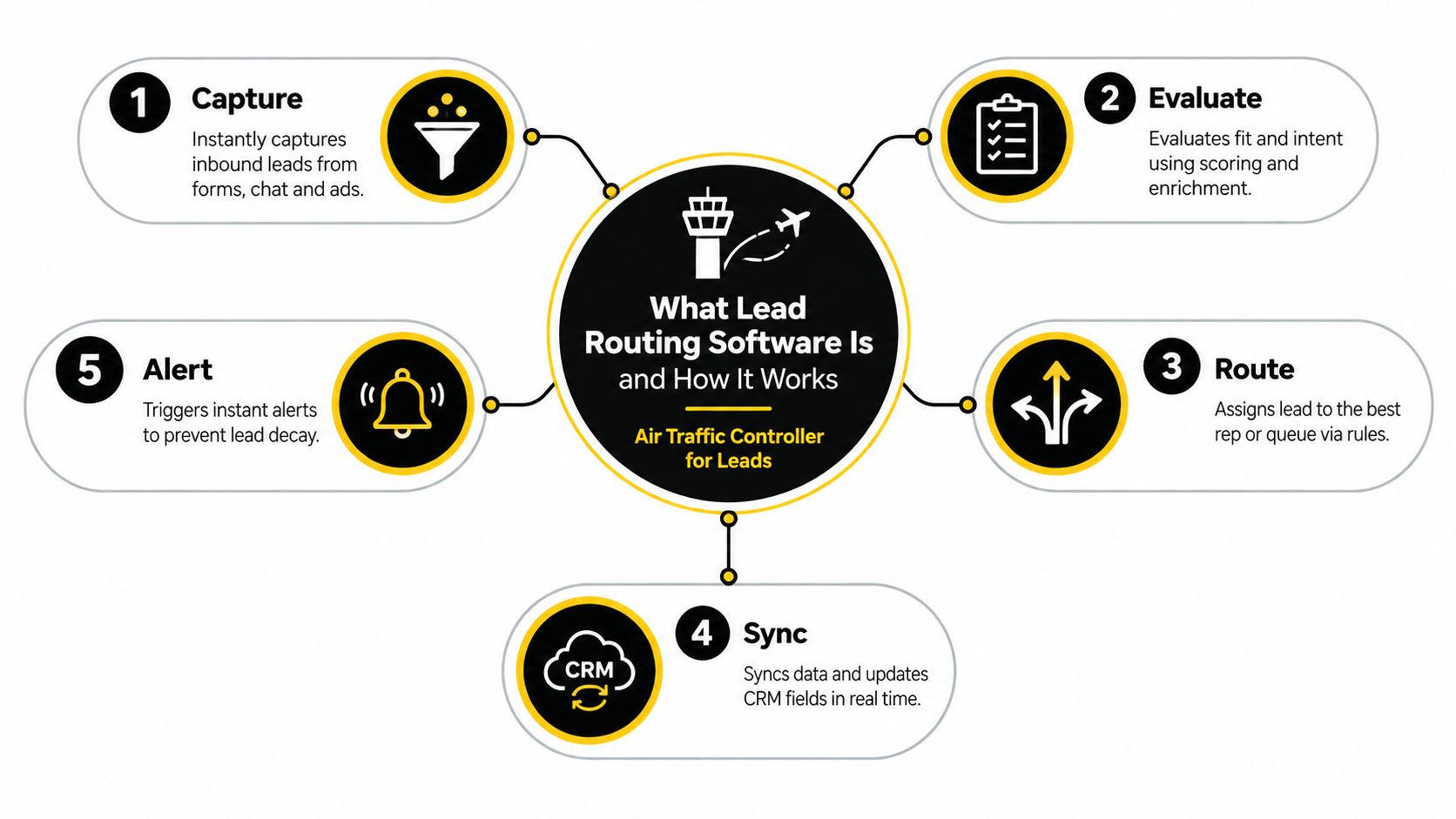
The simplest way to explain lead routing software is this: it acts like an air traffic controller for leads. Planes can't all land on the same runway at once, and leads can't all go to the same rep, queue, or playbook. Someone, or something, has to direct traffic using rules, timing, and context.
The five-part flow
Here's what usually happens inside lead routing software when a new inbound lead appears:
Capture the lead
The record enters from a form, chatbot, ad sync, signup flow, or another source.Check the inputs
The system looks at fields like email domain, country, company name, form source, or product interest. Some tools also enrich missing data before doing anything else.Evaluate fit and intent
The system decides whether the lead looks like a strong sales opportunity, a nurture candidate, or something that should be held for review.Choose an owner or destination
The software applies routing logic. That could mean account ownership, territory, round robin, named accounts, product line, queue-based triage, or a fallback path.Trigger the handoff
The assigned rep gets an alert. The CRM updates. A timer may start. A sequence, meeting workflow, or Slack notification may fire next.
How it differs from basic CRM assignment
A lot of teams already have assignment rules in a CRM and wonder whether that counts as lead routing software. Sometimes it does for very simple setups. Often it doesn't.
Basic assignment says, “If state equals California, assign to Rep A.”
Lead routing software handles a more realistic chain of decisions, such as:
- Account context first because the lead may belong to an existing customer or named account
- Qualification before assignment because a signup may need enrichment or risk screening
- Fallback logic because not every record has complete data
- Alerts and accountability because ownership without notification doesn't help
The key distinction is decision depth. Basic assignment moves records. Lead routing software evaluates who should act, why, and under what conditions.
Why near real-time processing matters
The routing engine has to make those decisions quickly enough that the rep still has time to respond while intent is fresh. That means the software can't wait on long review steps or batch updates for high-intent inbound.
A practical mental model helps here. The form submission is not the finish line. It is the starting gun. Routing software exists to make sure the right runner hears it.
Core Features That Make Routing Fast and Accurate
Teams shopping for lead routing software compare interfaces first. That's understandable, but it misses the important question. The important question is whether the system can make a good assignment from imperfect data.
That depends on a few capabilities working together in the right order.
Data hygiene before logic
Routing breaks earlier than teams expect. The failure often happens before rules even run.
Neutral implementation guidance emphasizes validating and standardizing fields like country, company, account match, and score before routing executes. The same guidance also recommends combining fit and behavior with lead scoring, while using negative scoring to exclude competitors, applicants, and other non-buyers. It also points to practical health metrics such as assignment above 98%, reassignment below 3%, and match rate above 85% for account-based routing, in this lead routing implementation guide.
That advice matters because teams often blame the rule tree when the actual problem is dirty input data.
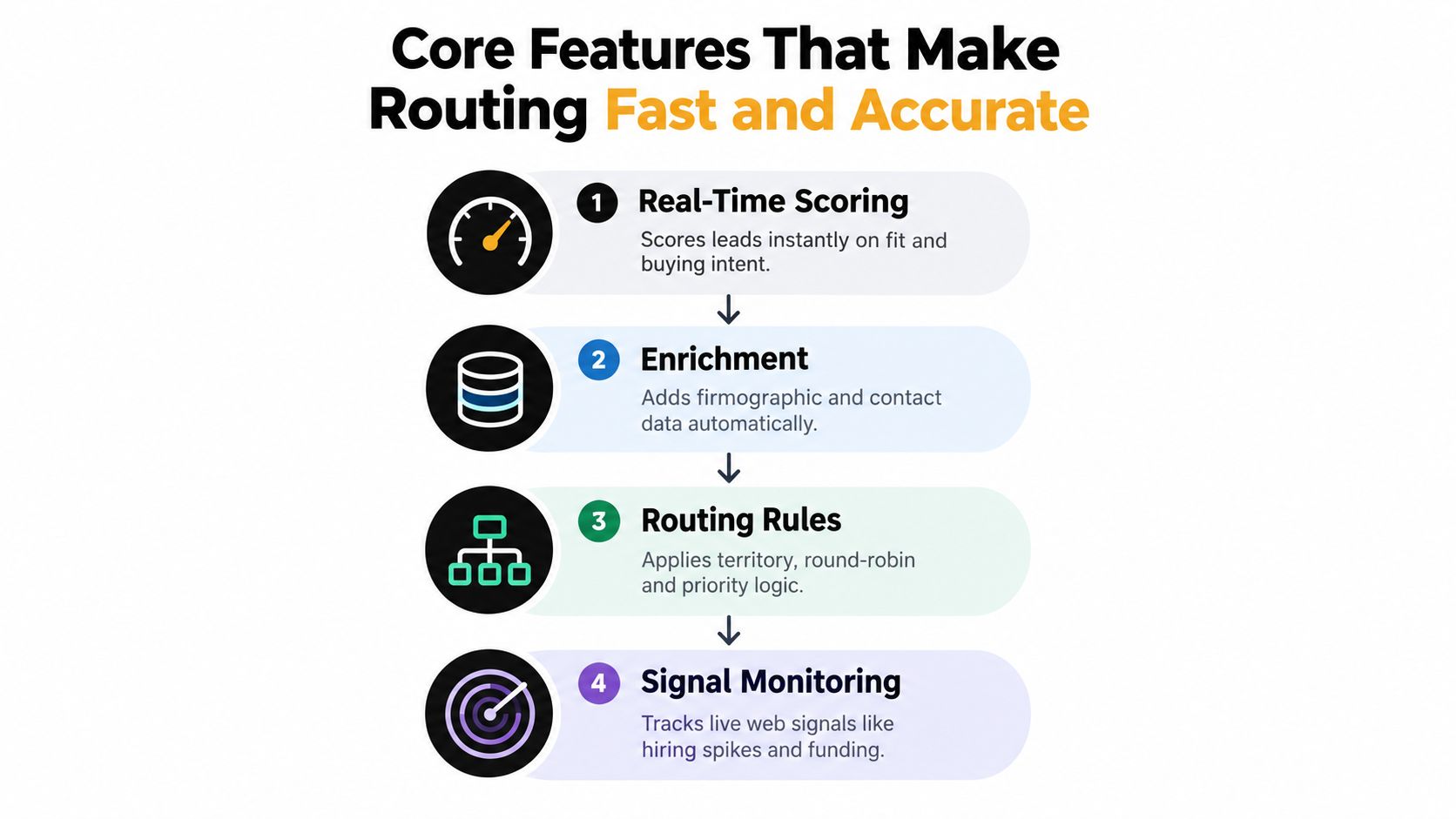
Four features that do the heavy lifting
A good routing stack usually includes these core components:
Real-time scoring
The software should estimate whether the lead deserves fast sales attention, a nurture path, or a manual review. Scoring works best when it includes both fit and behavior.Enrichment before assignment
If the lead only provides name, email, and company, the system may need more context. Firmographics, account matching, and business details make the routing decision more reliable.Routing rules with fallback paths
Rules still matter. Territory, named account ownership, queue logic, and round robin are all useful. The point is to apply them after the system has enough context to choose well.Signal monitoring
The strongest systems don't rely only on the form itself. They also look for buying signals around the account. If you're building that layer, this guide to buying signals and how to find them is a helpful reference.
Why timing and quality must work together
Speed-to-lead is a hard technical constraint, not just a workflow preference. Industry implementation guidance summarized in a neutral source reports that responding within 5 minutes makes a team about 21x more likely to qualify a lead than waiting 30 minutes, while manual assignment can add 5 to 15 minutes before any first touch occurs. That same guidance suggests that for high-intent inbound, automated assignment should ideally happen in under 60 seconds so the rep can still meet the sub-5-minute follow-up target, as described in this lead routing automation overview.
That's why enrichment and scoring can't be slow side processes. They have to happen inline, quickly enough to support the handoff.
A simple test
Ask your current system one question: Can it tell the difference between a fast lead and a real lead?
If the answer is no, you don't just need faster routing. You need better inputs, better qualification, and better decisions before assignment.
How AI and Signal Based Routing Changes Outcomes
Traditional routing assumes the form tells the truth and tells enough of it. In practice, neither is guaranteed.
A lead may mark “VP” on a dropdown and still be a student project. Another may choose “Other” but work at a target account that just raised funding, started hiring for implementation roles, and revisited your pricing page. Static rules treat the first lead as stronger because the form looks cleaner. Signal-based routing often sees the opposite.

Static routing versus signal-based routing
Here's the practical contrast.
| Approach | Primary input | Typical assignment logic | Main weakness |
|---|---|---|---|
| Static rule-based routing | Form fields and CRM fields | Territory, round robin, lead source, company size | Relies heavily on self-reported or incomplete data |
| Signal-based routing | Account context plus live behavior | Fit, risk, intent, timing, account ownership, recommended action | Requires better data collection and monitoring design |
The underserved issue in lead routing is what happens when the lead is not the buying signal. Recent coverage of the category notes that AI-native routing workflows increasingly classify inquiry intent and use conversational qualification before assignment because self-selected form data is often incomplete or misleading. It argues that the stronger signal in complex B2B deals is often timing, budget, incumbent, or use case rather than the contact record alone, in this discussion of best lead routing software and emerging patterns.
That framing is useful because it changes the job of routing. The system is no longer just deciding who gets a form fill. It is deciding what the account context suggests should happen next.
A before and after scenario
A traditional workflow might do this:
- Form says “Request demo”
- Company size field says “201-500”
- Region says “North America”
- System sends lead to the next SDR in the queue
A signal-based workflow might do this instead:
- Enrich company and account status
- Check whether the domain matches an open opportunity, customer record, or named account
- Review intent clues such as pricing-page revisits, hiring activity, tech changes, or recent funding
- Score fit, risk, and confidence
- Route to an AE, SDR, nurture path, or manual review based on the combined picture
That second workflow is more useful because it asks a better question: not “Who is next?” but “What does this account need, and who should act?”
Where AI fits
AI helps most when the system has to interpret messy or incomplete signals. It can classify intent, summarize why-now evidence, and rank options before routing fires. That's different from replacing all rules. Rules still matter. AI improves the inputs and the judgment layer.
For a deeper look at how models support faster ranking and routing decisions, this article on AI lead scoring and routing models breaks down the mechanics.
One useful example is a platform like CapyScout, which screens incoming signups, enriches records, scores fit, risk, and confidence, and writes “why now” notes back to the CRM before routing to sales, nurture, or hold. That kind of workflow reflects the broader shift from contact-led assignment to account-aware assignment.
A short walkthrough makes this easier to visualize:
Route based on evidence, not just declarations. A buyer's dropdown choice is often weaker than the account's recent behavior.
Implementation Integration and Workflow Examples in Practice
Most routing projects fail in the handoff between strategy and setup. The rules look fine on a whiteboard, but the CRM fields are inconsistent, alerts reach the wrong channel, or enrichment arrives after assignment instead of before it.
The fix is sequencing. Build the plumbing first, then the decision logic.
A clean implementation sequence
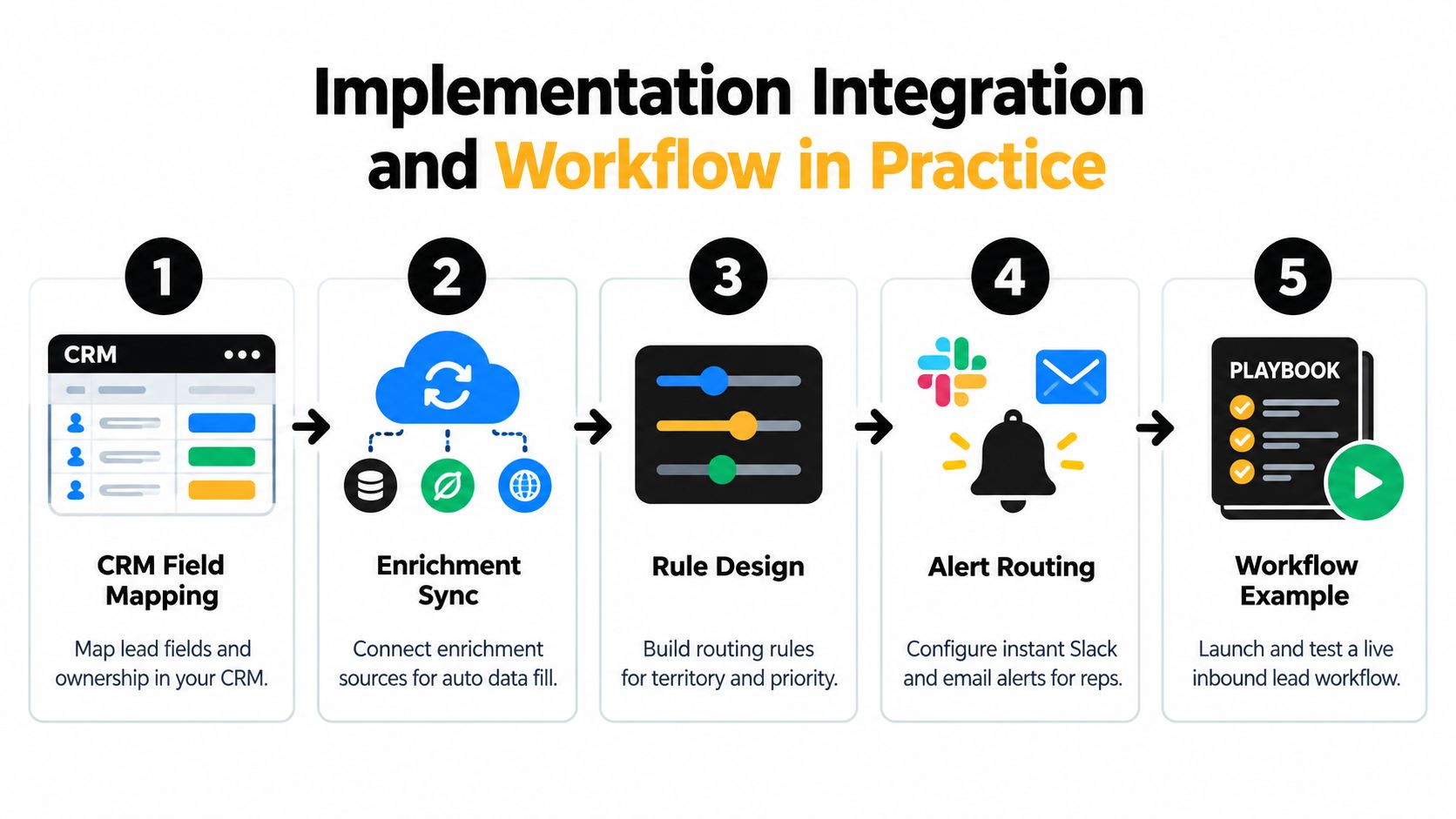
A practical rollout usually follows this order:
Map CRM ownership fields
Decide which fields determine routing. That often includes account owner, territory, lifecycle stage, lead source, fit grade, risk flags, and recommended action.Connect enrichment and sync layers
Make sure data updates can arrive before assignment. If your stack uses HubSpot, Pipedrive, or Attio, integration depth matters more than a pretty rule builder. Teams comparing options should look closely at available CRM and workflow integrations.Build routing logic with fallback paths
Start with account-based assignment where possible. Add territory or queue logic next. Keep a safe fallback for incomplete records.Set alert destinations
Ownership without visibility creates silent delay. Route notifications to Slack, Teams, email, or webhooks based on who must act fastest.Test with real records
Don't test with ideal sample leads only. Test broken fields, existing customers, partner referrals, and ambiguous signups.
Two common workflow examples
The first workflow is inbound signup screening.
A product signup comes in with a business email but little context. The system enriches the company, checks whether it matches the ideal customer profile, flags disposable or risky submissions, and recommends “route to sales,” “nurture,” or “hold for review.” The owner gets context with the alert, not just a name and email.
The second workflow is ongoing account monitoring.
A target account that was quiet last month starts hiring in a relevant department, changes technology, or revisits key website pages. The system updates the account, raises priority, and sends a daily queue item to the right rep even if no new form has been submitted.
If you're designing those automations in Salesforce, this guide to RevOps automation in Salesforce is a useful companion because it focuses on process design rather than just feature lists.
Routing Workflow Comparison for Common Scenarios
| Scenario | Enrichment and Scoring Action | Routing Rule and Destination |
|---|---|---|
| Demo request from a named account | Match domain to account, verify owner, add account context | Route to account owner or AE team |
| Free trial signup with weak fit | Enrich company, score fit and risk, check email quality | Route to nurture or manual review queue |
| Existing customer requesting new product info | Match to customer record, identify product interest | Route to account manager or expansion owner |
| High-intent account revisit without form fill | Monitor account signals, update why-now notes | Route as an alert to the watched account owner |
| Inbound lead with missing territory data | Standardize fields, attempt account match, apply fallback score | Route to triage queue with context for review |
What good implementation feels like
When routing is set up well, reps stop asking, “Why did I get this lead?” They can see the answer in the record and alert. RevOps stops babysitting edge cases all day. Marketing stops wondering whether high-intent leads disappeared into a queue.
That's the practical standard. The system should be understandable by humans, even when software makes the decision.
Common Pitfalls and Metrics That Prove Routing Is Working
Routing systems usually break in familiar ways. The challenge is that the symptoms show up in sales behavior, while the causes sit in data and operations.
A rep says lead quality is poor. Marketing says handoff is too slow. RevOps says the rules are correct. All three may be describing the same problem from different angles.
The most common failure patterns
Here are the mistakes I see most often:
Bad source data
Country, company, and ownership fields aren't standardized, so the logic routes inconsistently.Too many exceptions
The team keeps layering special cases until nobody understands the rule order.No negative qualification
Competitors, job seekers, students, or support requests reach sales because the system only looks for positive matches.Weak fallback design
A lead with incomplete data lands nowhere useful, or lands somewhere with no alerting.No SLA visibility
Teams assign leads but don't track whether anyone acted quickly enough.
If your team debates whether routing “feels better,” you need clearer operating metrics. Routing health should be visible, not anecdotal.
The metrics that matter
The same implementation guidance cited earlier recommends tracking a short set of operating metrics because they reveal whether the problem is data quality, decision logic, or follow-up execution.
| Metric | What it tells you | What a bad result usually means |
|---|---|---|
| Assignment success | Whether leads are getting assigned as intended | Missing fields, broken logic, sync failures |
| Reassignment rate | How often the first owner was wrong | Poor matching, weak qualification, bad territory rules |
| Match rate to existing accounts | Whether inbound leads connect to the right account | Duplicate data, weak account matching, inconsistent domains |
| SLA compliance | Whether reps act within the expected window | Alerting issues, workload imbalance, poor accountability |
| Speed-to-lead | How fast a buyer hears from a human | Manual queues, delayed notifications, unclear ownership |
How to diagnose without overcomplicating it
Start by pulling a sample of recent leads from each route path. Look at the records that were reassigned, ignored, or manually corrected. Then ask three direct questions:
- Was the input data usable?
- Did the routing logic make the right ownership decision?
- Did the assigned person get alerted in time and act?
That sequence matters. Teams often jump straight to changing rules when the issue is dirty account matching or missing context.
A healthy routing process feels boring. Leads arrive, get enriched, land with the right owner, and move. When people rarely notice the system, that's usually a good sign.
Choosing the Right Lead Routing Software and Next Steps
If you're evaluating lead routing software, don't start with vendor categories. Start with your own decision quality.
The selection question isn't “Which tool automates assignment?” Most of them do. The better question is, which tool can make reliable assignments from the messy signals your business receives?
What to evaluate first
Use this checklist when comparing options:
Data quality support
Can the tool validate, standardize, and enrich fields before routing?Flexible qualification
Can it score fit, risk, and intent instead of only applying static rules?Account context
Can it match to accounts, customers, and ownership records before assigning?Signal coverage
Can it use why-now evidence such as intent, web behavior, hiring, or account changes?Alerting and workflow depth
Can it send context-rich notifications to the right channels and support fallback paths?Integration fit
Does it work cleanly with your CRM and messaging stack?
If you want a broader perspective on how vendors frame this category, Captiwate's guide to lead distribution software is worth reading because it helps clarify where routing logic fits inside the larger lead handoff process.
A practical pilot plan
Keep the first rollout narrow.
Pick one inbound path, such as demo requests or free trial signups. Define the fields required before assignment. Add enrichment and qualification. Set one clear owner path, one fallback path, and one SLA. Then review the exceptions manually for a short pilot period.
The strongest setups aim for assignment quickly enough that a human can still follow up inside the early response window. That usually means automated routing has to happen almost immediately, not after several disconnected systems catch up.
Routing used to be treated as a distribution problem. More teams now realize it's a signal interpretation problem. The winning systems don't just move faster. They understand more before they decide.
CapyScout helps teams do that by screening inbound signups, enriching CRM records, monitoring account signals, and adding source-backed why-now context before routing decisions are made. If you want lead routing to reflect account fit, risk, and timing rather than just static form fields, visit CapyScout.
Not ready to start? Get a free target list: 10 companies to sell to, picked from your website.