

Marketing Customer Base: A Step-by-Step Playbook
A step-by-step marketing customer base playbook: segment accounts, time outreach with buying signals, write offers and measure results.
In 2025, only 15% of global consumers said they absolutely trusted brands with their personal data, according to Twilio's 2025 State of Customer Engagement Report. That's the central constraint on your marketing customer base. You don't have a list problem. You have a trust and freshness problem, and every stale record, duplicate, and mistimed message makes it worse. Treat the base as a living dataset first, then personalize.
Table of Contents
- The Customer Base Playbook at a Glance
- How to Audit and Segment Your Customer Base
- How to Prioritize Accounts and Read Buying Signals
- How to Write Targeted Messages and Offers Customers Accept
- Choosing Channels and Automating the Handoffs
- Measuring Results and Iterating Each Quarter
- Start With Ten Accounts This Week
The Customer Base Playbook at a Glance
Six phases turn a static list into a working marketing customer base. Run them in order, because each one depends on the quality of the last.
- Audit. Your CRM admin or RevOps owner checks every customer record for completeness, duplicates, and last verified dates. The output isn't a cleaner spreadsheet. It's a trusted base with confidence labels that tell everyone which fields they can act on.
- Segment. The marketing lead groups customers into four to eight named segments by value, health, and use case. Fewer is better than clever. If a segment doesn't change what you'd send, it isn't a segment.
- Prioritize. Sales and marketing score accounts together on fit and timing, then work a weekly ranked queue. Joint ownership matters, because a queue only sales ignores is just a report.
- Trigger. Someone watches each account for buying signals, hiring, funding, leadership change, review drops, or pricing page visits. Each alert needs a date and a source attached, so the rep can see why now.
- Message. Marketing and customer success keep a shared message library with one offer and one first line per segment. One, not five variants nobody maintains.
- Measure. Marketing operations maintains a dashboard tracking reply, expansion, and save rates per segment, so you learn which plays earn their keep.
Why the Order Isn't Negotiable
A message sent to a stale or duplicated record wastes the send and can embarrass you in front of a customer. That's why audit comes before segmenting, segmenting before scoring, and scoring before writing. Reversing the order is how teams end up with polished copy aimed at people who left the company months ago.
Starting move: Export your customer list today and count how many records lack an owner or a verification date. Let that number decide how much audit work comes before anything else.
If that count is large, you've found your first project. Everything else waits.
How to Audit and Segment Your Customer Base
A CRM history citing Gartner reports that on average, 65% of a company's business comes from current customers, while acquiring new customers can cost approximately five times more than retaining existing ones. With that economics, a segment only earns its place if it leads to a renewal, an expansion, or a save.
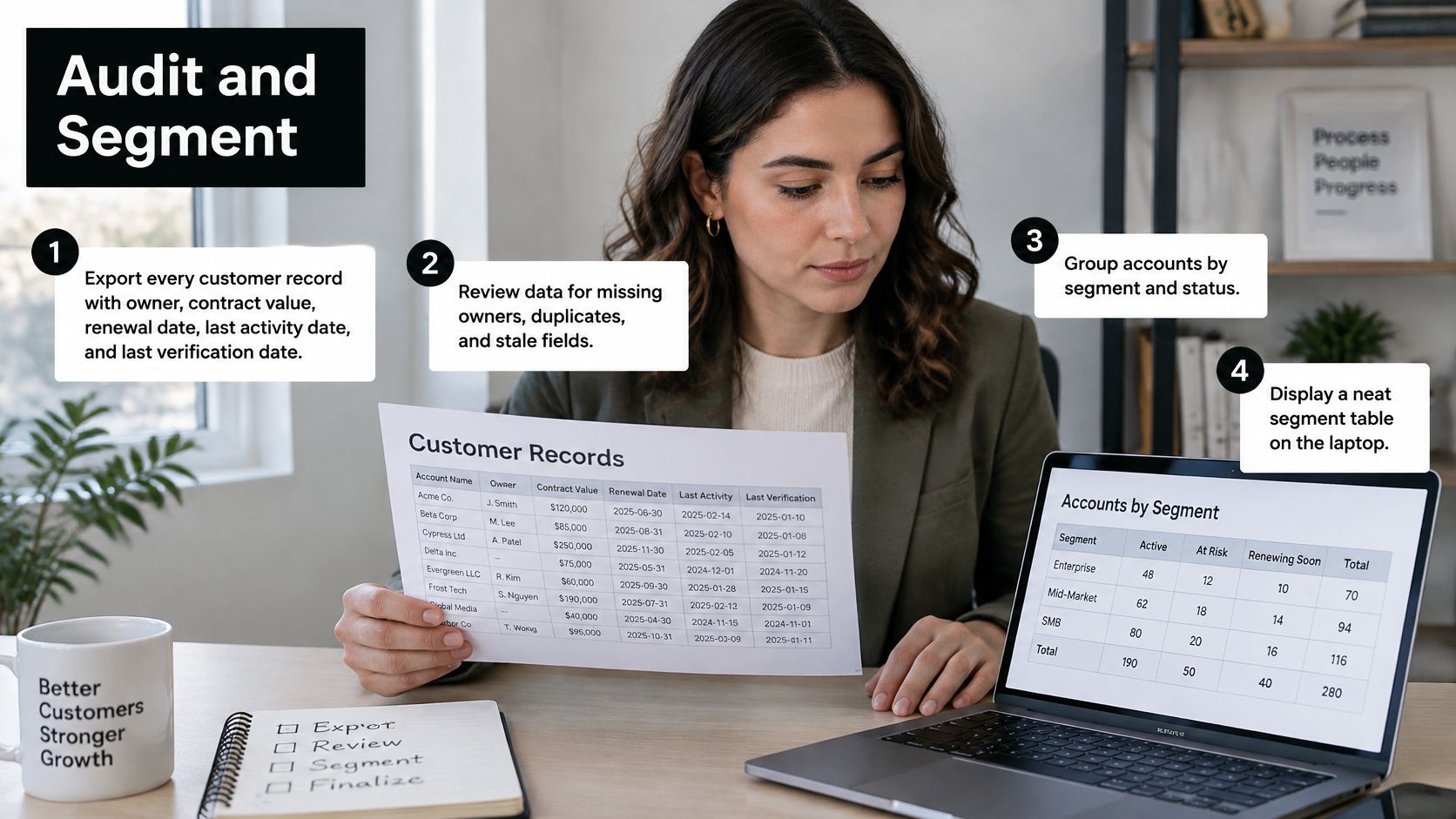
The Audit in Five Steps
- Export everything. Pull every customer record with its owner, contract value, renewal date, last activity date, and last verification date from HubSpot, Pipedrive, Attio, or whatever you run.
- Flag duplicates and stale records. Match on domain plus account name, and mark any record not verified in the last 90 days. I would treat that 90 day window as a hard outer limit, not a target.
- Label confidence. Tag each key field as verified, inferred, or unknown, so enrichment never overwrites a confirmed value with a guess.
- Segment from trusted fields only. Contract value, renewal date, usage trend, active seats, and whether your main contact is still in role. If you can't trust the field, you can't build on it.
- Name each segment plainly. Give it one first play. A name your newest hire understands beats an acronym only RevOps can decode.
Your segment definitions will be sharper if you've done the upstream work described in this guide to building an ICP customer profile, since fit criteria and segment boundaries come from the same evidence.
Starter Customer Segments and First Plays
| Segment | Defining fields | Example | First play |
|---|---|---|---|
| High-value expanders | Top-quartile contract value, seats growing each quarter | Multi-site dental group adding two locations after a pilot | Expansion brief and a cross-sell call |
| Stable core | Renewed twice, usage flat | 12-location clinic group on an annual plan | Renewal reminder with a case study request |
| At-risk | Usage down for 30 days, support tickets rising, champion left | Agency whose main contact changed roles | Account review call within 14 days |
| Churned or lost | Marked Churned or Lost, or a closed-lost deal | Former customer that left for a cheaper tool | Win-back offer tied to what has changed |
| Lookalike seeds | Best five to ten customers by margin and retention | Top accounts used to find similar companies | Prospect expansion from proven profiles |
Segments built this way also give acquisition a head start, because you can turn B2B interest into demand when your lookalike seeds come from customers who renewed and expanded.
The common mistake is building eight segments from fields that are half empty. Start with three to five you can defend. Add more once the data holds.
How to Prioritize Accounts and Read Buying Signals
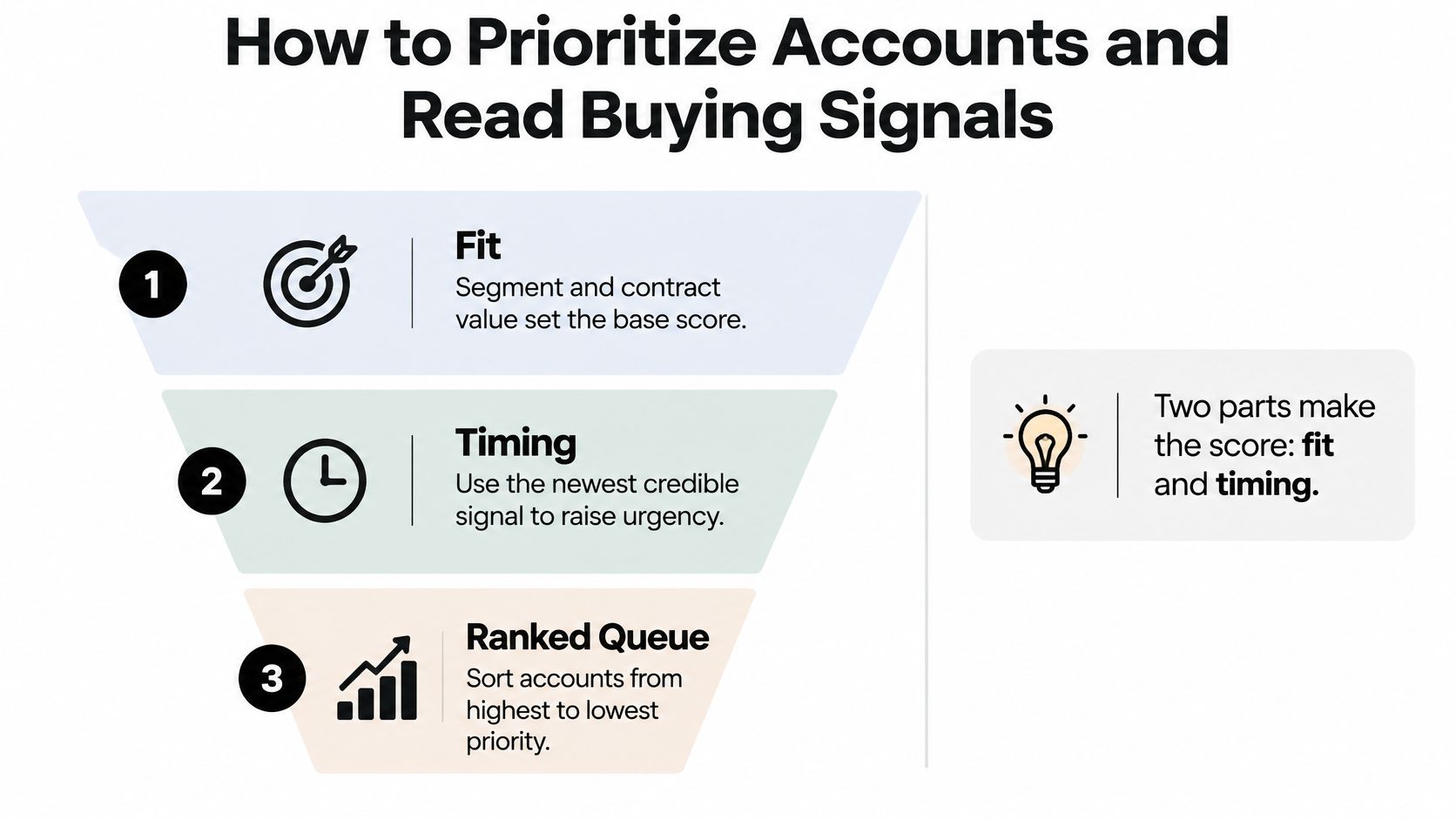
Segments tell you who matters in general. Prioritization tells you who matters this week. Build a simple score from two parts, fit from segment and contract value, and timing from the newest credible signal. Then sort accounts into three tiers.
- Act today: High fit plus a signal from the last few days. These get a named owner and a first touch before anything else.
- Act this week: Good fit with a recent but slower signal, such as a funding announcement or a new leader settling in.
- Monitor: Right profile, no fresh signal. Keep watching and don't burn outreach on silence.
Buying Signals, Response Windows and What They Suggest
| Signal | Where it shows up | Act within | What it suggests |
|---|---|---|---|
| Hiring for a role you sell into | Job boards and careers pages | One to two weeks | Team growth and budget for new tools |
| Funding round announced | Funding news and press releases | Two to four weeks | New budget and pressure to show results |
| New leader in a relevant role | Company news and professional profiles | 30 days | Tool review and vendor reset |
| Negative review trend for a local business | Google Business Profile reviews | Within two business days | Reputation issue with a concrete, recent cause |
| Pricing or integration page visits from a known account | Website visitor tracking | Same day | Active evaluation under way |
| Competitor tool removed from the tech stack | Technology change detection | One week | Gap that your product may fill |
If you're new to reading these, this breakdown of buying signals and free sources for finding them covers where each one surfaces without paid tooling.
Freshness Rules and the Exception Queue
Volatile fields decay fast. Recheck job titles, hiring status, and funding every 30 days. Headquarters country can wait a quarter. The 90 day verification window from your audit is the outer limit for all fields, while these volatile ones get the tighter 30 day cycle.
Neglect has a price. In Validity's global 2022 study of 1,241 CRM users and stakeholders in the United States, United Kingdom, and Australia, respondents reported that their organizations lost more than 10% of annual revenue because of poor-quality CRM data.
Daily habit: Keep an exception queue for high-value accounts with stale or conflicting fields. Store each value with its source and timestamp, and require a person to review any change to a risk or routing field.
Once accounts are chosen, the signal watch takes over. After you find the right brands, you watch them for buying signals, find the founder or operations lead, and start a campaign from your own inbox and LinkedIn. New people enter that watch from daily searches and feeds, LinkedIn connections, website visitors and signups, your customers, a list, or companies on a watched list when a signal fires.
Try it before you automate it. Build a queue of 20 accounts this week and label each one with its signal and its deadline. If you can't fill 20 rows with dated, sourced signals, your monitoring has gaps, and that's useful to know now.
How to Write Targeted Messages and Offers Customers Accept
Personalization has a trust ceiling, and many teams write as if it doesn't. A global study of more than 23,000 consumers found that 64% prefer buying from companies that tailor experiences to their needs, yet 53% are highly concerned about the privacy of their personal information and only 33% trust companies to use it responsibly. The same study shows comfort depends on data type. Consumers are relatively more comfortable with purchase history and website visits, but far less comfortable with financial information and social-media data.
The downside isn't theoretical. According to Thales' Digital Trust Index 2025, 82% of consumers across 14 countries had abandoned a brand during the previous 12 months because of concerns about how their personal data was used.
A Signal Hierarchy You Can Defend
- First, what the customer did with your product. Usage changes, support tickets, and renewal dates. This is your data from your relationship, and customers expect you to know it.
- Second, public account changes. Hiring, a new location, a review trend. Treat these as account-level evidence, never as proof of an individual's intent.
- Third, nothing. No private traits, no guessed personal intent, no inferred sensitive attributes. If you can't name the source, don't write the line.
We hold ourselves to the same standard. Contact results go only into the customer's lists and campaigns, and we don't warehouse or resell contact data.
Three First Lines That Pass the Test
- Renewal: "Your team added four seats in March, so your renewal next month is a good moment to check the plan still fits."
- Expansion: "Saw you're hiring a second operations lead. Teams at that stage usually outgrow single-location reporting."
- Save: "Your Google rating slipped over the last month. Happy to share what's driving the recent reviews."
Pair each segment with one offer, an onboarding session for a new team, a free account review for an at-risk client, or a credit tied to a feature a lost customer asked about. For fuller templates across segments, these outreach email examples for B2B SaaS and local services show the same structure at work.
Before any send, confirm the lawful basis for contacting each segment, record it in the sequence settings, and honor every opt-out within one business day. Keep the opt-out link visible in the first message, not buried in the footer, and cap frequency per sequence.
If you wouldn't say the message out loud while standing in the customer's office, cut the line.
Choosing Channels and Automating the Handoffs
Choose channels based on the segment and the account event, then coordinate timing across them. A single calendar helps prevent a customer from receiving conflicting messages from different teams. Keep the customer record current before adding personalization: outdated roles, duplicate contacts, or an unverified email can undermine a well-timed message.
Channels by Segment, Trigger and Limit
| Channel | Best segment | Trigger to use it | Constraint to respect |
|---|---|---|---|
| Email from your own inbox | Stable core and expanders | Usage milestone or renewal date | Keep sends inside the customer's time zone and a daily cap |
| LinkedIn warm message | Former champions and contacts who changed companies | Job change or engagement with your posts | Stay within weekly LinkedIn limits |
| In-product message | Active users | Feature not used after 14 days | No more than one message per week |
| Phone call or account review | At-risk and top-tier accounts | Usage drop or a negative review | Reserve for accounts where the value justifies the time |
| Win-back sequence | Churned and lost accounts | A product change the lost account asked about | Stop after three touches with no reply |
The channel is only part of the decision. A renewal date may suit a planned email, while a sudden usage drop calls for an account owner to review the context before contacting the customer. For each segment, record the trigger, channel, owner, and next step in one shared calendar. Teams coordinating several touchpoints can also review coordinated marketing for hospitality businesses as a relevant service example, while keeping their own customer messages tied to verified account records.
The Inbound Handoff, Step by Step
When an existing customer requests an upgrade or signs up for a new product, route the event with its actual context. A fast handoff only helps if the record belongs to the right person and company.
- Capture the event with its actual timestamp, not the CRM creation time.
- Validate the email and company identity.
- Enrich firmographics against the information you already hold.
- Score fit and confidence separately, with reason codes.
- Check for disposable addresses and duplicates.
- Route qualified records to a named owner immediately.
- Start a timed follow-up if nobody accepts within the agreed window.
Speed matters, but response-time targets should be measured against your own process. The MIT and InsideSales research summarized in this speed-to-lead playbook found that contacting a lead within five minutes made teams 100 times more likely to make contact and 21 times more likely to qualify the lead than waiting 30 minutes. The same piece reports a 32% close rate for qualified inbound leads answered in under five minutes versus 12% at 24 hours or longer. Treat that comparison as directional, and track your own p50 and p90 response times alongside outcomes. A quick response to a misidentified or poorly timed contact is still a poor handoff.
Two operating rules protect the relationship. First, current customers are left out of the LinkedIn connections campaign. A cold connection request to someone who already pays you signals that the record or campaign setup needs attention. Second, keep lost accounts in a separate win-back motion. Mark customers as Churned or Lost on the Customers page, or import closed-lost deals from the CRM, then press Start win-back campaign. That keeps former customers from receiving prospecting copy and lets outreach follow a relevant account event rather than a calendar blast.
Measuring Results and Iterating Each Quarter
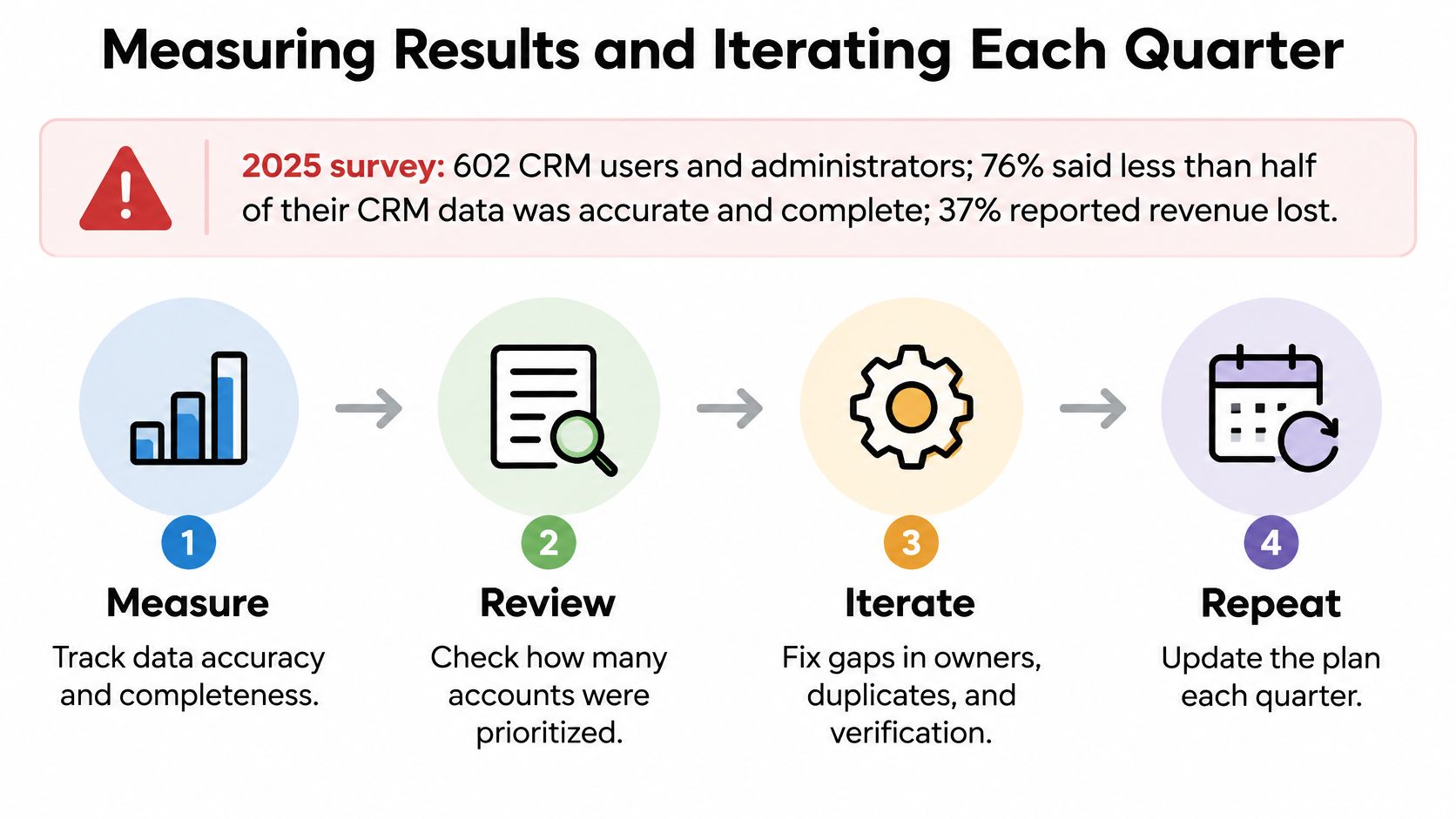
A campaign can look successful while the base underneath it is wrong. A 2025 survey of 602 CRM users and administrators in the United States, United Kingdom, and Australia found that 76% said less than half of their CRM data was accurate and complete, 37% reported revenue loss directly attributable to poor data quality, and 46% lacked a full-time person responsible for data quality. Measure data health next to outcomes, or you'll optimize against fiction.
Outcome and Data-Health Metrics to Review
| Metric | What it tells you | Healthy direction | Review cadence |
|---|---|---|---|
| Reply rate by segment | Which first lines and offers earn a response | Rising across three cycles | Every two weeks |
| Expansion revenue per segment | Whether expansion plays pay off | Higher than the previous quarter | Quarterly |
| Churn rate in the at-risk segment | Whether outreach saves accounts | Falling after contact | Monthly |
| Median time from signal to first touch | How fast the team responds | Under two business days for high-value signals | Weekly |
| Freshness of key fields | Share of volatile fields verified within their SLA | Set a target per field, starting near 90% | Weekly |
| Opt-out and complaint rate | Whether trust is eroding | Stable or falling | Every send batch |
The Quarterly Iteration Loop
Run the same four steps every cycle. Measure by segment, diagnose which variable is weakest, change one variable, the first line, the offer, or the channel, and re-run it for 30 days before judging. Record the previous cycle's reply rate as your baseline, and send enough messages per segment for a real difference to show. Judging a play on a handful of sends is reading tea leaves.
Add three metrics most dashboards skip.
- False positives: A signal fired but no real intent followed. A rising rate means your triggers are noisy, not your copy weak.
- Missed opportunities: An account churned without any alert. Each one names a signal you should have been watching.
- Time to correction: Days between a wrong record being spotted and fixed. This predicts how much stale data leaks into future outreach.
Retirement rule: If a segment's play shows no lift across two review cycles, retire it and reassign the time. Sentiment isn't a metric.
I'd also name one owner for data quality, even part time. Unowned quality work loses to campaign deadlines every single week.
Start With Ten Accounts This Week
You don't need a quarter to begin. You need seven days and ten accounts.

- Export the customer list and mark churned and lost accounts so they don't leak into active plays.
- Audit 100 records for missing owners, duplicates, and unverified fields.
- Pick three segments from the starter list and drop the rest for now.
- Select ten accounts across the at-risk and expansion segments.
- Find one recent, sourced signal per account and write one first line grounded in it.
- Send from your own inbox or LinkedIn, and log each reply and outcome.
- Review replies on Friday. Retire any first line that earned nothing and keep the ones that started a conversation.
The short walkthrough below shows how a signal becomes a ready-to-send first line, which is exactly the step five work above.
If your watch list runs to hundreds of accounts, a tool earns its place. With CapyScout, you enter your website or best customers and it shows companies that fit, each with a reason to reach out, in a few minutes. Lookalike setup starts by adding 5 to 10 of your best customers or importing won deals from your CRM.
You face one decision first. Audit or signal watch? If many records lack a verification date, the audit comes first, because signals attached to wrong records just produce faster mistakes.
The first ten conversations will teach you more than another month of planning.
Your marketing customer base gets more valuable the moment you can trust it, and CapyScout helps you do exactly that by finding companies like your best customers, watching them for dated buying signals, and drafting outreach grounded in a real reason to reach out. Start with your website or your top accounts, review the scored queue it builds for you, and send your first signal-timed messages this week.
Not ready to start? Get a free target list: 10 companies to sell to, picked from your website.