

How to Identify Web Visitors at Company Level

Identify web visitors at company level: match accounts, score pricing and demo intent, filter bots, and stay privacy-conscious without naming people.
The most popular advice about how to identify web visitors starts with the wrong promise: install a script and discover exactly who's browsing your site. A company match, a contact database, and a pageview don't add up to proof that a particular employee visited. Put those pieces together carelessly and your sales team gets invented certainty instead of useful intelligence.
A better approach is less dramatic and more actionable. Filter automation first, resolve visits to companies, attach an explicit confidence score, and preserve the evidence. Then decide whether the account deserves attention, without pretending you've identified a person.
Table of Contents
- What You Can Know About an Anonymous Visitor
- How to Match Visitors to Companies and Filter Bots
- Which Return Visits Signal Account Intent
- Privacy Rules for Lawful Visitor Identification
- How to Test Your Setup for Hidden Identifiers
- Decide Which Accounts to Contact Now
What You Can Know About an Anonymous Visitor
Visitor identification isn't a single capability. It's a series of evidence boundaries, and crossing each boundary requires something you didn't have before.
What each identification level can and cannot claim
| Level | What you can observe | What you must not claim | Typical evidence |
|---|---|---|---|
| Anonymous session | Pages, referrer, rough timing | Name, email, company or intent to buy | Server log or consented analytics event |
| Returning browser | Same browser came back to this site | Same person on another device, or a job title | First-party cookie or similar first-party ID |
| Company or account | An organization is a plausible source of the visit | A named employee made the visit | Form or email domain, CRM match, watched-account technical signal |
| Known person | This submitted identity is tied to subsequent authenticated or otherwise linked activity | Anything about them before they identified themselves without separate evidence | Login, form, or authenticated session |
Start with behavior, not identity
An anonymous session can tell you which pages were requested, where the visit came from when referral information is available, and the approximate sequence of activity. It can't tell you whether the visitor is evaluating vendors, helping a colleague, or researching an article.
A returning browser adds continuity. A first-party cookie is a small text value that the browser saves and returns to the same website on later requests. That lets the site connect activity across visits, but the value does not contain a name, email address, or employer.
Behavioral measurement is widespread: across the one million most-visited websites, HTTP Archive's 2024 Web Almanac found that approximately 39% of cookies were first-party and 61% were third-party, while Google Analytics cookies such as _ga and _gid appeared on more than 61% of websites across mobile and desktop clients. Those findings establish how common measurement is, not how many visitors can be personally identified.
For an operational companion to that distinction, SourceLoop's visitor tracking guide is a useful resource when planning what your website should measure. Keep the measurement design separate from any promise about identity.
Require an extra link for attribution
A company match needs evidence connecting the visit to an organization. That might be a submitted business email domain, a properly linked CRM account, or a technical signal associated with a watched company. The strength of that connection determines how confidently you can name the account.
A known person requires a direct identity link, such as a voluntary submission or authenticated session. Even then, don't attach every earlier anonymous visit to that person. Historical attribution needs its own supporting evidence and appropriate permission.
Contact enrichment is a separate operation. Finding a finance director at a matched company gives you a potential contact, not proof that the finance director opened your pricing page.
Evidence boundary: Describe the observed activity and the supported attribution. Don't add a person, job title, or buying decision that the evidence doesn't establish.
A defensible sales note might say that a browser plausibly associated with the account returned to pricing. It shouldn't say that Jane from the account is ready to buy.
How to Match Visitors to Companies and Filter Bots
Start by deciding which traffic should never reach a seller. Matching first and filtering later lets scanners and internal tests acquire company names, scores, and CRM records before anyone questions whether the activity was human.
The filtering sequence should be explicit enough for revenue operations and engineering to inspect together.
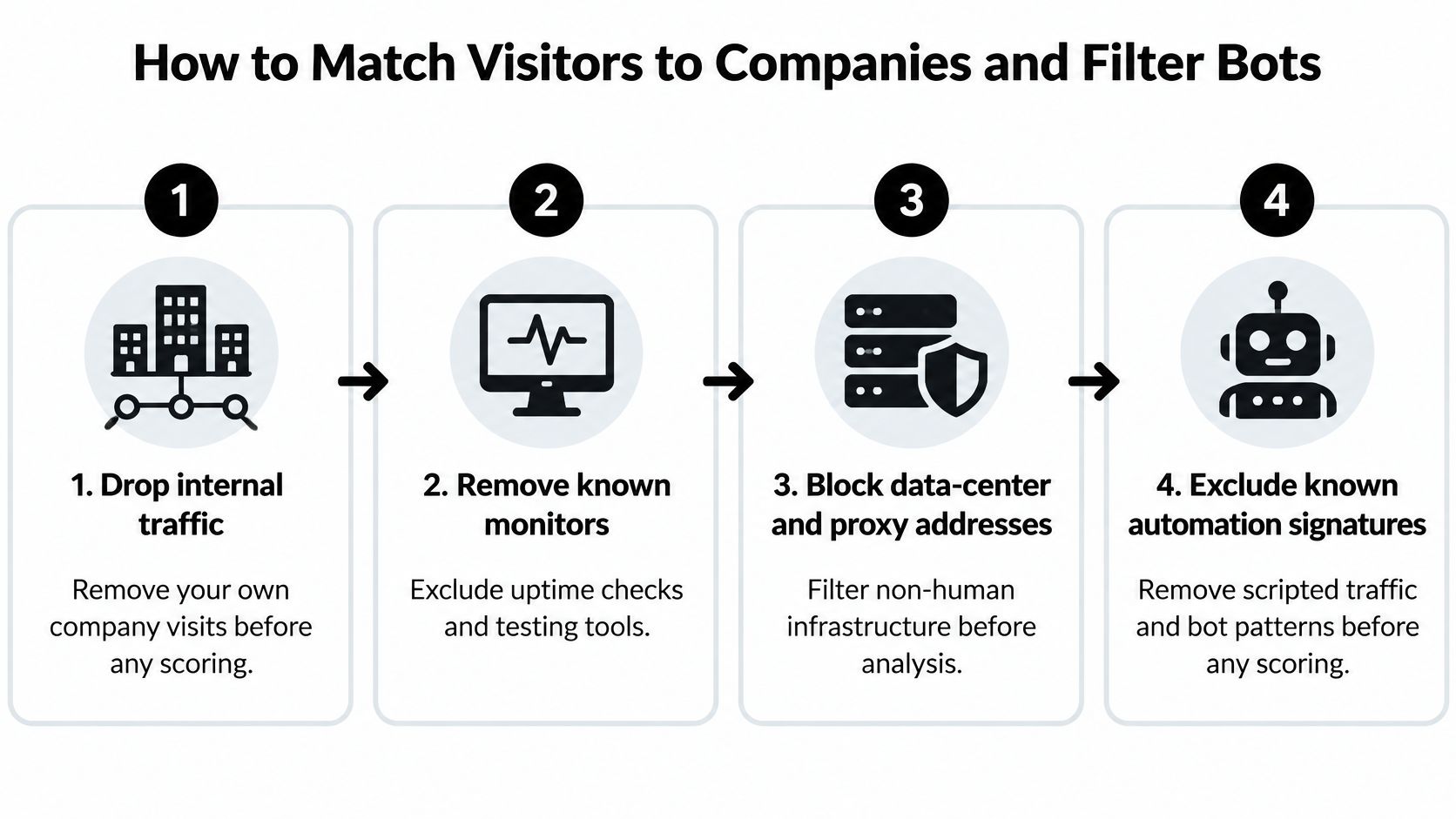
Filter before assigning intent
Remove internal traffic and known automation. Exclude your office traffic, employee test sessions, uptime checks, and testing tools. Filter known automation signatures and quarantine data-center or proxy traffic from sales scoring unless review establishes a legitimate use.
Automated activity reached 51% of web traffic in 2024, according to Kinsta's reporting on bot traffic. That's a web-wide finding, not an estimate for your own site, but it's enough reason not to equate raw pageviews with demand.
Compare JavaScript analytics with server-side records. Some agents don't execute scripts, while server logs record requests that aren't meaningful page visits. Neither view should be treated as the complete human audience.
Define the accounts worth investigating. Build a watched-account list using your ideal customer profile, or ICP: industry, business model, location, company size, and relevant technology. Keep customers, competitors, vendors, and prospects distinguishable.
A technically credible match can still be commercially irrelevant. Account fit should determine eligibility for review, not inflate your confidence that the match itself is correct.
Use direct links before inferred ones. Prefer a voluntarily submitted business email domain or an authenticated session linked to a known account. A CRM company record helps only when there's evidence connecting the session to that record.
Don't promote a consumer email address into a verified employer match. Don't assume that everyone using a shared network belongs to the organization associated with it.
For teams investigating suspicious storefront activity, Securify's guide to spot bot traffic on Shopify provides a focused companion resource. Keep detection decisions auditable rather than relying on a single opaque bot label.
Keep confidence separate from commercial value
Record probabilistic matches as hypotheses. IP, device, browser, and behavioral signals support inference, not direct identification. Store an explicit match-confidence score beside the company, along with its evidence: resolution method, page, timestamp, referral information, and filtering outcome.
Use a separate field for intent strength. A highly confident company match on a careers page can have little sales value, while an uncertain match on pricing still needs investigation. Combining both into one unexplained score hides the reason for the alert.
Route only evidence-backed alerts. Agree on a routing threshold after validation, and give each routed account a named owner. Lower-confidence records should stay in a review queue rather than appearing as verified leads.
An alert should tell the seller what happened, how the account was matched, and what remains unknown.
Account worth investigating: a fitting company was matched to relevant evaluation-page activity. Review the attached evidence before choosing a contact. No individual visitor has been verified.
Don't count an inferred job title as a verified visitor. Don't mistake recognition of returning browsers for coverage of all sessions. And don't reward a higher match count when it merely fills the queue with scanner leads.
The following video is a supplementary resource; your own validation should determine what reaches sales.
Validate against identities you already know
Measure precision separately from coverage. Set aside consented sessions with known account identities, hide those identities from the matching process, and compare predictions with the withheld answers. Keep that control group out of any tuning sample used to build your scoring rules.
One benchmark described in Geysera's visitor-identification methodology guide reported approximately 82% correct identification for deterministic matching versus 40–52% for purely probabilistic approaches. Treat that as a reported benchmark, not a performance promise for your audience.
Precision asks how many tested matches were correct. Coverage asks how much eligible traffic received a match. Report both with clear denominators, and label unverified predictions as unverified rather than counting them as correct.
Finish each review by checking the session itself. A lone request without navigation, implausibly fast movement across many URLs, or a pricing hit with no account fit warrants downgrading or exclusion. These patterns aren't proof of automation individually, but they're poor foundations for a sales alert.
Which Return Visits Signal Account Intent
Page visits and how strongly they signal account intent
| Page | One visit | Repeat plus account fit | Next move |
|---|---|---|---|
| Homepage or blog | Weak | Still weak | Don't alert sales |
| Feature or resource page | Weak | Low | Keep for nurture context |
| Pricing | Weak alone | Moderate to strong | Investigate only if the account fits |
| Demo or contact | Moderate | Strong | Same-day seller review |
| Integration, docs or API | Moderate for technical buyers | Strong when ICP fits | Route to the owner who can speak to implementation |
| Pricing plus demo or contact within a few days | Not applicable | Strongest web-only pattern in this working rubric | Review with the evidence attached |
Use this as a triage rubric, not a measured probability of purchase. A page's purpose helps you choose what to investigate; it doesn't establish a visitor's motives.
A homepage visit offers little context. A feature page narrows the topic, while pricing suggests commercial curiosity. Documentation may indicate technical evaluation, but it can also reflect an existing customer looking for help.
Compare account stories, not isolated clicks
Say a mid-market SaaS company matches your ICP and receives a credible account attribution. In a hypothetical sequence, its activity includes pricing followed by an integration-page return two days later. That combination deserves review because commercial and implementation questions appear together.
The useful conclusion is that the account may be evaluating suitability. You still don't know the employee, their authority, or whether a purchase project exists. Route the account to someone who can discuss the relevant integration rather than sending a generic meeting request.
Now consider a consumer internet-service-provider attribution with a single pricing hit and no ICP fit. Don't create a prospect merely because your tool produced a company name. The attribution may describe network infrastructure rather than an employer, and the commercial case is absent anyway.
The difference isn't that pricing means intent in one case and nothing in another. Relevant behavior becomes actionable only when account fit and attribution support it.
Add a public reason to act
Before drafting outreach, look for corroborating business context: relevant hiring, a newly visible technology, or a public expansion announcement. Read the underlying page and check that the change relates to your offer.
A hiring announcement for implementation roles, for example, can support a message about onboarding capacity. It doesn't prove that the company is shopping for your product, so keep the claim narrow.
- Keep web evidence internal. Use the page sequence to prioritize research, not as the opening line of an email.
- Choose the right owner. Technical evaluation belongs with someone who can answer implementation questions.
- Preserve uncertainty. A seller-review recommendation is not a declaration of buying readiness.
The website-intent workflow provides context for organizing these signals at account level. The practical goal is a shortlist with enough evidence to investigate, not a leaderboard of supposedly identified people.
Privacy Rules for Lawful Visitor Identification
Non-essential tracking needs active, freely given, specific, informed, and unambiguous consent under the ePrivacy framework, as the European Data Protection Board explains. That includes technologies beyond conventional cookies, such as pixels and device-based identifiers.
The EDPB's own analytics approach illustrates a less invasive pattern: mask IP addresses, aggregate activity, and leave tracking disabled unless the visitor consents. Your implementation still needs a jurisdiction-specific assessment, not a blanket assumption that business traffic is exempt.
Use this checklist when reviewing the collection design.
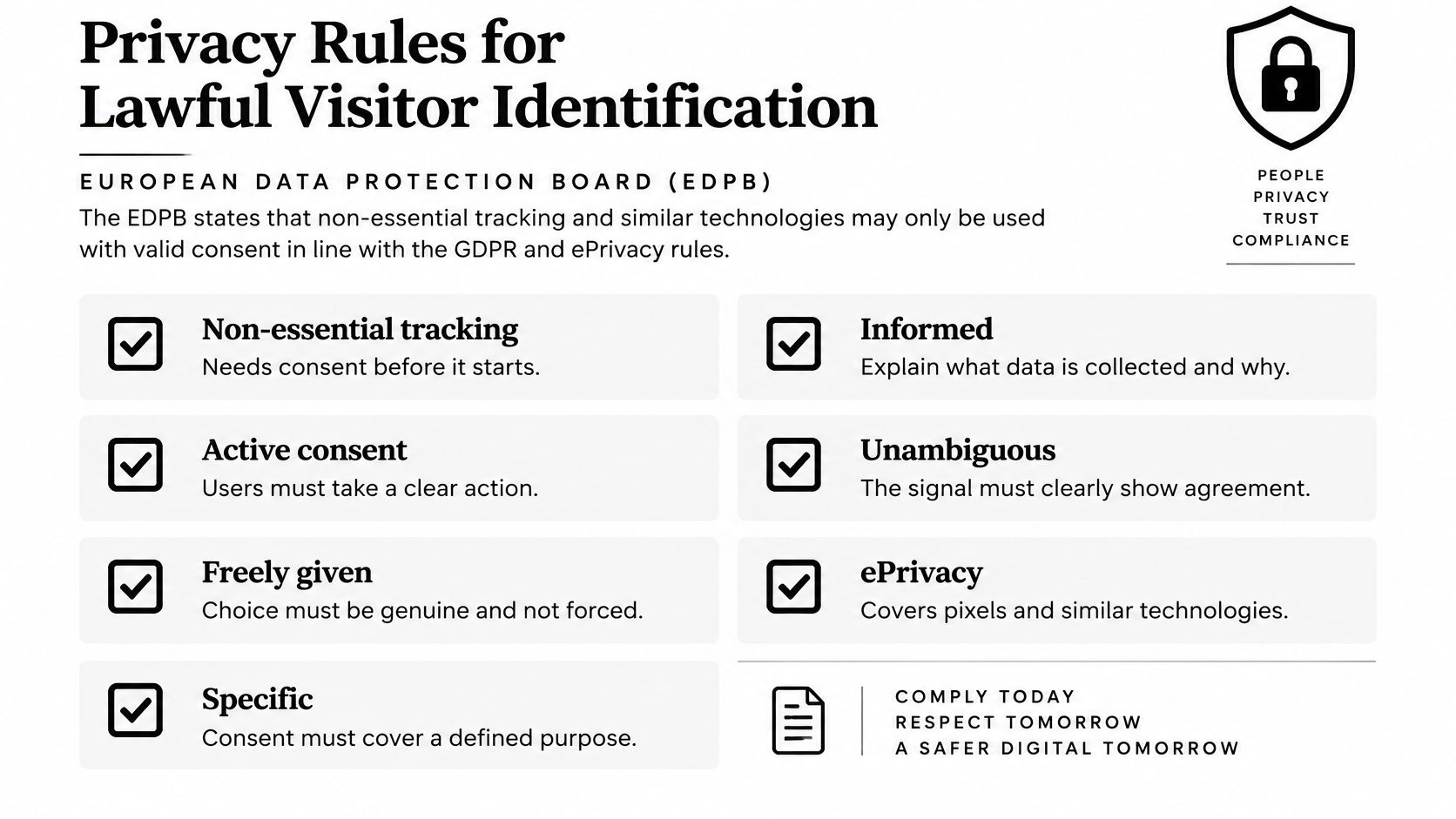
Build permission into the collection path
Separate permission to collect tracking signals from the lawful basis for later processing. An existing business relationship isn't automatic permission to start non-essential tracking, and a company-level output doesn't remove obligations attached to the identifiers used to produce it.
Use this build order:
- Gate non-essential collection. Before the appropriate consent, run only collection established as essential for the service. Don't load enrichment scripts early and suppress only their dashboard output.
- Document purposes, applicable regions, lawful basis, and disclosures. Have your privacy lead assess IP addresses, persistent IDs, fingerprints, and linkable parameters as potentially personal data.
- Minimize what remains. Pseudonymize identifiers, restrict resolution to watched accounts, and keep identifying information out of URLs and event parameters.
- Maintain a usable audit trail, retention schedule, suppression process, and deletion path. A visitor's refusal must reach downstream systems, not stop at the consent banner.
For campaign design, Polish's privacy-safe personalisation workflows offer a companion resource for thinking about relevance without unnecessary exposure. Personalization should explain why your offer fits the business, not reveal hidden observation.
Set limits sellers and engineers can enforce
Cookieless doesn't mean anonymous. Removing a cookie doesn't resolve privacy questions if the implementation reconstructs a persistent browser identifier through other signals.
Review consent rate alongside match precision, false-positive rate, suppression compliance, and deletion-request handling. A rise in matches isn't progress if the collection ignores refusal or if sellers receive more incorrect accounts.
Our website-intent events never store a raw IP address and are pruned after 30 days. Our campaign messages to website visitors never mention the visit. These are operational limits, not universal legal thresholds.
Outreach boundary: Use a public business reason to explain the message. Keep website activity out of the campaign copy.
Include the GDPR information in your implementation review, then check that the actual browser behavior matches your notices and internal policy. Compliance depends on what your systems send and retain, not just what the documentation says.
How to Test Your Setup for Hidden Identifiers
Test the collection path before trusting an anonymous or cookieless label. The TWIPLA guide to privacy-compliant website integrations recommends inspecting network traffic and persistent identifiers, not merely checking whether cookies exist.
Inspect what leaves the browser
- Start fresh. Use clean browser profiles across browsers and devices. Disable cookies and browser storage where feasible, and record which controls you changed.
- Open the browser's Developer Tools and inspect the Network panel. Check request URLs, query parameters, headers, and payloads for stable identifiers, especially opaque values repeated across events.
- Clear state and repeat. Compare requests before and after clearing local data. If recognition returns, investigate whether combined browser or device signals recreate the link.
- Check that identifying values aren't inserted into URLs. Verify at the receiving system that raw IP addresses aren't retained where your design requires masking or omission.
- Exercise consent choices. Test acceptance, refusal, withdrawal, and a fresh visit after refusal. Confirm that non-essential collection and enrichment remain off when permission is absent.
- Log the test date, browser, device, consent state, observed requests, and result. Keep sanitized evidence without copying personal identifiers into tickets.
Apply a pass rule that catches relabeling
A persistent non-essential tracking identifier that survives consent refusal is a failed test. Remove or properly gate the identifier; renaming it anonymous doesn't change its behavior.
Essential authentication and security mechanisms need separate assessment, so don't confuse a required login session with marketing recognition. Write down why each retained identifier exists.
Review these test results beside consent and deletion metrics. If deletion clears the dashboard but the next request reconstructs the same tracking profile, the deletion workflow hasn't solved the underlying problem.
Decide Which Accounts to Contact Now
Contact now only when account fit, match confidence, and relevant behavior align. The company should belong on your watched or ICP list, the attribution should be deterministic or validated high-confidence probabilistic, and the activity should justify investigation under the page-visit rubric.
These are separate checks. Don't let a persuasive page sequence compensate for a dubious match, or let a familiar company logo compensate for irrelevant activity.
Choose contact, hold, or drop
- Contact now. The account passes the evidence checks, outreach is permitted, and a public business reason supports a relevant conversation. Assign an owner and attach the supporting pages.
- Hold or nurture. Attribution remains uncertain, the only evidence is an isolated pricing view, or regional and consent requirements block enrichment. Record what would need to change before routing.
- Drop from the sales queue. The row represents internal activity, data-center infrastructure, or known automation. A commercially interesting URL doesn't make excluded traffic a prospect.
Use an account-prioritization matrix to keep those decisions consistent across owners. Include the reason for holding an account so the next reviewer doesn't repeat the same investigation.
For outreach, start with the public business change you verified. A relevant hiring announcement can support a question about the team's implementation workload. It shouldn't become a claim that the company has budget or that a specific executive is evaluating vendors.
Build a company queue before finding contacts
CapyScout's website visitors source is included on every plan. To start, install the website snippet under Integrations, then press Add high-intent companies to create a campaign with companies that viewed pricing, demo, or contact pages.
Visitors arrive as companies. Turn on contact finding in the campaign Settings to get a person to write to at each one; that contact is a prospecting choice, not an identified browser.
With Keep adding new high-intent visitors enabled, new high-intent visitors join the campaign every few hours. Treat the resulting queue as a daily shortlist, with human review before sending.
For each shortlisted company, confirm the attribution evidence, open the public source behind the proposed message, and check ownership and suppression status. Send only when you can explain both why the account fits and why the message is relevant now.
A smaller queue that sellers trust is more useful than a larger list they have to disprove. The goal isn't to name everyone who browses. It's to choose defensible next actions.
CapyScout turns company-level website activity and public business signals into source-backed account briefs and outreach priorities. Visit CapyScout to build a high-intent company queue, review the evidence, and choose who to contact without pretending you know which person visited.
Not ready to start? Get a free target list: 10 companies to sell to, picked from your website.