

10 Sales Prospecting Techniques That Work in 2026

Explore 10 sales prospecting techniques for finding better-fit accounts, using live signals, personalizing outreach, and measuring pipeline impact.
More contacts don't automatically create more pipeline. Static lead lists often give sales teams a long queue of names, but they rarely explain why a company should hear from you today. The strongest sales prospecting techniques combine account fit, a recent business change, source-backed research, and a next step that makes sense for the buyer.
That shift matters because buyers increasingly research independently before speaking with sales. One widely cited benchmark reports that 96% of prospects research companies and products before engaging with a sales representative, while 88% already know about the company, its services, and its competition when a representative first reaches out. The benchmark and its context are documented by Wiza. Your opening message must add context, not repeat the category description.
This roundup treats prospecting as an account-level operating system. It covers intent signals, account selection, inbound qualification, email, LinkedIn, referrals, local reputation, technology changes, video, and hiring triggers. CapyScout fits naturally into that workflow by finding companies on the live web, enriching CRM records, monitoring buying moments, scoring urgency, and producing cited briefs that help a rep decide who to contact and why. Teams can also use a practical framework for measuring pipeline impact with signals instead of judging prospecting by activity volume alone.
Table of Contents
- 1. Intent-Based Prospecting with Buying Signals
- 2. Account-Based Prospecting and Account-Based Marketing
- 3. Cold Email with Personalization and Multi-Touch Sequences
- 4. LinkedIn Sales Navigator and Social Selling
- 5. Inbound Lead Scoring and Real-Time Signup Qualification
- 6. Referral and Warm Introduction Prospecting
- 7. Reputation and Review-Based Prospecting for Local Businesses
- 8. Technology Stack and Competitor-Based Prospecting
- 9. Video and Personalized Outreach
- 10. Jobs-Based and Hiring-Signal Prospecting
- 10 Sales Prospecting Techniques, Side-by-Side Comparison
- Build a Prospecting System Around Timing
1. Intent-Based Prospecting with Buying Signals
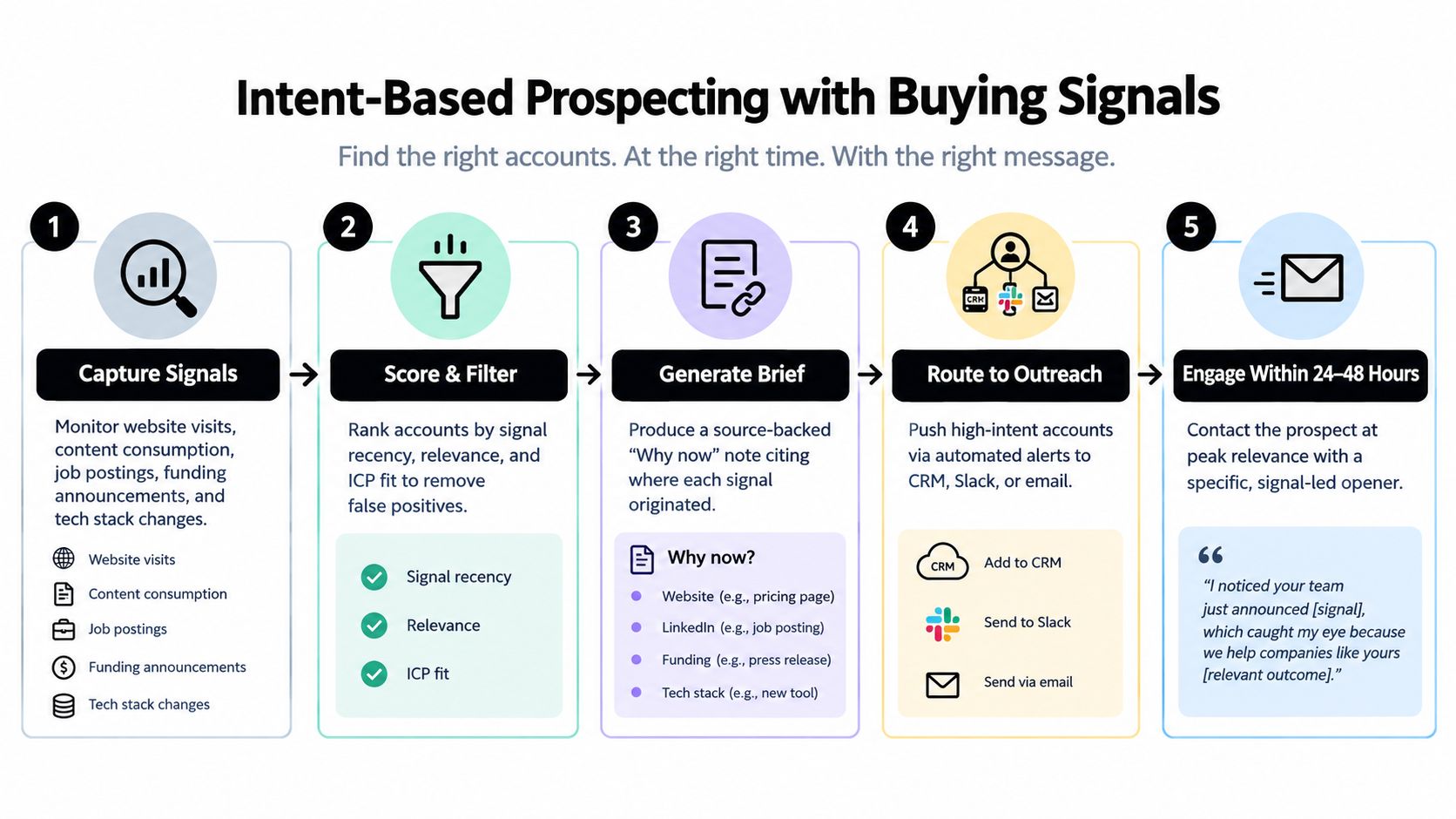
Intent-based prospecting starts with a simple question: what changed at this account that makes a conversation relevant now? Useful signals include visits to pricing or integration pages, new leadership, funding news, hiring activity, review changes, technology shifts, and mentions of a problem your product solves.
A single signal can be noisy. A new engineering leader might have inherited a stable stack, and a pricing-page visit might come from a student or competitor. Confidence improves when several independent signals point in the same direction. For example, a B2B software account hires a new VP of Engineering, returns to your pricing page, and begins recruiting cloud infrastructure specialists. The opening line should connect those facts to a plausible business priority, not pretend you know the buyer's internal plans.
Practical rule: A signal earns outreach when it changes the “why now” explanation, not merely because it appears in a monitoring tool.
Turn signals into a daily queue
Set up daily checks for a defined account pool. Enrich each account with industry, size, location, current technology, relevant contacts, and ICP fit. Then score urgency based on the freshness and combination of signals. The rep's morning queue should show the account, the evidence, the likely stakeholder, and the suggested next action.
A useful brief might read: “New VP of Engineering announced on the company site, cloud migration role added to careers page, pricing page visit detected.” The first line could be: “I noticed the new engineering leadership hire and the cloud infrastructure recruitment. Teams at that point often revisit how their current workflow supports the next stage of scale. Is that on your agenda this quarter?”
Use CapyScout's guide to finding buying signals to define the signal library, then measure signal-to-outreach time, qualified replies, and meetings by signal type. Contact high-confidence accounts while the evidence is still recent, and cite each source in the outreach brief.
2. Account-Based Prospecting and Account-Based Marketing
Account-based prospecting reverses the usual sequence. Instead of collecting contacts first and searching for a reason to email them, the team selects companies that fit the market, monitors those accounts, and identifies the buying group when a relevant event occurs.
Start with a small target account list that sales and marketing can clearly understand. Define the required industry, business model, geography, technology, growth profile, and use case. A B2B SaaS team might focus on fintech companies with a clear need for its workflow, then monitor each account for leadership changes, hiring, funding, website intent, and technology movement.
The account, not the individual contact, becomes the unit of coordination. If a new CRO creates a commercial trigger, the BDR can map the CRO, operations leader, finance stakeholder, and day-to-day user. Each person receives a role-specific reason to engage, while the CRM records who has already been contacted.
Make ABP operational
Account-based work fails when the target account list becomes a static spreadsheet. Refresh firmographics and contacts, assign ownership, and record the evidence behind every priority change. Natural-language search can help teams find companies by competitor, technology, hiring pattern, location, or niche, but a search result is only the starting point.
Research involving 488 buyers representing $4.2 billion in purchases and 489 outbound sellers found that top-performing prospectors were 2.7 times more likely to convert first meetings and produced 1.8 times more quality outcomes than the rest. RAIN Group describes the study and its implications, including stronger value propositions, better buyer targeting, and more customized first meetings.
For execution, save the account search, monitor the list, and route a cited “why now” brief to the owner. Use account-based marketing campaigns that convert as a planning reference, but keep the operating rule concrete: no rep should contact an account without seeing its fit, current trigger, assigned stakeholders, and agreed next step.
3. Cold Email with Personalization and Multi-Touch Sequences
Cold email still works when it behaves like relevant research, not a mail merge. The first sentence should identify a real account change, explain why the change may matter to the recipient's role, and make one modest request. “I help companies like yours” is not personalization. “I noticed your team is expanding its implementation function and recently changed the platform behind it” gives the buyer something specific to confirm or reject.
Build the message from a cited account brief. Keep the first email short, use one clear call to action, and avoid stacking several product claims into the opening. If the recipient doesn't reply, vary the follow-up angle. One message can ask about the priority, another can share a relevant observation, and a later touch can offer a concise resource or a low-friction conversation.
Cold outreach needs disciplined list sizing and measurement. One sales-outreach dataset reported 15% to 20% reply rates for sequences aimed at fewer than 200 prospects, compared with 11% to 13% for lists of 200 to 500 and about 8% for lists of 500 to 1,000. Campaigns under 200 prospects produced roughly twice the reply rate and 4.4 times the positive-reply rate of campaigns over 1,000, according to Cirrus Insight's sales statistics research.
Use a sequence as a learning system
Track positive replies, qualified meetings, unsubscribes, and conversion by signal type, not just opens. Stop pursuing bad-fit accounts quickly. Keep the sequence purposeful, and remove contacts when the account shows no fit or the person asks not to be contacted.
A practical opening might be: “Your new operations leader and recent integration-page activity suggest that the team may be reviewing how work moves between systems. We help operations teams reduce that friction. Would a short comparison be useful, or is this outside your remit?”
Use CapyScout's warm outbound templates to structure source-backed drafts, then have a rep check every claim before sending.

4. LinkedIn Sales Navigator and Social Selling
LinkedIn is most useful when it gives the rep context before the message, not when it becomes a sequence of empty likes. Sales Navigator can help identify people by role, industry, seniority, company, and geography. The valuable work happens after the search, when the seller connects the person's remit to an account-level event.
Suppose a target company appoints a new operations executive and publishes a post about process standardization. The rep can engage with the post thoughtfully, check whether the account fits the ICP, and then send a message tied to both facts. The message might say: “Your post about standardizing handoffs caught my attention. I also noticed the recent operations leadership change. Are you evaluating the workflow behind that process, or is the focus elsewhere?”
Social selling is slower than sending a generic email to a broad list, so reserve it for accounts where relationship context matters. It also demands judgment. A comment that merely praises the post adds little. A concise observation, useful resource, or relevant question creates a reason to remember the seller.
Coordinate social touches with account signals
Create a saved search for the ideal buyer and review it regularly. Add prospects to the outreach queue when a company signal appears, then use LinkedIn to understand the person's priorities and language. Email, phone, and LinkedIn should share the same account brief, otherwise different reps may send conflicting messages.
Measure profile views, meaningful conversations, qualified replies, and meetings sourced from social activity. Don't treat connection acceptance as pipeline. The useful outcome is a better conversation with a buyer who has a reason to engage.
For high-value accounts, assign ownership across the buying group and record every touch in the CRM. That prevents a marketing comment, a BDR message, and an executive introduction from arriving as disconnected requests.
5. Inbound Lead Scoring and Real-Time Signup Qualification
Inbound leads deserve speed, but not every signup deserves a sales call. A real-time qualification workflow combines firmographic fit, behavioral activity, identity quality, and risk factors. It should answer three questions quickly: does this company fit, is this person likely relevant, and what should happen next?
Start with an explicit ICP. Define the industries, business models, locations, use cases, company characteristics, and technologies that correlate with good customers. Add negative criteria such as competitors, disposable email domains, students, unsupported geographies, and accounts that clearly fall outside the product's use case.
A signup from a target company that visits pricing and integration pages should move quickly to sales. A low-fit signup should enter nurture or remain on hold. A suspicious or competitor record should not consume immediate rep time. The key is to preserve the evidence, so the rep knows whether the lead came from a form, a product action, a company change, or a combination.
Connect scoring to an action
Use thresholds that map to operational decisions rather than producing a score nobody trusts:
- High confidence: Route to the assigned seller with firmographic context, recent activity, and a suggested opening.
- Medium confidence: Place in nurture while monitoring for additional account signals.
- Low confidence: Hold, suppress, or request more information before assigning sales effort.
- Risk flag: Keep the record visible to operations, but prevent automated outreach until a person reviews it.
Review score quality against qualified meetings, opportunities, and closed business. If a factor frequently produces false positives, reduce its influence. Connect the workflow to HubSpot, Pipedrive, or Attio so enrichment and routing happen inside the team's existing process. CapyScout's platform overview describes this combination of signup scoring, CRM enrichment, and signal monitoring, which can support a shared inbound and outbound queue.
The measurable outcome isn't the number of signups scored. It's the quality of routed conversations and the time between a meaningful inbound action and a useful human response.
6. Referral and Warm Introduction Prospecting
A referral works because the buyer receives context from someone they already know. That context can remove the hardest part of cold outreach, which is proving that the conversation deserves attention. But referrals don't become a reliable channel through occasional requests sent after a deal closes. They need a repeatable customer and relationship process.
Identify customers who have seen a clear benefit and understand which companies they know. Ask for a specific introduction, not a vague request for “anyone who might be interested.” Give the referrer a short message they can forward, explain the problem you solve, and make it easy for them to decline.
A strong request might be: “You mentioned that your former colleague now leads revenue operations at a company with a similar handoff problem. Would you be comfortable introducing us? I'll keep the first conversation focused on whether the issue is relevant, and I'll close the loop with you afterward.”
Build the introduction around the account
Use CRM relationship data and LinkedIn mutual connections to map target accounts. When a rep finds a shared contact, the request should name the person, company, reason for relevance, and proposed next step. The referrer shouldn't have to write your positioning from scratch.
Warm introductions still need qualification. A trusted connection can open the door, but it doesn't create budget, authority, or need. Respect the prospect's context and avoid asking the referrer to overstate the relationship.
Track source, referrer, account fit, qualified meeting, opportunity, and revenue. Thank the person who made the introduction, even when the opportunity doesn't progress. Share an appropriate outcome so they know their effort was handled professionally.
A referral program can include recognition, a useful customer benefit, or another incentive where appropriate, but the reward shouldn't replace trust. The best referral ask follows a moment when the customer has expressed satisfaction, achieved a result, or identified a peer facing the same problem.
7. Reputation and Review-Based Prospecting for Local Businesses
Local reputation prospecting turns public customer feedback into a timely business conversation. Agencies can monitor Google Business Profiles, review platforms, and social channels for rating movement, recurring complaints, sentiment changes, or a sudden review stall. The seller's job isn't to exploit a bad review. It's to show the owner a specific issue and offer a credible way to investigate or improve it.
For example, a service business receives several recent complaints about delayed appointments. An agency that monitors the account can contact the owner with empathy: “I noticed recent reviews are concentrating on appointment delays. That pattern may be affecting new customer confidence. Would it help if I sent a short response and recovery plan?”
The source matters. Include the review date, the public theme, and the rating movement in the internal brief. Don't exaggerate a small change, misrepresent a customer's words, or imply that the agency knows the operational cause.
Balance recovery and positive momentum
Negative signals create urgency, but positive signals can also create an opening. A business with fresh praise may be ready to amplify what customers already value through local content, review requests, or profile improvements. A review stall may indicate reduced volume, a process problem, or a seasonal pattern, so treat it as a question rather than a diagnosis.
Use a daily or weekly watchlist segmented by business type, location, and service category. Route meaningful changes to the agency owner or account executive, then draft an opening that references the actual public evidence. Measure qualified conversations, consultations, retained accounts, and outcomes by signal type.
Avoid fear-based messaging. Owners can tell when a seller is using a vulnerable moment as a pretext. Specificity, respectful language, and a practical next step create better conditions for a conversation than an alarmist claim about lost business.
8. Technology Stack and Competitor-Based Prospecting
Technology changes reveal both fit and possible dissatisfaction. A company using a particular CRM, analytics platform, ecommerce system, or infrastructure provider may need an integration, migration service, specialist implementation, or complementary workflow. A competitor-based search can identify relevant accounts, but the competitor name alone isn't a reason to contact them.
Begin with the use case. If you sell a Salesforce alternative, search for accounts using Salesforce that also show a relevant operational change, such as a growing operations function or a newly advertised systems role. The opening should focus on the workflow your product handles better, not on an unsupported claim that the prospect's current system is failing.
“I noticed your team is recruiting for a systems administrator and expanding the operations function. If your current CRM is creating manual work across that process, I can share how similar teams evaluate alternatives. Is systems efficiency part of that hiring brief?”
Treat stack data as evidence, not certainty
Technology detection can be incomplete or outdated. Confirm the source and date before writing a message. A script on a website may not indicate the full internal stack, and a competitor installation doesn't prove that the account wants to switch. Use additional signals such as hiring, leadership changes, integration pages, product updates, or public complaints to strengthen the case.
Segment by industry and company stage because the same technology can support very different workflows. Test distinct angles, including migration risk, integration coverage, reporting gaps, implementation support, or a department-specific use case. Measure qualified replies and meetings by angle, not just by vendor category.
A monitored account that removes one technology and adds another deserves prompt review, but the rep should still verify the evidence. The practical next action is a cited brief with the detected stack, the relevant account change, the likely stakeholder, and one question that invites correction.
9. Video and Personalized Outreach
Personalized video can make a researched message feel more human, but it isn't a substitute for relevance. A short recording works best when the seller names the recipient, references one verified account signal, and explains why the issue may matter to that person's role. The video should feel like a useful note, not a product demonstration disguised as a greeting.
A rep might record: “Hi Maya, I noticed your team is hiring for implementation operations while you're expanding into new regions. We help teams standardize that handoff. I recorded this because the change may make the workflow more urgent. If it's relevant, would you be open to comparing approaches?”
Keep production simple. Clear audio, a quiet setting, and a visible face are usually more valuable than elaborate editing. Build reusable formats for different personas, but personalize the first sentence and the reason for reaching out. Don't make the buyer sit through a long overview before hearing why the video was sent.

Use viewing behavior carefully
Video tracking can show whether someone watched, but viewing isn't buying intent. A recipient may click out of curiosity, forward the video, or watch without authority to act. Combine viewing behavior with account fit and other signals before escalating.
If the prospect watches and doesn't reply, follow up with a useful question on the same account issue. If there's no engagement, stop rather than adding more novelty. Compare video with text for the same segment, track qualified replies and meetings, and keep the format only where it improves the quality of conversations.
The best next action is often a short email containing the video and one clear question. LinkedIn can support the touch when the buyer is active there, but don't duplicate the same message across every channel on the same day.
10. Jobs-Based and Hiring-Signal Prospecting
Hiring signals reveal where an account is investing attention. A new sales team can create demand for enablement, routing, and data workflows. Engineering recruitment can point to infrastructure or developer tooling needs. A growing customer success function may need better onboarding, support, or account intelligence.
The mistake is treating every job posting as a buying event. Companies hire for replacement, compliance, seasonal work, or projects unrelated to your offer. Read the job description, department, seniority, location, reporting line, and language used on the company site. Then compare the role with other evidence, such as a leadership change, product launch, funding announcement, or technology shift.
A relevant opening might be: “Your new implementation operations role mentions standardizing handoffs across customer teams. We help companies document and automate that process. Is the new hire expected to own the tooling decision, or would someone else be better to speak with?”
Connect the role to the buying group
Hiring can identify both the likely problem owner and the person who may influence a purchase. Map the hiring manager, department leader, operational user, and executive sponsor. Outreach should reflect each person's responsibilities, while the CRM should show the shared account context.
Monitor job postings continuously and prioritize new or materially changed roles. Cite the careers page or other source in the brief, record when the signal appeared, and contact the account while the hiring initiative remains active. Measure qualified replies, meetings, and opportunities by hiring category and department.
Use hiring as a conversation starter, not a prediction. Ask what the new role is intended to change, what systems support it today, and whether the prospect is evaluating outside help. That approach gives the buyer room to correct your assumption and gives the rep a path to a more accurate discovery conversation.
10 Sales Prospecting Techniques, Side-by-Side Comparison
| Approach | 🔄 Implementation Complexity | ⚡ Resource Requirements | ⭐ Expected Effectiveness | 📊 Typical Outcomes / Metrics | 💡 Ideal Use Cases & Key Advantages |
|---|---|---|---|---|---|
| Intent-Based Prospecting with Buying Signals | High, integrations & signal tuning | Medium–High, intent platforms, enrichment, CRM | ⭐⭐⭐⭐, very relevant outreach | Higher reply rates (3–4×), prioritized pipeline, short intent windows | B2B SaaS & local contexts; contact at peak relevance with source-backed "Why now" |
| Account-Based Prospecting (ABP) / ABM | High, cross-team orchestration & personalization | High, sales + marketing alignment, content, ABM tools | ⭐⭐⭐⭐, high conversion on targets | Larger deal sizes, measurable ROI, lower volume but higher value | Enterprise or high-value accounts; concentrates scarce resources on best-fit targets |
| Cold Email with Personalization & Multi-Touch Sequences | Medium, sequence design & copy testing | Low–Medium, email automation, data enrichment | ⭐⭐⭐, scalable with good personalization | 15–25% reply with signal-triggered personalization; scalable pipeline | Early-stage teams and SDRs needing cost-efficient, high-volume outreach |
| LinkedIn Sales Navigator & Social Selling | Medium, consistent engagement & content cadence | Medium, Sales Nav subscription, time investment | ⭐⭐⭐, strong relationship-building over time | Build rapport, ~12–15% reply in warm sequences; longer nurture cycles | Relationship-driven B2B and senior decision-makers; complements other signals |
| Inbound Lead Scoring & Real-Time Signup Qualification | Medium, scoring model & tuning | Medium, enrichment, automation, CRM sync | ⭐⭐⭐⭐, improves speed and qualification consistency | Faster response (minutes), higher close rates, reduced wasted SDR time | SaaS with signups/forms; route high-fit leads instantly to sales |
| Referral & Warm Introduction Prospecting | Low–Medium, program design & tracking | Low, incentives, CRM attribution, CSM effort | ⭐⭐⭐⭐⭐, highest trust and conversion | Reply 40–50%, meeting rates 20%+, shortest sales cycles | Best for products with strong customer satisfaction; highest-quality leads |
| Reputation & Review-Based Prospecting (Local) | Low, monitoring & alerting setup | Low–Medium, review monitoring tools, outreach templates | ⭐⭐⭐⭐, timely and concrete outreach | High reply rates (example: 35%), fast consults for SMBs | Local service businesses experiencing rating drops or review stalls |
| Technology Stack & Competitor-Based Prospecting | Medium, tech detection & list hygiene | Medium, BuiltWith/Clearbit-like tools, enrichment | ⭐⭐⭐, relevant but needs differentiation | Scalable lists; meeting rates 12–25% when well-targeted | B2B SaaS targeting integrations or competitor customers; good for switch campaigns |
| Video & Personalized Outreach (Video Messages) | Medium, recording workflows & templates | Medium, video tools, time per prospect | ⭐⭐⭐⭐, higher engagement for targeted accounts | 2–3× open/click rates; watch metrics inform follow-up | High-value accounts where personalized, memorable outreach is justified |
| Jobs-Based & Hiring-Signal Prospecting | Low–Medium, job feed monitoring & filtering | Low–Medium, job board feeds, alerting tools | ⭐⭐⭐, solid early-stage buying signal | Timely outreach to expanding teams; increased responsiveness | Target companies actively hiring in departments tied to your product |
Build a Prospecting System Around Timing
The ten techniques above work better as one operating workflow than as separate channel tactics. Start by defining the ICP in language a seller can use. Include the industries, business models, company characteristics, locations, technologies, use cases, and disqualifiers that matter. If the team can't explain why an account fits, no amount of sequencing will make the outreach precise.
Next, create a focused account list and enrich the records before assigning activity. Store the company's current technology, relevant roles, ownership, public sources, and previous engagement. A CRM record should answer more than “who is the contact?” It should show what the account does, what may have changed, who owns the relationship, and which evidence supports the next action.
Then monitor live-web signals. Hiring, funding, leadership changes, technology shifts, reviews, news, and website intent can all become useful when they connect to a specific business problem. Score both fit and urgency. A perfect-fit account with no relevant change may belong in a watchlist, while a good-fit account with several recent signals may belong in today's outreach queue.
Choose the channel after identifying the buying moment. Email is useful when a concise source-backed note can explain the relevance. LinkedIn helps when the buyer's public activity provides useful context. A referral is appropriate when a trusted relationship exists. A call may be the right next step when the signal indicates an active operational issue. Video can add personality when the account deserves extra attention.
Every first line should cite or clearly reference the source behind the claim. Don't write that a company is “scaling rapidly” unless the evidence supports that description. Write what changed, why it may matter, and what you want to learn. This protects credibility and gives the buyer an easy way to correct the assumption.
Measure account-level outcomes, not activity theater. Track:
- Signal-to-outreach time: How quickly does a meaningful change reach an assigned rep?
- Qualified reply rate: Which signals and openings produce relevant conversations?
- Meeting quality: Which meetings progress to a real business discussion?
- Conversion by signal type: Do hiring, technology, leadership, website, or reputation signals perform differently?
- Pipeline created: Which account workflows create opportunities, not merely touches?
- Data quality: How often do sellers find the source current, accurate, and useful?
A practical starting point is one signal, one segment, and one repeatable cadence. For example, choose hiring signals in a defined SaaS segment, monitor a focused account list, and route a cited brief to one owner. Review the results, remove weak signals, improve the opening, and add another trigger only when the first workflow is understood.
Sales engagement technology is becoming standard operational infrastructure. Industry reporting cited in the brief says 81% of B2B sales organizations with 50 or more employees use at least one sales engagement platform, and estimates the category at $4.2 billion in global spend with roughly 38% CAGR. The 2026 industry reporting is available here. Tools help with monitoring, enrichment, routing, and drafting, but they don't replace judgment. Automation should help a rep act on a credible buying moment, not send more generic messages.
CapyScout can serve as one option for centralizing live-web account discovery, CRM enrichment, signup qualification, signal monitoring, source-backed briefs, and daily priorities. Its value in this workflow is practical: the team can move from “find more leads” to “find the right account, verify what changed, and decide what to do next.” For broader context on building an AI-supported sales process, see this guide to a sales AI operating system from Overvue.
CapyScout helps sales teams find fit accounts, enrich CRM records, monitor buying signals, qualify inbound signups, and prepare source-backed outreach briefs. Visit CapyScout to build a prospecting workflow around account timing, verified context, and a clear next action.