

Attio vs HubSpot 2026: Which CRM Fits Your Team
Attio vs HubSpot compared on data model, workflows, three-year cost, API limits and CapyScout sync, with a clear pick for each buyer persona.
The usual advice on Attio vs HubSpot is too simple: choose Attio for flexibility and HubSpot for features. That ignores the work your team will do after buying either platform. A flexible CRM can become an unmanaged database, while a broad suite can leave RevOps maintaining workflows nobody trusts.
The better decision starts with data-model fit, three-year operating cost, and synchronization capacity. Can the CRM represent your actual customers without duplicate records? Will consolidation save more than configuration costs? Can enrichment reach the right records without delaying lead routing?
Table of Contents
- Attio and HubSpot Side by Side at a Glance
- Why Data Model Fit Matters More Than Feature Count
- How Daily Sales Workflows Differ in Practice
- Three-Year Cost Beyond the Monthly Seat Price
- API Limits, Integrations and CapyScout Sync
- How to Move Records From HubSpot to Attio
- Choose Attio or HubSpot by Buyer Persona
Attio and HubSpot Side by Side at a Glance
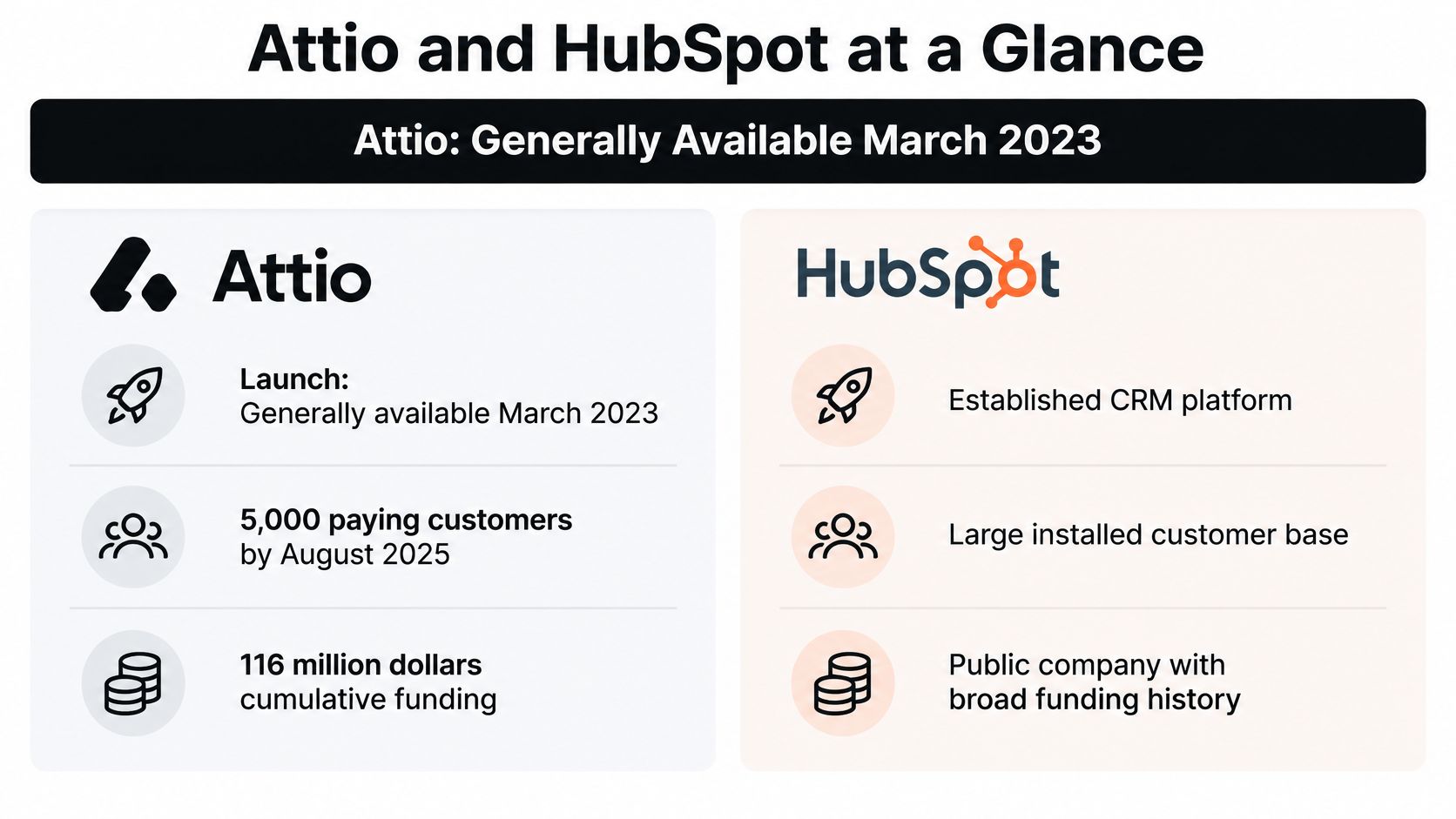
Attio is a newer CRM, while HubSpot operates at a larger commercial scale. Attio's company blog places Attio's general availability in March 2023 and reports 5,000 paying customers and $116 million in cumulative funding following its $52 million Series B in August 2025. HubSpot's revenue and customer figures are not needed to make the core comparison: the practical distinction is between a CRM-focused product and a wider customer platform.
Attio vs HubSpot at a glance
| Attribute | Attio | HubSpot |
|---|---|---|
| Maturity | Generally available March 2023; newer challenger | Scaled public software company |
| Customer base | 5,000 paying customers, reported by August 2025 | Large installed customer base |
| Funding or revenue | Funding-backed challenger | Established revenue-generating business |
| Core data model | Configurable objects, attributes, and relationships | Standard contacts, companies, deals, and tickets, with customization options |
| Free entry point | Free plan with a seat ceiling | Free CRM |
| Suite breadth | CRM-focused | Sales, marketing, service, content, and operations products |
| Best-fit team | Sales-led teams with unusual account structures | Teams coordinating cross-functional customer lifecycle work |
| CapyScout integration | Native, bidirectional sync | Native, bidirectional sync |
G2's 2026 comparison lists Attio's free plan at up to three seats and HubSpot's free CRM at $0.00. These are entry points, not proof that either free edition can support a production workflow. Check the limits and configuration your team would need.
What scale tells a buyer
A larger installed base does not establish that a CRM fits your account structure. It does make ecosystem maturity and cross-functional deployment relevant, particularly when marketing, sales, and service need shared administration.
A newer platform calls for a different risk assessment. Evaluate the product and integrations available now, rather than assuming that roadmap items, integrations, or packaging will stay unchanged.
Buying rule: Treat company maturity as a risk assessment, not a usability score.
Both platforms support the enrichment destination considered here through native, bidirectional CapyScout sync. That makes CRM choice less about access to account intelligence and more about where your records, workflows, and operating costs fit. The comparison narrows the choice; testing how each platform handles your actual data and processes should decide it.
Why Data Model Fit Matters More Than Feature Count
Choose the model that requires fewer exceptions to describe your business. A CRM becomes expensive when users must remember that a company record sometimes means a parent organization, sometimes a branch, and sometimes a referral partner.
TechRadar's Attio review identifies support for custom objects and relationships, which matters when your revenue process includes investors, agencies, partnerships, locations, or product-led accounts. HubSpot's counterweight is consolidation: teams can connect sales activity with marketing, service, content, and operations rather than coordinating separate systems.
Neither approach removes design work. Attio gives administrators more freedom to define entities, so they must decide which distinctions deserve an object. HubSpot gives teams a more standardized starting point, so administrators must check where their process fits the defaults and where additional customization is justified.
Test relationships, not empty pipelines
Use real accounts during the trial. Include a customer with several locations, an opportunity introduced by a partner, and an account with unresolved service work.
Data model stress test by workflow
| Workflow | What to count | Attio pattern | HubSpot pattern |
|---|---|---|---|
| Multi-location accounts | Custom fields, duplicate records, workarounds | Locations represented as linked objects under a company | Company hierarchy and custom properties; verify custom-object entitlement |
| Partner-led opportunities | Referrer attribution fields, external automations | Partner object linked to each deal | Partner information in deal properties and associations |
| Post-sale service | Account health fields, ticket linkage, manual handoffs | Account and relationship objects with custom attributes | Tickets associated with company records through service tooling |
These are trial configurations, not guarantees that every edition includes every component. Build the smallest workable version, then ask a seller to find the responsible owner, update the relationship, and explain the account's status without administrator help.
For a location-based business, distinguish the parent buyer from the branch receiving the service. If users copy parent information into every branch record, they'll need a reliable update mechanism whenever ownership or commercial terms change.
For partner-led sales, test attribution after the deal changes hands. A text field containing a partner's name may be enough for occasional referrals, but it becomes awkward when administrators need partner-level reporting across opportunities.
Count the maintenance work
Record the custom fields, duplicate records, manual workarounds, and external automations each configuration requires. Don't give customization an automatic penalty: a well-designed object can eliminate repeated manual work.
Also inspect the meaning of each relationship. A company can be a customer and a partner simultaneously; forcing users to select only one role may simplify a dashboard while damaging the underlying account record.
Account signals should follow the same design. Attach location-specific reputation observations to the location, not indiscriminately to its parent. In Attio, flexible objects can hold those distinctions; in HubSpot, use company and contact properties, associations, and lifecycle stages deliberately.
The conclusion is conditional but clear: Attio is a stronger candidate when entity structure causes the operational problem. HubSpot is a stronger candidate when coordinating departments causes it.
How Daily Sales Workflows Differ in Practice
An SDR opens a morning work queue and finds a target account with a recent hiring signal. The useful question isn't which CRM has the cleaner screenshot. It's whether the rep can understand the signal, choose an action, and hand off the account without repairing the record.
Start the trial with that sequence of work. Use the same account, outreach tool, and handoff requirements in each platform so you're comparing operational effort rather than demo polish.
The collaboration to test is the everyday exchange between the rep who qualifies an account and the seller who takes ownership.

From signal review to outreach
In Attio, build a saved list or view around the team's working stages and account attributes. This suits a process where an account may require partner verification, location review, or technical qualification before becoming an opportunity.
In HubSpot, test the same work through deal stages, properties, and the requirements available in the selected edition. The benefit of a standard pipeline disappears if reps create premature deals merely to make an account appear in their queue.
Next, follow the outbound task. HubSpot places sequencing within a broader sales suite; Attio's outbound fit needs to be checked against the team's actual sequence requirements and current plan. Don't assume that either product's entry edition replaces the sending tool you already use.
- Check execution: Confirm where the rep sends, pauses, and resumes outreach.
- Check synchronization: Verify whether replies and ownership changes reach the CRM record used for routing.
- Check exceptions: Test what happens when an account is already a customer or has an open opportunity.
From activity logging to handoff
After outreach, the rep should record an outcome and assign a next action. In Attio, inspect list membership, attribute updates, and any rules or webhooks connecting external tools. In HubSpot, inspect enrollment triggers, branching, and workflow precedence in the edition you're evaluating.
Attio can cost time when administrators maintain overlapping lists or distribute logic across connectors. HubSpot can cost time when several workflows update the same property and nobody can explain which one wins.
A successful automation isn't just one that runs. The administrator must be able to explain why it ran.
Finish with reporting and the AE handoff. Test whether the dashboard's account population matches the rep's working queue, and whether the AE receives the source-backed reason for outreach, owner, and next step.
Routing an alert is only part of setup. Acceptance testing must cover the receiving workflow, including duplicates, reassignment, and stale signals. Check every required capability against the current tier before committing, rather than treating a product-family feature as an included entitlement.
Three-Year Cost Beyond the Monthly Seat Price
Monthly seat price is the wrong starting number if you don't know which systems the purchase replaces. A CRM with a lower subscription can cost more after migration, external sequencing, connector maintenance, and reporting rebuilds. A broader suite can cost less when the company already pays for its adjacent products.
For a price anchor, Aliteq's 2026 comparison lists Attio Plus at $35 per user per month and Pro at $79 per user per month, with annual billing. HubSpot's CRM pricing page separates products and tiers, so a defensible comparison requires the current quote for your chosen hubs, seats, and capabilities.
Build the cost model around work
Cost lines that drive three-year total cost
| Cost line | Attio | HubSpot | What drives it |
|---|---|---|---|
| Entry tier | Free plan with limited seats | Free CRM | Team size and production requirements |
| Paid seat price | Plus or Pro subscription | Selected hub, tier, and seat entitlement from the current price list | Active users and required features |
| Additional hubs | Broader functional tools remain separate purchases | Price Marketing, Service, and Data Hub where required | Which departments use the platform |
| Migration labor | Import mapping, normalization, automation rebuilds | Import mapping, portal cleanup, automation rebuilds | Record quality and workflow complexity |
| Integration maintenance | Maintain API and webhook connectors | Maintain connectors and plan-aware quota handling | Sync count and write volume |
| Stale-data cost | Incorrect fields can misroute accounts | The same risk applies | Record churn and refresh cadence |
Use this formula:
Three-year operating cost = subscriptions + migration labor + automation rebuilds + integration upkeep + data-quality remediation.
For labor, multiply the hours your administrator estimates by the company's loaded hourly rate. Include validation and troubleshooting, not just the import itself.
Then separate cash spending from capacity consumed. An internal RevOps employee rebuilding reports may not create a new invoice, but that employee can't simultaneously improve routing, attribution, or forecasting.
Work the numbers without inventing a HubSpot quote
For a clearly hypothetical team of ten users managing fifty thousand records, multiplying the cited Attio rates gives Plus a subscription cost of $350 monthly, $4,200 annually, and $12,600 over three years. The same calculation gives Pro $790 monthly, $9,480 annually, and $28,440 over three years, before migration, maintenance, and any additional charges.
Those calculations are a budgeting illustration, not a claim that either tier meets that team's object, automation, or record requirements. Verify entitlement before treating the subtotal as a usable proposal.
For HubSpot, insert the current written quote into the same formula. Include the tools you can retire, but count those savings only after confirming the replacement workflow works in practice.
Cost discipline: A tool is a saving only when you can stop paying for it without transferring its work to a person.
That produces the counterintuitive result: HubSpot can be less expensive for an organization already using its marketing and service stack, while Attio can be less expensive for a sales-led team that doesn't need a broader suite. Neither conclusion follows from a seat-price table alone.
Finally, budget for keeping imported records current. Daily enrichment can support either destination, but administrators still need ownership rules, exception handling, and a way to review conflicting updates.
API Limits, Integrations and CapyScout Sync
A sync can stall at the burst limit before it uses the daily allowance. Concurrent requests may overwhelm an API even when the job's total volume is modest, so evaluate request shape as well as request volume.
Attio's rate-limiting documentation specifies workspace-wide ceilings of 100 read requests per second and 25 write requests per second. Merges, semantic search, and reporting have separate, lower limits.
Documented API limits by platform and tier
| Platform or tier | Limit | Condition | Implication for sync |
|---|---|---|---|
| Attio reads | 100 requests per second | Workspace-wide | Supports account discovery and monitoring reads |
| Attio writes | 25 requests per second | Workspace-wide; specialized operations have separate lower buckets | Cap bulk-update concurrency |
| HubSpot private app, Free or Starter | 100 requests per 10 seconds; 250,000 per day | Privately distributed apps; subscription-dependent | Pace backfills and reserve daily capacity |
| HubSpot private app, Professional | 190 requests per 10 seconds; 625,000 per day | Privately distributed apps; subscription-dependent | Use supported batch endpoints |
| HubSpot private app, Enterprise | 190 requests per 10 seconds; 1,000,000 per day | Privately distributed apps; subscription-dependent | More daily capacity, not unlimited burst capacity |
| HubSpot quota exhausted | HTTP 429 | Quota exhaustion | Retry with exponential backoff |
The HubSpot figures apply to privately distributed apps, as documented in HubSpot's API usage-limit documentation. They are not a universal allowance for every connector. Check the app's distribution model and the portal's entitlement before using the figures to plan capacity.
Design for recovery, not just throughput
Attio's read allowance can support monitoring and discovery, but it does not establish how quickly enrichment can be written back. For HubSpot, plan around both burst limits and daily consumption. API quotas affect whether live enrichment can sync on schedule, so model them alongside data-model fit and three-year operating cost, not as an integration footnote.
Build the connector to recover safely:
- Queue with exponential backoff: Pause retries after throttling. Keep bulk jobs from delaying urgent signup-routing updates.
- Use idempotent upserts: Match records with a stable account identifier so retries do not create duplicates.
- Send incremental updates: Write changed fields rather than replacing whole records repeatedly.
Batch endpoints can reduce request overhead when the destination supports the required operation. They do not make it safe to overwrite ownership, lifecycle, or manually verified fields without rules for resolving conflicts.
Check the whole delivery path
The Attio integration lets CapyScout send enrichment to Attio, alongside its native HubSpot and Pipedrive connections. Account alerts can go to Slack, Teams, email, or webhooks. REST API, webhook, and MCP server options support custom workflows.
Keep alerts separate from CRM writes. A seller may need an immediate notification while a nonurgent backfill waits in a queue. For capacity planning, measure records per day, changed enrichment fields, request count per record, and alert frequency against the destination's actual quota. Then test whether a replay recovers cleanly after throttling. A connector that resumes without duplicate records or delayed urgent updates is more useful than one that runs only under ideal conditions.
How to Move Records From HubSpot to Attio
Migrate the operating definitions before moving the database. Decide what counts as an account, an opportunity, an owner, and an active customer, then map the records to those definitions.
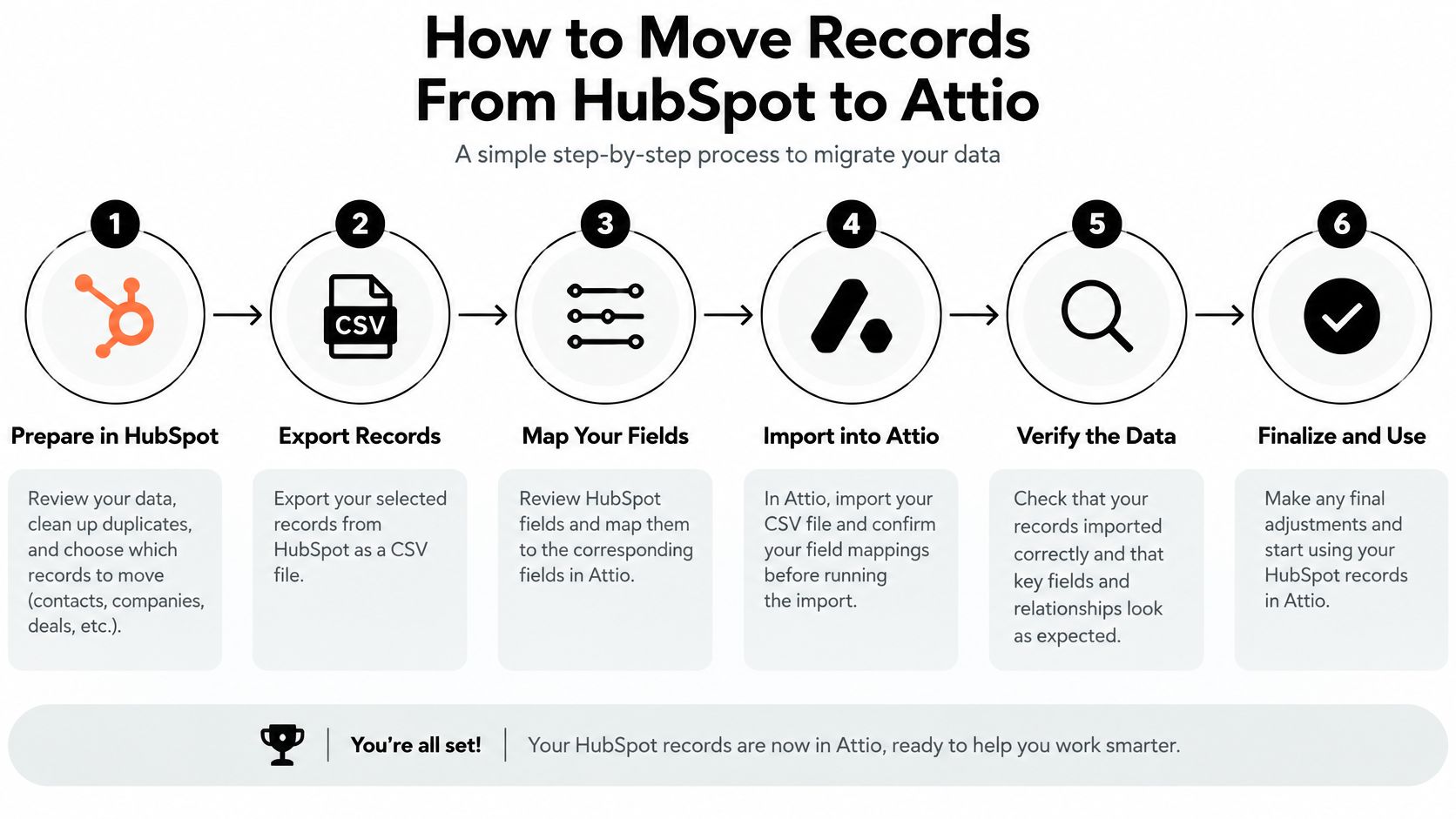
Use the migration flow as a checklist for dependencies, not as proof that every export field will import unchanged.
Move in controlled stages
- Export records with identifiers intact. Include contacts, companies, deals, activities, and owners where export permissions and formats allow. Preserve associations separately if the export doesn't carry them.
- Map HubSpot properties to Attio attributes and decide which entities deserve objects. Avoid creating a new object merely because a legacy property is difficult to interpret.
- Normalize before import. Standardize lifecycle values, owner assignments, currencies, and duplicate contacts so the destination doesn't inherit inconsistent definitions.
- Import a representative sample. Include inactive owners, merged companies, missing domains, unusual currencies, and activity-heavy accounts, not just clean records.
- Rebuild automations and reporting around the destination model. Copy the business requirement, such as qualified-account assignment, rather than reproducing every legacy workflow branch.
- Preserve signal provenance. Map the canonical account identifier to a stable CRM record identifier, retain source URLs and observation timestamps as event history, and keep the current score separate from its change log.
- Run enrichment backfill through a paced queue. Pause the job if owner changes, unexpected duplicates, or conflicting updates appear.
- Operate both systems until reconciliation passes, then disable the old write paths. Set an explicit cutover owner so users don't continue updating both indefinitely.
The architectural distinction between flexible objects and standard CRM structures is described in Attio's startup CRM guidance. Use it to inform mapping, but validate the receiving fields and permissions in your own workspace.
Repair failures before cutover
Missing activity history: Compare the source export with imported timelines. Retain a read-only archive for activity types that don't transfer cleanly rather than pretending the destination contains a complete history.
Broken ownership: Create an owner-mapping sheet, assign a fallback owner, and test routing with inactive users. Don't let an unrecognized owner silently become an unassigned account.
Changed reports: Reconcile the underlying record lists, not just dashboard totals. A matching total can conceal different stage definitions or excluded accounts.
Use a CRM data-integrity checking process to record failures, owners, and acceptance criteria.
For a complementary walkthrough, review the migration video alongside your mapping sheet.
The reverse migration needs the same controls. Adjust batching and retry behavior for the receiving HubSpot portal instead of assuming the existing connector's pacing remains appropriate.
Choose Attio or HubSpot by Buyer Persona
Early-stage founder with a small selling team: Choose Attio when the free entry point and configurable model cover the immediate process, but budget for leaving the free edition rather than designing around it indefinitely.
Sales-led scale-up with partner or location-based accounts: Choose Attio when explicit relationships eliminate duplicate records and attribution workarounds, with a named administrator responsible for custom-object governance.
RevOps team already paying for HubSpot Marketing or Service: Choose HubSpot when shared lifecycle execution lets the company retire separate tools, while checking the installed app's quota and the required subscription tier.
Outbound SDR or BDR team with a standard pipeline: Follow the sequencing stack that already works, and choose the CRM that preserves reply handling, suppression, ownership, and handoff with less maintenance.
Customer success team managing renewals and tickets: Choose HubSpot when service records and company context need to stay together, but include the required service capabilities in the commercial quote.
Local agency serving service businesses: Let the existing CRM and client-location structure decide; reputation monitoring can support either destination, provided location-level updates don't create uncontrolled sync volume.
Match the purchase to the problem
| Primary problem | Stronger starting candidate | Evidence to demand in the trial |
|---|---|---|
| Account relationships don't fit the schema | Attio | Correct representation without duplicate entities |
| Departments lose context during handoffs | HubSpot | Shared records and reliable lifecycle execution |
| Outbound work breaks between tools | Existing-stack fit | End-to-end sequence and ownership testing |
| Administration consumes too much capacity | Lower-maintenance configuration | A documented operating model and cost estimate |
Choose Attio when the schema is the problem; choose HubSpot when the cross-functional process is the problem. If neither describes the organization, widen the shortlist rather than forcing a binary decision; the HubSpot versus Salesforce comparison offers another evaluation path.
Run the workflow tests on real accounts, calculate operating cost, and verify current quotas. Before migrating, connect the intended enrichment flow to a representative account set and confirm record matching, source traceability, alert routing, and recovery after failed writes.
CapyScout offers live-web account discovery, source-backed buying signals, and bidirectional enrichment for Attio and HubSpot. Connect your shortlisted CRM to a representative account set, then test whether sellers receive useful account context without creating duplicates or disrupting routing.