

What Is AI BDR? How It Works and Where It Fits

What Is AI BDR? Learn what an AI BDR automates, where it fits beside human reps, and how B2B teams use signal-driven prospecting.
An AI BDR is software that does the research, prioritization and first-draft work of a business development rep using live buying signals, while humans own judgment, trust and conversations. You're probably asking about it because your reps start each morning with the same aging list, spend an hour checking LinkedIn and job boards, then send a message that could have gone to anyone. The account may have hired, raised money or changed leaders last week, and nobody saw it in time. That's the gap this category tries to close, not by sending more mail, but by surfacing evidence early enough for a person to act well. Understanding What an AI BDR is starts with that boundary between preparation and judgment.
Table of Contents
- What an AI BDR Is and Is Not
- Which BDR Tasks AI Takes Over and Which Stay Human
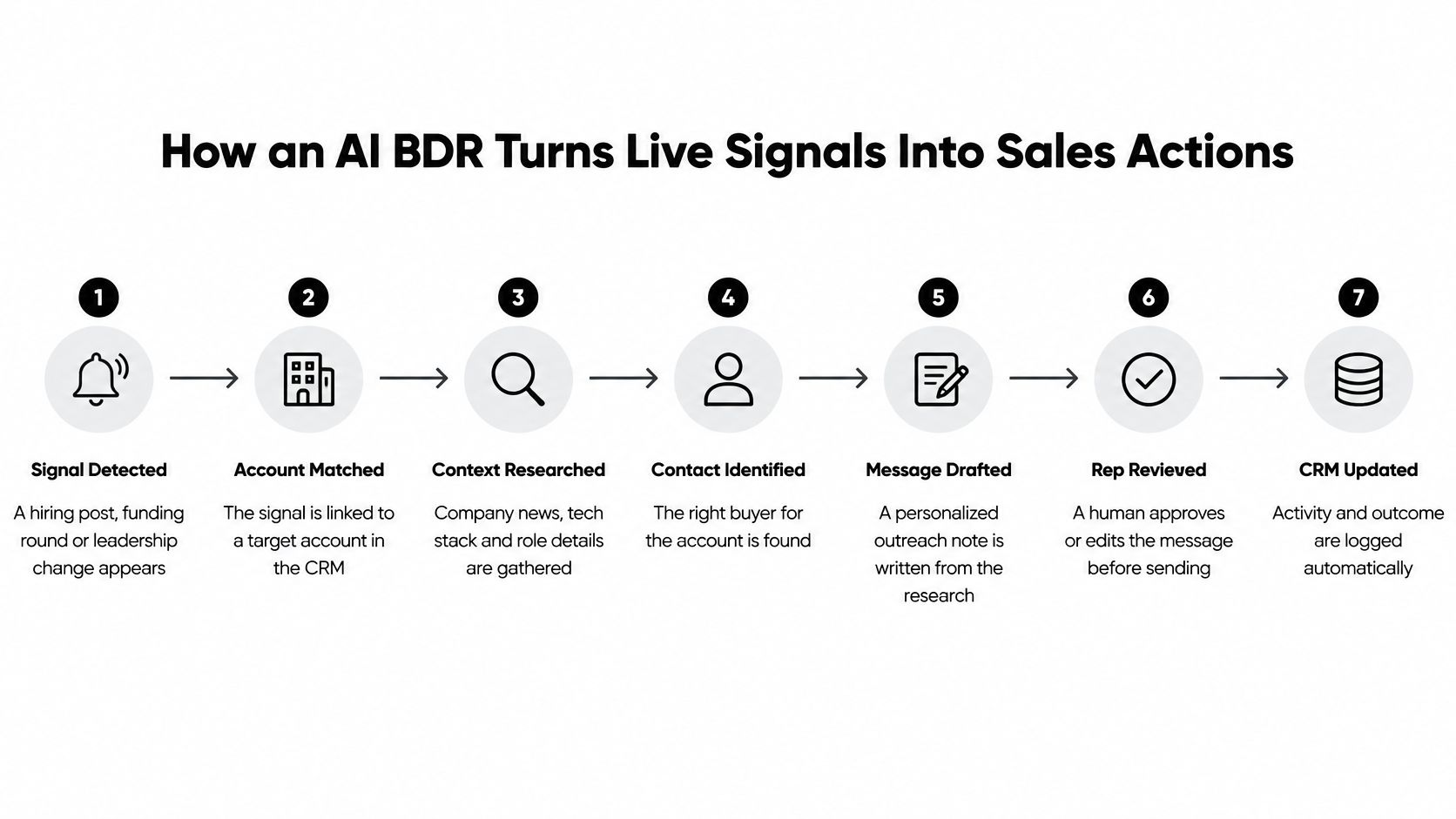
- How an AI BDR Turns Live Signals Into Sales Actions
- Where Speed and Signals Pay Off Most
- Benefits, Limits and What Buyers Think
- Is an AI BDR Right for Your Team
- Measuring an AI BDR by Revenue Quality
- Confirm the Evidence Rules Before You Switch It On
What an AI BDR Is and Is Not
A sales manager opens the CRM to find a new hiring signal at a target account. An AI BDR can connect that evidence to the account, show where it came from and prepare a suggested next step. The useful question is whether the signal justifies contacting someone, not how many messages the system can send.
An AI BDR is software that supports early revenue development. It can identify target accounts, research company context, find relevant prospects, prioritize leads, detect buying signals and draft or trigger personalized outreach. The human team still sets the rules for what counts as good evidence.

From a Static List to Live Evidence
A static contact database is like a map that never updates. An AI BDR adds live markers, watching for changes such as hiring, funding, leadership moves, technology adoption and website activity. It can then recommend which account merits attention, when to act and what evidence supports that choice.
Calling the tool an email generator misses the earlier work. It gathers signals, connects them to accounts and ranks them before a message is drafted. A polished note is not proof that the underlying reason for contacting someone is sound.
For example, a target company posts three roles that call for your product. The system can flag those postings, link them to the account in your CRM, identify a relevant hiring manager and draft a note about the change. A rep should check that the postings are current and relevant before using the message. If the evidence is weak or unclear, the system should hold the recommendation rather than turn it into outreach.
What It Doesn't Do
An AI BDR doesn't own trust. It can organize research, score opportunities, route inbound interest and prepare drafts. People remain responsible for qualification, relationships and closing, and should review claims that could affect credibility.
A useful test is whether the tool shows why now, cites the source for its signal and gives a person a chance to approve contact. Those steps make the system more like a research assistant that leaves an evidence trail than an auto-sender that acts on a score alone. If it cannot explain its recommendation, the team cannot reliably judge whether a prospect should be contacted.
Which BDR Tasks AI Takes Over and Which Stay Human
The working principle is simple. AI takes on the research and preparation, humans keep judgment, trust and conversations. The table below shows how that split looks across the tasks a BDR handles each week. For a deeper look at the qualification side, see a practical guide to AI lead qualification for 2026.
Who Handles Each BDR Task in an AI Assisted Team
| Task | AI BDR Handles | Human Owns | Risk If Left Unchecked |
|---|---|---|---|
| Account discovery | Finds firms matching the ICP by market, tech stack, hiring and location | Approves the target list and territory | Off-fit accounts flood the queue |
| Company research | Pulls funding, hiring, leadership and review context with source links | Checks the context is still true before use | Stale or unverifiable claims reach prospects |
| Lead prioritization | Scores fit, signal strength and freshness into a daily queue | Sets scoring rules and overrides them | A score rewards activity instead of fit |
| Inbound triage | Enriches signups, flags disposable emails, routes or holds | Reviews holds and edge cases | Good leads sit in a hold queue or spam reaches reps |
| Outreach drafting | Writes a first draft around one specific recent change | Edits tone and verifies every claim | Generic or inaccurate first lines |
| Sending and follow-up | Sets timing and opens drafts in the rep's own mail client | Decides who gets a second touch and when to stop | Over-messaging or mistimed follow-ups |
| High-trust messages | Flags pricing, legal, ownership and reputation topics | Writes or approves these messages | Brand and legal exposure |
| Discovery and closing | Compiles account history into a pre-call brief | Runs the conversation and negotiates | Lost trust, the core human job |
The Two Rows That Matter Most
Company research decides whether everything after it is sound. If a funding announcement is months old or a leadership move didn't happen, your first line tells the prospect you didn't check. That's why every factual claim needs a source link a rep can open in seconds, and why unverifiable items should be labeled rather than smoothed over.
High-trust messages carry the most consequence. Anything about pricing, legal claims, ownership changes or a company's reputation can create problems that outlast one email. The software can flag those topics and prepare background, but a person writes or approves the words.
Practical rule: If a task is repeatable and checkable against a source, delegate it. If it depends on trust, nuance or consequence, keep a human approval gate.
That rule also protects sending and follow-up, where it's easy to overdo things. Timing a second touch is a scheduling job. Deciding that a prospect who replied cautiously shouldn't get a third nudge is judgment. When teams blur that line, activity goes up and credibility goes down, often without anyone noticing until the damage has spread across a whole territory.
How an AI BDR Turns Live Signals Into Sales Actions
A prospect posts a hiring notice on Monday, then visits a pricing page. An AI BDR can connect those events to an account and prepare a next step. The team's job is to check whether the evidence justifies contact, not to reward the system for sending more emails.
- A signal appears. A hiring post, funding announcement, leadership change or pricing-page visit can start a workflow. The signal is a clue, not proof of buying intent.
- The system retrieves current account data. It adds recent information to the account record, rather than relying only on an older database entry.
- Rules and scoring assess the account. Fixed rules check requirements such as company size and territory. A probabilistic score estimates fit, signal strength and confidence. These answer different questions, so teams should keep them distinct.
- It prepares a why-now brief. Each factual claim should have a source a rep can open and verify before acting on sales trigger events. If a signal is stale or uncertain, the brief should say so.
- It drafts or routes the next step. A strong, supported match can receive a draft for an approved segment. A weaker match can go to nurture or be held for review.
- A person approves anything sent. Approval is the final check that the evidence supports the message and that the timing and wording are appropriate.
- The outcome updates the CRM. Replies, decisions and corrections return to the account record, so a later run can use what the team learned.
The workflow is like a chain of checks: each step should pass enough evidence forward to justify the next action.
How We Got Here
The workflow grew from three kinds of software. Rule-based automation handled database fields, lead routing and scheduled emails. Machine learning added predictions based on behavioral and company patterns. Large language models can read unstructured web pages, summarize account information and prepare context-specific drafts. Each adds a capability, but none makes an unverified signal reliable.
Adoption does not prove that a workflow is accurate. A McKinsey analysis of generative AI's potential in B2B sales discusses how AI could reshape sales work. For a sales team, the practical test is narrower: can a rep trace the proposed contact back to a current, relevant signal and correct the record when it is wrong?
The short video below shows a signal becoming a reviewed action.
A working AI BDR combines retrieval, rules, scoring, orchestration and approvals. The draft is only the visible output. The evidence checks and human decisions determine whether it should be sent at all.
Where Speed and Signals Pay Off Most
A pricing-page signup arrives while the assigned rep is away. The useful question is not how many emails an AI BDR can send, but whether the signup is a strong enough signal to justify a timely contact, and whether the rep can verify why.
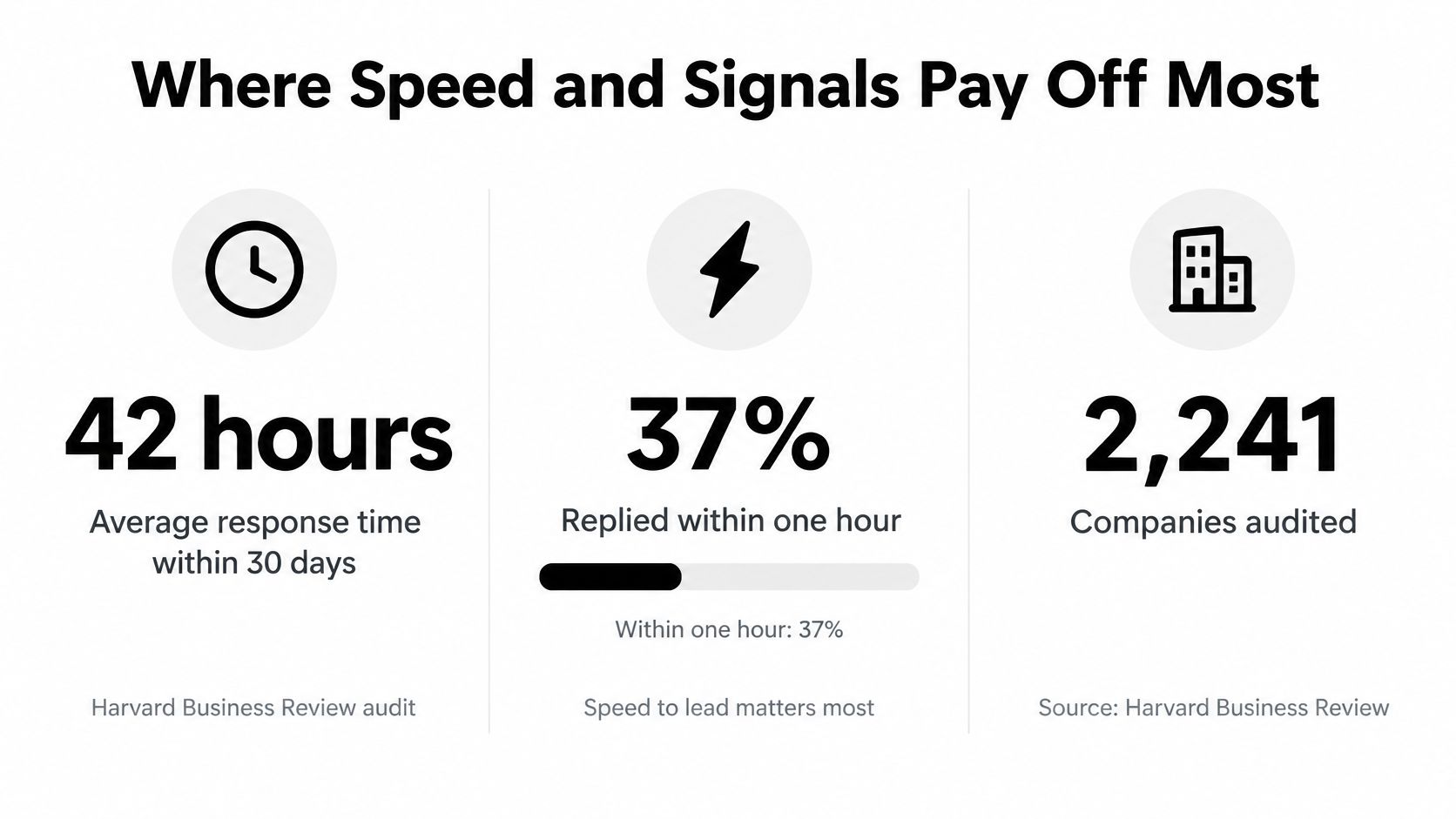
Response-time figures offer context, with limits. A vendor summary of a Harvard Business Review audit of 2,241 companies reports that, among companies responding within 30 days of an inquiry, the average response time was 42 hours. The summary also says 37% responded within one hour and 23% did not respond. These figures describe reported response behavior, not proof that faster contact caused a particular outcome. The vendor summary of the audit does not provide a primary study link here.
The infographic below collects response-time figures.
Why Timing Works
A live signal is like a doorbell: it tells the team someone may be ready to talk, but it does not prove who is at the door or what they need. Routing a relevant inquiry quickly can help a rep respond while the request is still current. The signal should earn contact through evidence, such as a pricing-page signup, rather than through activity alone.
Three examples show how that rule works:
- Inbound triage: A pricing-page signup is enriched and checked against qualification rules. The system can recommend routing to sales, nurture, or hold, with the evidence attached.
- Signal-triggered outbound: A target account posts a role relevant to the product. The AI BDR can surface the posting and prepare a draft for review. The hiring signal supports research, but does not by itself prove the account is ready to buy.
- Reputation drops: A local service business sees its rating fall or reviews stall. An agency can review the specific, recent evidence before deciding whether to contact the owner.
CapyScout's real-time signup screening follows this pattern by suggesting whether to route, nurture, or hold, and giving reps source-backed explanations they can check before acting.
Where Speed Helps Less
In a long enterprise sale, one person's activity may not represent the buying group. A signal should prompt account research and stakeholder mapping before outreach, rather than a rushed message based on thin evidence.
Set up event-driven intake, rapid enrichment, confidence thresholds, duplicate and disposable-email checks, and automatic routing. Treat these as gates: they help determine whether a signal is current, credible, and relevant enough for contact. The system should show its evidence and allow a human to hold or reject an action. Faster sending is not the measure of success; justified contact is.
Benefits, Limits and What Buyers Think
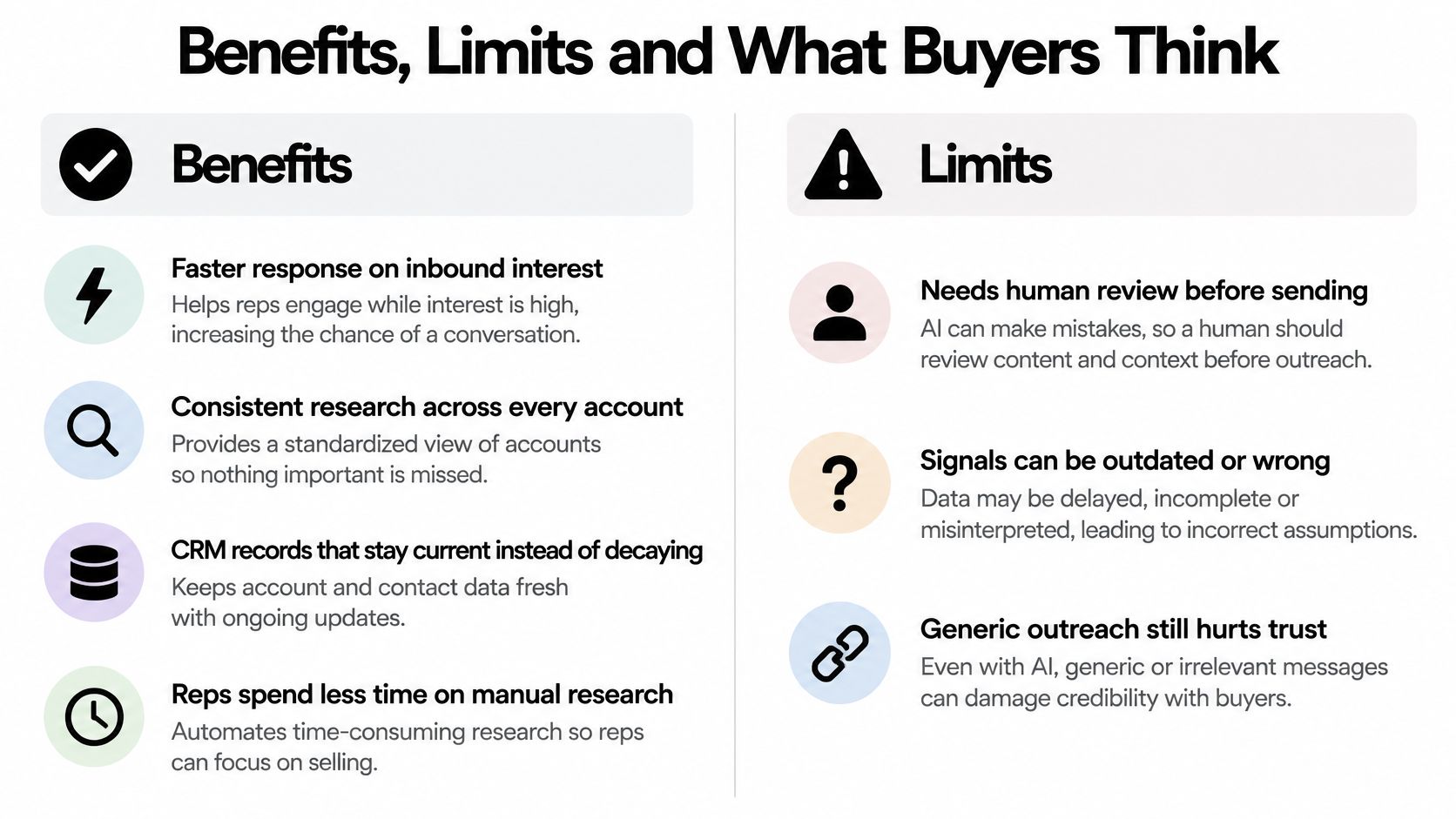
A faster reply helps only when the underlying signal is sound. An AI BDR can shorten response time, make account research more consistent, keep CRM records current, and reduce pre-call digging. Each gain depends on a check that shows whether the system's evidence is reliable enough to act on.
For example, speed is useful when an inbound lead has a current, relevant source behind it. Stale web data can send a rep in the wrong direction, so alerts should show when and where the information was found. Consistent research can also make account comparisons fairer, provided the scoring rules reward fit rather than activity and a person can override the score.
Benefits, Limits and the Control for Each
| Benefit | Limit | Control |
|---|---|---|
| Faster response to inbound interest | A quick response based on stale or incorrect data can misdirect the conversation | Show the source and its freshness before an alert is used |
| Consistent research across accounts | A scoring model may favor activity over genuine fit | Make scoring rules visible and allow a named person to override them |
| Current CRM records | Unsupported personalization can sound inaccurate or intrusive | Attach sources and confidence labels to claims |
| Less pre-call digging for reps | Unreviewed messages can damage trust or create compliance problems | Require approval before an outbound message is sent |
Buyer adoption also comes with reservations. G2 reported in April 2025 that 60% of surveyed B2B software buyers were using AI in sales, while more than 30% were not using it because of fear or doubts about its capabilities. The finding points to a practical distinction: using AI is not the same as trusting every recommendation it makes.
Automation doesn't replace credibility. Buyers still want a person they can trust at the point where it counts.
For sales operations, the useful test is whether a team can trace an action back to evidence. If a rep cannot see why an account was flagged, what source supports the claim, or who approved the message, the workflow is hard to audit. A clear record makes it possible to review whether a signal justified contact and improve the rules when it did not. That is stronger buyer assurance than a promise of faster outreach.
Is an AI BDR Right for Your Team
Start with your own house rather than the software. Adoption tends to work now when these conditions are already true.
Signs You're Ready
- A written ideal customer profile: Segments are named, so the system knows which firms count as a fit.
- One definition of qualified: Marketing and sales agree on what a qualified opportunity means.
- A CRM that's kept current: Account owners and stage fields are reliable enough to route work into.
- A real flow to work on: You have steady inbound interest or a short list of target accounts worth monitoring.
- Reps who'll review daily: Someone opens the queue, checks sources and edits drafts every day.
Signs to Wait
Waiting makes sense if nobody owns the scoring rules, if the plan is to send fully autonomously from day one, or if you sell only through long single-buyer cycles where early contact can backfire. It also makes sense if nobody has time to verify sources, because unverified alerts just become faster mistakes.
The role split helps you judge fit clearly. The software moves SDRs and BDRs away from list building and pre-call digging and toward conversations. A human still owns judgment, relationships and closing.
So the verdict is conditional. If most of the first list describes your team, run a narrow pilot on one segment. If most of the second list does, fix your data and qualification definitions first. Adding automation to an unclear process doesn't clarify it.
Measuring an AI BDR by Revenue Quality
A reply can look like progress while leading nowhere. For example, a clever message may get a response, but the account may never become a qualified opportunity. If the system is judged on replies alone, it can learn to chase attention instead of useful sales activity.
Buyers also check claims before speaking with sellers. TrustRadius's 2025 research found 72% of technology buyers encountered Google AI Overviews during research and 90% of those users clicked through to cited sources. That finding makes evidence quality relevant to outreach: a message should rest on a traceable signal, not a guess about an account. As a measurement recommendation, give more attention to whether a signal justifies contact and reaches the right stakeholders than to the number of messages sent. A lead scoring framework built around conversion quality can help teams connect those signals to outcomes.
Revenue Quality Metrics for an AI BDR
| Metric | What It Tells You | Watch Out For |
|---|---|---|
| Reply rate | Share of prospects who respond to outreach | Rewards gimmicky or overly aggressive messages |
| Qualified opportunity rate | Share of contacted accounts that become qualified opportunities | Needs one shared qualification definition with sales |
| Meeting-to-opportunity conversion | Whether booked meetings turn into real pipeline | Slow to read in short sales cycles |
| Source-verification rate | Share of alerts and claims backed by a verifiable source | Measures evidence quality, not revenue, so pair it with pipeline metrics |
| Time from signal to relevant action | How quickly a timely change reaches the right owner | Speed without relevance wastes the signal |
| False-positive rate | Share of flagged accounts that show no real buying interest | Track it by signal type to find weak triggers |
| Pipeline influenced across stakeholders | Opportunities where several buyers engaged after an AI-prepared touch | Attribution is hard, so define the counting rule in advance |
The Order to Measure In
Set a baseline before switching the system on. Record current response times and qualification rates so you have a comparison. During the first weeks, watch source-verification rates and false positives. Those measures show whether the evidence behind alerts is reliable. If a trigger repeatedly flags companies with no sign of buying interest, revise or disable it.
Then track qualified opportunities and pipeline influence over a full sales cycle, rather than judging the system by one good week. This gives meetings time to show whether they become real deals and whether multiple stakeholders engage.
A useful analogy is a quality check on a production line: count the finished, usable output, not just how quickly items pass through. A high reply rate paired with weak opportunities is a warning that the system is optimizing for attention instead of revenue.
Confirm the Evidence Rules Before You Switch It On
Everything so far comes down to one decision. Which evidence earns outreach, which earns nurture, and which needs a named human before anything happens? Answer that on paper first, and the tool settings become much easier.
Five Checks for Every Signal
- Source freshness: How old is the signal, and does it still hold today?
- Confidence label: Is the claim verified, partly verified or unverifiable?
- Account fit: Does the company match your ideal customer profile?
- Signal strength: Does this change matter much? A funding round outweighs a single job post.
- Message risk: Would using this claim touch pricing, legal, ownership or reputation topics?
Here's a sample rule built from those checks. A fresh, verified, high-fit signal with low message risk becomes drafted outreach for rep approval. A medium signal goes to nurture. Any high-risk claim goes straight to a named owner, whatever the score says.
Test the Guardrails First
The architecture behind this combines retrieval from current account data, deterministic qualification rules, probabilistic scoring, workflow orchestration, CRM write-back and human approval gates. It converts signals like hiring, funding, technology changes, leadership moves and pricing-page visits into a ranked why-now queue. Before you expand autonomy, independent sales-agent guidance recommends testing source quality, suppression rules, approval gates and CRM write boundaries.
That means checking practical details. Can the system suppress current customers and recent opt-outs? Does it stop instead of guessing when a claim can't be verified? Which CRM fields is it allowed to write, and which does it only suggest? Those answers protect you more than any draft quality test.
Start small: One segment, five written rules, one queue your reps actually open. Expand only when the evidence holds up.
Do that this week. Choose one segment, write the five checks into a one-page policy and run a 30-day pilot. Judge it with the revenue-quality metrics from the previous section: source-verification rate and false positives early, qualified opportunities and stakeholder pipeline over the full cycle. If the evidence rules hold, widen the segment. If they don't, you'll know exactly which rule failed, and you'll have learned it on a small list instead of your whole market.
If you want to try that evidence-first approach without building the plumbing yourself, CapyScout searches the live web for fitting companies, monitors accounts for hiring, funding, leadership and reputation signals, and delivers source-backed briefs and a scored daily queue that show your reps who to contact and why. Drafts cite their sources and open in your own mail client for review, so your team keeps the final word on every message. Visit CapyScout to set up a watched segment and see your first why-now queue.