

Salesforce vs Pipedrive: Which CRM Fits Your Team
Salesforce vs Pipedrive compared on cost, automation limits, API capacity and migration risk, plus a decision checklist for B2B sales teams in 2026.
Most Salesforce vs Pipedrive roundups tell you to buy the cheaper pipeline tool if the team is small, and the bigger platform if you expect to scale. That advice treats a license as a strategy. It skips the questions that decide whether anyone still trusts the CRM six months later: who keeps fields clean, whether you can tell which account is worth a call today, and whether a nightly enrichment job will hit an API wall.
Seat price and feature checklists are the easy part. A ten-person team can drown in Salesforce without an owner for the data, and a multi-team company can outgrow a simple automation cap without noticing until routing breaks. The comparison that matters scores implementation risk, ongoing data upkeep, timing signals, and API governance. Fit depends on the team you have. There isn't a blanket winner.
Table of Contents
- Salesforce vs Pipedrive at a Glance
- Three-Year Cost of Ownership for a 10-Seat Team
- Automation and Data Model Ceilings
- API Limits and Integration Design for Enrichment Workflows
- How to Migrate Between Pipedrive and Salesforce Safely
- Sample Playbooks and ROI Examples
- Which CRM Fits Your Team Situation
- Confirm the CRM Choice Before You Sign
Salesforce vs Pipedrive at a Glance
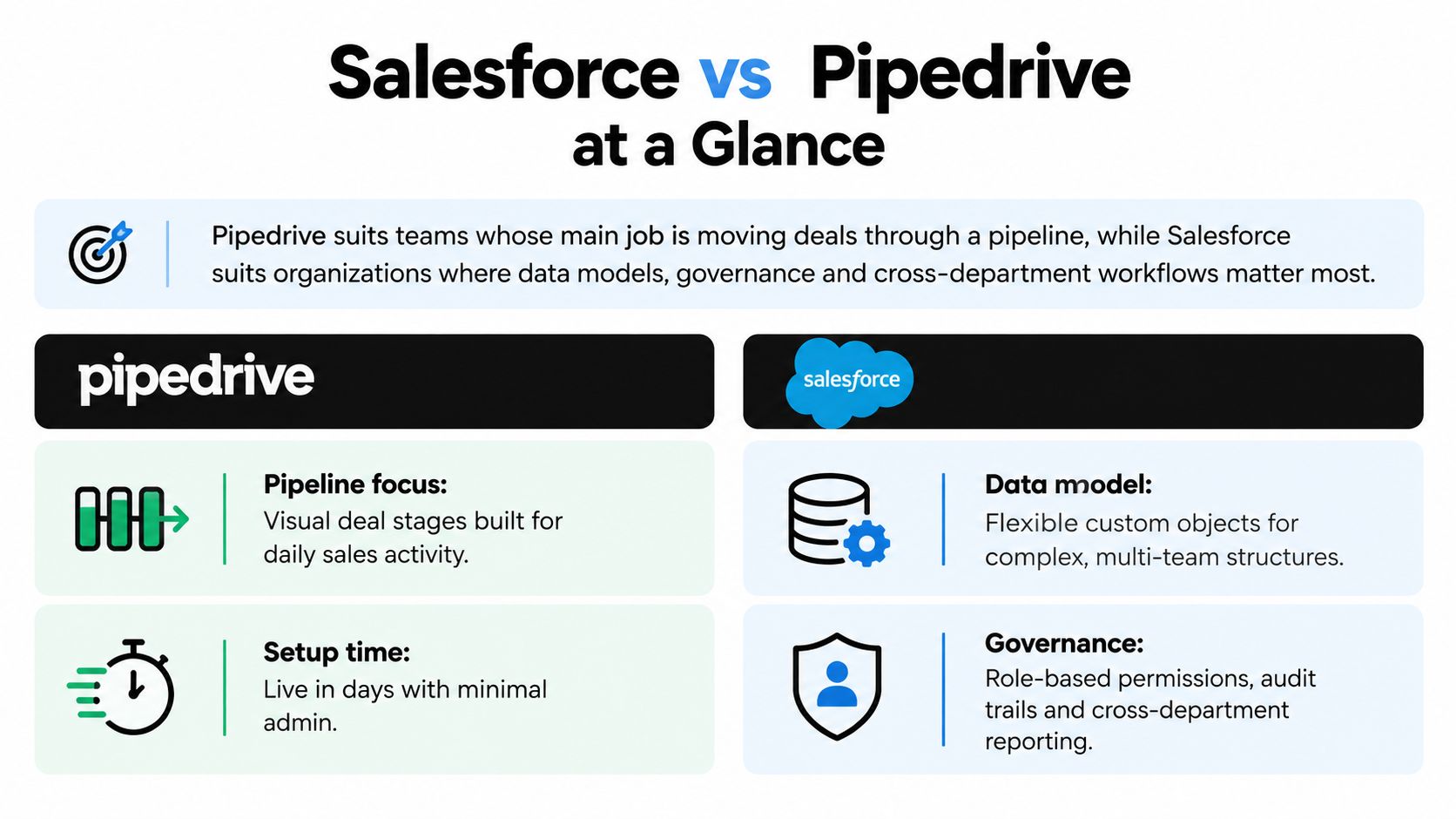
Pipedrive fits teams focused on moving deals through a pipeline. Salesforce fits organizations where data models, governance, and cross-department processes shape how the CRM is used. Adoption offers context, not a verdict on which product will suit a particular team. Salesforce's fiscal 2025 annual report states that more than 90% of Fortune 500 companies were customers. Pipedrive has built a large base of small and mid-sized sales teams. These milestones do not establish which CRM will be easier to implement or keep accurate.
| Criterion | Salesforce | Pipedrive |
|---|---|---|
| Best fit | Multi-department processes, complex data models, enterprise governance | Sales-led teams whose main job is pipeline execution |
| Typical buyer | Large accounts with RevOps or a dedicated admin | Founders, SDRs, BDRs, and small to mid-sized sales teams |
| Pricing model | Per-user editions with add-ons | Per-seat tiers (Growth, Premium, Ultimate) |
| Admin requirement | Dedicated admin or partner most teams need | A sales ops generalist can usually run it |
| Implementation effort | Typically weeks to months, depending on scope | Typically days to weeks for a standard pipeline |
| Customization depth | Custom objects, Flow, Apex, and extensive reporting | Custom fields, visual pipelines, and simpler automations |
| Verdict | Choose when the complexity is real and funded | Choose when pipeline speed and simplicity are the job |
The operational trade-off is in upkeep as much as setup. Salesforce offers deeper customization, but teams need the admin capacity to manage that complexity. Pipedrive's simpler pipeline model may reduce the work of maintaining a standard sales process, though it may not suit organizations that need complex data structures and governance.
Use the table to identify which operating model is closer to yours. Then weigh implementation effort and ongoing administration against the timing signals and integrations your sales process depends on. Teams also considering a Microsoft-centered stack can compare Salesforce versus a Microsoft-centered CRM to assess how the CRM choice fits their existing tools.
The right CRM is the one your team can keep accurate after launch, not the one with the longer feature list.
Three-Year Cost of Ownership for a 10-Seat Team
The subscription gap is clear; the three-year ownership gap is not. The SaaS CRM Review comparison puts ten Pipedrive Growth seats at about $4,680 a year and ten Salesforce Pro Suite seats at about $12,000 a year, before implementation or administration. Over three years, those reference prices amount to about $14,040 and $36,000, respectively. The difference matters, but costs outside the license can change the comparison.
Estimate total cost as three years of subscriptions, plus admin time at a loaded hourly rate, implementation or partner fees, integration work and upkeep, training, migration cleanup, and add-ons such as storage or sandboxes.
| Cost line | Pipedrive (10 seats) | Salesforce (10 seats) |
|---|---|---|
| Annual subscription, reference price | about $4,680 | about $12,000 |
| Three-year subscription | about $14,040 | about $36,000 |
| Implementation or partner setup | Fixed-scope pipeline build, typically measured in days | Scoped partner project, typically measured in weeks to months |
| Ongoing admin time (your hours × loaded rate) | Monthly hours × loaded hourly rate × 36 | Monthly hours × loaded hourly rate × 36 |
| Integration build and upkeep | Quote each connector's build plus yearly maintenance | Quote bulk API design, middleware, and quota monitoring |
| Training and onboarding | Pipeline workshop for reps and a manager | Role-based training for reps, managers, and an admin |
| Data cleanup before migration | Hours to dedupe organizations, people, and deals before export | Hours to clean accounts, contacts, and opportunities before import |
| Add-ons, storage, and sandboxes | Higher tier if active automations exceed the plan cap | Storage, sandboxes, and extra clouds quoted by edition |
Why the license gap misleads
Admin effort is one of the largest variables. Salesforce objects, permission sets, and Flows need ongoing coordination, which may require an admin or partner from the outset. A Pipedrive team can often configure one visual pipeline, assign owners, and manage a handful of automations in-house. The difference depends on the scope of the setup and who will maintain it after launch.
For example, 10 admin hours a month at $60 an hour costs $600 monthly, or $21,600 over three years. Those hours could offset a substantial part of Salesforce's subscription premium. For a Pipedrive team, comparable admin time may be optional rather than necessary to keep the CRM usable. If Salesforce upkeep approaches a part-time role, its three-year premium grows beyond the license-price difference.
Implementation timing and data upkeep also affect the total. A short pipeline setup is not comparable to a scoped partner project measured in weeks or months. Likewise, cleanup work depends on the records being migrated, while integrations add both initial build costs and recurring maintenance. Teams should include those tasks in the estimate, rather than treating the subscription as the full cost.
Before signing, get written quotes for the exact edition, required add-ons, implementation hours and scope, and the renewal price after year one. A lower first-year price can produce a different three-year total if renewal pricing rises.
Automation and Data Model Ceilings
Two ceilings decide whether a team has outgrown a sales CRM: how many automations can stay active, and how freely you can shape the data model. Bigin's Pipedrive versus Salesforce comparison reports Pipedrive's published caps at 50 active automations on Growth, 150 on Premium, and 250 on Ultimate. Salesforce sales pricing doesn't expose an equivalent per-plan count. Capacity follows the edition you bought, how Flows are designed, execution limits, and how tightly admins govern them.
That difference changes planning. A Pipedrive team doing lead routing, enrichment writes, and Slack or webhook alerts rarely burns through 50 active automations. A company with several business units, each with its own stage logic, assignment rules, and handoff alerts, can hit 50 quickly and then has to buy a higher tier or delete automations that reps still rely on. Salesforce won't give you a single number to budget against, so you plan by process inventory: list every Flow, count daily executions, and name who approves a new one. If nobody owns that list, the higher ceiling becomes unmanaged sprawl.
When the data model is the constraint
Salesforce custom objects let a team store buying signals, account intelligence, and multi-stage revenue operations separately from the deal. Pipedrive custom fields and visual pipelines cover most single-team sales motions, and they do it with less configuration friction. You don't need a custom object to track a next step, a lost reason, and an activity. You do need one when the same account carries a signal history, a renewal motion, and a new-logo opportunity that must not overwrite each other.
You've likely outgrown Pipedrive when several of these are true:
- Split stage logic: several business units share one pipeline but need different stages.
- Cross-object forecasts: board reporting needs dashboards that join objects, not a single deal view.
- Approvals: discounting or legal review has to stop a stage change until someone signs off.
- Signal storage: buying-moment data needs its own object, with source and date, rather than a note on the deal.
You have not outgrown it when you run one sales motion and stay under 50 active automations. Enrichment design for either CRM is covered in this practical guide to CRM data enrichment. Budget implementation to the ceiling you will use in practice, not the ceiling a vendor demo can reach.
API Limits and Integration Design for Enrichment Workflows
Nightly prospecting and enrichment fail without warning when the CRM's capacity model doesn't match the job. ClonePartner's architecture comparison lays out the split. Salesforce uses an organization-level API quota over a rolling 24-hour window, plus per-transaction governor limits. Commonly documented Apex limits include 100 synchronous SOQL queries, 150 DML statements, and a 6 MB synchronous heap. Pipedrive uses token-based rate limiting, with a base allocation of 30,000 tokens per seat per day and endpoint costs that change with how heavy the operation is.
| Factor | Salesforce | Pipedrive |
|---|---|---|
| Limit model | Organization-level daily quota over a rolling 24 hours, plus per-transaction governor limits | Token-based daily budget that scales with plan and seats |
| Base capacity | Edition and license count set the daily request allowance | 30,000 tokens per seat per day as the base allocation |
| Documented transaction limits | 100 synchronous SOQL queries, 150 DML statements, 6 MB synchronous heap in Apex | Endpoint costs vary by operation complexity |
| Best-fit sync pattern | Bulk, event-driven, multi-object orchestration | Routine record updates and webhook-driven alerts |
| Engineering requirement | Batching, queueing, retry logic, and quota monitoring | Simpler path, but token spend still needs a log |
| CapyScout connection | REST API, webhooks, and an MCP server, not a native integration | Native bi-directional sync of ICP grade and Why now notes |
A nightly run you can test
Take 2,000 watched accounts. Each needs a company read, a contact search, and a note write. That's about 6,000 calls before retries. On Pipedrive, convert those calls into token spend using the published cost of each endpoint, then multiply by seats. Five seats at 30,000 tokens is a 150,000-token day, which may cover a light sync and fail a heavy one. On Salesforce, count the calls against the org's rolling quota, and remember a single Apex transaction still dies at 100 SOQL queries or 150 DML statements even when the daily quota looks fine. Add a 30 percent buffer for retries, so plan for about 7,800 operations, not 6,000.
Pipedrive's native bi-directional sync fits routine updates and webhook alerts. Salesforce teams connect through the REST API or webhooks and need bulkified, queued workers, because synchronous loops will breach governor limits long before the business logic is wrong.
Three rules keep either integration alive:
- Batch enrichment writes so one transaction updates many records instead of one.
- Stagger nightly runs so a full account sweep doesn't land in the same hour as a bulk import.
- Log every quota response and alert a human when you cross 70 percent of the daily allowance.
How to Migrate Between Pipedrive and Salesforce Safely
The license you pick matters less than whether the records survive the move. Coverage of Canadian retail rollouts on Retail Insider cites data migration as the biggest implementation challenge for 62% of organizations, names poor data quality as a leading cause of failure, and puts CRM implementation failure at 55% when measured against the original business objectives. Simplicity doesn't guarantee a clean Pipedrive, and flexibility doesn't make Salesforce safer. Someone has to do the cleanup.
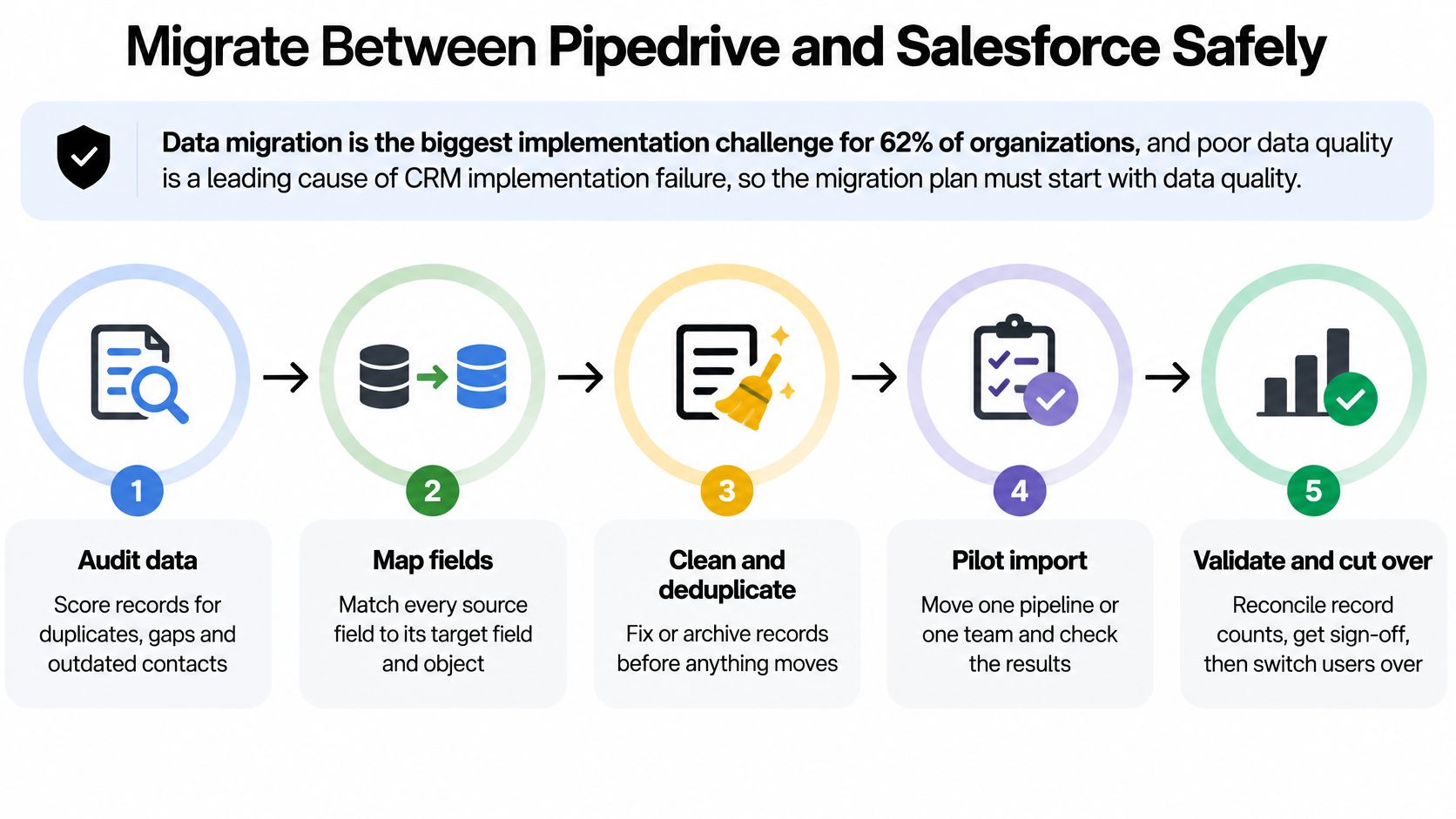
- Audit the current system. Count accounts, contacts, open opportunities, and activities. List every field nobody has filled in six months. Each unused field is a mapping decision you don't need to make, and leaving it in the map is how junk columns get a second life.
- Map objects before you export. Salesforce Accounts line up with Pipedrive Organizations, Contacts with Persons, Opportunities with Deals, and Tasks and Events with Activities. Flag anything without a home, such as a custom signal object or a Pipedrive product line, and decide to drop it or rebuild it. Field-level checklists in the CRAIM migration documentation are a useful cross-check so a required target field isn't discovered on import day.
- Deduplicate before export. Match on domain and email. Duplicate organizations split activity history, so the new CRM looks empty even when the old one was busy.
- Map stages and owners. Cut the stage list to what reps will use, and confirm a single owner on every open record. Shared ownership fields become blank owners after import.
- Pilot 50 records. Check attachments, notes, and timestamps, not just record counts. A note that lands on the wrong person is worse than a failed row, because nobody notices.
- Run both systems for two weeks. Reps work only in the new CRM. The old one is read-only, so you can compare counts without creating a second source of truth.
- Freeze, then assign. Lock the old system, name a data owner, and put a monthly stale-record check on that person's calendar.
Setup time is only the first cost. The ongoing cost is keeping fields, routing, deduplication, and reporting accurate. The CRM that stays trustworthy without a dedicated administrator is the one whose process a named person can still run on a Friday afternoon. If that person doesn't exist, Pipedrive's smaller surface is easier to keep honest, and Salesforce's extra objects will decay faster. Neither tool creates the discipline.
A short walkthrough of field mapping and a pilot import makes the sequence easier to brief:
After cutover, watch one metric weekly: the share of open deals with an activity in the last 14 days. If that share falls, reps have a new login and an old habit, and the migration hasn't landed.
Sample Playbooks and ROI Examples
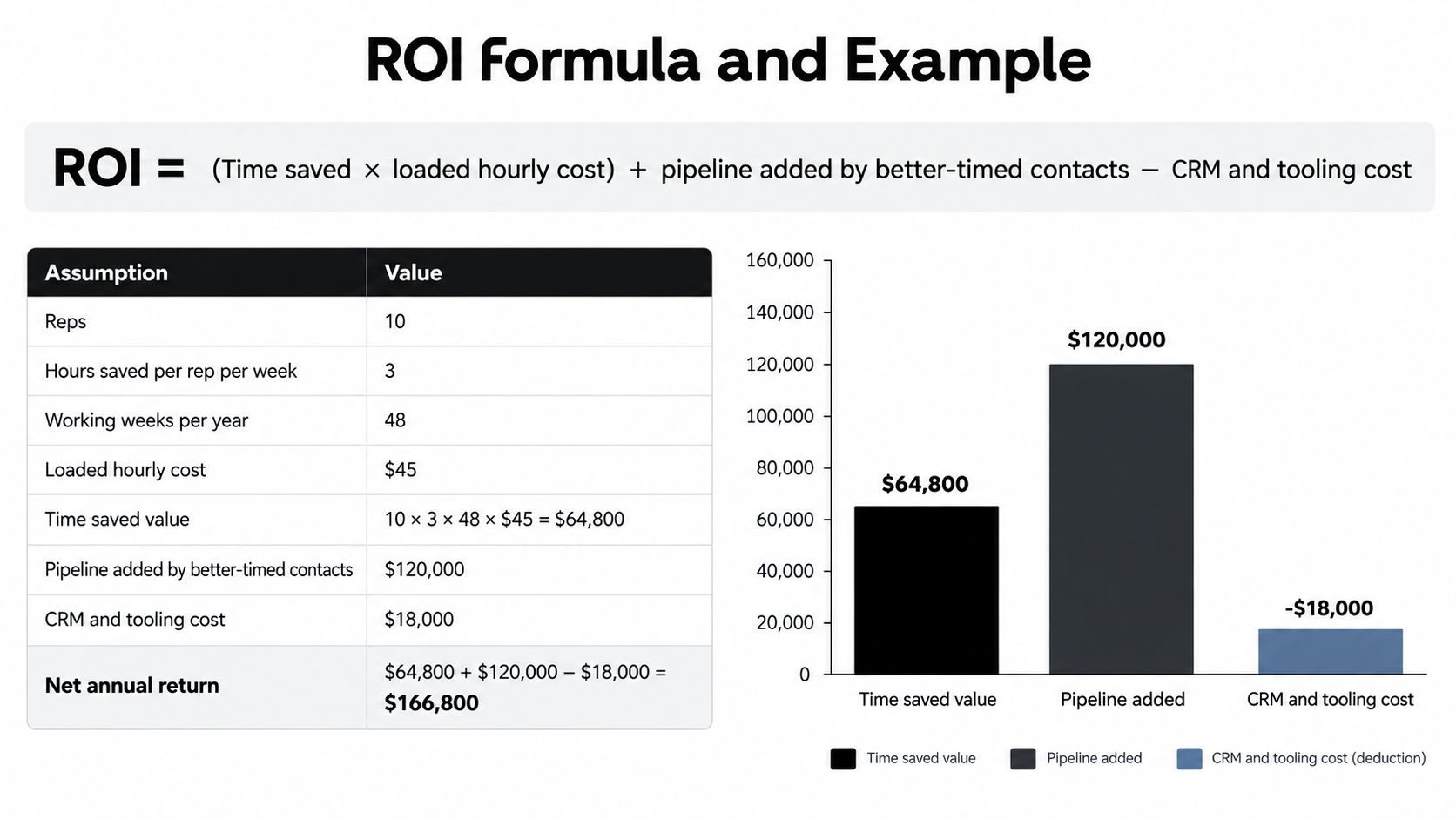
A CRM's value depends less on its feature count than on whether the team can maintain useful data and act on timely signals. Estimate it with this formula: time saved × loaded hourly cost, plus pipeline added by better-timed contacts, minus CRM and tooling cost. SaaS CRM Review puts the annual subscription gap at about $4,680 for ten Pipedrive Growth seats versus about $12,000 for ten Salesforce Pro Suite seats. Those prices do not capture research time, data upkeep, or the effort required to manage routing and reporting. Hiring, funding, leadership changes, technology shifts, and reputation movement can give reps a reason to contact an account now. Replace the assumptions below with your own figures before treating them as a forecast.
| Scenario | CRM and team | Assumptions |
|---|---|---|
| Pre-call research time saved | Pipedrive, 6 reps | 2 hours a week each, 48 weeks, $45 loaded, about $25,920 a year |
| Signal-timed outreach | Pipedrive, 4 SDRs | 1 extra qualified meeting a week, $3,000 average pipeline, about $144,000 a year if the rate holds |
| Stale record cleanup | Either CRM | 4 hours a month at $60 to review records with no activity in 90 days, about $2,880 a year |
| Complex routing and reporting | Salesforce with RevOps | Cross-business-unit routing and custom objects, admin cost at 20 hours a month and $60, about $14,400 a year |
Three ways this shows up in a week
An SDR morning on Pipedrive. A rep opens a Today-style queue, checks a cited signal such as a hiring push, funding round, or leadership change, and writes an opening line tied to that event. Pipedrive holds the deal; the research brief helps the rep focus. The time saved comes from less tab-switching, not from skipping qualification.
Inbound screening the same day. A new signup receives fit, risk, and confidence scores, plus a suggested next action. High-fit signups are routed to sales; low-fit ones go to nurture or hold. The routing recommendation can prioritize follow-up without claiming that a deal is created automatically or within a set time.
An account team on Salesforce. A technology shift or drop in reviews can trigger an alert for a watched account, with a cited brief delivered through the API or a webhook. The account record remains the system of record. The signal gives the owner a timely reason to open it, while the integration's upkeep and routing rules still need an owner.
The CRM remains the system of record; live, cited signals and a ranked daily action list help determine what to work on.
Signals can raise an account's priority, but they do not replace qualification. Track reply rate and meeting rate for each playbook for 60 days before adding headcount or another automation. If replies do not improve, review whether the brief is specific enough and whether the accounts fit. A workflow that saves research time but sends reps toward weak-fit accounts may add activity without improving results.
Which CRM Fits Your Team Situation
A founder-led startup with under 15 reps, one pipeline, and no admin. Choose Pipedrive. Days-to-weeks setup and a per-seat tier keep the team selling instead of configuring. Revisit the choice when active automations approach the Growth cap of 50, or when a second product needs its own stages. For a wider look at lightweight systems, CRM tools for small businesses is a useful companion to this Salesforce vs Pipedrive split, and a HubSpot versus Pipedrive choice guide helps if the alternative is a marketing-led platform rather than an enterprise one.
A scale-up with RevOps, several products, and forecasts that go to the board. Salesforce is worth the premium only if the team can name the custom objects and reports it needs on day one. If the answer is "we'll figure out the data model later," you're paying for capacity you won't use, and the admin hours from the cost model will show up whether or not the board pack improves.
A local agency or account team whose real problem is timing across many accounts. Either CRM can hold the record. Pick the one whose integration your team can keep running without a specialist on call. Put signal monitoring on top so a rating drop or a leadership change creates the outreach, not a quarterly list pull.

A company that already employs a Salesforce admin. Stay, unless the complaint is data quality. Stale fields, duplicate accounts, and empty next steps are an administration problem before they're a platform problem. Switching CRMs copies the mess unless the cleanup steps happen first.
A CRM doesn't fix a team that can't keep its records current.
Every verdict above assumes someone owns data quality. If that name is blank, fix the ownership before you sign either contract.
Confirm the CRM Choice Before You Sign
Tick these before a signature. Each one points at a number you should already have, rather than a fresh debate.
- Count day-one automations and set them against the Pipedrive tier caps in the automation section.
- Name every custom object the team requires. If the list is empty, Pipedrive usually covers the model.
- Run the nightly call count from the API section and add the 30 percent retry buffer.
- Collect written quotes that include implementation hours, mandatory add-ons, and renewal uplift.
- Assign a named data owner and a monthly stale-record check.
- Pilot the migration on 50 records before the full import, and reconcile notes and timestamps.
- Decide where timing signals come from and who acts on them the same day.
Then test the timing layer on the CRM you already run. Teams on Pipedrive, HubSpot, or Attio can connect CapyScout so enrichment, ICP grades, and Why now notes write to records daily, with alerts routed to Slack, Teams, email, or a webhook. Run a 30-day test with signal alerts on and compare reply rates with the prior month. Salesforce teams connect through the REST API or webhooks, using the queued-worker setup from the API section, and judge the same reply-rate change before they fund a larger build.
CapyScout watches live buying signals, enriches the CRM you already run, and ranks who to contact today with a source-backed reason. Whether you stay on Pipedrive for pipeline speed or Salesforce for a governed data model, the timing layer doesn't have to be another research tab. See how the daily queue works at CapyScout.