

HubSpot Lead Routing: A Practical Setup Guide
Set up HubSpot lead routing that actually works. Learn criteria, scoring, workflows, round-robin rules, and how to fix routing gaps before they cost deals.
A founder checks HubSpot after a promising demo request comes in. The contact has been sitting unassigned for nearly an hour, the SDR queue is full, and nobody knows whether the lead belongs to sales, nurture, or an account owner who already manages the company. The form worked. The CRM captured the record. The routing system still failed.
That failure usually isn't caused by one broken workflow. It comes from treating HubSpot lead routing as a one-time assignment setup instead of a live operating system. Routing has to make a decision, preserve context, trigger the right follow-up, and leave enough history for RevOps to explain what happened later.
Table of Contents
- What Lead Routing Actually Means Inside HubSpot
- Setting Up the Routing Inputs You Cannot Skip
- Building Lead Scoring and Qualification That Feeds Routing
- Designing Round Robin, Territory, and Capacity Assignment
- Testing, Monitoring, and Measuring Routing Outcomes
- Handling Edge Cases and Adding External Signal Data
- Habits That Keep Lead Routing From Breaking Quietly
What Lead Routing Actually Means Inside HubSpot
Lead routing is the live decision system that determines who owns a contact, what happens next, and how quickly a human responds after the record enters HubSpot. It isn't the same as building a segmented list. A list tells you which contacts match a condition. Routing acts on that condition and changes ownership, lifecycle progression, notifications, tasks, or downstream workflows.
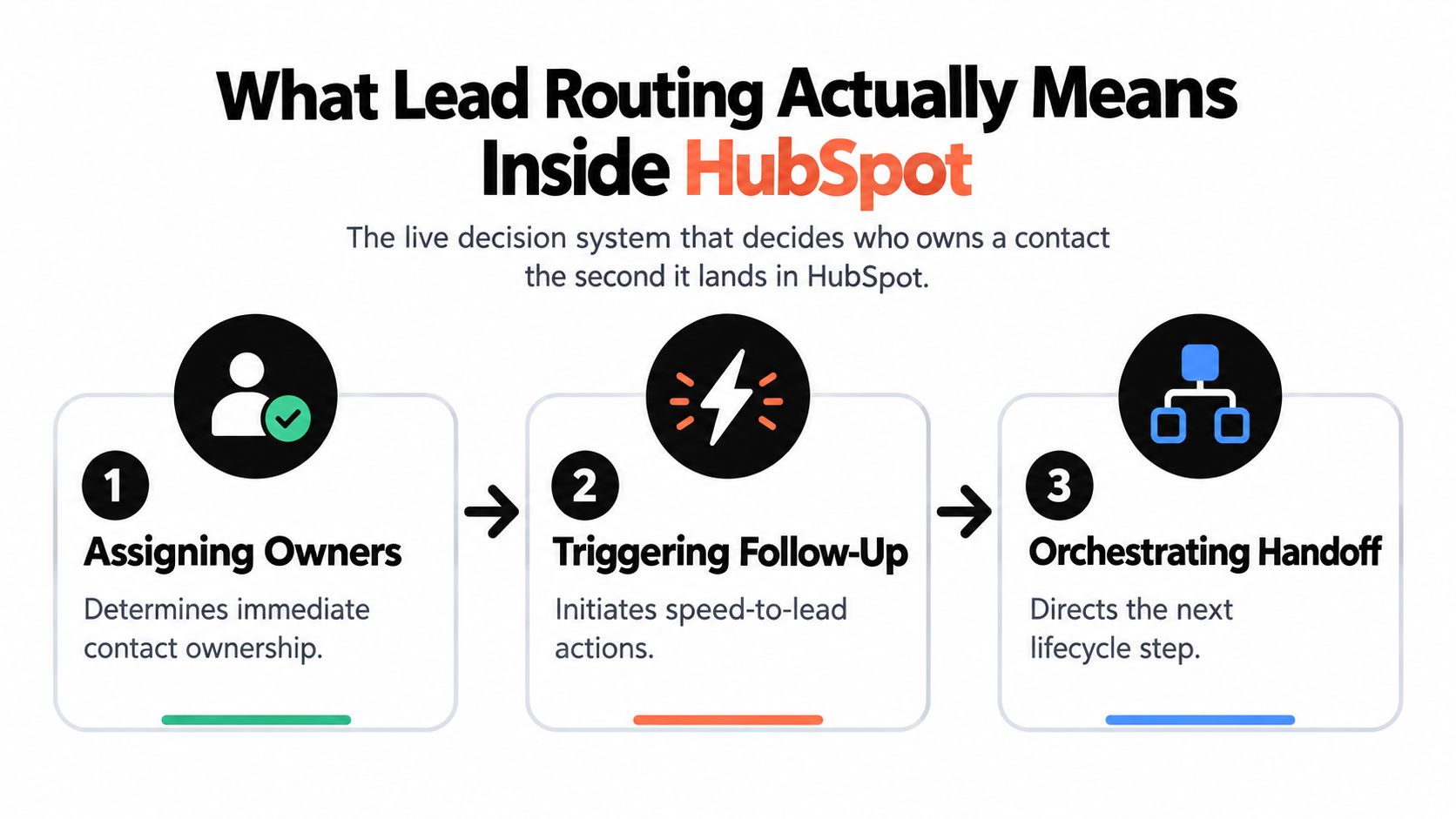
The system performs three connected jobs:
- Assigning owners: It selects an individual or queue using criteria such as territory, value, use case, and lead score, all criteria described in HubSpot's own lead-routing materials.
- Protecting speed-to-lead: It starts notifications, tasks, meeting actions, or escalation paths immediately after qualification.
- Orchestrating handoffs: It moves the record through marketing, SDR, AE, customer-agent, or nurture processes without losing ownership history.
HubSpot's routing layers overlap. Record assignment can establish ownership, workflows can evaluate properties and change that ownership, and conversation routing can direct inbound interactions to teams or users. Without a defined order of operations, one workflow can assign a lead to an SDR while another later overwrites the owner based on a lifecycle-stage update.
Lifecycle stage, lead status, source, and score should therefore work as signals in a sequence, not isolated fields. A form submission might create a contact, a score change might qualify it, and an ownership rule might route it to a specialist. HubSpot documentation also lets users inspect lead/property history and score history on individual records, giving teams an audit trail for score changes, lifecycle transitions, and ownership actions. See the HubSpot integration overview when you're connecting routing to broader CRM operations, and use this CRM workflow automation guide if your process extends beyond assignment.
Operational rule: If you can't explain why a contact received its owner from the record history, the routing system isn't finished.
The scale of the problem is clear in the inbound benchmark HubSpot cites: 61% of B2B marketers send all leads directly to Sales, while only 27% of those leads are qualified. That gap makes routing a qualification and queue-management problem, not merely an ownership problem. HubSpot's current customer-agent documentation reflects that broader model, with rules that can book a meeting or update lifecycle stage as part of the customer-agent workflow. Routing has become an operational step that can be audited, measured, and corrected.
Setting Up the Routing Inputs You Cannot Skip
Reliable routing starts before the first branch is built. Normalize the properties that determine eligibility, ownership, and follow-up, then make the workflow consume those controlled values.
Create a controlled input layer
Start with country, state, region, seniority, department, company size, industry, source, medium, lifecycle stage, lead status, lead score, and owner. The exact property names can vary, but the values shouldn't. “United Kingdom,” “UK,” and “GB” may all describe the same market to a person while sending records down different workflow branches.
Country and region support territory decisions. Company size and industry support vertical or segment ownership. Source and medium help distinguish inbound intent from partner, paid, organic, or outbound activity. Lifecycle stage and lead status tell the workflow whether the contact is new, qualified, working, or already in motion.
Build these fields as controlled properties with dropdowns or other constrained value types where appropriate. Don't let free-text form answers become the source of truth for territory assignment. If a form must collect open text, use a normalization workflow to translate the submitted value into a standard routing property before assignment occurs.
Protect existing ownership
An empty owner field needs a different path from an already-owned record. Check existing contact ownership first, then associated company ownership where account-based selling matters. Reassigning a contact because a new form submission triggered a generic round-robin workflow is one of the fastest ways to break account continuity.
Use active lists to surface records with blank, unexpected, or contradictory values. A weekly input audit should look for unknown regions, missing company size, invalid lifecycle combinations, and contacts whose owner is inactive or unavailable. The routing workflow should not guess when a required property is absent. It should send the record to an explicit fallback path.
| Property | Routing Role | Common Failure When Dirty |
|---|---|---|
| Country and region | Territory selection | Mixed names or codes send contacts to the wrong team |
| Company size | Segment and capacity logic | Blank values bypass segment rules |
| Industry | Specialist ownership | Unrecognized values fall into general queues |
| Source and medium | Intent and channel handling | Paid, partner, and organic leads receive identical treatment |
| Lifecycle stage | Qualification state | Nurture contacts enter sales assignment prematurely |
| Lead score | Priority gate | Score changes trigger inconsistent branches |
| Contact and company owner | Continuity protection | New activity overwrites an established relationship |
The practical sequence is normalize, validate, preserve, then assign. HubSpot routing guidance that uses controlled inputs also recommends separating classification, assignment, and SLA enforcement into distinct workflows. That separation makes troubleshooting far easier than one oversized workflow with every exception embedded inside it.
Building Lead Scoring and Qualification That Feeds Routing
A score is useful only when it changes an operational decision. If it merely ranks contacts on a dashboard, sales still has to interpret the list manually. In a routing system, the score should answer a sharper question: is this lead worth human attention now, and which type of human should receive it?
Build the score around fit and behavior
Use firmographic fit to represent whether the account resembles your target market. Industry, company size, department, seniority, geography, and technology context may all contribute. Behavioral signals then show urgency, such as a demo request, pricing-page activity, repeated visits, or engagement with a product-specific resource.
Negative signals matter just as much. Competitor domains, disposable email addresses, job-seeker patterns, and irrelevant company profiles should lower priority or stop sales assignment. A lead with strong activity but poor fit shouldn't jump directly to an AE because the score accumulated engagement points.
Choose HubSpot's predictive score where its available data fits your motion, or use a custom score property when your qualification logic needs transparent control. Either way, document the reasoning behind each input and review whether score changes still correlate with sales readiness.
Turn score bands into workflow gates
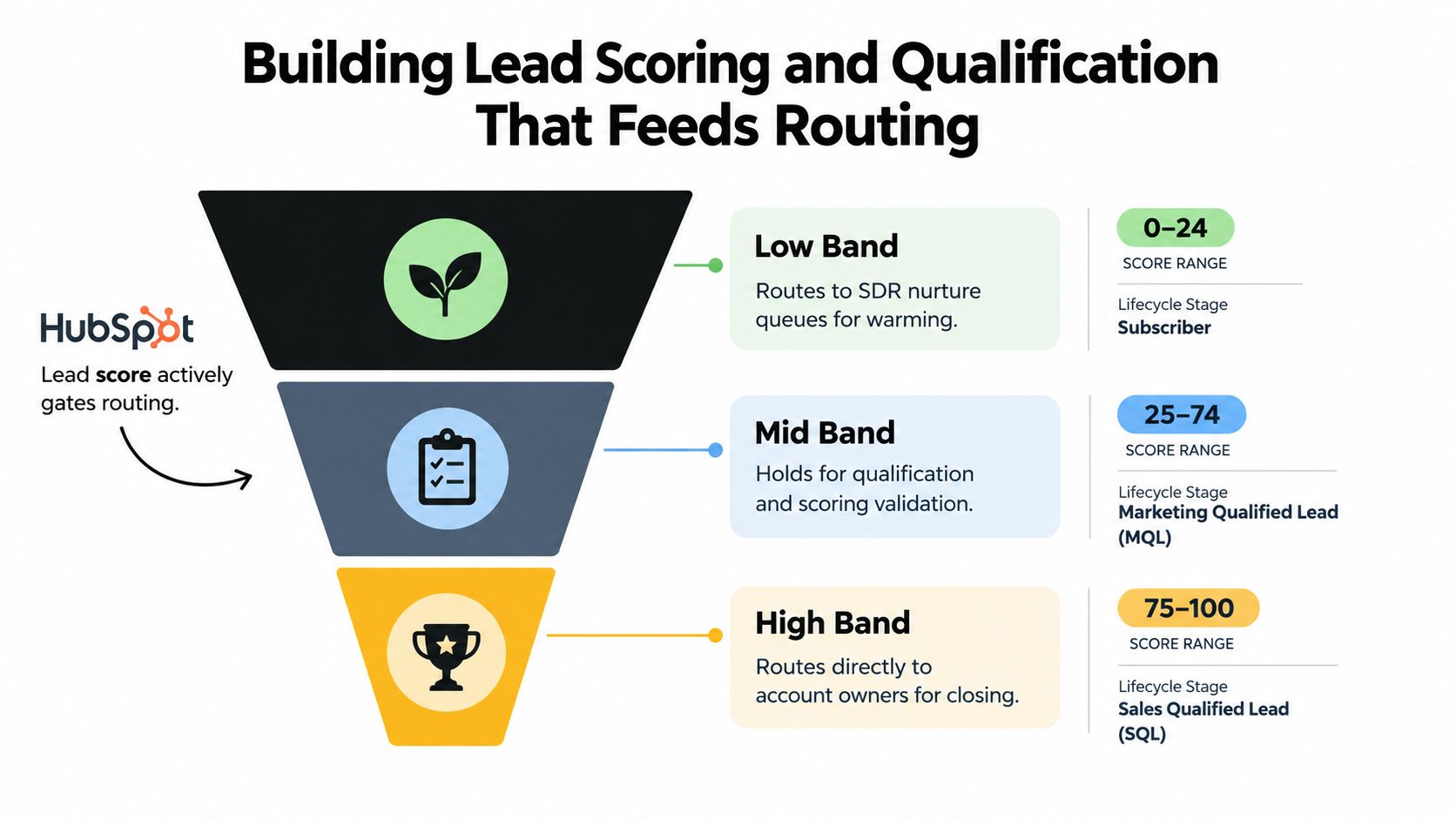
Don't send every scored contact to the same queue. Create clear bands tied to lifecycle and ownership actions:
- Low band: Keep the contact in nurture or an SDR warming queue. Marketing can continue education while the record remains visible for later signal changes.
- Mid band: Move the contact into active qualification. Create an SDR task or internal notification, but require validation of fit and intent before an AE handoff.
- High band: Set the appropriate qualified lifecycle state and route directly to the relevant account or territory owner, with immediate follow-up actions.
The exact thresholds should come from your conversion history and sales agreement, not a universal template. The important design choice is an explicit qualification gate, typically an MQL transition, before high-priority assignment triggers. That gate prevents a score fluctuation from repeatedly reassigning records.
Score history matters after launch. HubSpot's record-level history lets RevOps inspect whether routing happened because of a new form, a behavioral event, a lifecycle update, or a score recalculation. For practical guidance on sales-ready lead prioritization tips, focus on the connection between scoring criteria and a specific next action. Teams building more advanced scoring can also review how AI models rank and route leads faster.
The score should not own the lead by itself. It should open the right door, while territory, account ownership, specialization, and capacity decide who walks through it.
Designing Round Robin, Territory, and Capacity Assignment
The assignment engine is where most HubSpot implementations become difficult to maintain. Three patterns cover most use cases, but they solve different problems.
Choose the pattern that matches the motion
Round robin works for a defined inbound SDR pool where eligible reps can handle similar leads. HubSpot's rotating contact owner action can distribute records across that pool, but the rotation is only fair if the pool contains active, available users and the workflow excludes records that already have an owner.
Territory routing fits geographic or named-account ownership. Branch on a normalized territory property rather than repeatedly comparing raw country, state, and city values. A property-driven implementation can support up to 250 branches from one territory property, as described in the technical routing guidance from ResonateHQ. That structure is easier to audit than a nested tree of conditions.
Capacity routing is appropriate when workload and availability matter more than equal distribution. A rep with a full queue shouldn't receive another lead because the rotation says it's their turn. Capacity logic needs a maintained counter or availability property, plus a clear fallback when no eligible rep has room.
Stack the rules in a deliberate order
A durable sequence usually looks like this:
- Check whether the contact or associated company already has an owner.
- Confirm that the qualification gate has been met.
- Classify the record by territory, product, or specialization.
- Remove unavailable or over-capacity reps from the eligible pool.
- Apply round robin within the remaining group.
- Notify the assignee and start the SLA workflow.
- Send unmatched records to a monitored fallback queue.
This order protects account continuity before optimizing distribution. It also keeps classification separate from assignment and SLA enforcement, which makes a failed branch easier to locate.
Practical rule: Round robin is a distribution method, not a qualification strategy. Never use it as the fallback for records whose data hasn't been validated.
Test tied reps, repeated submissions, out-of-office users, and simultaneous workflow enrollment. Lowercase property values, non-normalized country codes, and capacity counters that never decrement are common real-world failures. Add an explicit “routing reason” property so each assignment records the branch that made the decision.
For a visual walkthrough of these patterns, watch the following HubSpot routing overview:
Testing, Monitoring, and Measuring Routing Outcomes
A workflow can show as successful in HubSpot while qualified leads still wait in the wrong queue. Healthy routing requires an operational dashboard that measures speed, correctness, fallback pressure, and distribution.
Track four core metrics:
| Metric | Definition | Healthy Target | Warning Sign |
|---|---|---|---|
| Time to assign | Time from record creation or qualification to owner assignment | Keep the median low and investigate any qualified record unassigned after 30 minutes, a benchmark used in HubSpot workflow guidance | Qualified records remain unassigned beyond the agreed SLA |
| Assignment accuracy rate | Share of records reaching the intended owner or queue without correction | Maximize assignment without manual intervention | Reassignment activity rises |
| Fallback queue depth | Records that matched no active rule | Keep the queue actively reviewed and small | Unknown territory, missing data, or new sources accumulate |
| Rep-level load balance | Distribution of eligible records across active reps | Keep workload within the team's capacity policy | One rep repeatedly receives the majority of new volume |
HubSpot workflow guidance recommends monitoring the percentage of leads unassigned after 30 minutes, median time from creation to first rep activity, and reassignment behavior. Another routing benchmark recommends watching assigned-without-manual-intervention rate, time to first assignment, and fallback queue size. These measures expose different failures, so a high assignment count alone is not enough.
Build a repeatable test loop
Create test records that represent each route, including missing region, existing company owner, low score, high score, duplicate submission, and unavailable rep. Confirm the owner, lifecycle stage, lead status, task, notification, and routing reason after each record enters the workflow.
After every workflow edit, compare new records with a control set. Look for the same user receiving every assignment, a sudden increase in fallback records, or a territory with no assignments. Store creation time, assignment time, lifecycle stage, and a calculated routing-delay property so reports can distinguish a slow workflow from a slow human response.
The benchmark cited in HubSpot's ecosystem also says that anything above zero unassigned leads over the last 90 days indicates a routing failure. Treat that as a diagnostic standard, not a reason to hide the queue. A visible failure gives RevOps something to repair.
Handling Edge Cases and Adding External Signal Data
Routing breaks at the edges because workflows usually assume the record is complete, unique, and ready for sales. Real records violate all three assumptions.
Hold contacts during ramp periods when the team hasn't agreed that a new source or segment is sales-ready. Send underqualified contacts into nurture rather than forcing them into a general SDR rotation. Branch disposable email domains, competitor domains, and obvious job-seeker patterns into review or suppression paths before they affect assignment quality.
Duplicate submissions need their own logic. Check for an existing contact and associated company before creating a new ownership event. If the record already has an owner, preserve it unless an explicit account or territory rule authorizes a change. HubSpot routing guidance also emphasizes checking associated company ownership and adding fallback logic when key fields are missing.
Use enrichment to change decisions
External data should rewrite routing inputs, not merely decorate the record. A firmographic enrichment provider can fill company size, industry, location, or technology values. An intent platform can add a buying-signal property. A reverse-IP tool can provide account context for an anonymous visit, but it shouldn't be treated as proof that a specific person is ready for outreach.
For teams implementing this layer, a HubSpot data enrichment implementation guide can help structure field mapping and CRM updates. Tools such as ZoomInfo or Bombora may contribute firmographic or intent fields, but the routing workflow should still validate freshness, confidence, and source before changing lifecycle stage.
A useful pattern is to separate signal ingestion, qualification update, and assignment. The signal workflow updates the normalized property. The qualification workflow decides whether the contact crosses the agreed gate. The assignment workflow then uses the new state without needing to understand every external provider.
Fallback design deserves ownership. Define where unmatched records go, who reviews that queue, which fields must be corrected, and how often the queue is inspected. A fallback queue without an accountable owner is only a slower version of an unassigned record.
Habits That Keep Lead Routing From Breaking Quietly
Routing systems decay when ownership becomes diffuse. Marketing adds a source, Sales changes territory coverage, and RevOps patches the workflow without removing the old branch. Each change appears harmless until a new lead follows a path nobody remembers building.
Set a recurring operating cadence:
- Weekly review: Inspect unassigned leads, reassignment rates, fallback reasons, and SLA breaches.
- Quarterly validation: Confirm that routing properties, lifecycle gates, territories, specialist pools, and capacity assumptions still match the go-to-market motion.
- Immediate source review: When a new form, campaign, integration, or channel appears, verify that it has a deliberate routing branch.
- Named accountability: Assign one owner for routing logic, documentation, testing, and change approval.
- Branch retirement: Remove or consolidate branches that haven't fired in 90 days, using the routing maintenance guidance as the review point rather than allowing unused logic to accumulate.
The discipline matters because every extra exception increases the chance that two workflows will compete. Keep classification, assignment, and SLA enforcement separate. Preserve existing ownership by default. Require a fallback reason instead of allowing silent failure.
Routing isn't a project that ends after the initial build. It's a recurring audit of data quality, qualification policy, team capacity, and CRM behavior. Teams that review those inputs consistently avoid the rebuild cycle that begins when nobody can explain why leads are waiting, reassigned, or disappearing into a queue.
CapyScout can enrich HubSpot company records, add ICP scores and “Why Now” notes, monitor account-level buying signals, and help distinguish leads to route, nurture, or hold. Visit CapyScout to connect source-backed prospect intelligence with a routing process your team can monitor.
Not ready to start? Get a free target list: 10 companies to sell to, picked from your website.