

Product Data Enrichment: Sources, Scoring and CRM Sync
Learn what product data enrichment is, where live and stale sources differ, how to score fields and sync them to your CRM.
60.4% of German online shoppers identified inaccurate descriptions or images that differed from the product as a reason for returns, according to the evidence cited in Werner Strauch's product-data-quality analysis. That reframes product data enrichment: the job isn't to fill more cells. It's to give people information they can safely act on.
For commercial teams, that applies to product specifications and account intelligence alike. A wrong compatibility claim can mislead a buyer; an outdated company profile can send a sales rep toward the wrong account. Useful enrichment starts with deciding what evidence each field needs before anyone trusts it.
Table of Contents
- What Product Data Enrichment Adds to a Record
- Where Enrichment Data Comes From and How Fresh It Is
- How Sales, Marketing and Customer Success Use Enriched Data
- Score Each Field and Set Governance Rules
- How to Build an Enrichment Workflow Step by Step
- How to Connect Enrichment to Your CRM
- Choose Your First Enrichment Pilot
What Product Data Enrichment Adds to a Record
A bare product record is like a passport with only a name and number. You can identify it, but you can't tell whether it meets the requirements for the journey. Product data enrichment adds attributes, identifiers and relationships so a record can be searched, compared, published and scored.
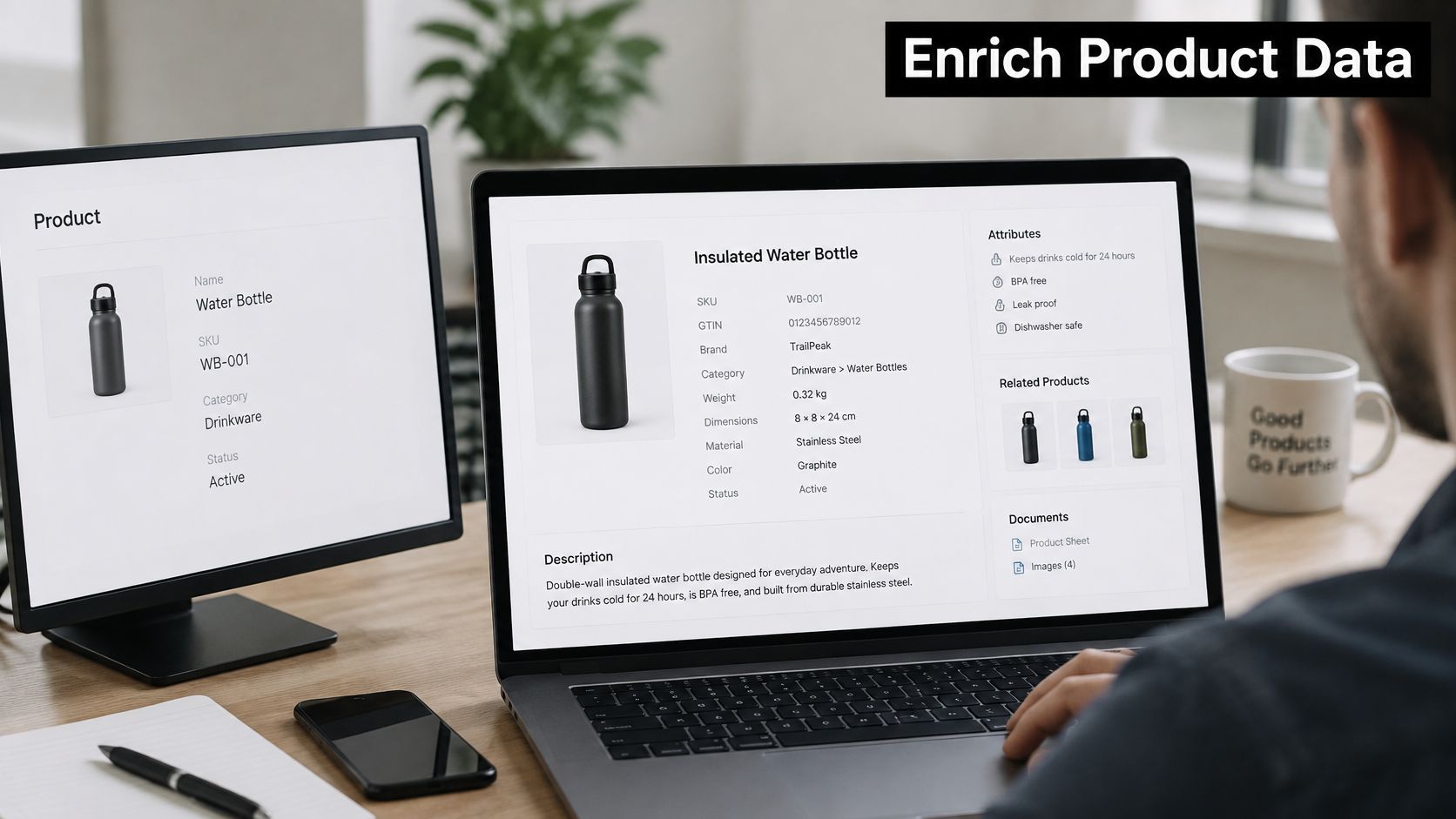
Say you sell a reusable water bottle. The supplier sends a product name and SKU, but buyers need to know its material, dimensions, lid compatibility and cleaning instructions. Adding an attractive description won't answer those questions unless you also add reliable, structured values.
The buyer-facing consequences matter: in 2025, 75% of consumers globally said they form negative opinions about a brand when online product information is incomplete or inaccurate, according to Syndigo's survey of more than 8,500 consumers.
Enrich the layer your decision needs
The bottle record illustrates the main layers:
- Core attributes establish identity and physical facts, including name, SKU, GTIN, dimensions and weight.
- Classification explains category, use case, compatibility and variant relationships. A replacement lid must connect to the right bottle, not just the same brand.
- Signals describe changing conditions, such as a launch, review pattern, stock state or revised specification.
The same distinction applies to B2B accounts. Company location and size describe the organization; industry and technology labels support classification; hiring or a new product launch can provide timing context.
The example below shows how those details turn a recognizable item into a decision-ready record.
Practical rule: Decide which layer your decision depends on before you enrich anything.
A marketplace listing needs channel-ready specifications. A sales brief needs account fit and a defensible reason to contact the company. Treating those as the same enrichment job produces unnecessary fields and unanswered questions.
Where Enrichment Data Comes From and How Fresh It Is
Choose sources by the claims they can support. A manufacturer can establish a product's material; a job advertisement can establish that a company advertised a role. Neither automatically proves how customers use the product or whether the company has purchased a particular technology.
The central trade-off is coverage versus current, verifiable evidence. A licensed database can populate a large starting list, while a live webpage can expose a recent change. Both need checks, but they fail differently.
Enrichment sources compared by freshness and verification
| Source | Examples | Freshness | Verification | Best use |
|---|---|---|---|---|
| Supplier feed or manufacturer spec sheet | ERP, PIM or supplier spreadsheets | Updated when the supplier releases changes | High when signed off by the supplier | Core technical attributes such as dimensions, materials and compatibility |
| Licensed third-party database | Commercial product or firmographic catalogs | Governed by the vendor's refresh cycle; check before use | Medium unless per-record checks are supplied | Broad first fill and coverage gaps |
| Live web signals | Retailer pages with schema.org markup, product launches, job posts, funding news, review sites | Observed at retrieval; freshness requires scheduled rechecks | Traceable to a source URL, but the claim still needs validation | Timing, new products, recent changes and buying signals |
| Internal operational data | Returns reasons, sales notes, support tickets | Updated as operational records are entered and reviewed | Check entry quality and supporting evidence | Real-world usage, compatibility and failure points |
A stale database can return a well-formatted value that was once correct. Its weakness is hidden age: without a record-level confirmation date, you can't distinguish an unchanged fact from an unchecked one. Don't mistake a recent file export for a recent source check.
A live web signal has a different weakness. Retrieval proves that the page was accessible when checked, not that the event just happened or that the page describes the right company. Syndicated announcements, archived vacancies and similarly named businesses can all create misleading matches.
Assign authority by field
Supplier specifications should take precedence for approved technical characteristics. Support tickets are better evidence for reported installation problems, but a customer's complaint shouldn't become a universal compatibility restriction. Preserve the context of the observation.
For account discovery, our Agent's new people come from campaign sources: daily searches and feeds, LinkedIn connections, website visitors and signups, the user's customers, a list, or watched companies when a signal fires. CapyScout's daily searches and feeds documentation explains that discovery workflow.
Combining sources is useful when each has a defined role. Store which source supplied each field, and don't let whichever connector ran last become the accidental authority.
Match the source to the field it can substantiate, not to the number of empty cells it can fill.
How Sales, Marketing and Customer Success Use Enriched Data
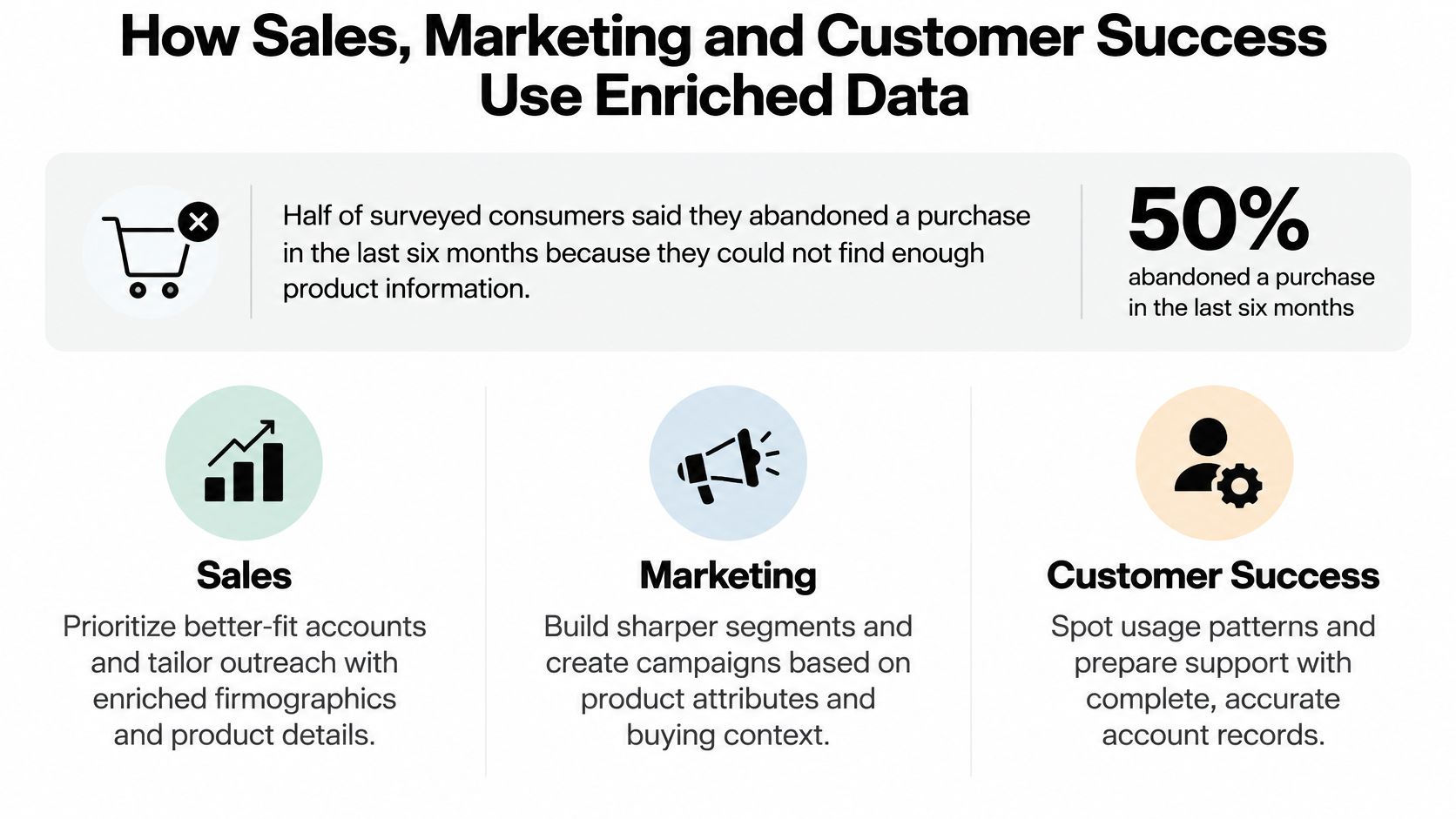
In 2024, 50% of surveyed consumers said they had abandoned a potential purchase in the previous six months because they couldn't find sufficient product information, according to Syndigo's research based on YouGov data from 6,480 adults. Commercial teams should treat missing information as a decision obstacle, not merely a content defect.
The operational response differs by team. Sales needs relevant account context, marketing needs usable audience and product distinctions, and customer success needs evidence that an account's situation has changed.
This visual summarizes those different uses.
Sales needs a specific reason to engage
Consider an illustrative rep who sets aside an hour to research an account before a call. Instead of opening disconnected tabs, the rep could start with a sourced brief containing company fit, an announced product line and relevant hiring activity; this is a workflow example, not a measured time-saving result.
The useful change isn't a longer profile. It's the ability to distinguish why this account fits from why contact might be timely. A funding announcement alone doesn't establish buying intent, and a technology mention doesn't establish budget.
Marketing needs distinctions that survive activation
A marketer promoting replacement accessories might begin with a broad audience of previous customers. Enriched compatibility relationships let the team separate eligible owners from buyers whose product variants won't work with the accessory.
That distinction should carry through campaign segments, product feeds and landing-page content. Otherwise, the audience rules can be correct while the advertisement still promises compatibility the product doesn't have.
Customer success needs changes with context
A customer success manager might previously discover an account's changed setup only after a support escalation. An enriched account record can flag a documented technology change and bring relevant support notes into the renewal preparation.
The next action should be a compatibility conversation, not an automatic conclusion that the customer will churn. Reviews and support patterns are prompts for investigation, especially when they describe different deployments or product versions.
For every team, enrichment is valuable only when the action is proportionate to the evidence. A useful field changes a decision; a trustworthy field changes it for a defensible reason.
Score Each Field and Set Governance Rules
More fields can mean more ways to get a decision wrong. Completeness measures coverage, not truth, and an inferred value shouldn't earn the same authority as a confirmed specification.
Consumer research across eight countries found that 30% of respondents were dissatisfied with the completeness of product information and 53% had abandoned an online purchase because product data was incorrect, according to the research reported by 360 Magazine. Both missing information and incorrect information matter.
Field scoring rubric for enriched product and account data
Use completeness, accuracy, freshness and provenance as trust dimensions. Add sensitivity as a separate gate governing whether a value may be used at all.
| Dimension | Question to ask | Red flag | Action |
|---|---|---|---|
| Completeness | Is the field filled for this channel, market and use case? | Blank for a required channel attribute | Route the record to a fill queue before publishing |
| Accuracy | Does the value match the source of record? | Two sources disagree | Keep both observations and mark the field as conflicting |
| Freshness | When was the value last confirmed? | Older than the refresh interval for that field | Re-run the source check or lower the confidence score |
| Provenance | Which source supplied it, and is that source authoritative? | No source URL or supplier reference | Don't use for scoring or outreach until a source is added |
| Sensitivity | Is the field factual, inferred or personal? | Inferred role or intent with no review | Block automated outreach and limit retention |
Don't average these into a score that conceals a critical failure. A fully populated compatibility field with contradictory evidence should remain blocked, even if its retrieval date is recent.
Keep observed facts, derived values and inferences distinguishable. A normalized weight derived from a supplier's stated unit is different from a guessed material based on an image. For account scoring, the same distinction should govern which inputs can influence routing; the practical B2B lead-scoring framework provides relevant decision context.
Govern inferred personal information separately
An inferred role, seniority or intent associated with an identifiable person can be personal information. The overview of AI data provenance and privacy guidance describes Australian guidance treating AI-inferred or generated personal information as collected information, with accuracy obligations, and European guidance emphasizing transparency, minimization, retention, security and impact assessments for high-risk processing.
Operationally, classify fields as factual, inferred or sensitive. Record origin and permitted use, establish retention periods by field class, and provide a correction route. Review potential privacy impacts before inferred personal attributes drive outreach, and conduct a formal impact assessment where the processing warrants one.
Contact handling also needs a clear boundary. Our contact results go only into the customer's lists and campaigns; CapyScout doesn't warehouse or resell contact data.
Trust boundary: A field without a timestamp and a source is a hypothesis, not a fact.
How to Build an Enrichment Workflow Step by Step
Build an approval pipeline, not a connector that writes whatever it finds. The important boundary is between an observation arriving and an approved value becoming available to a commercial team.
Ventana Research's product-information-management white paper describes a lifecycle approach to defining, enriching and deploying product information. That's a better operating model than treating enrichment as an occasional bulk update.
Build the path from observation to approval
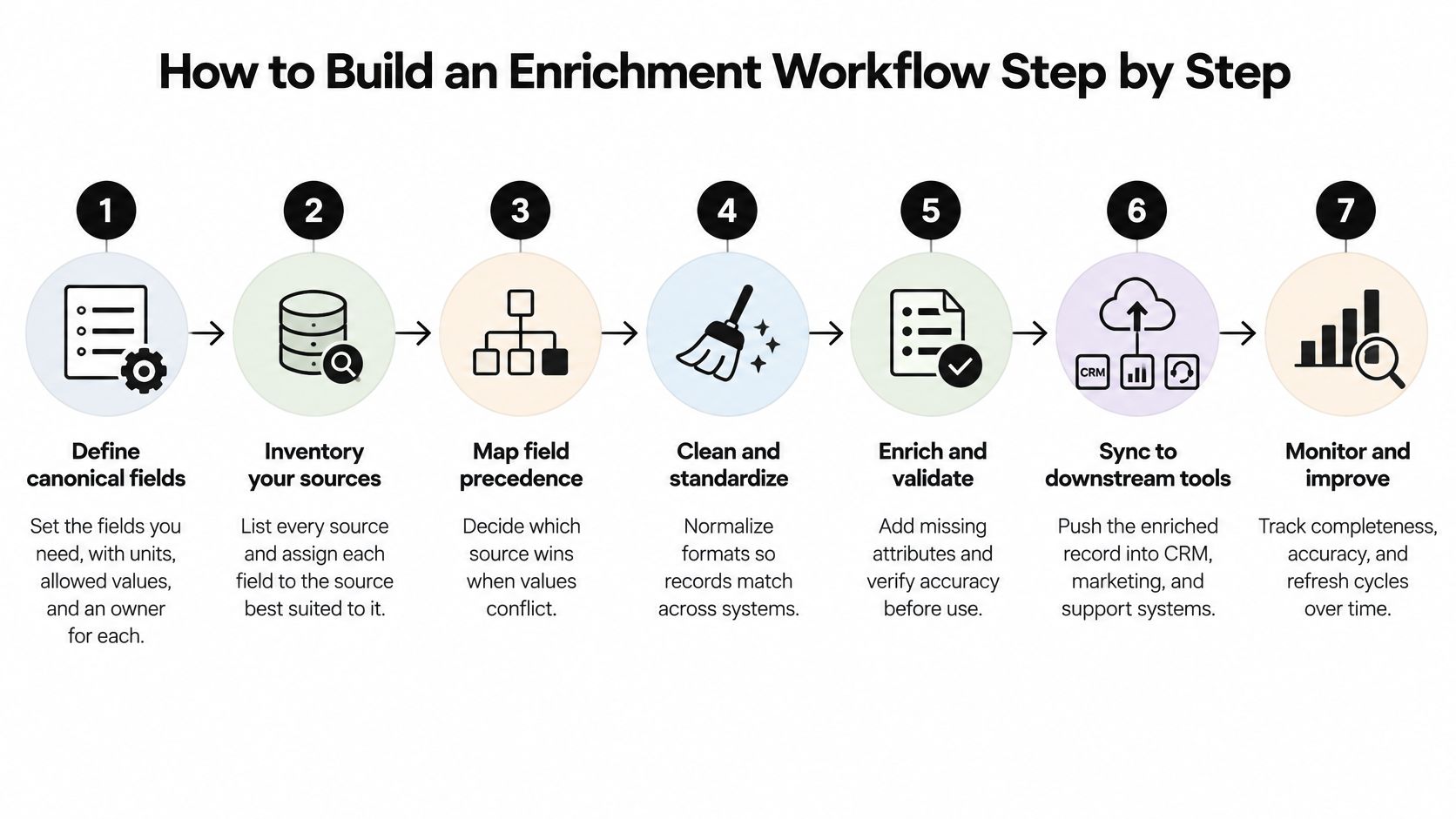
Define canonical fields. Write a field dictionary with data types, units, allowed values and a named owner. Specify whether dimensions describe the product or its package; leaving that ambiguous creates valid-looking values that answer different questions.
Inventory sources and assign authority. Map each field to its preferred source and document acceptable fallbacks. The common mistake is choosing a single provider for every attribute, then treating weakly supported fields as equally reliable.
Normalize identifiers and labels. Standardize company domains, preserve GTIN formatting, convert units consistently and map categories to controlled labels before merging. Enriching first can create duplicate records that appear to be new companies or new product variants.
Match on stable identifiers first. Use exact identifier matches when available, and reserve probabilistic matching for records without reliable keys. Don't merge companies merely because their names look alike, or product variants merely because they share a title.
Attach evidence to every new value. Capture source, retrieval time, confidence and validation status with the observation. A polished generated summary isn't a substitute for metadata that lets a reviewer inspect the underlying claim.
Validate before approval. Check required channel fields, accepted values, unit conversions, duplicate conflicts and cross-field logic such as package dimensions against shipping class. Rejecting malformed rows is necessary, but insufficient when individually valid fields contradict each other.
Publish approved fields and monitor refreshes. Track required-field fill rate, conflict rate and staleness on a fixed operating schedule. Keep rejected observations visible to operators rather than dropping them unnoticed and reporting a misleadingly clean run.
The workflow below provides a visual checklist for organizing the handoffs.
Diagnose failures at the right stage
When fill rate drops, inspect source availability and parsing before changing the scoring rules. When conflicts rise, investigate matching and source precedence before buying more coverage.
Repeated manual corrections suggest a defect in the process, not merely an operator backlog. Capture the reason for each correction so the owner can change a mapping rule, parser or approval condition.
A healthy workflow produces fewer manual corrections, fewer unresolved conflicts and stable required-field coverage across refreshes. Review those signals together: high fill rate achieved by accepting questionable matches isn't improvement.
How to Connect Enrichment to Your CRM
Integration problems often begin with incompatible models, not failed API calls. 52% of organizations have incompatible tools and 48% manage disparate forms of data in product-information environments, according to Ventana Research's analysis of product information management.
A company's industry might be free text in an enrichment layer but a controlled dropdown in HubSpot, Pipedrive or Attio. Map those meanings before writing records, and separate company-level attributes from contact-level observations.
CRM integration is a shared operational task, not just a connector setup.

CRM integration patterns for enriched data
| Pattern | Data direction | When it fits | Main risk |
|---|---|---|---|
| One-time backfill | Enrichment tool to CRM staging fields | New CRM or large historical gaps | Overwriting values reps have already corrected |
| Scheduled batch refresh | Enrichment tool to CRM on a defined schedule | Steady state with predictable data needs | Values going stale between runs |
| Event-triggered write | Signal fires, record updates and alert is sent | Timing-led sales or account monitoring | Alert noise and duplicate updates |
| Bi-directional sync | CRM and enrichment layer exchange fields | Revenue operations with clear field ownership | Write loops and conflicting edits |
| Reverse feed | Closed deals and outcomes feed back into scoring | Refining the ideal customer profile | Learning old biases from past wins |
Start with a backfill into staging fields, not live deal fields. Review differences alongside existing values, especially rep-entered exceptions, before promoting approved updates.
For bi-directional sync, assign a system of record to each field and retain update identifiers so the same change doesn't bounce between systems. Include failures in an exception queue with an owner, rather than repeatedly retrying an invalid dropdown value.
Make the evidence visible to reps
Label verified values and inferences differently in the CRM view. Use a related evidence record when the CRM can't hold source, confirmation date and status beside the main value.
The CRM integration documentation is a practical reference when planning field mappings. For contact-data hygiene alongside enrichment, Mailbeam's resource on GDPR-focused email validation for marketing teams addresses a complementary task; email validation doesn't establish permission to contact someone.
Use the video alongside the mapping and ownership checklist when reviewing the integration.
A CRM field should expose its source and last-confirmed date. Otherwise, a rep can mistake an old or inferred value for an approved current fact.
Choose Your First Enrichment Pilot
Pick a narrow decision, not a large import. A single segment, channel or CRM object makes it easier to identify whether the constraint is source quality, matching or the commercial use case.
Define the pilot before connecting sources
- Field set. Choose only attributes that change the decision, and assign a source and refresh rule to each. Product dimensions might come from approved supplier specifications; recent launches or hiring need event-oriented checks.
- Publication gate. Require channel-specific fields, normalized units and resolved source conflicts before approved values reach users. Decide who handles exceptions so blocked records don't disappear into an unattended queue.
- Review point. Set the review date before launch and allow a complete refresh cycle. Compare required-field coverage, conflicts and stale values alongside a business measure such as sampled pre-call research time or reply rate.
A good result combines stable coverage with fewer conflicts and a measurable commercial benefit. If disagreements remain high after refresh, pause expansion and fix the sources or matching rules first.
Don't increase coverage to compensate for unresolved trust problems.
For an inbound pilot, signup screening offers a clear decision: route to sales, nurture or hold. Keep trial risk, support escalation and partner-fit decisions outside the initial scope so reviewers can interpret the results.
Before adding any new field, write down the one decision it must support. If nobody can explain what would change when the value changes, leave it out.
CapyScout researches live web signals to enrich account records and deliver source-backed briefs; its search agent re-runs your ideal customer description and adds only new companies. Visit CapyScout to start with a focused account-enrichment workflow built around the fields your team needs to make a decision.
Not ready to start? Get a free target list: 10 companies to sell to, picked from your website.