

Inbound Lead Scoring: A Modern Guide
Master inbound lead scoring with real-time signals, predictive models, and CRM automation. Learn to route high-intent leads faster and boost conversions.
The popular advice is to perfect your points model before you worry about anything else. Add points for a pricing-page visit, subtract points for a personal email address, choose a threshold, and let the CRM do the rest. That approach looks orderly, but it often optimizes the least important part of inbound conversion. A beautifully calibrated score that sits in a queue for hours is still a failed revenue process.
Modern inbound lead scoring works better as a timing and routing engine. It ranks who appears ready now, explains why, and triggers the next action while the buying signal is still relevant. The shift reflects a broader change in the field. Academic literature describes predictive scoring as an evolution from rule-based systems, using historical closed-won and closed-lost outcomes to estimate conversion propensity and uncover non-linear relationships between predictors and outcomes. A 2023 Springer review of lead scoring models also notes that a published predictive model reached 99.41% accuracy, although that result should never be treated as a universal expectation for every CRM or market.
The practical lesson is less glamorous than model selection. Fit tells you whether a lead could buy. Timing helps determine whether sales should act now. Teams that treat the score as a static grade often miss the operational work that turns a prediction into a conversation.
Table of Contents
- The Shift From Static Points to Real-Time Timing
- Key Signals for Modern Inbound Lead Scoring
- Building and Calibrating Your Scoring Model
- Operationalizing Scores Through Routing and Automation
- Integrating Live Web Signals and CRM Enrichment
- Measuring Success and Avoiding Common Pitfalls
- Next Steps for Your Revenue Team
The Shift From Static Points to Real-Time Timing
A spreadsheet-style model usually assigns fixed values to visible actions. A form submission earns points, a content download earns more, and a pricing-page visit pushes the contact toward sales. The model is easy to explain, but it treats every event as if it carries the same meaning regardless of sequence, recency, account context, or the words the buyer used.
That's the first problem. A visitor can open a pricing page while casually researching the category, while another arrives there after returning to an integration page and asking whether implementation can happen this quarter. The page visit is identical in the spreadsheet. The buying moment isn't.
Fit remains necessary, but it isn't sufficient
Static firmographic scoring still has a place. Company size, industry, geography, role, and existing account ownership help sales avoid spending time on contacts outside the serviceable market. The mistake is treating those fields as the complete decision.
Predictive models use historical outcomes to rank prospects by estimated conversion propensity. The research literature frames that move from points to prediction as a major milestone in B2B sales operations and sales-performance optimization, because models can identify relationships that a fixed rule set may miss. Score histories in systems such as HubSpot also make it possible to observe how a lead's status changes rather than relying on one permanent grade.
That doesn't mean you should hand every decision to a model. A model can rank effectively and still create an unusable queue if it produces too many alerts, ignores account ownership, or fires after the buying window has passed.
Practical rule: A score has no commercial value until it changes who gets contacted, by whom, and how quickly.
Timing changes the action
The modern workflow asks a more useful question than “How many points does this lead have?” It asks, “What changed, and what should happen next?”
A return visit to a pricing page may justify an immediate alert when it appears alongside strong ICP fit. A hiring change can raise account priority, but it shouldn't automatically create a sales task if the individual is only browsing educational material. A technology shift may matter to one product line and be irrelevant to another.
This is why workflow-based scoring is replacing many static calculators. The workflow combines current behavior, account context, message content, and CRM history, then routes the lead to a fast-track, nurture, hold, or review path. Teams researching managing viral social care surges can apply the same operational principle to revenue workflows: live signals are useful only when systems can process and act on them before they become stale.
The strongest inbound programs therefore separate three decisions:
- Fit: Does the account resemble the ICP?
- Intent: Is the buyer showing meaningful interest?
- Timing: Does the signal justify action now?
A perfect static score answers only the first two imperfectly. A useful system connects all three to an owner and an SLA.
Key Signals for Modern Inbound Lead Scoring
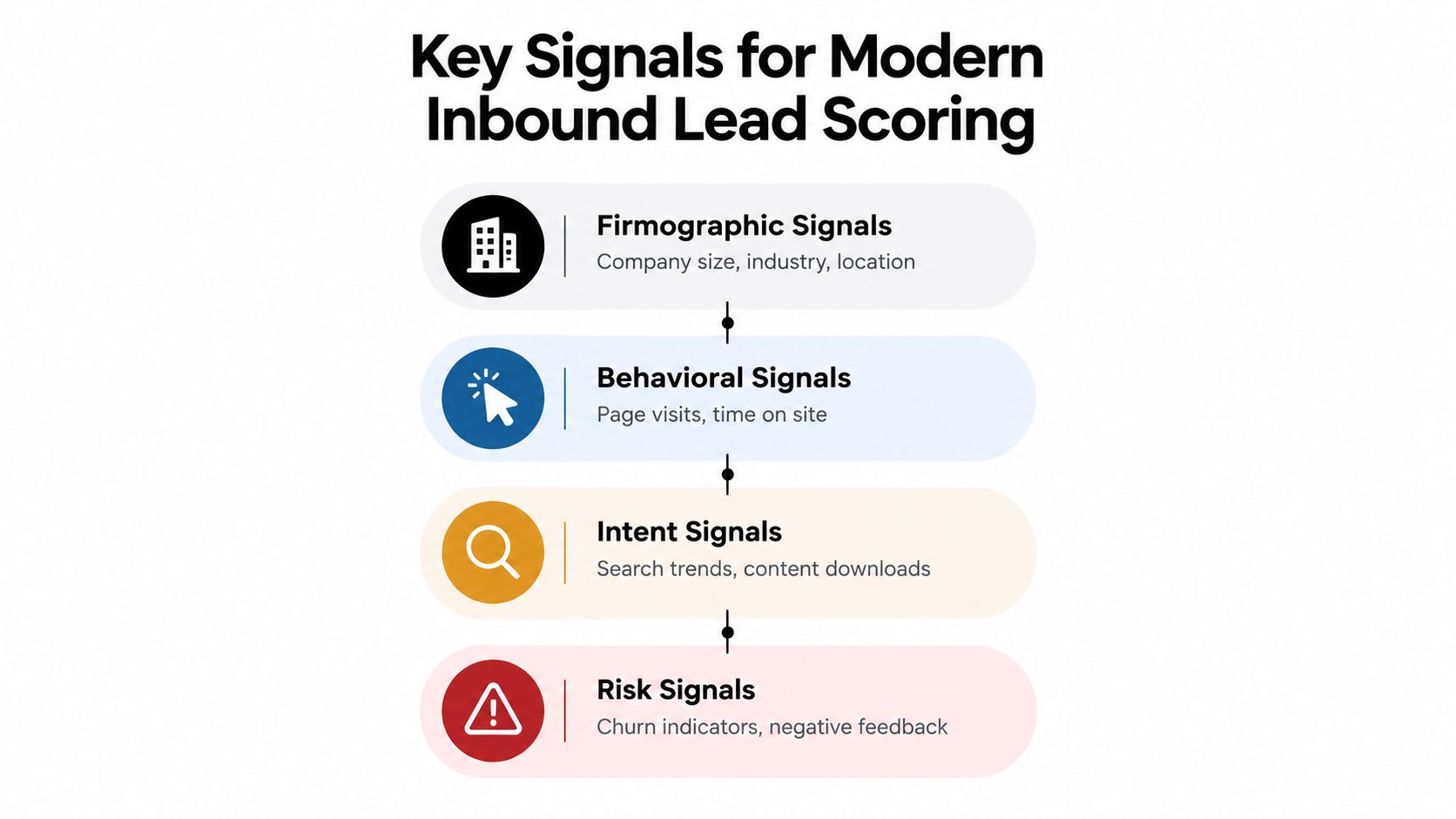
A modern model should not treat every engagement event as evidence of purchase intent. It should combine firmographic, behavioral, intent, and risk signals, then test whether those signals correspond with meaningful sales outcomes.
Firmographic signals establish fit
Start with the attributes that define your ICP:
- Company profile: Industry, location, business model, and company size.
- Operating context: Whether the organization has the team, process, or technical environment your product supports.
- Buying role: The contact's function and seniority, interpreted alongside the account rather than in isolation.
- Account status: Existing customer, open opportunity, partner, competitor, or unknown company.
A job title alone is weak evidence. A senior title at an unsuitable company shouldn't outrank a relevant operator at a high-fit account. Account-level matching also prevents duplicate ownership, particularly when multiple people from the same organization submit forms.
Behavioral signals need recency and sequence
Behavior shows engagement, but engagement isn't automatically intent. A single blog visit or broad guide download usually says little. Repeated sessions, movement from educational content to product pages, and a return after a sales interaction provide more useful context.
Track the path, not only the event. A pricing visit after an integration-page session means something different from a pricing visit caused by an internal research assignment. Recency matters as well. Older activity should generally lose influence unless a current signal confirms renewed interest.
Intent signals should describe a buying moment
High-value intent often appears when an account's circumstances change. Examples include:
- Product research: Repeat visits to pricing, demo, comparison, or integration pages.
- Business change: Hiring for functions your product supports, leadership changes, or a new operating initiative.
- Technology context: Adoption of an adjacent tool or a shift in the account's technology stack.
- Direct language: A form message that mentions urgency, an active problem, a contract event, or a specific implementation question.
Live-web monitoring can add account context that a contact record can't provide. For a broader framework on finding and interpreting these events, see this guide to buying signals and how to find them.
Risk signals stop false positives
Risk scoring should be explicit rather than an afterthought. Disposable email domains, mismatched company size, inconsistent company details, unclear account matches, and suspicious form patterns can send a lead to hold or manual review. Negative feedback and signs of churn should also prevent an automated workflow from treating the contact like a new prospect.
A sales intelligence system can help unify these inputs. Teams comparing data sources and enrichment workflows may find a practical sales intelligence platform guide useful for thinking through the difference between raw contact data and actionable account context.
The central discipline is restraint. Don't reward every click. Give greater weight to specific, recent, account-relevant changes, and keep uncertain signals visible instead of converting them into false confidence.
Building and Calibrating Your Scoring Model
Build the model around outcomes, not around the fields your CRM happens to store. The target isn't a pleasing score distribution. It's a ranking that puts likely buyers near the top and helps sales decide what to do next.
Choose outcome labels that reflect your actual funnel. Useful labels include sales accepted, meeting held, opportunity created, and closed-won. They answer different questions. A model trained on meeting held may prioritize booking potential, while one trained on closed-won may favor longer-term commercial fit. Don't combine these outcomes casually. Define which decision the score is meant to support.
Start with a ranked cohort
Evaluate the highest-scoring cohort against your baseline conversion rate. Then repeat the comparison across the segments that matter commercially:
- ICP fit: Strategic accounts may behave differently from smaller customers.
- Region: Territory coverage and response practices can affect results.
- Persona: Economic buyers, champions, practitioners, and students don't signal readiness in the same way.
- Source: Organic search, product referrals, paid campaigns, and partner traffic can produce different intent profiles.
Aggregate performance can conceal failure. A model may look strong across the entire database while under-ranking the region or persona that generates your most valuable opportunities. Segment reporting turns that hidden problem into a visible calibration task.
Timestamp every score decision
Store the score and the input signals at the moment the decision was made. Don't validate a lead using data that appeared later in the buying cycle. That creates hindsight bias, because the model gets credit for information it didn't have when sales received the alert.
The benchmark guidance from the Pedowitz Group's predictive scoring analysis recommends treating predictive scoring as a ranking problem, comparing top-score cohorts with baseline conversion, and segmenting by ICP fit, region, persona, and source. It also stresses that score thresholds must reflect SDR and AE capacity. A threshold isn't good because it looks mathematically elegant. It's good when it creates useful lift without flooding the team.
Calibrate thresholds to capacity
Suppose sales can act on only a defined portion of daily inbound volume. The threshold should produce a queue that the assigned team can work within the response SLA. If alerts exceed capacity, raise the threshold, add a nurture route, or separate urgent signals from research activity. If the queue is too thin, lower the threshold cautiously and inspect the additional leads for fit and intent quality.
Keep a human queue for ambiguous cases. Low-confidence enrichment, uncertain account matches, and contradictory signals deserve review rather than an automatic assignment. For teams improving how they capture leads for AI workflows, the same principle applies at the form stage: collect enough context to support routing, but don't force the model to pretend it knows what the data can't establish.
Operationalizing Scores Through Routing and Automation
A scoring model can rank a lead accurately and still lose the opportunity if the handoff takes too long. Inbound qualification research consistently points to response speed as an operational constraint. Firms contacting leads within an hour are reported as seven times more likely to qualify them than firms waiting longer, according to the inbound lead qualification findings from Sendspark. The same source reports that contacting leads within five minutes produces conversion eight times more often than contacting them between five minutes and twenty-four hours later, while only 0.1% of inbound leads are reached that quickly.
Build the handoff as a chain
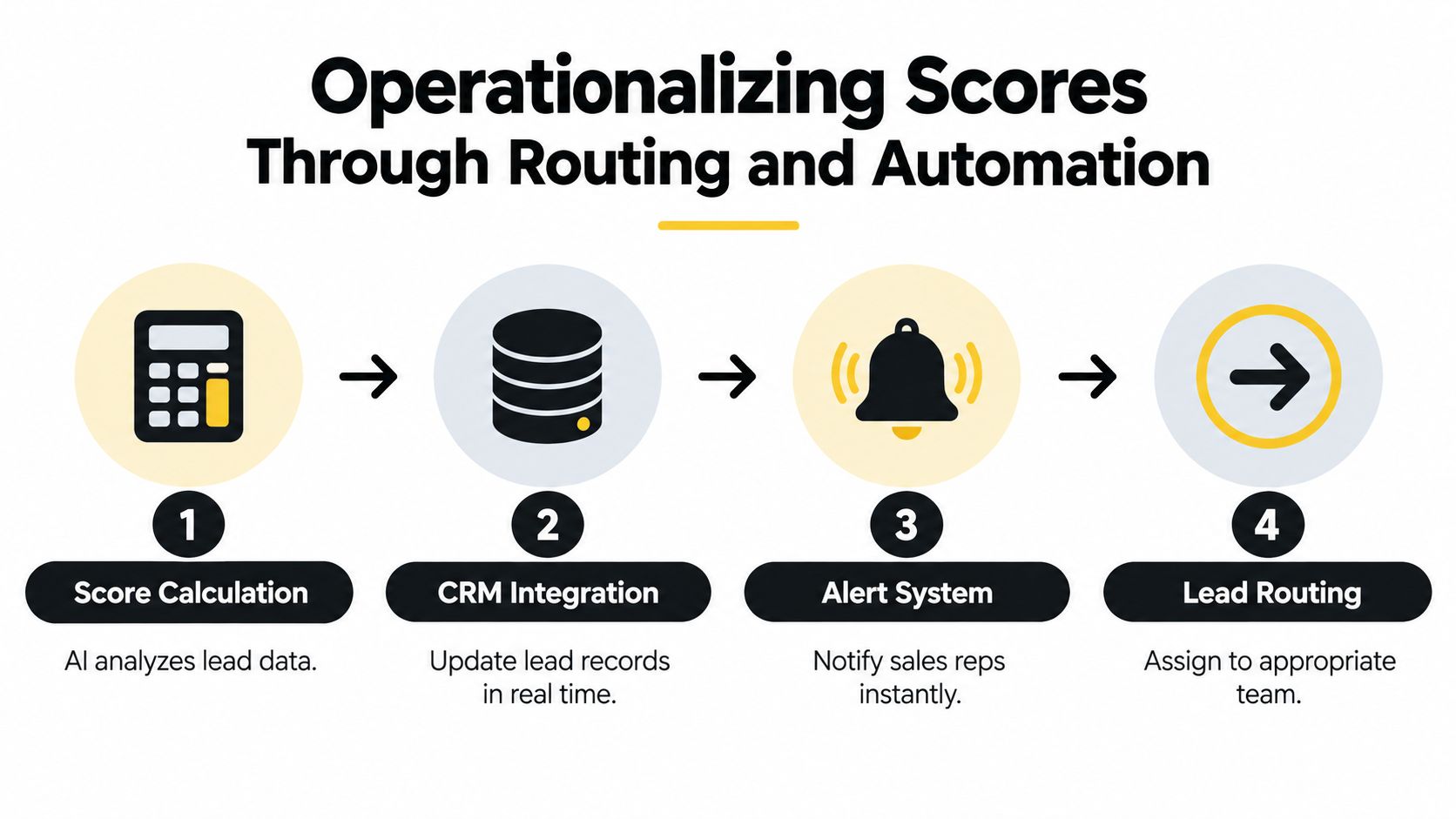
The workflow should move from score calculation to ownership without waiting for a batch process or a manual spreadsheet export:
- Calculate: Enrich the signup, evaluate fit, intent, risk, and confidence.
- Check the CRM: Look for an existing account, opportunity, customer, or owner.
- Assign: Apply territory, segment, product, or round-robin rules.
- Alert: Send the reason, priority, owner, and next action to the relevant channel.
- Monitor: Start the SLA clock and escalate when no one accepts or contacts the lead.
Slack and Teams alerts are useful when they carry context rather than just a notification. Include the account, the triggering signal, the score rationale, the assigned owner, and the expected action. A bare “new lead” message still forces the rep to investigate manually.
Separate urgency from uncertainty
Use confidence thresholds to distinguish fast-track leads from cases that need review. A high-fit lead with a clear buying request can route directly to the appropriate rep. An ambiguous company match or disposable address should go to hold or manual review, even if the contact visited valuable pages.
The routing workflow should also preserve existing ownership. Before creating a new record, match the company against the CRM. Otherwise, multiple submissions from one account can create duplicate records, conflicting assignments, and fragmented reporting.
The model decides priority. The routing layer decides ownership. The SLA decides whether the system creates revenue or merely creates tasks.
Teams can audit the handoff with the lead routing software guide for faster sales follow-up. The useful question isn't whether every integration fires successfully. It's whether the right person receives enough context to act immediately, and whether the system exposes failures instead of hiding them in a queue.
Integrating Live Web Signals and CRM Enrichment
A lead record starts aging as soon as it's created. A company can hire a new team, change technology, launch a product, receive negative reviews, or alter its positioning while the CRM still shows yesterday's profile. Static databases provide a starting point, but they don't reliably describe the account's current buying context.

Compare the two operating models
| Static database workflow | Live signal workflow |
|---|---|
| Starts with a precompiled contact row | Starts with an account and a current event |
| Relies on periodic list refreshes | Monitors relevant changes continuously or on a defined schedule |
| Scores known fields | Combines CRM history with web and behavioral context |
| Creates outreach from generic attributes | Gives sales a source-backed reason to contact |
| Treats enrichment as a one-time task | Writes updated context back into the CRM |
Live signals shouldn't mean unrestricted surveillance. Account-level website intent can identify return visits to watched pricing, demo, and integration pages without relying on cookies or person graphs. The objective is to understand whether a known account appears to be entering a buying window, not to infer private identity from anonymous browsing.
Enrich the account, not just the contact
Useful account signals include hiring changes, funding events, leadership movement, technology shifts, news, reviews, and reputation changes. Their value depends on relevance. A hiring event may matter when it supports a product use case, while an unrelated vacancy should carry little or no weight.
The system should write firmographics, ICP grade, and a concise “Why now” note back to HubSpot, Pipedrive, or Attio. Bi-directional sync prevents the scoring layer from becoming another isolated dashboard. Daily CRM backfill keeps records usable for sales, marketing, and customer success without requiring every rep to research the same company repeatedly.
Require evidence for action
Source-backed briefs make a signal inspectable. A rep should be able to see what changed, when it changed, and why the event relates to the product. Unverifiable items should remain marked as uncertain rather than appearing as facts.
CapyScout is one example of this operating model. It searches the live web, monitors account signals, enriches CRM records, scores inbound signups for fit and risk, and sends alerts through channels such as Slack, Teams, email, and webhooks. Whether you use it, build internally, or combine several tools, the design principle is the same: keep the profile current, preserve the source, and connect every signal to a decision. Teams evaluating the mechanics can use this practical guide to CRM data enrichment in 2026 as a reference point.
Measuring Success and Avoiding Common Pitfalls
Revenue teams often start by asking whether the model is accurate. That's necessary, but it's not enough. A model can classify leads well and still fail if sales rejects the alerts, the queue exceeds capacity, or routing sends strong accounts to the wrong owner.
Track performance at the point where the model meets execution.
Measure lift, acceptance, and speed
A useful dashboard should include:
- Conversion lift by score cohort: Compare the highest-ranked group with the baseline, then inspect the result by ICP, region, persona, and source.
- Sales acceptance rate: Measure how often SDRs or AEs accept the leads the model sends them.
- Meeting and opportunity outcomes: Track whether accepted leads produce meetings held and opportunities created, not just activity.
- Speed to first action: Record time from submission or signal detection to assignment, alert, acceptance, and human contact.
- Alert volume and queue health: Watch whether the team can work the high-priority queue within its agreed SLA.
- Data quality: Audit missing domains, stale company fields, duplicate accounts, and unexplained score changes.
Predictive scoring research provides a useful directional benchmark. A 2026 B2B study reports an average conversion-rate improvement of 5% compared with traditional manual methods, and a legal-consulting application in that study reached a 19.30% conversion rate, compared with a 5.81% intuition-based baseline, an improvement of 13.49 percentage points. These figures come from the study summarized by Taylor & Francis, so treat them as published findings from specific contexts, not promises for your own funnel.
Diagnose the failure before changing the model
A stalled program usually has one of four problems:
- Data quality: The model lacks reliable company identity, role, source, or behavioral history.
- Signal quality: The workflow rewards noisy engagement and ignores sequence, recency, or account context.
- Threshold calibration: The queue is too broad for sales capacity or too narrow to create enough opportunities.
- Execution: Alerts arrive late, ownership is unclear, or reps don't know what action the score recommends.
Don't optimize accuracy in isolation. The benchmark guidance on predictive scoring accuracy emphasizes timestamping decisions to avoid hindsight bias and adjusting thresholds to operational throughput. That's the standard to apply in production: the score should improve conversion lift while keeping alert volume manageable.
Keep the model under review
Inbound behavior changes as campaigns, pricing, competitors, and markets change. Review false positives and false negatives with sales, then feed the outcomes back into the model. A lead incorrectly fast-tracked may reveal a weak intent signal. A lead missed by the threshold may show that a current buying event isn't represented.
The system should also show its reasoning. Reps trust “return visit to integration page, matching technology environment, existing account owner” more readily than an unexplained numerical grade. Explainability makes calibration collaborative instead of turning scoring into a black box that marketing owns and sales resists.
Next Steps for Your Revenue Team
Start with the delay, not the algorithm. Measure the time between form submission and assignment, assignment and alert, alert and acceptance, and acceptance and human contact. If you don't know where the handoff slows down, building a more complex model may only make the bottleneck harder to see.
Then audit the inputs and actions:
- Define the outcome: Choose sales accepted, meeting held, opportunity created, or closed-won.
- Separate signal types: Keep fit, intent, risk, and confidence distinct.
- Inspect the account: Match existing ownership before creating new records.
- Set practical thresholds: Align the fast-track queue with SDR and AE capacity.
- Create a review path: Send uncertain matches and weak data to humans.
- Monitor the SLA: Escalate unworked high-priority leads automatically.
- Review outcomes: Compare score cohorts and segment results by the dimensions that matter to revenue.
The first useful version doesn't need to score everything. Start with the few signals that sales already recognizes, add a clear next action, and prove that the workflow improves prioritization and response discipline. Expand into live-web enrichment only after the team can explain how each signal affects routing.
Modern inbound lead scoring is less a calculator than a control system. It keeps account context current, identifies meaningful changes, and moves the right lead to the right person while intent is still active. That's the standard worth optimizing for.
CapyScout helps B2B teams find live account signals, screen inbound signups for fit and risk, enrich CRM records, and route timely alerts with source-backed context. Visit CapyScout to see how a real-time scoring and routing workflow can fit your revenue operation.