

Outreach AI Prospecting Agent: How It Works in 2026
An outreach AI prospecting agent finds accounts, spots buying signals and drafts sourced outreach. See how it works, its risks and how to evaluate one.
You open your prospecting list, pick a promising company, and start checking its website, job postings, and recent news. By the time you've found a credible reason to contact someone, your calling block is nearly over. An outreach AI prospecting agent can take on that preparation, but only if it can tell the difference between a useful business signal and a plausible excuse to send another email.
The important question isn't how many messages it can write. It's whether you can trust its evidence, understand its decisions, and stop it from contacting people when the reason isn't strong enough.
Table of Contents
- What an Outreach AI Prospecting Agent Is
- How the Agent Runs Its Daily Workflow
- Integrations and Role-Based Best Practices
- Benefits and Risks Teams Should Weigh
- Judging Whether a Timing Signal Is Trustworthy
- Writing Openers That Earn a Reply
- A Four-Step Campaign Example You Can Adapt
- Set Human Checkpoints Before You Launch an Agent
What an Outreach AI Prospecting Agent Is
Think of an agent as a research assistant who reads trade publications, job boards, and review sites overnight. In the morning, instead of handing you a pile of articles, the assistant identifies a relevant account change and prepares a note for your approval.
An outreach AI prospecting agent is software that finds companies matching your ideal customer profile, monitors business changes, identifies a suitable contact, and drafts outreach grounded in those changes. A useful system also routes its findings into your CRM or team messaging tools. It's not just a contact database or a bulk mailer with better wording.
The category sits within a broader adoption shift. In McKinsey's 2024 global survey, 65% of respondents said their organizations regularly used generative AI in at least one business function, with marketing and sales among the functions using it most often. That's context for adoption, not proof that any particular agent improves sales results.
Who Does Each Prospecting Task
The distinction is easiest to see through ownership. This comparison describes a basic sequence tool and an evidence-led agent configured with human approval.
| Task | Manual SDR | Sequence tool | Outreach AI prospecting agent |
|---|---|---|---|
| Find target accounts | Researcher searches by hand | Works from an imported list | Searches the live web against the ideal customer each day |
| Detect buying signals | Reads news and job boards manually | Not included | Monitors hiring, funding, leadership, technology, and review changes |
| Find the right contact | Manual lookup per company | Uses the list supplied | Identifies a contact per account and checks the email |
| Write the message | Rep writes each note | Template with merge fields | Drafts from the signal and cites its source |
| Send and follow up | Rep sends from own inbox | Automated sequence | Drafts for approval, then sends within set limits |
| Update the CRM | Rep logs notes by hand | Partial sync | Writes source-backed notes and a fit grade to the record |
Say you sell dispatch software. A new depot announcement could prompt the agent to identify an operations contact and prepare a question about coordinating routes across locations. The announcement is evidence; a routing problem is still a hypothesis.
Our outbound process follows that distinction: find accounts, catch the right moment, then send outreach.
Bottleneck test: If reps spend more time finding a defensible reason to call than actually calling, research is the task to improve first.
How the Agent Runs Its Daily Workflow
A reliable workflow separates discovery, verification, and execution. Don't let the same unexamined assumption pass straight from a web search into a sent message.
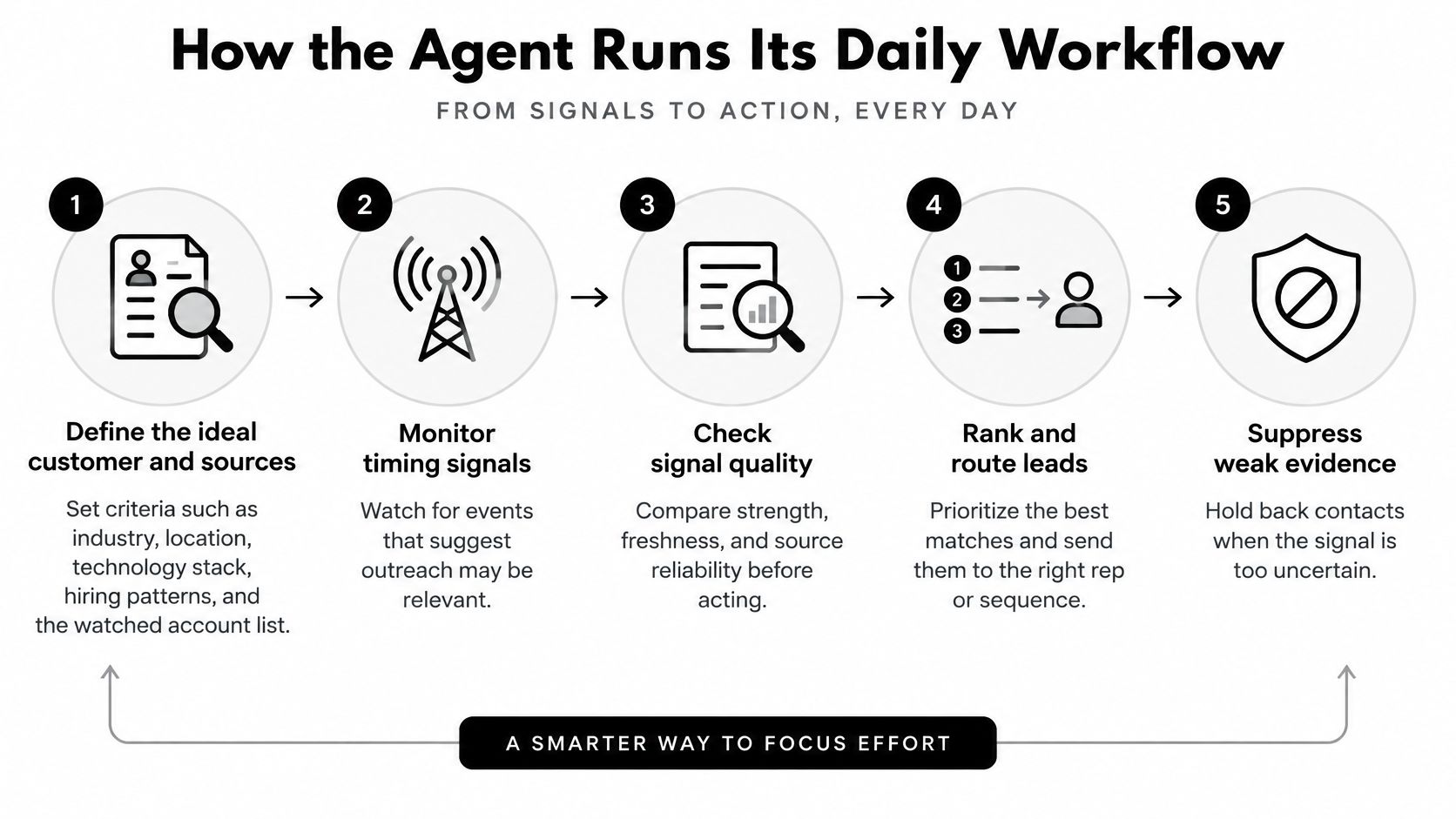
The diagram shows the decision flow, including the option to hold back weak evidence.
From Search Criteria to an Approved Message
Define the ideal customer and permitted sources. Specify industry, location, technology stack, relevant hiring patterns, and the watched account list. Include exclusions, such as existing opportunities or businesses outside your service area, so the agent doesn't mistake superficial similarity for fit.
Collect candidate companies from the campaign's chosen sources. Our process can draw from daily searches and feeds, LinkedIn connections, website visitors and signups, customers, uploaded lists, or watched companies when a signal fires. Keep the source attached to each candidate so reviewers can understand why it entered the queue.
Score fit separately from timing. A company may match your ideal customer without having a reason to talk now. Evaluate hiring changes, funding, leadership moves, technology changes, review patterns, and relevant website activity without treating any of them as proof of buying intent.
Find the person responsible for the relevant work. We check the email, or use the business inbox or phone when that's how the company buys. Website activity identifies a company rather than automatically identifying the individual visitor, so don't write as though you know who browsed.
Draft from the strongest verified signal. For our signal campaigns, the user chooses the moment to watch for, then we add the company, find the person, and draft an opener that starts with that signal. The draft should make it easy to distinguish the observed event from the proposed business implication.
A human reviews, edits, or approves the draft. Reject wording that turns an observation into a diagnosis, such as changing “you're hiring dispatchers” into “your dispatch team is overwhelmed.” Approval should cover both factual accuracy and whether the proposed conversation makes sense.
Execute within the campaign's boundaries. Approved outreach leaves the rep's own email or LinkedIn account at a human pace, within the configured send window and daily limit. Our process stops outreach when the prospect replies, allowing the seller to take over the conversation.
Record results and prepare the working queue. Write the evidence, decision, message, and outcome to the appropriate record, then surface drafts, replies, and calls for the rep. Keep rejected alerts visible to operations staff so they can diagnose noisy sources rather than hide the mistakes.
What Healthy Operation Looks Like
Look for approved drafts that need little substantive editing, not merely polished sentences. If reviewers repeatedly replace the trigger, change the recipient, or delete unsupported claims, the problem sits upstream in discovery or scoring.
A short queue of well-supported actions is more useful than a long queue that reps must research again.
Integrations and Role-Based Best Practices
Connect the agent to the places your team already makes decisions. Treat each connection as a defined handoff, with an owner and a testable outcome.
| Connection | What should pass through | What to test |
|---|---|---|
| CRM | Signal, original source, event date, confidence, fit grade, and reviewer decision | Notes land on the correct account and contact |
| Slack or Microsoft Teams | Actionable alerts and the morning work queue | Each alert opens the relevant evidence and record |
| Email and LinkedIn | Approved messages and delivery or response events | Replies, bounces, and opt-outs stop pending steps |
| Webhooks | Permitted website-intent events and routing instructions | Duplicate events don't create duplicate outreach |
For CRM implementation, map fields explicitly in HubSpot, Pipedrive, or Attio rather than placing everything in an unstructured note. Preserve the original event date separately from the date the agent discovered it.
Give Each Role a Clear Responsibility
- SDRs and BDRs: Review drafts, rewrite weak openers, and handle replies personally. Flag incorrect signals with a reason that operations can investigate.
- Founders and sales leaders: Define account fit and supply approved customer evidence. Read reply patterns weekly to judge whether the chosen angles reflect problems buyers recognize.
- RevOps: Own suppression lists, cross-campaign frequency caps, field mapping, control groups, and audit logs. Review access permissions and retention settings before connecting prospect information.
Don't enable an integration just because authentication succeeds. Use a test record to follow an event from ingestion through routing, drafting, and cancellation.
No integration goes live until the test record shows the right fields, working evidence links, and functioning stop conditions.
Benefits and Risks Teams Should Weigh
An agent can reduce repetitive account research, surface genuine changes sooner, and give reps a more consistent basis for prioritization. Those benefits depend on the agent's inputs and operating rules, not the fluency of its writing.
Buyer preferences make relevance especially important. In a survey of buyers conducted from August through September, Gartner's 2025 buyer findings reported that 73% of B2B buyers actively avoided suppliers sending irrelevant outreach, while 61% preferred an overall rep-free buying experience. Buyers still favored seller involvement for contextual decisions, including whether a solution fits their organization.
That combination doesn't mean sellers should disappear. It means a seller needs to bring something more useful than general product information.
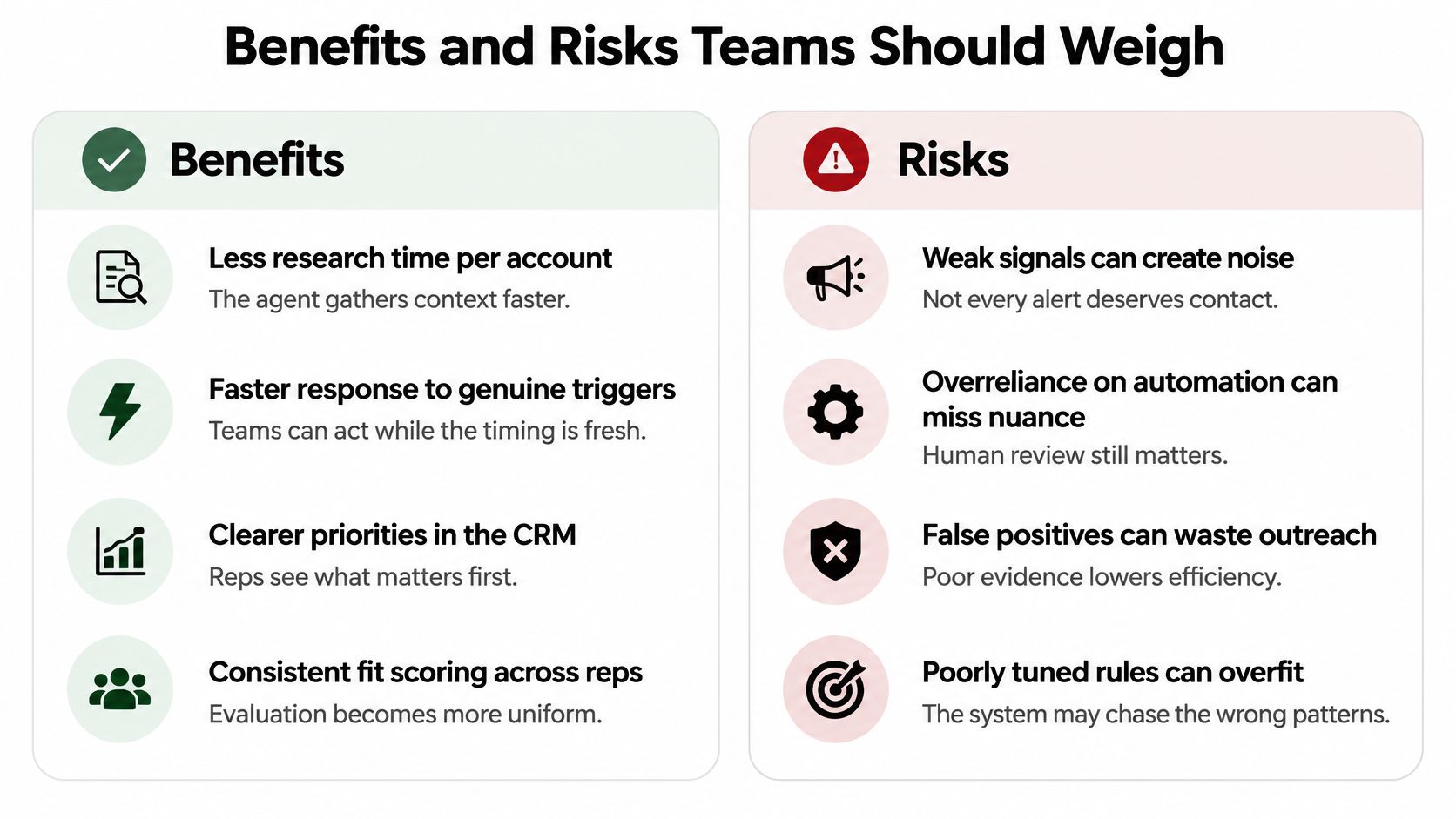
The comparison below separates potential operational gains from failure modes.
Weigh the Gain Against the Failure Mode
| Benefits to pursue | Risks to control |
|---|---|
| • Less research time: Gather account context without repeating searches. • Faster trigger response: Review a relevant change while it still matters. • Clearer CRM priorities: Give reps an ordered queue with reasons. • Consistent fit scoring: Apply shared criteria across the team. |
• Invented personalization: A draft claims an office opened when it didn't. • Stale evidence: A closed job posting becomes a current hiring claim. • Over-contacting: Several campaigns approach the same buyer. • Deliverability damage: Poor targeting and excessive sending generate unwanted contact. |
Review the Mistakes That Look Convincing
Hallucinated personalization deserves special attention because it can sound entirely reasonable. A company may announce a distribution partnership, while the agent describes it as a new company-owned depot. The resulting message is specific but wrong.
Weak inference is subtler. A drop in public ratings might justify reading the reviews, but it doesn't establish that the owner wants a new reputation-management provider. Similarly, repeated pricing-page visits may warrant account review without justifying a message that reveals monitoring details.
Reviewers should also distinguish consistent scoring from correct scoring. An agent can apply a bad rule uniformly, such as ranking every funding announcement above a directly relevant operational change. Examine rejected recommendations and negative replies alongside positive outcomes.
An agent is worth using when message relevance rises and volume stays controlled.
Judging Whether a Timing Signal Is Trustworthy
An alert can be timely and still be wrong. A useful prospecting agent shows the evidence behind a signal and leaves room to decide that the account should not be contacted yet.

Trust matters on both sides of a sales conversation. A survey described in Gartner's buyer-validation findings found that 45% of B2B buyers used generative AI during a recent purchase, while 51% said it made them more likely to encounter misleading information. A prospecting message should add reliable context, not another unsupported claim.
Require an Evidence Trail
Before acting on a public business signal, check its original source, freshness, and independent corroboration. A press release copied to another website is still one source, not two.
Keep the event separate from its possible meaning. A live job advertisement confirms that an employer is advertising a role. It does not, by itself, confirm headcount growth, available budget, or dissatisfaction with current software.
Signal Freshness and Verification by Type
Treat these windows as starting points, then adjust them based on reviewed outcomes. A website visit can become stale quickly; an expansion announcement may remain relevant longer.
| Signal | Typical source | Suggested freshness window | Verify before outreach |
|---|---|---|---|
| Hiring for a relevant role | Job boards and careers page | While the role remains open and relevant | Confirm the role is still open on the company site |
| Funding round | Press releases and business news | While the announced deployment plans remain current | Match it to an independent report or company confirmation |
| Leadership change | Company news and professional profiles | During the current appointment transition | Check the person's current title on the company site |
| Technology change | Job descriptions and website scripts | While current evidence supports adoption or migration | Confirm it on another page or job description |
| Review rating drop | Google Business Profile | While the underlying complaint pattern remains current | Read the reviews for a pattern rather than an isolated complaint |
| Pricing or demo page visit | Website intent on watched accounts | Within the campaign's configured intent-expiry window | Confirm the watched account, timestamp, and account-match confidence |
Private website events may have no public corroboration. Treat them as clues for prioritization, not proof of a person's intentions. Check the source, timestamp, and interpretation before approving an alert.
Use the video alongside a practical review of an alert's source, date, and interpretation.
If a review spike conflicts with a hiring freeze, hold the account for human review. Conflicting signals call for a pause, not a more confident story.
Writing Openers That Earn a Reply
Personalization is a commercial practice, not just a writing style. McKinsey's personalization analysis reports that personalization typically produces a 10–15% revenue lift, with observed company-specific outcomes ranging from 5–25%. Those are broad personalization benchmarks, not guaranteed results from prospecting agents.
Establish a control group before crediting the agent for improved results. Otherwise, changes in account selection, offer, or seller effort can be mistaken for better personalization.
Replace Generic Praise With a Relevant Observation
Say a logistics company has posted a dispatch-coordinator role for a newly announced depot. The stronger version below uses that hypothetical event without claiming to know the company's internal workload.
| Weak opener | Stronger opener |
|---|---|
| We help innovative companies like yours improve their sales and operations processes. | Your careers page lists a dispatch-coordinator role for the new {City} depot, posted on {Verified posting date}. We help operations teams coordinate routing across locations. How are you planning to divide dispatch between the sites? |
The stronger version gives the recipient something concrete to recognize and an uncomplicated question to answer. It doesn't assume that expansion has already caused a problem.
Build the Message From Evidence
- Rank before drafting: Choose the strongest recent signal that connects to the recipient's responsibilities. Don't mention every fact the agent collected.
- State the event accurately: Preserve distinctions such as announced versus opened, hiring versus hired, and evaluating versus using a technology.
- Keep the first email compact: Use a short observation, a relevant explanation of your offer, and an easy question. Remove the company history and feature inventory.
- Keep the source accessible: Preserve the original link in the review record and include it naturally in the message when useful. Don't create a citation that points only to the agent's summary.
Avoid flattery based on unrelated details. A founder's interview may be interesting, but it doesn't belong in the opener unless it explains why your proposed conversation matters.
Writing check: If removing the company name leaves a message you could send to almost anyone, the personalization probably hasn't earned its place.
Log signal type, source, event timestamp, account fit, message variant, and outcome. Track meaningful replies and opportunity creation, not just any response, and use the results to refine scoring within each segment.
A Four-Step Campaign Example You Can Adapt
Say a regional logistics software company wants to approach operators expanding into another location. The agent finds a company announcement about a second site and a matching operations job posting. A reviewer confirms both, then selects the person responsible for dispatch.
The opportunity is a conversation about coordination across locations. It isn't permission to claim that the prospect's routes are failing.
Four-Step Sequence With Angles and Sample Openings
The following sequence uses placeholders deliberately. Replace each with verified account information or approved customer evidence before sending.
| Step | Channel | Angle | Sample opening |
|---|---|---|---|
| 1 | New site or hire as the trigger | I saw {Company} is opening a second site in {City}, according to {Company announcement}. How are you planning dispatch routing across the locations? | |
| 2 | LinkedIn connection | Shared context, no note | Connection request with no message |
| 3 | One example from a similar firm | We helped a {Peer type} team in {Region} address {Verified dispatch issue} after its second site opened. Would the example be useful? | |
| 4 | Easy question to close | Is dispatch routing on your list for this quarter, or is it handled already? |
Our campaign process uses that progression: an email about a new office or hire, a LinkedIn connection without a note, an email with a relevant peer example, and a final easy question. Each message starts from what we found about the person and the reason to reach out now.
Review the Story Before Scheduling It
The reviewer should be able to answer these questions without conducting a fresh investigation:
- Did the event happen? Confirm the site announcement names the prospect and location, rather than a partner or similarly named business.
- Does the wording match the source? A planned opening shouldn't become an operational site in the email.
- Is the recipient relevant? A warehouse hiring manager may not own dispatch software decisions.
- Can we substantiate the proof point? The peer example must come from an approved customer story, not generated copy.
- Is the question easy to answer? Ask about ownership or priority before requesting a detailed discovery call.
The sequence stops when the prospect replies, bounces, or opts out. A response from someone else at the account should also prompt a seller to check whether the remaining touches still make sense.
Don't schedule increasingly urgent messages because the earlier ones went unanswered. Silence doesn't confirm a problem, and another channel doesn't justify repeating an unsupported claim.
Before running this campaign, replace the dispatch angle with your own relevant use case and the peer example with customer evidence you can defend. If you lack that evidence, offer a useful explanation or checklist instead of inventing a success story.
Set Human Checkpoints Before You Launch an Agent
Let the agent handle account discovery, enrichment, source collection, CRM updates, and queue prioritization. Keep sensitive interpretation, stakeholder coordination, and claims about a prospect's business problems with a seller.
Buying decisions aren't necessarily owned by the person whose email the agent finds. Demandbase's 2025 buyer findings, described in Forrester's discussion of B2B buying preferences, reported that 72% of B2B purchases involve complex buying groups. Assign an account owner who can judge whether another contact would help or create confusion.
Evaluation Criteria for an Outreach AI Prospecting Agent
| Criterion | Question to ask | Red flag |
|---|---|---|
| Source transparency | Does every alert link to its original source and date? | Alerts with no links or dates |
| Suppression logic | When does the agent refuse to contact an account? | No documented stop conditions |
| Human checkpoint | Is each draft reviewed before it is sent? | Messages sent automatically with no review |
| Send limits and pauses | Are daily limits and bounce or opt-out pauses set? | No caps or pause rules |
| CRM auditability | Are signals and notes written back to the record? | Scores with no history or explanation |
| Contact data and consent | Where does each contact come from and how is it verified? | Unverified contacts with no provenance |
Use individual draft review during the pilot. If a proven campaign later moves to autonomous operation, treat that as a separate approval decision, not the default consequence of connecting an inbox.
Test the Boundaries, Not Just the Happy Path
Our Agent campaigns send only inside the configured send window and pause on bounces, negative replies, or opt-outs. Include those cases in testing, alongside duplicate accounts and contacts already active in another campaign.
For contact handling, verify provenance and suitability rather than assuming that a deliverable email address establishes permission. Review applicable privacy and outreach requirements with the person responsible for compliance.
Run a pilot in a narrowly defined segment with a comparable control group. Before approving launch, inspect a sample alert with its original evidence, trigger a suppression condition, and demonstrate a pause, then judge the pilot by better decisions per seller hour, not messages sent.
CapyScout finds fitting companies, monitors account changes, and prepares source-backed outreach around a concrete reason to make contact. Visit CapyScout to explore a focused campaign built around your ideal customer and the buying moments your team can verify.
Not ready to start? Get a free target list: 10 companies to sell to, picked from your website.