

Sales Trigger Events: How to Find and Act on Them
Learn what sales trigger events are, how to detect buying signals, and proven workflows to act on them before competitors do. Includes real examples and KPIs.
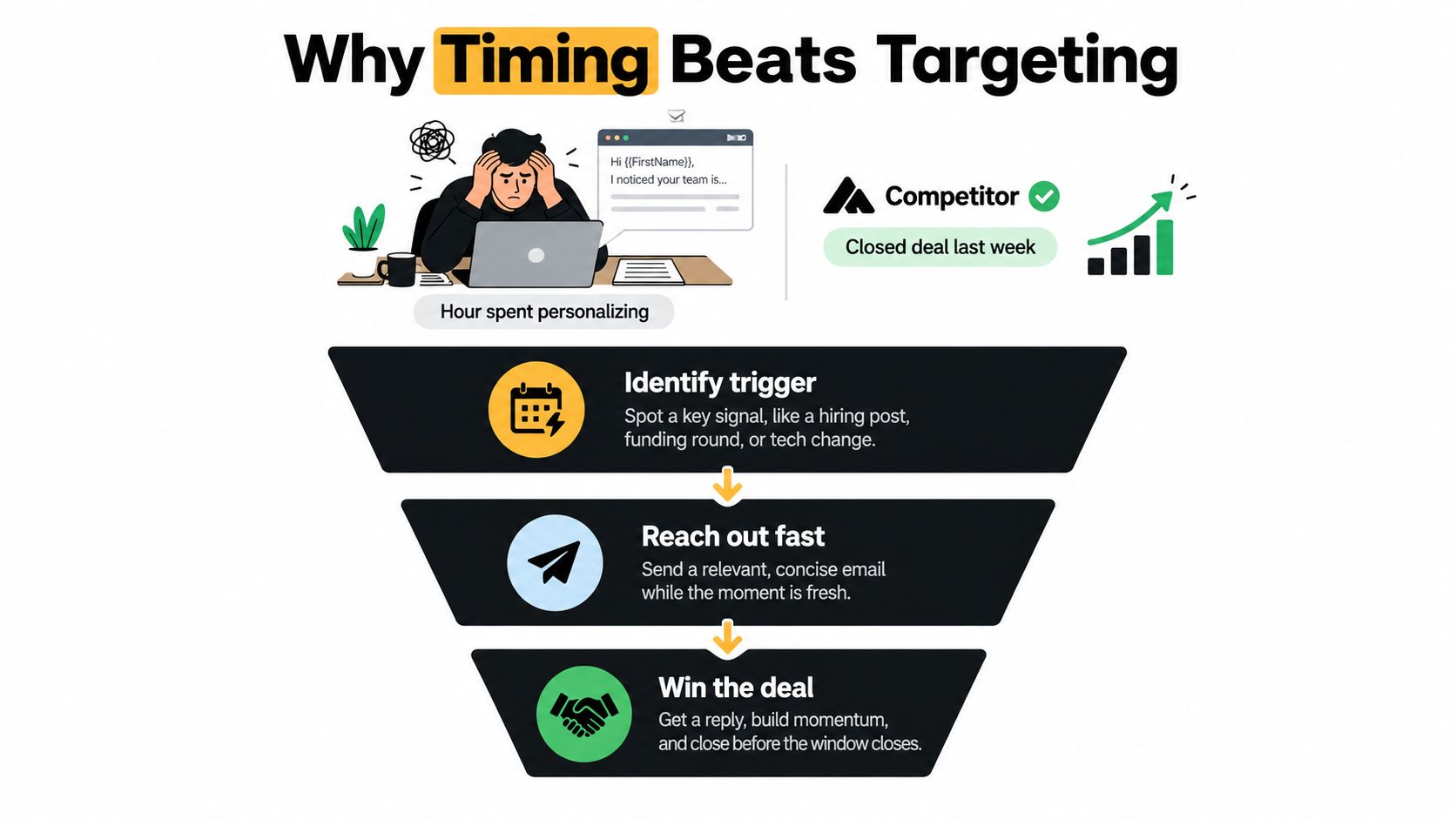
Your SDR spends an hour polishing an email to a perfect-fit account, then learns a competitor closed the deal last week. In this familiar scenario, the competitor didn't have a better opening line. Their rep noticed a hiring surge, investigated the project behind it, and contacted the right person while the decision was still open.
That's the job of sales trigger events: identify a relevant change early enough to do something useful. But collecting alerts isn't a strategy. You need rules for which evidence justifies contact, how quickly to respond, and when to stop treating yesterday's news as today's opportunity.
Table of Contents
- Why Timing Beats Targeting in Modern Outbound
- What Sales Trigger Events Actually Are
- The Six Categories of Buying Signals Worth Tracking
- Real-World Trigger Scenarios and Outreach First Lines
- Where Triggers Come From and How to Detect Them
- Building a Trigger-Based Workflow That Actually Works
- When a Trigger Expires and How to Stop Chasing Cold Accounts
- Measuring Success, Common Pitfalls, and a 30-Day Starter Plan
Why Timing Beats Targeting in Modern Outbound
A clean account list answers a narrow question: which companies resemble your customers? It doesn't tell a rep whether anyone at those companies is working on a problem your product solves.
That distinction matters when allocating selling time. A carefully researched message about someone's podcast appearance can still arrive after they've selected a vendor. An ordinary message about a verified, active initiative gives the recipient a practical reason to respond.
Fit tells you where to look. Change tells you where to investigate now. Neither replaces the other.
Start with movement, not decoration
Consider the hiring-surge scenario. The useful observation isn't that the company has vacancies. It's that the relevant team is expanding, the job descriptions mention a workflow you support, and someone likely owns the resulting operational decisions.
A timing-led rep would:
- Confirm the change: Check whether the openings are current and relevant, rather than recycled listings.
- Identify the implication: Work out which process might need to change as the team expands.
- Find the owner: Contact the person responsible for that process, not whichever executive has an available email address.
That's materially different from adding a company announcement to a generic pitch.
The contrast is straightforward.
Build a queue of decisions
In a list-led program, managers ask how many contacts reps processed. In a timing-led program, they ask which accounts changed, whether the evidence supports action, and who owns the next move.
A trigger program should help a rep decide what to do, not merely give them another reason to send.
Keep ordinary prospecting for accounts that fit but show no current movement. Reserve the trigger queue for time-sensitive investigation and action. Otherwise, reps end up working the same static list with more notifications attached.
What Sales Trigger Events Actually Are
A new VP of Sales starts at a target account on Monday. By Friday, four vendors have sent congratulatory emails pitching their platforms. None of them checked whether she owns the relevant budget, whether the company fits, or whether she has decided the problem matters at all.
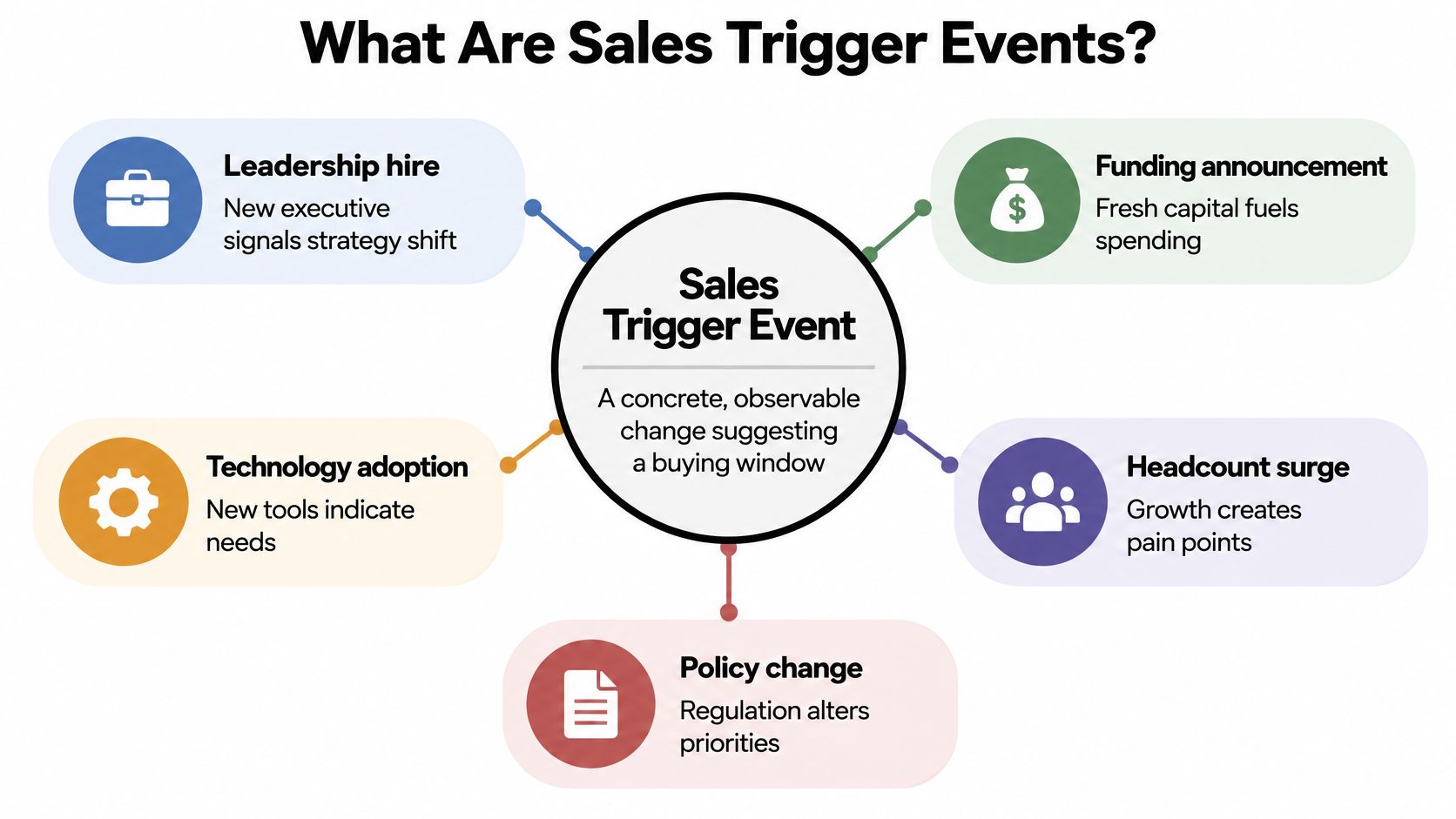
A working definition should prevent that reflex. A sales trigger event is an observable change that suggests an account may have entered a buying window. A relevant leadership hire, a funding announcement, a technology adoption, a headcount expansion, a return visit to your pricing page.
Each one is evidence with a decay window.
Account records tend to blur four separate questions together, so separate them yourself. Fit asks whether the company could reasonably benefit from your product. The trigger asks what changed to make an investigation timely. First-party intent asks what the account has done on your own properties. Authority asks whether the person you identified can influence or approve a purchase. A funding announcement answers the capacity question while saying little about need. A new executive may carry a relevant mandate, but a job title proves nothing on its own. A pricing-page visitor might be researching for someone else entirely.
Buyer behavior reinforces the case for useful input over instant meeting requests: a 2025 buyer-research summary reports that buyers complete roughly two-thirds of their journey before contacting sales, while 88% still want useful vendor input during evaluation.
The events are easy to spot. Their commercial relevance takes judgment.
How fast should you respond?
That depends on which kind of evidence arrived. A speed-to-lead research summary reports that an InsideSales.com analysis of more than 15,000 leads associated contact within five minutes with approximately 21 times greater qualification likelihood than waiting 30 minutes. It also describes Harvard Business Review research on 1.25 million leads, where response within one hour was associated with seven times greater qualification likelihood than longer delays and 60 times greater likelihood than waiting 24 hours.
Those findings concern inbound lead response. They do not prove every funding alert deserves an email within the hour. The practical split: explicit inquiries and high-intent actions get response standards measured in minutes, public company news gets a measured investigation window measured in days, and accounts whose evidence goes stale get dropped from the queue.
Triggers earn investigation. Sufficient evidence earns outreach.
The Six Categories of Buying Signals Worth Tracking
Don't copy a universal trigger list into your CRM. Choose categories that connect to the problems you solve, then distinguish measurable purchase associations from your own working hypotheses.
The buying-signal analysis summarized by Prospeo, covering one million B2B software purchases, reports the purchase lifts below and estimates that roughly 70% of the buyer journey occurs outside sellers' direct observation.
Typical Lift Reported for Each Trigger Category
The figures below come from that analysis. They aren't interchangeable confidence scores, and the table doesn't establish causation.
| Category | Reported purchase lift | Typical source |
|---|---|---|
| Technology adoption and stack shifts | AI-tool adoption 46%; recent software purchases 38% | Technology observations, company announcements |
| Hiring and headcount growth | Headcount growth 38%; increased job postings 7% | Career pages, job boards |
| Leadership changes | Executive or vice-president hires 28% | Leadership announcements, professional profiles |
| Funding and financial events | Funding rounds 25% | Funding announcements, financial disclosures |
| First-party website behavior | No comparable lift provided | Your pricing, demo, and integration pages |
| Reputation and review shifts | No comparable lift provided | Business profiles, review platforms |
Interpret each category differently
Technology adoption deserves close attention when your product complements the new system. If the account just selected a direct competitor, investigate implementation needs before assuming replacement demand.
Hiring needs role-level interpretation. Recruitment for a function you support is more useful than general growth. A replacement vacancy doesn't carry the same implication as an expanding team.
With leadership changes, look for the mandate. A new operations leader discussing process standardization provides a more useful opening than a title update alone.
Funding belongs on the watch list, not automatically at the top of the outreach queue. Look for stated investment priorities that connect the capital to your category.
For the remaining categories, use different qualification rules:
- Website behavior: Prioritize relevant activity on your own site, but distinguish account-level observations from known individual requests.
- Reputation shifts: For local businesses, examine the substance of recent feedback. Appointment-access complaints and clinical complaints imply very different conversations.
Track what helps you form a defensible business hypothesis. A highly visible announcement that has no connection to your product is still irrelevant.
Real-World Trigger Scenarios and Outreach First Lines
The following are hypothetical worked scenarios, not customer case studies. Each shows how a rep should move from an observation to a question without pretending to know the prospect's internal situation.
Reviewing the evidence together helps separate a useful account hypothesis from a convenient sales story.

A SaaS company changes its stack
Suppose an account adopts a competing tool while advertising engineering roles that mention maintaining integrations. Confirm that the technology observation is current and that the listings describe work your product supports.
A generic opener would congratulate the company on growth. A useful draft would ask:
Your engineering listings mention maintaining integrations alongside the new platform. Is integration upkeep part of the rollout you're managing, or does another team own it?
The message doesn't claim dissatisfaction with the competitor. If you sell a complementary product, explain that connection next. If you only sell replacement software, the recent purchase may be a reason to wait.
A company hires a revenue operations leader
Suppose a mid-market business appoints its first VP of Revenue Operations. Verify the appointment and check whether the announcement describes a relevant priority.
A trigger-grounded first line could read:
Your appointment announcement mentions standardizing sales handoffs. Are you starting with routing rules, account ownership, or reporting?
That question is appropriate only if the announcement mentions that priority. Without it, ask about the leader's remit instead of inventing a broken process.
For more drafting patterns, compare these outreach email examples for B2B SaaS and local services.
Use the accompanying video as a separate discussion prompt when reviewing your team's messaging.
A dental practice receives negative feedback
Suppose a practice's rating falls and recent reviews repeatedly mention unanswered appointment requests. Check the review text and dates before deciding whether the issue fits your service.
A respectful opener would be:
Recent patient feedback mentions difficulty reaching the front desk for appointments. Is improving that process something you're reviewing?
Don't lead with a dramatic rating decline or imply lost revenue you can't verify. Across all these examples, the pattern is observation, relevant implication, honest question. The trigger supplies context; the rep still has to demonstrate judgment.
Where Triggers Come From and How to Detect Them
A trigger is only as good as its paperwork. If the record cannot show what changed, which account it belongs to, and when it became visible, treat it as a rumor. Monitoring should preserve evidence and freshness while keeping weak mentions out of the lead pool.
Start from the question, not the feed
| Question to answer | Better source | Evidence to keep | When it loses value |
|---|---|---|---|
| Are they hiring for a problem we solve? | Career pages and job boards | Role description, team, location, posting date | When the req is old, duplicated, or clearly backfilled |
| Did money or priorities change? | Funding announcements, news wires, relevant SEC filings | Amount, stated purpose, date, named executives | When coverage is syndicated or the stated use is vague |
| Did leadership actually change? | Company announcements plus LinkedIn profile changes | Start date, remit, reporting line, prior role | When title changes lack dates or contradict the announcement |
| Did their stack shift? | Website fingerprinting, app marketplaces, integration docs | Product name, where it appeared, first seen date | When the clue only suggests a category, not adoption |
| Are they already evaluating us? | Pricing, demo, and integration page activity | Pages viewed, recurrence, known account match | When visits cannot be tied to the right company |
| Is local sentiment slipping? | Google Business Profiles and review platforms | Review text, dates, repeated operational themes | When complaints are isolated or unrelated to your service |

Finding a mention is cheap. Proving it belongs to the account is the work. A lead database can establish company coverage. Live-web monitoring can spot change. CRM enrichment can attach the change to the right record. Intent tools can add behavior from your own properties. Slack or Teams can deliver the alert, but the account record still needs the artifact behind it.
For monitored watch lists, use CapyScout's signals and tuning guidance to turn broad interests into dated, observable account changes.
My rule set is blunt. Act when you have a dated artifact, the right account, and a defensible link to the problem. Wait when the event looks real but the date or source is murky; put a review date on it. Stop when the claim depends on a copied announcement, a lookalike company name, an old role, or evidence outside its useful window.
Building a Trigger-Based Workflow That Actually Works
A rep gets a funding alert at 9:07. By 9:15 she has found the original announcement, confirmed the account, and drafted a first line tied to the expansion plan inside it. A second rep sees the same alert, recognizes the logo, and sends a template. Same trigger, opposite outcomes. The difference is the workflow sitting between detection and the send.
That workflow makes five decisions in order: detect, enrich, assess, route, review. Outreach happens after all five.
Everything hangs on one record per event. Store the account, event type, source, observed date, detection time, owner, an evidence summary, and the next review condition. Keep observed facts in one field and the rep's interpretation in another, so anyone auditing the account later can separate what is known from what is inferred.
Before any scoring, run four gates in order. Identity: the evidence belongs to the right company. Fit: the account matches your real customer criteria. Relevance: you can state, in one sentence, how the change connects to a problem you solve. Eligibility: suppression rules, open conversations, and account ownership all permit contact. A numerical score never rescues a bad account match, so grade only what passes. Then rate recency, source reliability, proximity to the problem, and corroboration as high, medium, or low until your own reply data justifies a more elaborate model.
Routing follows confidence. Solid, relevant evidence goes to a rep. Incomplete evidence goes to research. Weak but plausible observations sit on a watch list with a review date attached.
Give the rep something usable
The alert should carry a one-line explanation of why the account matters now, the source, a recommended action, and an editable draft. Deliver it through Slack, Teams, email, or a webhook, and write the decision back to the CRM.
With HubSpot, Pipedrive, or Attio, decide which system owns each field before enabling bi-directional sync. A routine enrichment refresh will overwrite a rep's disqualification or a reassigned owner unless human decisions are protected.
Workflow rule: Automate evidence collection and preparation. Keep an accountable owner for the contact decision.
Keep contact acquisition in the preparation stage. If an approved workflow involves collecting social contacts, HarvestMyData's walkthrough on how to export Instagram contacts belongs in list prep, where it does not get mistaken for buying intent.
For recurring execution, use the campaigns and Autopilot workflow guidance. A daily refresh and a prioritized Today queue earn their keep only when the system respects holds, logs rep decisions, and clears out evidence that no longer supports action.
When a Trigger Expires and How to Stop Chasing Cold Accounts
The hardest trigger decision is often the one after silence. Does the account still merit attention, or is the rep repeating a message because the alert remains open?
Buying processes can stall even when the initial observation was valid. Industry reporting on stalled B2B buying cites 34% of revenue teams describing average sales cycles of one to two quarters, an average of seven stakeholders in mid-sized-company decisions, and 89% of buyers reporting a stalled purchase in the prior year.
That doesn't justify indefinite follow-up. It justifies checking whether the reason for contact still exists.
Assign expiration by event type
Use these as recommended operating rules, not universal benchmarks.
| Signal | Recheck condition | Downgrade or stop condition |
|---|---|---|
| Leadership hire | Review during onboarding for evidence of the relevant mandate | Leader leaves, remit changes, or no relevant initiative emerges |
| Job posting | Check whether the role remains open and materially unchanged | Role is filled, removed, or confirmed as unrelated backfill |
| Funding | Look for execution against the announced investment priorities | No relevant initiative follows or spending priorities change |
| Technology change | Verify implementation activity and your product's role | Rollout ends or evidence contradicts the proposed need |
| Website activity | Reassess rapidly unless relevant activity repeats | Isolated activity receives no corroboration |
| Reputation shift | Check whether the same issue continues in recent feedback | Feedback stabilizes or the issue falls outside your service |
A leadership event may remain useful through onboarding. A job listing has an observable lifecycle. A website visit should lose priority quickly without supporting evidence. Don't give all of them the same expiration setting.
Separate waiting from chasing
Act when current evidence supports a relevant conversation. Wait when the hypothesis is plausible but incomplete. Stop when the evidence is contradicted, the account declines, the project ends, or the account no longer fits.
A follow-up should contribute something: new corroboration, a useful answer, or a clarified question. If nothing has changed, don't present the original announcement as fresh news.
An unanswered email is not new buying evidence.
Record why an account moved out of the active queue. Allow a new event to reopen the investigation, but don't let an automated refresh reset an exhausted sequence. Daily monitoring should update confidence in either direction.
Measuring Success, Common Pitfalls, and a 30-Day Starter Plan
Measure whether reps reach relevant buyers at useful moments, not whether your system detects lots of activity. A large alert count can reflect broad rules, duplicate sources, or poor filtering.
Use an operational scoreboard
- Speed-to-lead: Track elapsed time from eligible inbound or high-intent activity to human action. Keep public-news alerts separate.
- Signal-to-reply rate: Measure replies to trigger-grounded outreach, distinguishing substantive responses from declines and automated messages.
- Trigger-sourced pipeline: Record opportunities originating from the program, separately from existing opportunities that received new account intelligence.
- Alert decay: Track evidence downgraded or expired before action, including whether delay, irrelevance, or duplication caused it.
- Rep disposition: Capture why reps acted, waited, or rejected an alert.
Compare outcomes within similar account segments. Don't credit the trigger when the apparent difference comes from account fit, contact seniority, or an existing relationship.
The avoidable mistakes are straightforward: treating every event as intent, skipping fit checks, scoring only at detection, and failing to stop. Bad contact data is a separate execution problem; SkipForge's guide for B2B outreach teams is a relevant resource when reviewing enrichment alongside your trigger workflow.
Run a month-long operational pilot
Treat the following as a proposed schedule, not a performance promise:
- Week one: Choose a narrow account segment, define relevant events, and write act, wait, and stop rules. Checkpoint: reps can explain why each event matters.
- Week two: Connect sources, resolve account matching, and test routing without sending automatically. Checkpoint: each alert has usable evidence and an owner.
- Week three: Launch rep-reviewed outreach and record dispositions. Checkpoint: managers can distinguish weak signals from weak execution.
- Week four: Inspect replies, missed windows, and expired alerts. Remove noisy rules before expanding coverage.
Start with the CRM accounts your team already understands. Assign an operator to own the queue, review rejected alerts alongside successful conversations, and change the rules based on what those records show.
CapyScout offers live-web account monitoring, source-backed briefs, CRM enrichment, and a scored Today queue with outreach drafts. Visit CapyScout to build a watched account list and turn relevant changes into a reviewable queue with clear reasons to act, wait, or pause.