

AI SDR Meaning: What an AI Sales Development Rep Does
AI SDR meaning: software that handles early sales prospecting, outreach and follow-up. See how it works, where it falls short, and how it fits human SDRs.
An AI SDR is software or an AI agent that performs the early-stage prospecting, outreach, follow-up and qualification work that a human sales development representative traditionally does. It's no longer a fringe experiment: AI adoption in sales grew sharply from 2023 to 2024, according to HubSpot's AI Trends for Sales report, which is why almost every outbound tool now prints those three letters on its pricing page.
Here's a scene that plays out most weeks. You run a small sales team, or you're the founder doing the selling yourself. One vendor demo promises an AI SDR that fills your calendar while you sleep. Another sends a deck describing a sequence builder with an AI button as an AI SDR too. The labels match. The products don't.
What follows is the explanation I'd give across a table: what the job is, where automation earns its keep, and how to tell a serious product from a rebranded one. The difference comes down to trust. A serious product shows the evidence behind each contact it picks and waits for your approval before sending. A rebranded one just sends faster.
Table of Contents
- AI SDR Meaning in Plain Terms
- The Work an AI SDR Takes Over
- Automation Levels From Assistive Tools to Autonomous Agents
- Benefits Teams Get From an AI SDR
- Where AI SDRs Go Wrong and How to Limit the Damage
- AI SDR and Human SDRs Working Together
- Decide Whether an AI SDR Fits Your Team
AI SDR Meaning in Plain Terms
AI SDR stands for artificial-intelligence sales development representative. Spelled out that way, the meaning is easier to hold onto: a system that runs the first leg of the sales race.
Outbound selling works like a relay. One runner finds the baton and gets it moving at speed. The other runner finishes. Sales development reps have always run that first leg. They identify prospects, research them, open the conversation, follow up, test whether there's real interest, and pass the promising ones to an account executive who runs discovery, builds the proposal and closes. An AI SDR runs that first leg with software, at a pace and a coverage a person can't match.
The day-to-day reality looks like this.

The split isn't new. Companies separated prospecting and qualification from closing years ago, precisely so account executives could spend their hours on discovery, proposals and negotiation instead of list building and chasing follow-ups.
Sales teams have already decided the tools are worth having. In 2025, 61% of surveyed sales professionals said generative AI would help them serve customers more effectively, according to Salesforce. The harder question is what you're buying, because the answer varies wildly between products wearing the same label.
If you want the human-side detail, the split between an SDR and a BDR and what each is measured on is covered well in this breakdown of SDR vs BDR responsibilities and KPIs.
Where the definition gets tested
A conventional CRM rule is a switch. A field changes, a template fires, done. An AI SDR is supposed to make a decision across a workflow: whether this lead fits the criteria you defined, what a reply means, and whether the next step is another touch or a handoff.
An AI SDR is an automation layer for top-of-funnel sales development, not a replacement for the people who close.
Three questions cut through most vendor claims. Does it decide anything, or does it just execute a rule you wrote? Does it act across several steps, or only draft a single message? Does it hand off to a person at defined points, and can you see where those points sit?
The Work an AI SDR Takes Over
Sales development is a chain, not a checklist. Each task feeds the next, and a weak link at the front ruins every step after it. Read the table from top to bottom and you're following one prospect's journey from a name on a list to a confirmed call.
| Task | What the AI SDR does | Example |
|---|---|---|
| Prospect identification | Finds companies that match ideal customer profile criteria from live sources | Mid-sized SaaS firms that posted a revenue operations job this month |
| Enrichment | Adds firmographics, technology stack, region and relevant contacts | Headcount, CRM in use and the head of sales role |
| Signal monitoring | Watches hiring, funding, leadership, review and website activity | New VP of Sales flagged within two weeks of appointment |
| Personalized outreach | Drafts a first message that cites a specific recent change | Opener referencing a funding round announced last week |
| Multistep follow-up | Runs timed sequences and changes course when a prospect replies | Second touch three business days later with a different angle |
| Conversational qualification | Asks qualifying questions and scores the answers against criteria | Budget range, decision-maker and buying timeline captured |
| Meeting booking | Proposes times and books a slot on the account executive's calendar | Confirmed call placed on the AE calendar |
| CRM update | Logs activity, updates fields and writes context notes | "Why now" note added to the account record |
The best outreach in that chain starts with a reason to act now, not a generic pitch about your product. A well-built system writes each message from what it found about the person, opening with the reason to reach out today, whether that's a new sales leader, a funding round or a shift in the tech stack.
Where automation helps and where it stops
Sort the tasks into two piles and the buying decision gets simpler.
- Research-heavy, repetitive work. Identification, enrichment, signal monitoring and CRM logging are where automation pays for itself fastest. Nobody joined your team to copy job titles between tabs.
- Judgment-heavy work. An answer that carries an objection, a reply with ambiguous intent, a question about contract timing. These belong with a person, and the system should say so rather than improvise.
Every task in that table is only as good as the account data underneath it. A job post that was reposted rather than newly opened, a contact who left last quarter, a funding announcement from a company that has since been acquired: the workflow runs perfectly and produces a wrong message. Signal quality is the whole game, and buying signals and how to use them covers eight free sources worth watching before you spend a cent on a database.
Automation Levels From Assistive Tools to Autonomous Agents
The same label covers products that behave nothing alike. Four levels explain most of the difference, and knowing which one you're being sold saves a lot of disappointment later.
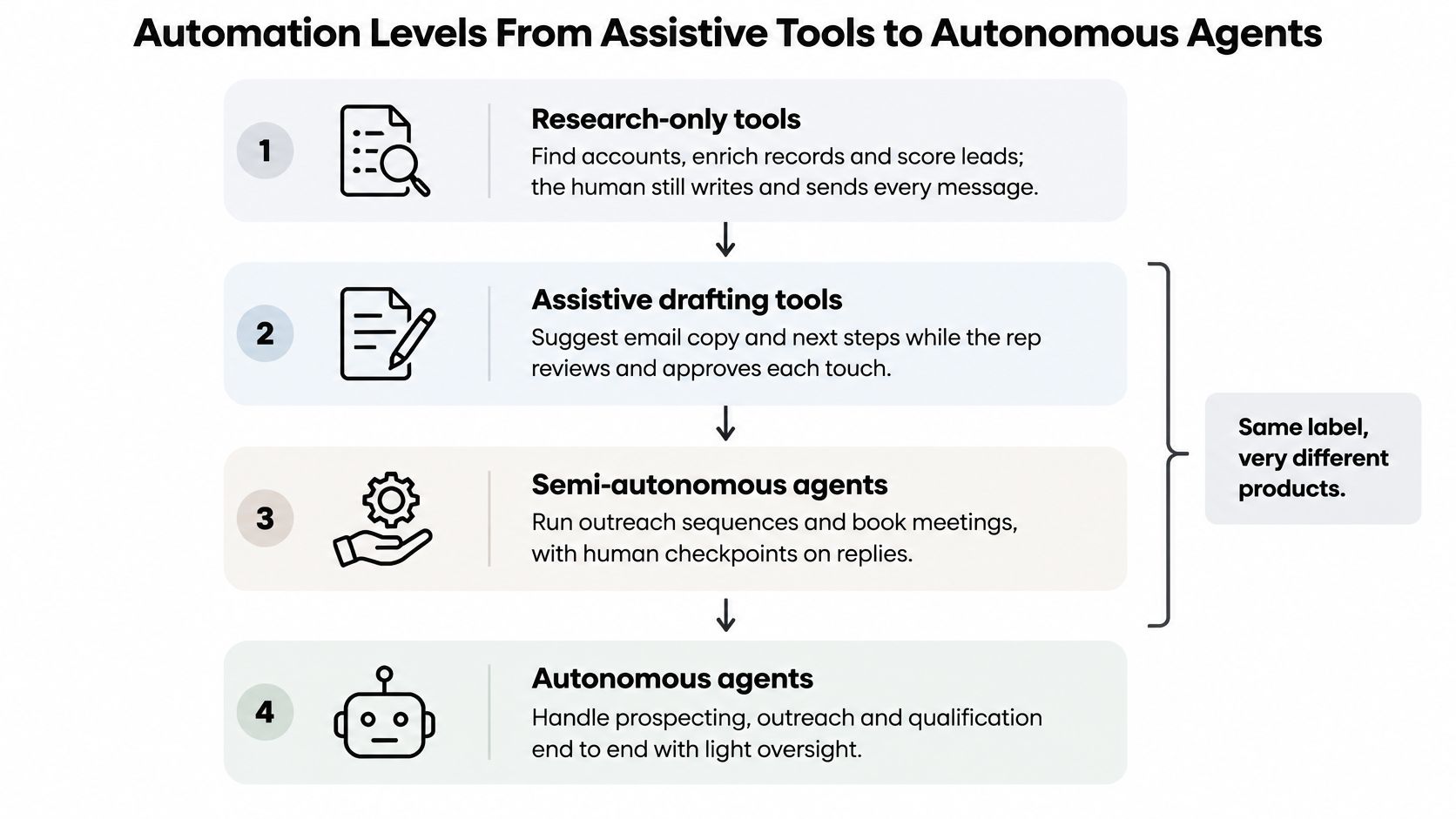
| Automation level | What the system does | Human role | What you see in practice |
|---|---|---|---|
| Research-only | Finds accounts, enriches records and scores fit | Writes and sends all outreach | Scored lists and account briefs |
| Draft-and-approve | Writes evidence-based messages and prepares sends | Reviews, edits and sends each message | Prefilled drafts in the existing email client |
| Semi-autonomous | Runs sequences and pauses when a reply arrives | Handles replies, objections and pricing questions | Reply-triggered routing to a rep |
| Fully autonomous | Sends, qualifies and books meetings | Reviews escalations and exceptions only | Meetings on the calendar with no rep touch before the call |
Draft-and-approve is where most careful teams land, and a worked example shows why. A user decides to go after companies that just hired a sales leader. For signal campaigns, the user picks the moment, CapyScout adds the company, finds the person and drafts an opener that starts with the signal, and the user approves it. Nothing leaves the outbox until a human reads it.
That middle setting appeals because it keeps two things intact. Your brand stays in your voice, and your sending domain stays yours instead of being handed to a vendor that might burn it on someone else's campaign.
Test before you buy: ask which actions the system takes without a person, and which decisions still require approval. A vendor who can't answer both clearly hasn't thought it through.
If you want the wider picture of how this sits alongside the rest of your stack, this explainer on what AI automation covers in a sales team is a useful reference point.
Benefits Teams Get From an AI SDR
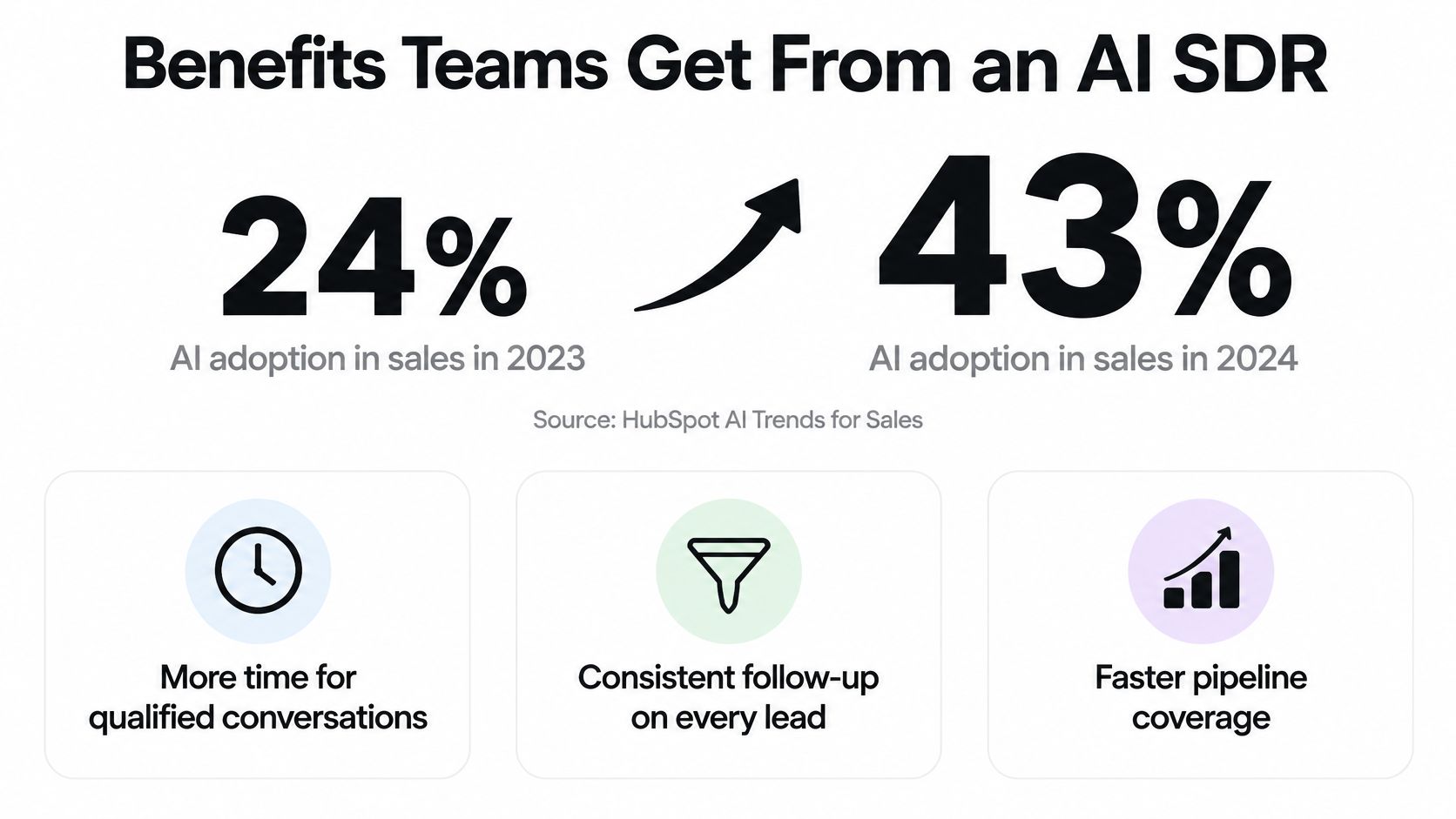
The question for many sales leaders is no longer whether to use AI in sales. In 2024, AI adoption in sales reached 43%, up from 24% in 2023, according to HubSpot's AI Trends for Sales report. The question is where the gain shows up.
The gains are concrete when you name them.
- Research time per account collapses. A brief bundles the company context, the people involved, the recent change and a suggested angle in one place, so a rep starts from a summary instead of five open tabs.
- Coverage expands into the long tail. Accounts your team would never reach by hand get monitored, and some of them will surprise you.
- Follow-up stops dying after the third touch. Sequences run on schedule, including the ones your reps would have skipped during a busy week.
The gains that show up later are the ones buyers underrate. An inbound signup gets a scored decision and a draft reply within minutes rather than the next business day. CRM records stay current instead of decaying over a quarter. Reps spend more of their week talking to people, which is the only activity that produces pipeline.
Say a three-person team used to scan a few dozen accounts a week by hand. With monitored lists and drafted openers, the same headcount can cover several hundred, with the human hours going into the replies that matter.
Here's a short walkthrough of how these systems get deployed in practice.
Then be strict about what you count. Messages sent and emails opened tell you whether the tool is busy, not whether it works. Track qualified pipeline created, meetings that were held, disqualification rate, complaint rate and the time between a signal appearing and a human picking it up. For a deeper look at how scoring works on these systems, this guide to AI lead qualification is worth your time. Benefits come from accurate targeting, not from volume.
Where AI SDRs Go Wrong and How to Limit the Damage
More autonomy is not automatically better. The typical failure isn't a chatbot saying something absurd. It's a perfectly executed sequence aimed at the wrong person over a trigger that stopped being true six weeks ago.
Each failure mode has a safeguard that costs almost nothing to switch on.
- Stale or conflicting company data. A contact who left last quarter still sits in the sequence as if they were the buyer. Pair it with a freshness check before sending, and refresh the record whenever a sequence pauses.
- A misread signal. A job post that was reposted is not a new opening. Pair it with a link to the posting and its date, so the rep can confirm it in one click.
- Sending to a generic inbox. info@ reaches a gatekeeper. Pair it with contact-level verification and suppression of role accounts.
- Too much volume from one domain. This damages deliverability and reputation for everything else you send. Pair it with a daily cap and domain rotation.
- Ambiguous intent scored as interest. "Not now" is not a yes. Pair it with intent classification that routes anything unclear to a person.
- Poor fit for complex enterprise deals. Six stakeholders and a nine-month cycle won't be handled by a sequence. Exclude named accounts by policy.
Four situations need a human by default, no exceptions: pricing exceptions, legal or security questions, unclear qualification, and low-confidence evidence.
The rule to write down first: if a rep can't see the evidence behind a trigger in one click, that trigger isn't ready to be automated.
That's a design constraint, not a limitation. Each signal hit links to its evidence, such as the job posting, news article, review, or page change that triggered it, so you can verify it before acting. Add suppression lists for customers and opt-outs, approval thresholds for anything touching a live opportunity, and an audit trail that records what went out and why. If your outbound runs across borders or into regulated buyers, this look at AI outbound sales and the compliance checks that go with it is a sensible read before you scale volume.
AI SDR and Human SDRs Working Together
The relationship question deserves a direct answer. An AI SDR carries the research-heavy, repetitive front-end work at a scale no team can match by hand. Human SDRs own judgment, rapport and exceptions. Neither side is close to doing the other's job well.
| Dimension | AI SDR | Human SDR |
|---|---|---|
| Research speed | Scans many sources in minutes | Often takes hours per account |
| Outreach volume | Consistent at scale across long lists | Limited by daily capacity |
| Reading nuance and rapport | Limited, depends on available context | Strong, reads tone and builds trust |
| Exceptions and judgment | Escalates when rules are unclear | Decides within company policy |
| Availability | Runs nightly and in real time | Works set hours |
| Learning and improvement | Adjusts through rules and feedback loops | Improves through call reviews and coaching |
The handoff runs in three stages
Stage one. The system prospects, enriches and sends the initial outreach. Nobody on your team touches a first message unless your approval setting says they should.
Stage two. It passes the account to a person when the prospect shows buying intent, when a reply raises an objection or asks about pricing or security, or when confidence in the evidence is low. These are the same human-by-default triggers from the escalation list, which is why that list has to be written before launch rather than after the first awkward reply.
Stage three. The human SDR owns the conversation until a meeting is booked, then hands the account to the account executive with a short brief. Two paragraphs is enough: who they are, why now, what they've already asked.
The human role changes rather than disappears. Reps review the queue each morning, approve or rewrite drafts, take the replies that need a person, and tune the targeting criteria when the hit rate drops. Teams often start by naming one rep to supervise the AI queue for a single segment, which keeps the feedback loop tight while the rules settle.
Policy first: the boundary between the two roles is a written document, not a judgment call made at 4pm on a Friday.
Some teams fill the human side of that boundary with a contractor before they commit to a full-time hire, and services like these SDRs for hire exist for exactly that stage. Either way, the escalation rules need to be down on paper before any automation is switched on.
Decide Whether an AI SDR Fits Your Team
A short fit check answers this faster than any demo. First, is your ideal customer profile written down clearly enough that a stranger could apply it? Second, do you have a steady flow of target accounts rather than one spike a quarter? Third, is your CRM data clean enough to enrich?
The team side matters just as much.
- Good candidates have a named person to review the queue each week, a clear measure of what counts as a qualified meeting, and a segment small enough to test properly.
- Teams that should wait haven't settled their targeting, have data badly out of date, or have nobody with an hour a day to review drafts. Automation aimed at a fuzzy profile just produces wrong messages faster.

Run a 30-day pilot on one segment. Choose draft-and-approve, write the escalation rules, set a daily send cap, and measure qualified meetings, complaint rate and handoff time against a manual baseline you record in week zero. Review at day 30, then decide whether to widen it.
CapyScout fits that pilot shape. It finds accounts from live web sources, monitors buying signals, writes source-backed briefs, and handles buying signals, contacts and sending in one tool, routing work into HubSpot, Pipedrive or Attio. One concept worth measuring closely is the signal-timed contact, a person reached for a reason, such as a buying signal at their company, a warm path opened, or a fresh match to your ideal customer profile. Those contacts are the ones a pilot should be judged on, not the size of the send list.
If you'd rather see the whole loop running on your own market than read another comparison, CapyScout finds fitting companies from the live web, watches them for buying signals, and drafts openers that start with the reason to reach out, each one linked to the evidence behind it. You approve every message before it leaves your existing inbox, so your domain and your voice stay yours. Start with one segment and see what CapyScout surfaces for your ideal customer profile.
Not ready to start? Get a free target list: 10 companies to sell to, picked from your website.