

Company Enrichment API: Endpoints, Fields and Workflows
Learn how a company enrichment API works: endpoints, response fields, provenance, freshness, error handling and CRM sync patterns.
In 2025, 37% of organizations surveyed by Validity reported losing revenue directly because of poor CRM data quality, according to the Validity State of CRM Data Management announcement. A match rate on last year's file doesn't protect this year's pipeline. A company enrichment API only earns its place when every field it writes can be dated, sourced, and refused when the evidence is thin.
Table of Contents
- Why Company Records Decay and Why APIs Matter
- Company Enrichment API Operations at a Glance
- Request and Response Anatomy for a Single Lookup
- Provenance Fields That Keep Every Value Auditable
- Field Freshness and Refresh Intervals
- Batch, Webhook and CRM Sync Integration Patterns
- Error Handling, Retries and Idempotency
- Compliance and Evidence Rules for Web-Derived Data
- Choose and Test a Company Enrichment API
Why Company Records Decay and Why APIs Matter
Say a trial signup lands in January. The rep stores the domain, a guessed industry, and a headcount copied from a careers page. By November the company has a new legal name, a second domain after an acquisition, and a headquarters that moved. The same row still routes the lead to a mid-market owner. The call is polite, and the opportunity is wrong.
Company records drift because firms change names, domains, locations, ownership, leadership, and operating status. A row that was accurate on the day someone typed it becomes a routing error later. That is an operations problem, not a one-time import problem.
A company enrichment API takes a company identifier, usually a domain or legal name, matches it to a canonical company, and returns firmographics such as industry, location, employee range, and revenue range. It can also return signals such as hiring or funding, in JSON a CRM or form handler can store. If you want the wider idea of filling records from outside sources, our guide to B2B data enrichment walks through the matching idea before the API details.
What breaks in a spreadsheet refresh
Periodic CSV exports and hand-kept sheets refresh only when someone remembers. Nobody stores which page the employee range came from, or whether two sources disagreed. The next export overwrites the cell, and the argument about the old value is gone.
Practical rule: Treat a blank field as unknown, and treat a filled field without a timestamp as untrusted.
Before you buy coverage, decide how you will prove the CRM got better. Doczen's notes on how to measure data accuracy gains are a useful frame for before-and-after checks on duplicates, blank required fields, and routing mistakes.
Read the operations table next if you are choosing a call shape. If the pain is stale values, go to freshness. If sync jobs fail halfway, go to errors.
Company Enrichment API Operations at a Glance
| Operation | Main input | Returns | Mode | Idempotency key |
|---|---|---|---|---|
| Single company lookup | Domain or company name | Normalized firmographics and match status | Synchronous | No |
| Bulk enrichment | List of domains or record IDs | Per-record outcomes | Asynchronous job | Yes, on job creation |
| Discovery search | Criteria such as industry, location, technology or hiring | Matching company IDs | Synchronous | No |
| Job status lookup | Job ID | Job state and results | Synchronous | No |
| Webhook subscription | Event types and target URL | Signed event payloads | Push | Delivery ID per event |
| CRM sync trigger | Record IDs | Per-record write confirmation | Synchronous or asynchronous | Yes |
These are common operation patterns, not a fixed endpoint list. Check the provider's current reference for paths, query names, and limits before hard-coding a client.
Access scope and why the mode column matters
REST became a familiar integration pattern early on. A 2011 analysis of the ProgrammableWeb directory reported that 73% of listed APIs were RESTful, according to InfoQ's report on the directory analysis.
Keep API keys narrower than the integration itself. CapyScout supports full access, enrich and discover, read-only, and monitoring-only scopes. A read-only key should not create jobs or trigger CRM writes. A monitoring-only key should read signals and subscribe to updates, without discovering companies for export.
Choose the call mode around the caller's wait time. A signup form or search box can use a synchronous lookup or discovery request. Bulk backfills and larger CRM writes fit asynchronous jobs because they may outlast a browser timeout. Webhooks deliver events to your endpoint; use the delivery ID to track each event.
A practical starting setup is a single lookup for signup forms, a bulk job for existing records, and webhooks for changes that occur after a record is written. Treat the response and its source evidence as part of the sync contract, not just the matched company ID.
Request and Response Anatomy for a Single Lookup
A production lookup is a small contract. The request carries the domain, an optional company name and country when the domain is shared or newly registered, the field list you want, and an idempotency key only if this call also creates a job or writes to the CRM.
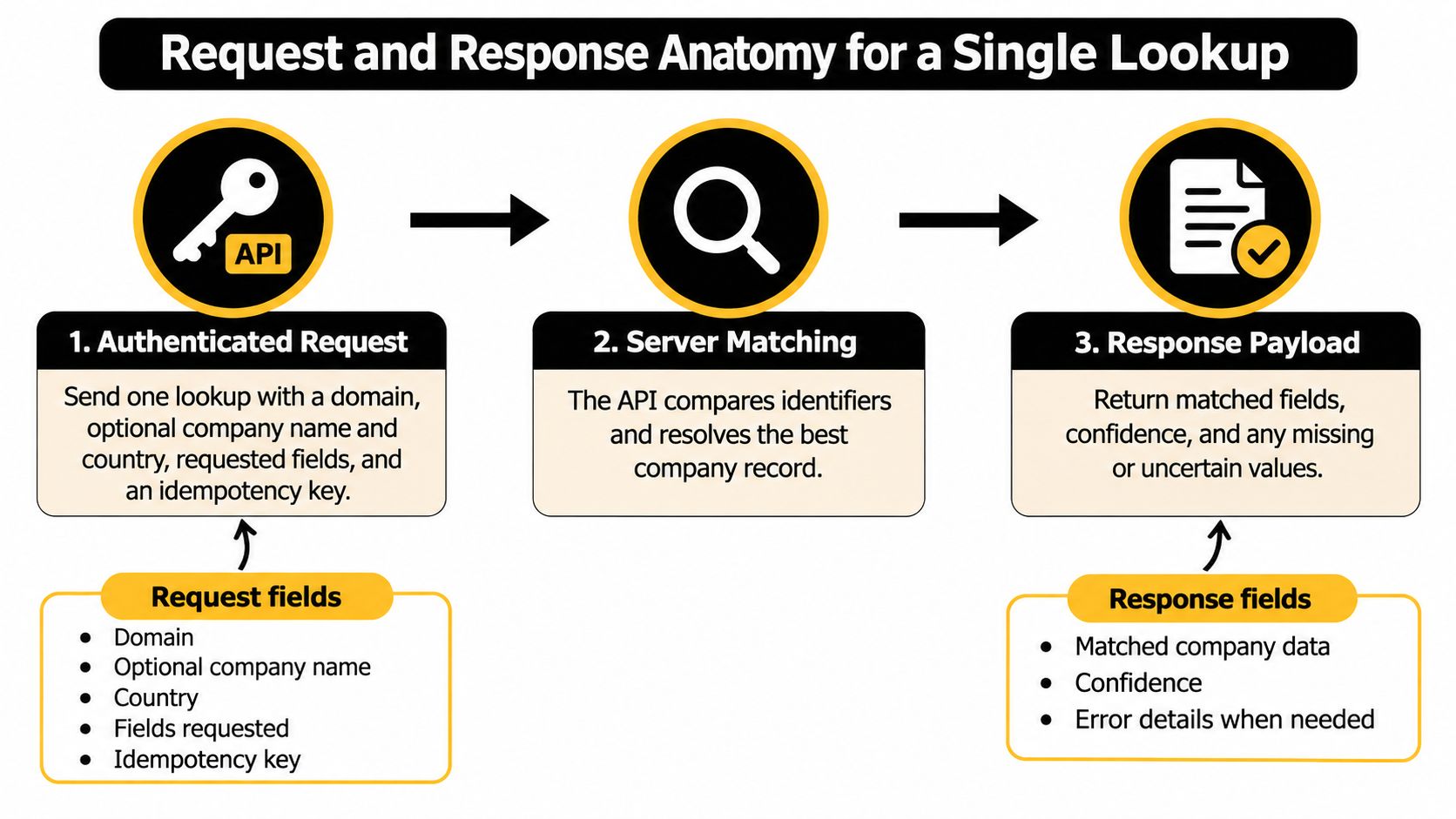
The diagram is the short version. The payload is where routing bugs hide.
A matched body has four things a client should read before any firmographic value.
- Status:
matched,ambiguous,not_found, orpartial. - Canonical company ID: the stable key for later jobs, not the raw name.
- Input key: the domain or name you sent, echoed back so logs line up.
- Attributes: each one with a normalized value, source identifier,
observed_at, confidence, and match method.
Say you send northwind.io plus country US and fields industry, employee_range. A clean result is matched, one company ID, and two attribute objects. An ambiguous result does not pick a winner. It returns candidate IDs with scores, and your code stops for review or asks for another identifier.
Empty is not the same as withheld
A field left out because no source had it is absent. A field withheld because confidence sat under your threshold is suppressed. Write those differently in the CRM. Absent can be retried when a new source appears. Suppressed should not be shown to a rep as if it were blank by accident.
If a partner allowlists caller addresses and lookups start failing after a deploy, confirm the egress address with a find your current IP address check before you treat it as a matching bug. Request shapes and auth headers for our endpoints are documented for developers using the API.
Server order is boring on purpose.
- Validate the domain.
- Resolve the canonical company, or return candidates.
- Collect only the requested attributes.
- Score each attribute and attach evidence.
- Return the body with a top-level status.
Before you route on a value, check status, then observed_at, then confidence. A high confidence on a two-year-old observation is still a stale observation.
Provenance Fields That Keep Every Value Auditable
The response fields above are the wire format. What you store is a history. I would split storage into three objects and refuse to collapse them into one CRM column.
Company holds the canonical ID, primary domain, and legal name. Attribute holds the field name, the normalized value, and a status such as currently observed, last verified, or previously reported. Evidence holds the source URL or source identifier, observed_at, retrieved_at, the match or transformation method, and the confidence score.
When employee range moves from 11–50 to 51–200, keep the previous attribute row. Downstream tools can explain the move. If you overwrite the cell, a rep who trusted the old band has nothing to appeal.
Matching has provenance too
Domains, legal entities, brands, and offices rarely map one to one. Store the input key, the canonical ID, the match method, and the ambiguity state on the link itself. "We matched the domain" and "we matched a similar brand name in another country" are different decisions.
If two sources disagree, return both observations with timestamps and a resolution status such as unresolved or preferred_by_policy. Silent overwrite is how audits fail.
The W3C PROV overview is the vocabulary for this. It represents the entities, activities, and agents that produced a piece of data, which is what you need for reproducibility and processing history. You don't have to expose the full model on the wire. You do need source, time, and activity on every value you write.
In 2025, 45% of CRM users surveyed by Validity said their company's CRM data was not ready for artificial intelligence applications, per Validity's July 2025 data briefing. Scoring and routing models inherit whatever you stored. A model can't tell a fresh, sourced employee range from a guessed one unless you kept the evidence.
For any single value, a RevOps lead should be able to answer five questions. Which source, observed when, matched how, how confident, and what changed since last time.
Every field you sync needs source, observed-at, and confidence stored beside the value. If one of the three is missing, don't let automation treat the value as fact.
Field Freshness and Refresh Intervals
| Field group | Volatility | Starting refresh interval |
|---|---|---|
| Legal name and domain | Low | Monthly verification, plus on change alert |
| Headquarters and country | Low | Quarterly, plus on relocation signal |
| Industry and category | Low | Quarterly |
| Employee count range | Medium | Quarterly |
| Technology stack | Medium | Weekly |
| Leadership and key roles | Medium | Weekly, plus on leadership-change event |
| Funding | Event-driven | Daily or on funding event |
| Hiring activity | High | Daily |
| Reviews and reputation | High | Daily |
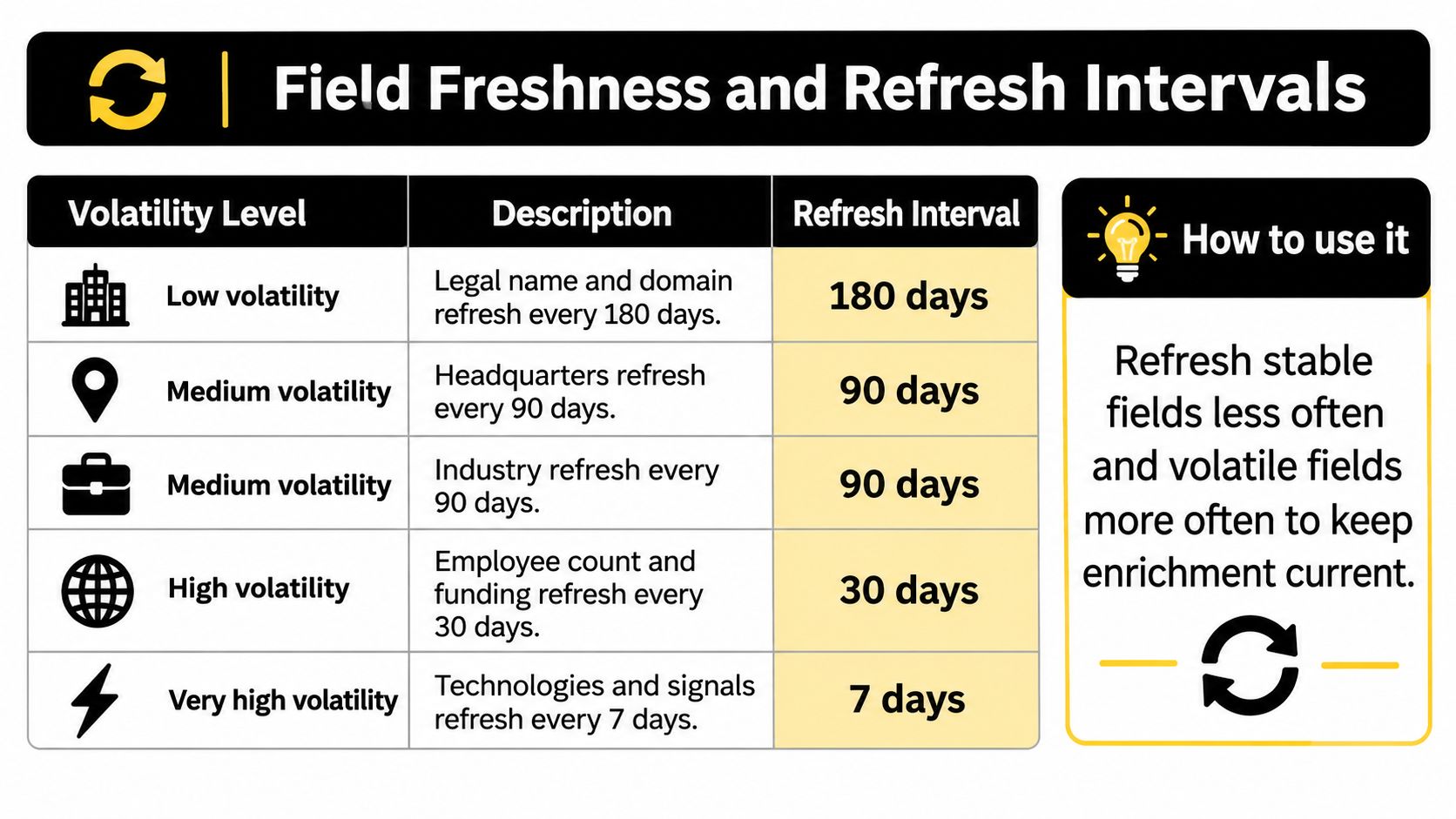
The table is the schedule I would start from, then tune against how often your own accounts change. Treat each refresh as a new observation, not an overwrite: retain the value's observed time, source, and confidence so downstream systems can distinguish a current signal from an old one.
A 2024 survey cited by Jeeva's 2025 sales data health check found that only 25% of CRM administrators believed at least half of their CRM data was accurate and complete. The write-up also relays commonly reported estimates of annual CRM-data obsolescence around 30% and extreme B2B contact-data decay as high as 70%. Those figures combine a survey with outside estimates, so they are not a forecast for your records. They do point to the practical question a match rate cannot answer: how fresh and confident is each field?
Why one nightly job is the expensive default
A single refresh schedule spends credits checking legal name and industry at the same pace as hiring, even though those fields change at different rates. A slow schedule can leave hiring data stale; a fast schedule can waste credits on stable fields. Leaving fields untouched creates another risk: an employee range may look authoritative long after anyone checked it.
Funding and leadership changes can be handled through event alerts rather than constant polling. Keep a slower scheduled refresh as a backstop, so a missed event does not leave an outdated value indefinitely. Store the event's source and observation time alongside the field it updates.
Plan tier also sets a practical limit. Higher-tier plans provide more monitored companies, monthly enrichment credits, active signals, and daily refresh instead of the weekly checks on lower tiers. If hiring and reviews need daily updates, a plan with weekly checks cannot meet that schedule.
Measure interval quality by operational results. After each refresh cycle, count routing changes, replies from signal-based outreach, and duplicate accounts merged or created. If weekly technology updates never change routing or replies, extend the interval. If quarterly employee ranges keep sending enterprise deals to an SMB queue, shorten it.
Batch, Webhook and CRM Sync Integration Patterns
In 2025, 50% of firms surveyed in Validity's CRM data research identified legacy systems that are difficult to integrate as a contributor to data silos, as reported by MediaPost's coverage of that research. That is why each CRM field needs one owning system before the first sync runs. If both sides write industry, you don't have enrichment. You have a race.

Four patterns cover almost every production path. Developers can reach the same records with an API, webhooks, and an MCP server when the CRM's native app isn't the whole workflow.
Real-time signup screening. A new signup arrives by API, Zapier, or CSV upload. The response carries a score, a next step, and a suggested reply, and something writes back within seconds. Use it on inbound forms. The failure mode is a duplicate contact when a timeout retry creates a second record.
Nightly backfill. A scheduled batch walks existing accounts and returns per-record outcomes, not one green batch flag. Use it to fill blanks and attach evidence to old rows. The failure mode is a partial provider outage that looks successful because the job object says completed while 40 domains failed.
Webhook-driven updates. A hiring, funding, or leadership event pushes to your consumer. Verify the signature, store the delivery ID, and make replay a supported operation. The failure mode is a missed delivery that nobody notices because the CRM still shows last month's values.
Two-way sync. Enrichment writes firmographics. Reps correct a name or a segment, and that correction must sync back. The failure mode is the next nightly job restoring the value the rep just fixed. Name the owner of each field. For awkward legacy objects, tailored integrations for enterprise systems are often how teams keep that ownership map when the CRM's native fields won't bend. Our practical notes on CRM data enrichment sit next to this if you are mapping HubSpot, Pipedrive, or Attio specifically.
A field map that doesn't mirror everything
- Input domain maps to Account Website and stays the lookup key.
- Canonical company ID maps to an Enrichment ID on the account.
- Industry maps to Industry, and
observed_atmaps to a companion field. - Employee range maps only when confidence meets the threshold you set.
- Hiring and funding stay on a signals object. They never land on contact fields.
Don't mirror every attribute the API can return. Extra fields without an owner become the next silo.
Error Handling, Retries and Idempotency
| Status | Meaning in enrichment | Retry | Client action |
|---|---|---|---|
| 400 | Malformed domain, unknown field, or bad query | No | Fix the request, don't retry the same body |
| 401 | Missing or revoked credentials | No | Refresh the key, then retry once |
| 404 | No company for that identifier | No | Store not_found, don't spin |
| 409 | Idempotency key reused with a different payload | No | Keep the original key and payload paired |
| 422 | Payload is valid JSON but fails business rules | No | Correct the record and use a new key |
| 429 | Rate limit | Yes | Honor Retry-After, then back off with jitter |
| 500 | Provider internal error | Yes | Retry with exponential backoff and jitter |
| 503 | Upstream source timeout, often partial | Yes | Retry the failed records, not the whole batch |
Clients should branch on a stable problem type, not on a sentence in detail. RFC 9457 defines a problem-details body with type, title, status, detail, and instance. Map validation failures, unknown identifiers, provider timeouts, rate limits, partial matches, and auth errors onto that shape so one parser covers every endpoint.
Keys, jobs, and per-record results
Write calls, including job creation and CRM sync triggers, take an idempotency key bound to the payload and the tenant. Retries with the same key and the same body return the original result. The same key with a different body is a 409, not a second job. Keep keys long enough to cover your longest retry window, and document that retention.
Asynchronous work returns a job ID. The client polls job status or waits for a signed webhook. Don't block the signup request on a bulk backfill.
Inside a batch, report matched, ambiguous, unchanged, enriched, rate_limited, and failed per record. A single batch status hides the rows you still owe the CRM.
Put a correlation ID on the CRM write, the enrichment call, and the webhook consumer. When a rep asks why industry changed at 02:14, that ID is the trail.
Log the correlation ID, store the idempotency key with the payload hash, never resend an unchanged 400 or 422, and dead-letter any record that still fails after a fixed number of attempts.
Compliance and Evidence Rules for Web-Derived Data
Public on a website is not the same as approved for your CRM. A careers page, a press release, or a leadership bio can be visible and still be the wrong thing to copy into an automated profile.
European guidance is blunt about this class of processing. The EDPS orientations on generative AI and web-scraped data stress lawful basis, transparency, purpose limitation, data minimization, accuracy, confidentiality, and a real way to opt out or be deleted. "More coverage" that drags undocumented personal data into every account record makes the API harder to buy, not easier.
Reuse the evidence you already store for company facts, then add three compliance fields the match response doesn't replace. Collection purpose, retention period, and a correction or deletion path.
What the API should refuse to show
- Unverifiable claims: If you can't attach a source and a time, suppress the value. Don't ship it with confidence zero and hope the UI hides it.
- Stale values: Replace what the rep sees, and keep the prior observation in history so a dispute has a trail.
- Deletion and opt-out: The request has to reach CRM fields, exports, and warehouse copies, not only the enrichment vendor's primary table.
- Separate objects: Company facts and personal data must be deletable on their own. A leadership name is not an employee-range attribute.
Default to company-level signals. Pull a named person only for a defined workflow, such as a buyer role you sell to, with its own purpose and a shorter retention rule than the account's firmographics.
Re-check before a field reaches the CRM when you add a source, when a field starts containing personal data, or when the purpose changes. Volume, support, and security reviews for larger programs go through service@capyscout.com.
This is general information, not legal advice. Involve counsel for your jurisdiction before you treat web-derived people data as fair game.
Choose and Test a Company Enrichment API
Pick the contract before you pick the logo. I would require field-level provenance, a freshness time on each field, machine-readable problem details, idempotency keys on writes, signed webhooks with replay, and either native CRM sync or an explicit field map. Pricing should follow usage. Hidden per-record fees on top of a platform fee make the 200-record test lie about cost.

Pull 200 records from your CRM. Enrich the same set with each candidate. Use the volatility table to decide which fields must carry a recent observed_at, and the status table to decide which failures you retry and which you fix in the source data.
| Metric | What to record |
|---|---|
| Matched rate | Share of the 200 records returned as matched |
| Ambiguous rate | Share returned as ambiguous with candidate IDs |
| Field disagreement | Share of fields where candidate APIs conflict on the normalized value |
| Timestamp coverage | Share of written fields carrying observed-at |
| Routing changes | Records whose owner or route changes after enrichment |
Count a disagreement only when both sides returned a normalized value and those values conflict. An empty side is coverage, not a fight. Read matched and ambiguous together. A higher match rate that never returns ambiguous is often a silent guess.
For a fast look at your own market, enter your website or best customers and we show companies that fit, each with a reason to reach out, in a few minutes. Use the 7-day trial as the window for this test. After the trial, the free plan stays, with 5 watched accounts and 250 credits. Paid plans include unlimited team members, the REST API, MCP, CRM sync, and Slack and Teams alerts, so the test isn't locked to a single seat.
Run the 200-record test this week. Keep the sheet. Choose the provider that wins on evidence and error handling, not on the widest column list.
CapyScout's company enrichment API returns source-backed firmographics and account signals, with freshness you can store beside every CRM field and webhooks when hiring, funding, or leadership moves. That is the difference between a one-time match and a record you can still defend next quarter. Start with your own site or a short list of customers at CapyScout.
Not ready to start? Get a free target list: 10 companies to sell to, picked from your website.