

HubSpot Lead Scoring Setup and Optimization
Master HubSpot lead scoring with this practical guide. Learn to configure models, avoid static data traps, and integrate live signals for better routing.
You've spent days building a HubSpot lead scoring model. Marketing has assigned points to page views, email activity, form submissions, job titles, and company size. The score is live, yet sales still opens the CRM and works from instinct, recent replies, or whichever contact happens to be at the top of the view.
That failure usually isn't caused by HubSpot's scoring engine. It comes from a model that treats old activity as current intent, relies on incomplete CRM fields, and ignores what's changing inside the account. A useful system combines fit, engagement, recency, and live account context, then turns the result into a clear routing or nurturing action.
Table of Contents
- Why Most HubSpot Scoring Models Fail
- Configuring Your First Multi-Object Score
- Enriching Scores with Live External Signals
- Building Workflows for Routing and Nurturing
- Monitoring Performance and Preventing Decay
- Maintaining Data Hygiene for Long-Term Accuracy
Why Most HubSpot Scoring Models Fail
Sales teams ignore scoring when the number doesn't explain a useful decision. A contact who downloaded several resources may receive a high score, but that activity doesn't necessarily mean the company is ready to buy. The account might be too small, outside your service region, already using a competing solution, or just researching a problem without an active project.
HubSpot's earlier lead-grading approach was simpler. Its current framework supports scores for contacts, companies, and deals, with engagement, fit, or combined scoring depending on the object and subscription. The HubSpot lead scoring documentation also describes score decay and multiple score types, which reflects a more useful principle: recent intent should matter more than accumulated history.
Activity isn't the same as intent
Most weak models overvalue easy-to-measure events. Email opens, general blog visits, and repeated visits to educational pages can create an attractive score distribution without producing qualified conversations. Those activities may indicate awareness, but they rarely provide enough context for a rep to decide who deserves immediate attention.
A stronger model separates two questions:
- Does this record fit? Consider role, industry, geography, company characteristics, operating model, and other properties tied to closed-won customers.
- Is there current interest? Consider recent high-intent actions, direct responses, meetings, pricing activity, and other events that suggest an active evaluation.
A combined score can bring both dimensions together, but it shouldn't hide them. Sales needs to know whether a record is highly engaged, well matched, or both. A high activity score with poor fit should usually trigger a different action from a high-fit account showing a current buying signal.
Practical rule: A score should answer “why now?” and “why this account?” If it answers neither, sales will treat it as decoration.
Static accumulation creates false positives
A score that only adds points becomes a historical scrapbook. Every old click remains in the total, so a prospect can appear more qualified long after the original interest has disappeared. HubSpot's score decay settings can be applied to engagement or combined score event groups at intervals of one, three, six, or twelve months, with each month counted as 30 days, as documented in HubSpot's explanation of score decay and score history.
Decay does not fix a bad model by itself. It prevents old events from retaining their full influence indefinitely. You still need sensible event weights, exclusions, negative criteria, and a clear distinction between a person's activity and the account's commercial relevance.
Configuring Your First Multi-Object Score
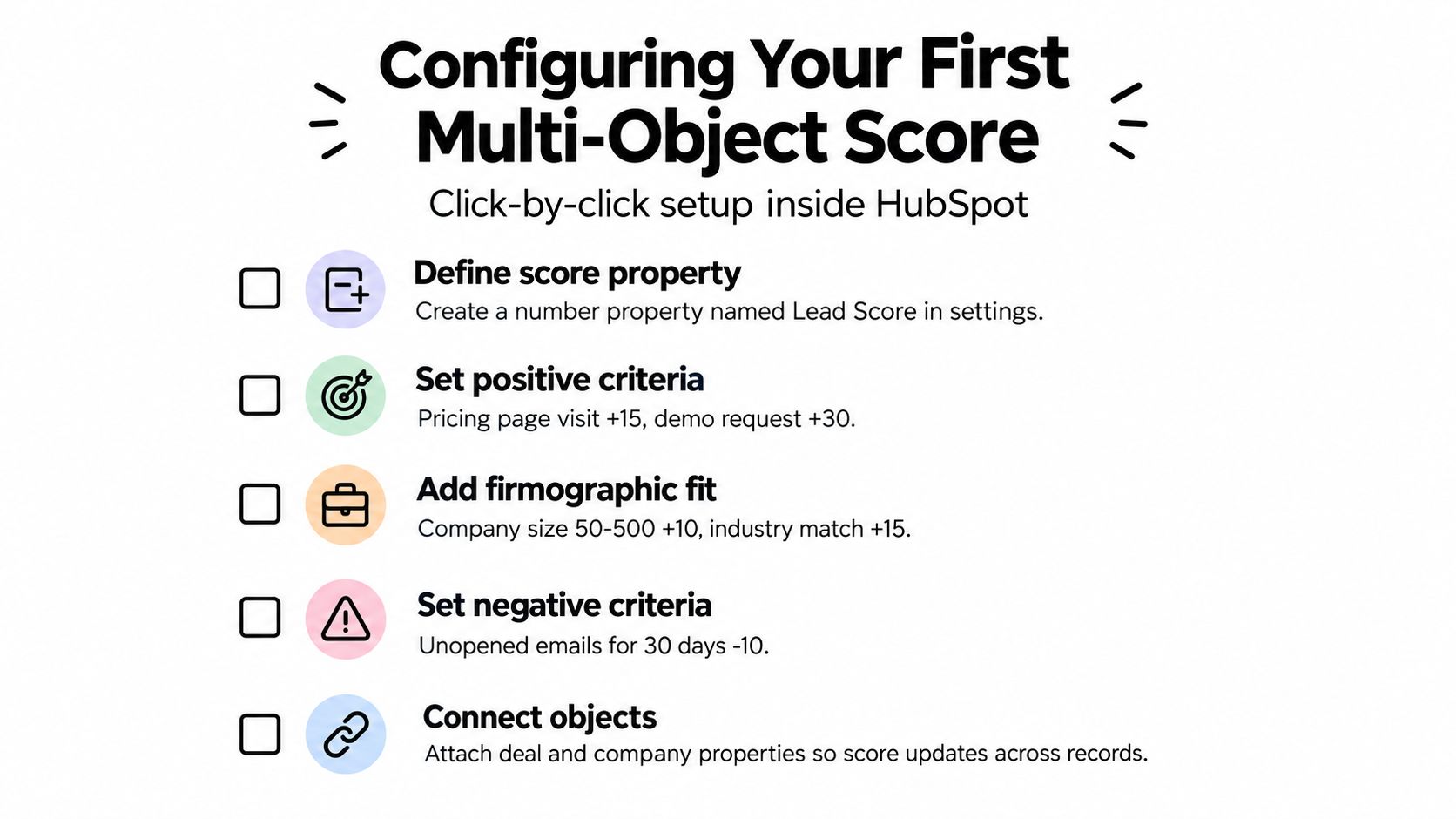
Start with the decision, not the points. Write down what should happen when a record qualifies. For example, a high-fit contact showing recent purchase intent might create a sales task, while a low-fit contact with strong engagement might enter a marketing sequence without entering the active pipeline.
HubSpot lets you create a score, choose the object, define criteria and thresholds, test records, and then turn the score on. The official HubSpot setup guide confirms that scores can evaluate contacts, companies, and deals, and that records are evaluated retroactively when a score is first enabled using current and historical property values or actions.
1. Choose the object and score type
Open HubSpot's lead scoring tool and select the object that matches the decision you're making.
- Contacts work well for individual engagement and role-based fit.
- Companies are better for account-level qualification, especially when several contacts interact with your site.
- Deals help sales teams assess active opportunities using combined fit and engagement signals.
For a first model, choose a combined score only if both dimensions are reliable. Otherwise, create separate engagement and fit scores so the team can see which side of the model is driving the result.
2. Build criteria groups around decisions
Create groups that reflect how your revenue team evaluates an account. A practical structure might include commercial fit, high-intent engagement, sales interaction, and disqualifiers.
Give more influence to actions that represent a meaningful next step, such as a demo request or completed meeting, than to broad awareness activity. Use group limits where necessary so repeated low-intent actions can't overwhelm stronger signals.
Be precise with logic. Separate property or event rules can update a score independently, while multiple criteria added within the same rule may require all conditions to be met. Test each rule against records that your sales team recognizes as good, poor, and ambiguous prospects.
3. Add negative criteria deliberately
Negative scoring is useful when it represents a real operational constraint. Examples include an unsupported region, a clearly irrelevant business type, an unsubscribed contact, or a record associated with an existing customer process that shouldn't enter acquisition routing.
Don't subtract points merely because a prospect hasn't performed an activity. Lack of evidence isn't always evidence of disinterest, particularly when tracking is incomplete or multiple people from the same company are researching independently.
4. Set thresholds from outcomes
HubSpot's performance guidance describes a common expert benchmark of roughly 50 points for a marketing-qualified threshold and 75 to 100 points for a sales-qualified band, but it also emphasizes calibration to the actual sales motion. Treat those values as a starting hypothesis, not a universal standard. The right threshold is the one that separates useful sales conversations from noise in your own pipeline.
Before activation, use HubSpot's testing feature to inspect real records and preview score distribution. Look for obvious contradictions, such as unqualified records receiving high scores or known customers appearing in a prospect queue.
The video below provides a visual walkthrough of the lead scoring workflow.
Turn the score on only after reviewing the affected workflows, views, segments, and reports. Because HubSpot evaluates historical data when a score is enabled, the first live distribution may be broader than your team expects.
Enriching Scores with Live External Signals
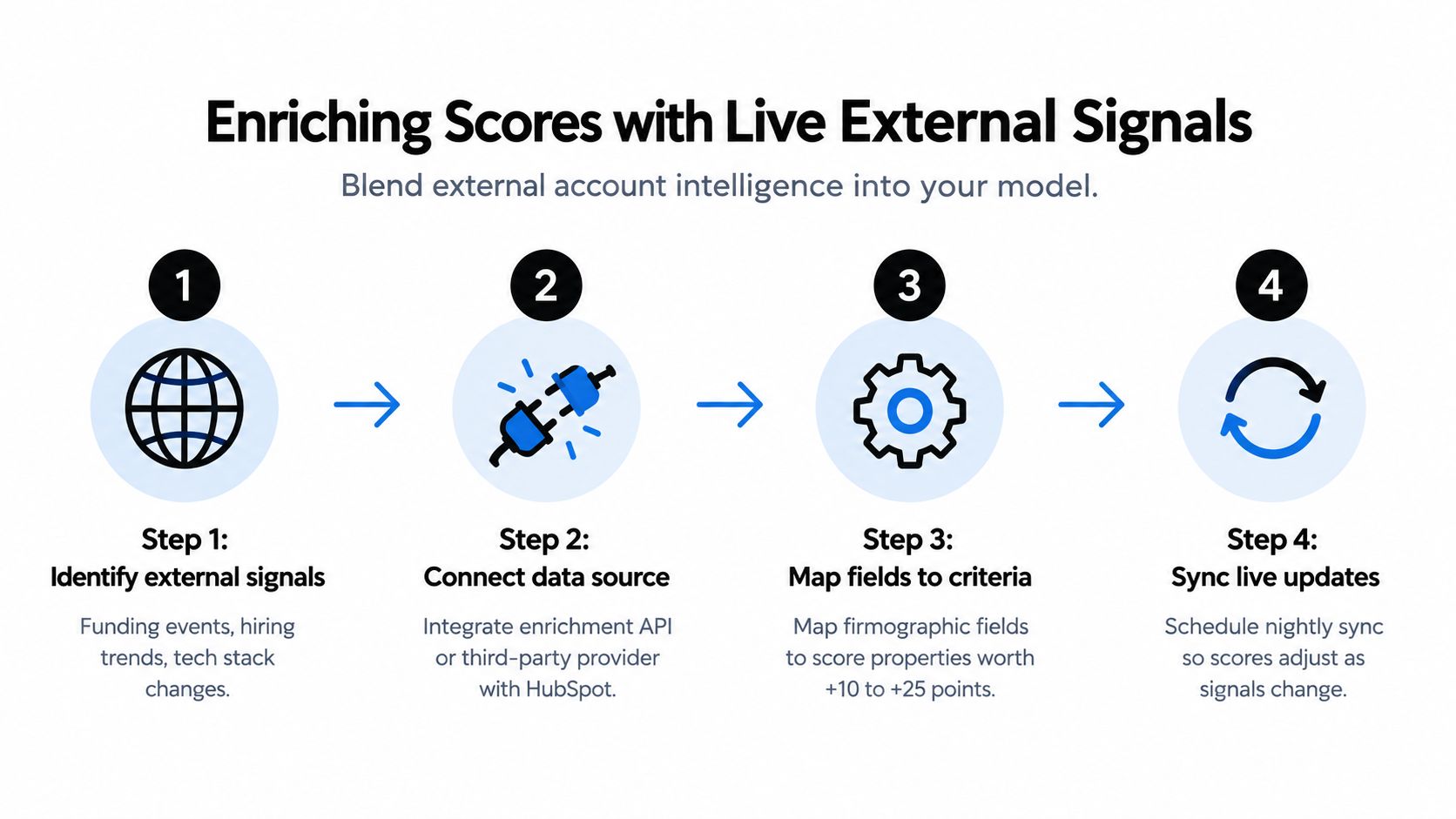
Internal activity tells you what a known contact did. It doesn't always tell you what changed inside the company. A hiring push, new funding, leadership change, technology migration, expansion, or worsening customer sentiment can alter the account's relevance even when no contact has filled out a form.
That's the gap between contact scoring and account timing. A company with modest website activity may deserve attention if it has just created a department your product serves. A heavily engaged contact may deserve less urgency if the account is shrinking, outside your market, or showing signs of operational risk.
Start with signals your team can act on
Don't connect every available data source. Choose signals that change either priority, message, ownership, or timing.
Useful categories include:
- Funding activity, when it indicates new budget or an expansion mandate.
- Hiring trends, especially for roles connected to the problem you solve.
- Leadership changes, which can create new priorities or reset vendor relationships.
- Technology changes, such as a platform adoption or migration relevant to your offer.
- Reputation and news, particularly for local businesses or industries where public sentiment affects urgency.
The signal should become a structured property in HubSpot, not remain buried in a research note. Create fields such as Hiring Signal, Technology Change, Recent Funding, Signal Date, Signal Source, and Why Now. Store the date and source separately so reps can judge freshness and credibility.
Map external context to scoring logic
Suppose a signup has the right company profile and requests a demo. That record might already qualify for a fast response. If enrichment also shows active hiring for the team your product supports, increase its account-level fit or timing score. If the company has an incompatible technology stack or operates outside your service model, subtract points or route the record to review.
The exact weighting depends on your sales motion. Avoid assigning points just because a signal sounds impressive. Ask whether the signal has historically changed conversion quality, sales urgency, or the recommended message.
CapyScout can fit this workflow as one enrichment option, with live-web account research, inbound signup screening, CRM enrichment, and HubSpot synchronization. Its account monitoring capabilities are described further in this guide to buying signals and how to find them.
Keep the signal explainable
A rep shouldn't see “external intent score: high” and have to investigate the model before calling. The record should show the signal, its date, the source, and a short reason it matters.
That context also protects against overfitting. External signals are not proof of purchase intent. They're evidence that should modify prioritization, not replace qualification. Use them to decide who gets attention first and what the rep should investigate.
Building Workflows for Routing and Nurturing
A score becomes valuable only when it triggers a controlled action. The workflow should make ownership explicit, prevent duplicate outreach, and preserve the evidence that caused the record to qualify.
Start with separate routing logic for fit and urgency. A high score alone isn't enough if the score can be inflated by low-intent activity. Build enrollment around a combination of score threshold, lifecycle stage, territory, contactability, and account assignment status.
Route high-priority records
A practical high-priority workflow can follow this sequence:
- Enroll when the combined or relevant score crosses the agreed threshold.
- Confirm that the record isn't already owned, an existing customer, or enrolled in an active opportunity process.
- Check company fit, territory, and any exclusion properties.
- Assign the contact or company to the correct owner using your existing routing rules.
- Create a task with a due date and include the score drivers in the task description.
- Send the owner an internal notification containing the recent action, fit rationale, external signal, and recommended next question.
- Stamp fields such as
Scoring Qualification Date,Routing Reason, andFirst Response Status. - Remove the record from competing nurture workflows.
The notification should be useful without requiring the rep to open five tabs. “Score increased” is weak context. “High-fit account, demo request, and recent hiring for the team your product serves” gives the rep a reason to act and a starting point for the conversation.
For a detailed operational pattern, use this practical HubSpot lead routing setup guide as a reference, then adapt the branches to your ownership model.
Nurture the middle, don't dump it
Most records aren't ready for a sales handoff or a permanent discard. Create a middle path for contacts with meaningful engagement but incomplete fit, missing data, or no clear commercial timing.
That workflow should:
- Hold the record outside the active sales queue.
- Request or enrich missing firmographic information.
- Deliver content matched to the problem indicated by the activity.
- Recheck score, fit, and account signals after a defined period.
- Suppress outreach when the contact unsubscribes, becomes a customer, or enters an opportunity.
Low scores also need classification. A low-fit record with high engagement may be useful for product-led education, partner development, or a different segment. A low-engagement record at a high-fit account may deserve account-based monitoring rather than a generic email sequence.
Build safeguards before activation
Use re-enrollment carefully. A record shouldn't create a new task every time a score fluctuates around a threshold. Add a cooldown property, a last-routed date, or a workflow branch that checks whether the previous task remains open.
Document the handoff contract in HubSpot. Marketing owns the model inputs and enrichment quality. Sales owns disposition and outcome feedback. RevOps owns the thresholds, exceptions, and audit trail. Without those responsibilities, automation hides disagreement instead of resolving it.
Monitoring Performance and Preventing Decay
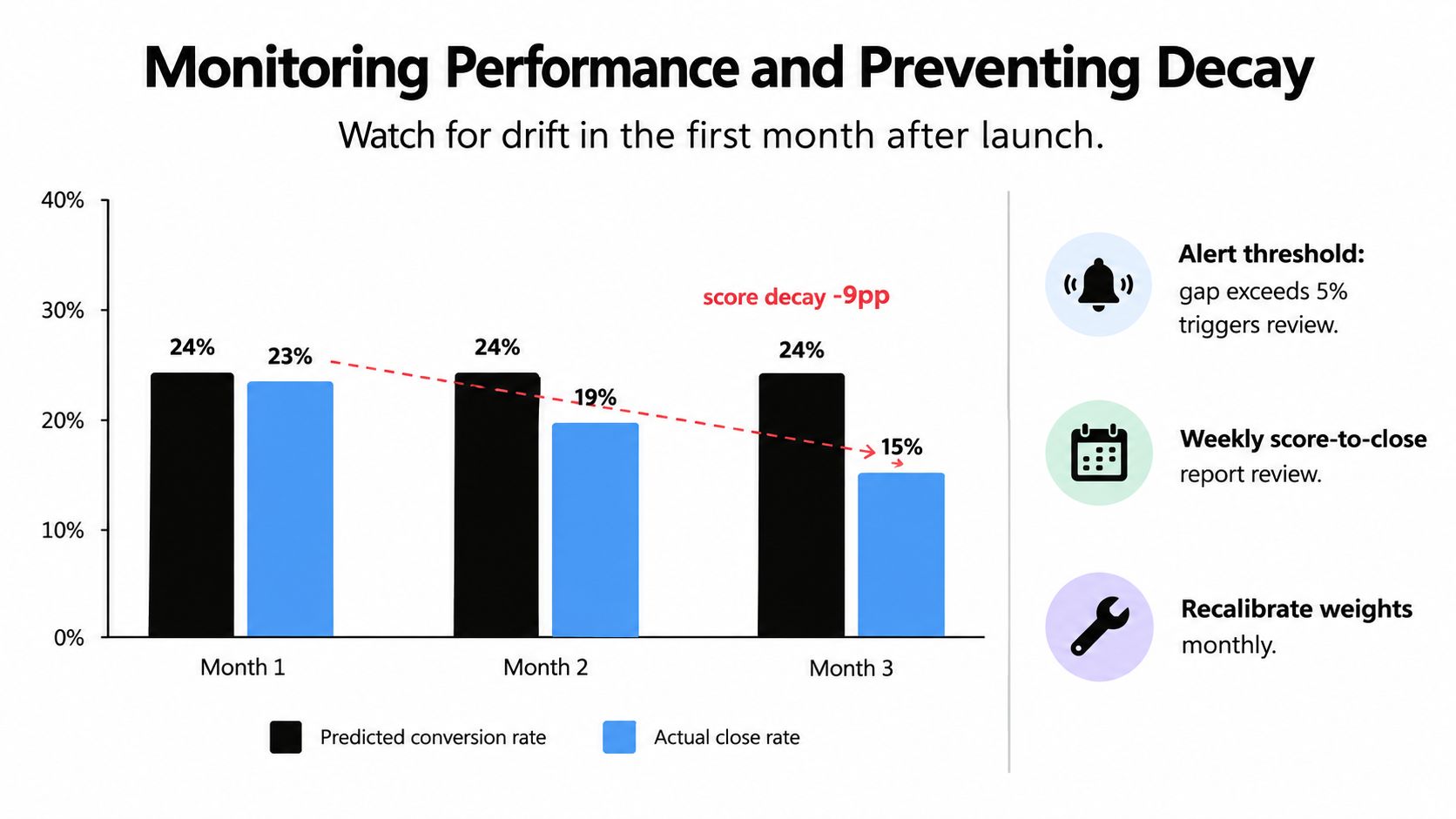
The first month after launch is when most scoring models reveal their weaknesses. Teams often watch whether scores populate, confirm that workflows enroll, and then move on. That checks system operation, not model quality.
HubSpot provides a Lead Score card, score distribution information, score history, and a performance view that helps teams inspect how records are spread across the database. The HubSpot performance documentation supports an iterative operating model: review distribution, compare high-score cohorts with actual outcomes, and recalibrate when scores are too concentrated or too broad.
Audit the distribution before celebrating it
A healthy distribution isn't one where the highest band looks large or impressive. It's one where the bands create useful operational separation.
Review:
- How many records sit in each score range.
- Whether most records cluster in the middle.
- Whether high-score records receive timely owner action.
- Whether high-score accounts produce better-qualified conversations.
- Which criteria contribute most often to qualification.
- Whether one event, such as repeated email activity, dominates the model.
If nearly everyone qualifies, the threshold has no routing value. If almost nobody qualifies, the model may be too strict, missing data may be suppressing fit, or the sales motion may not generate the tracked events you selected.
Compare score history with disposition
Score history should help explain changes at the record level. Look for sudden jumps caused by duplicate events, stale properties, imports, or workflow loops. Check whether a score rises because of a genuine new signal or because a historical field was rewritten.
At the program level, compare high-score cohorts with sales dispositions and closed-won outcomes. Don't evaluate the model only on whether contacts become opportunities. Sales rejection reasons, disqualified stages, no-response outcomes, and account fit feedback reveal where the model is overconfident.
Review the score as a product. Every threshold is a product decision about where a human should spend time.
Use decay, then recalibrate
Decay is most useful when the buying cycle makes recency meaningful. A recent pricing visit or meeting request should carry more urgency than the same action from a distant period. HubSpot's score history and decay controls help express that principle, but the team still has to choose which events deserve decay and how quickly their influence should fade.
Static models also fail when the market changes. New competitors, pricing changes, product launches, and shifts in customer mix can make yesterday's strongest signals less predictive. Refresh the criteria when outcome quality changes, not only when someone complains.
Finally, inspect data hygiene alongside performance. Missing values, contradictory records, duplicates, and biased outcome labels can make a complex model less reliable than a simple, transparent one.
Maintaining Data Hygiene for Long-Term Accuracy
A scoring model can only be as dependable as the properties feeding it. In practice, the biggest problems usually appear in ordinary CRM maintenance: company records aren't associated consistently, job titles are entered in incompatible formats, lifecycle stages don't reflect sales reality, and disposable email addresses enter the same workflows as legitimate prospects.
Predictive scoring is especially sensitive to these issues. Guidance on predictive lead scoring and CRM data quality highlights missing fields, duplicate records, contradictory system data, biased historical outcomes, insufficient training data, score drift, and opaque rationale as recurring failure modes. Model complexity can't compensate for unreliable outcomes.
Establish a maintenance cadence
Assign ownership for the inputs, not just the score itself. A practical operating checklist includes:
- Normalize properties: Use controlled values for industry, region, seniority, and company type.
- Deduplicate entities: Merge or suppress duplicate contacts and companies before they distort engagement and fit.
- Validate associations: Confirm that contacts connect to the correct primary companies and that deal relationships remain current.
- Review invalid addresses: Use a process for removing invalid emails from CRM lists before those records enter outreach or scoring workflows.
- Refresh enrichment: Update firmographics and external signals regularly, and retain the date of the latest refresh.
- Check lifecycle integrity: Make sure sales dispositions and closed-won records reflect actual outcomes.
- Audit score usage: Review every workflow, view, segment, and report that depends on a score property before changing its logic.
Keep a visible change log. Record what changed, why it changed, which teams approved it, and how you'll judge the result. That history prevents the model from becoming a collection of unexplained exceptions.
Align the people using the score
Marketing and sales need a shared definition of a qualified record, but they also need shared language for uncertainty. A high score means “prioritize investigation,” not “the buyer is ready.” Reps should be able to mark false positives and explain why, while marketers should be able to distinguish a bad threshold from a missing field.
For implementation details on enriching records and syncing account context, see this HubSpot data enrichment implementation guide. The operating principle is simple: refresh the evidence, preserve the rationale, and let outcomes improve the next version of the model.
CapyScout helps teams enrich HubSpot records, screen inbound signups for fit and risk, and monitor live account signals such as hiring, funding, leadership, technology, and reputation changes. Visit CapyScout to connect account intelligence with scoring, routing, and the “why now” context sales reps need.