

What Is an MCP Server? a Plain-English Guide

What is an MCP server? See how it links AI apps to tools and data, what it exposes, and the security limits to check first.
An MCP server is a service that gives an AI application standardized access to tools, data and prompts through the Model Context Protocol. If your mental picture of "what is an MCP server" is "the brain that decides what to do," you're looking at the wrong component.
The model in the chat reasons. Something else fetches the record, scores the signup, or writes the CRM field. Mix those jobs up and you grant the wrong piece of software the wrong power. The useful question is narrower. Where does the server run, where do the credentials live, and which component is trusted with the data?
Table of Contents
- What an MCP Server Is and Is Not
- The Three Things an MCP Server Exposes
- How One Request Moves From Prompt to Answer
- Local Versus Remote MCP Servers
- Where MCP Servers Show Up in Real Work
- Securing an MCP Server Before You Connect It
- Decide Whether an MCP Server Fits Your Workflow
What an MCP Server Is and Is Not
How can one AI application work with different outside systems without a custom connection for each one? MCP provides a shared protocol for that exchange, much like a standard port lets a laptop connect to different accessories. An MCP server implements the protocol for a particular system, such as a CRM, code repository, or ticket queue.
The server makes capabilities available to a compatible AI application. The host application decides how the model can use them, while the server handles the requests it receives. Those roles matter because the server's location, stored credentials, and data access determine what each component can reach.
Four assumptions that don't hold
The MCP architecture separates the host, client, and server so each has a distinct role.
The server isn't the model. A language model runs in the host application, such as a coding assistant or chat product. The server publishes capabilities and handles requests; it does not reason or choose what to do.
The server isn't necessarily a database or SaaS product. It can be a local process that wraps a filesystem or API, or a remote service reached over HTTP. Depending on the setup, authentication may use bearer tokens, API keys, custom headers, or OAuth.
The server doesn't automatically give the model unrestricted access. Access depends on the capabilities the server exposes and the host's authorization policy. A prospect lookup, for example, does not by itself allow the model to browse the web or edit every CRM field.
MCP isn't one fixed product. Different servers can implement the protocol, and compatible clients can connect to them. A REST API exposes an application's endpoints; MCP lets a compatible client discover and call capabilities provided by a server.

The host creates the client connection, manages the session, and sets rules for how the model may use each capability. A host can maintain connections to several servers. For a commerce example, MCP access to Seller Central data shows how the protocol can connect an AI application to marketplace records.
Ownership test: Identify the machine where the server runs, where its credentials are stored, and which component can access the record. If any answer is unclear, pause before connecting it.
The Three Things an MCP Server Exposes
A server doesn't offer "access" as a blob. It offers named primitives, and each one has a different trigger and a different risk.
MCP primitives compared
| Primitive | What It Provides | Who Usually Triggers It | Example |
|---|---|---|---|
| Tools | Actions the model can call with typed inputs | The model, within host policy | score_signup returns score, confidence and evidence |
| Resources | Read-only context the host can load | The host or the user | Account record with source identifiers |
| Prompts | Reusable templates for common tasks | The user selects them | Standard prospect discovery brief |
Tools
A tool is an action with a schema. Say a sales assistant needs a fit score on a new signup. It calls score_signup with a validated identifier. The server returns a typed score, a confidence level, the evidence, and a recommended action such as route, nurture, or hold. It doesn't return a database connection the model can wander through.
That narrowness is the whole design rule. Accept identifiers you've already checked. Return a typed result. Refuse anything that looks like open query access. Teams that already expose scoring over HTTP can keep that path and add the same operation as a tool. The CapyScout developer API is one place that pattern shows up beside webhooks.
Resources and prompts
A resource is context, not an action. An account record with source identifiers attached can be loaded into the conversation so the model quotes a hiring change or a funding note instead of inventing one. The host or the user pulls it. The model reads it.
A prompt is a reusable template a person selects, such as a standard prospect discovery brief. It isn't something the model fires on its own. Treating prompts like tools is a common mix-up, and it puts user-facing wording under model control.
A server can also send a notification when its tool list or resource list changes, so the client doesn't keep calling a capability that disappeared overnight.
What gets agreed at startup
During initialization, client and server negotiate a protocol version and the capabilities each one supports. A client then won't assume tool execution, resource subscriptions, or prompt templates the server never offered. That negotiation fails closed. A missing feature is caught before the first real task, not halfway through a CRM write.
How One Request Moves From Prompt to Answer
The MCP architecture specification separates the host from the connector. The host creates one or more clients. Each server publishes tools, resources, and prompts. Messages travel as JSON-RPC 2.0, so every request carries a method name, parameters, and a place for a result or an error. The server doesn't include a language model. It returns data the model then interprets.
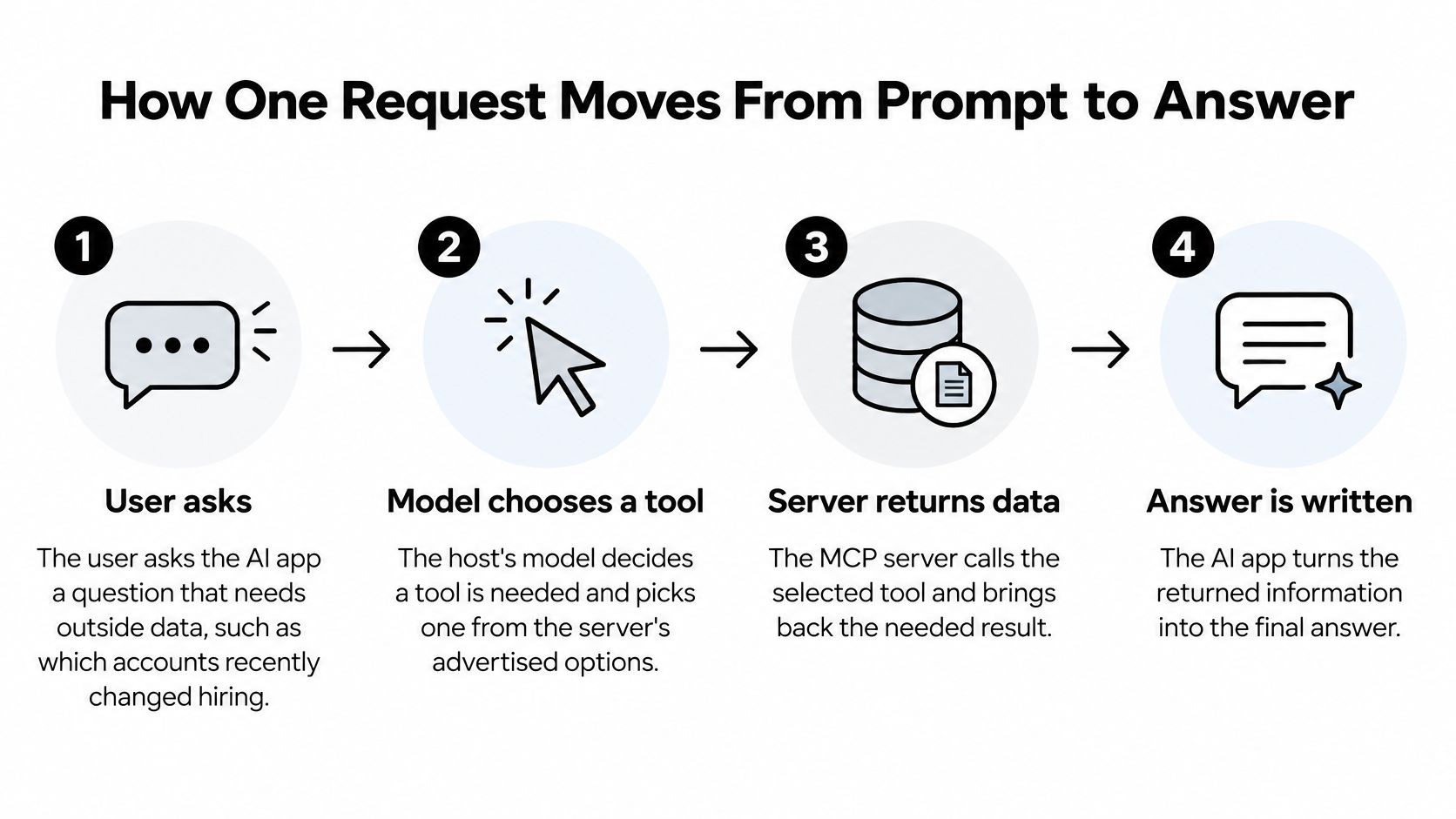
Walk one question through, "which accounts recently changed hiring," and the failure points show up at specific steps.
- The user asks the AI app something that needs data outside the chat. The host can't answer from memory alone, so it has to leave the conversation. The failure here is asking a server question when pasted text would have been enough.
- The host's model decides a tool is needed and picks one from the server's advertised list. It can only pick what initialization already confirmed. A tool that was never published isn't a choice.
- The host's MCP client sends a JSON-RPC 2.0 request with a method name and parameters. Machine-readable fields matter because a vague sentence can't be validated. A missing method name or a parameter of the wrong type should fail before any system is touched.
- The server checks the inputs against its schema and runs the operation on its own systems. Malformed identifiers die here with a structured error, not a half-written CRM record. This is also where a tool that's too wide does the most damage, because the model supplied the arguments.
- The server returns a typed result with evidence or source identifiers, or a structured error if the operation failed. A result with no sources makes the later answer impossible to check. For prospecting, that means the hiring signal comes back with the page or record it came from.
- The model reads that result and writes the answer the user sees. If the evidence is thin, the honest output is "I couldn't verify this," not a polished brief. The server's job ended at step 5.
A short walkthrough of the same round trip, from plain question to tool call and back, is easier to follow on video once the steps are familiar.
A clean error at step 4 is a success. A confident paragraph with no source identifier is the failure you should design against.
Local Versus Remote MCP Servers
MCP splits a data layer from a transport layer. The data layer is the JSON-RPC messages, version and capability discovery, notifications, and the primitives. The transport is how the connection is opened, framed, streamed, and authorized. Picking a transport is really picking where the process lives and who can reach it. The transport and authorization guidance is explicit about that split.
MCP transports compared
| Transport | Where It Runs | Best Fit | Security Needs |
|---|---|---|---|
| Stdio | Local process started by the host | Desktop apps and developer tools | Local permissions and file access scope |
| Streamable HTTP | Remote service reached over HTTP POST, optionally streaming with SSE | Hosted and centralized enterprise deployments | Authentication, authorization, TLS, rate limits, audit logs |
Stdio on your own machine
Stdio connects the client to a local server process through standard input and output. There's no network hop, which suits a desktop coding assistant or a developer tool that only needs files on that laptop. The catch is the process runs with the user's own permissions. If that user can read the finance folder, a careless tool can too.
Streamable HTTP for a shared service
Streamable HTTP sends client messages as HTTP POST requests and can stream replies with Server-Sent Events. That fits a hosted service several people share, or an integration the vendor runs. Remote deployments need ordinary HTTP controls. Authenticate the caller, authorize each action, use TLS, rate-limit calls, write an audit log, and keep each tool's permission narrow.
The authorization rules also require the server to check that a presented token was issued for that server specifically. That check cuts down token confusion, where a token meant for one API gets replayed against another.
Choose local when the data should never leave the user's machine. Choose remote when several people share one integration or the vendor hosts it.
A scoring service tied to a CRM almost always belongs on the remote side. It should enforce tenant and account ownership at the server boundary, keep read tools separate from CRM writes, and return a source identifier with every enrichment result. A wrong argument from the model then changes one account, not the tenant.
Where MCP Servers Show Up in Real Work
MCP servers become useful when an assistant needs information or actions from a tool the user already relies on. The server is the connector: it exposes a system's data or functions, while the host decides what to ask and the underlying system remains responsible for its records.
Four jobs people actually hand off
A coding assistant searches a repository. A developer asks which open issues mention a flaky test. The MCP server calls the code host's API and returns matching issues; the assistant can then draft a fix plan with links to the relevant records. Access depends on the credentials and permissions configured for that connection.
A browser agent checks a flow. A browser-control server can expose actions such as opening a page and clicking through a signup. The agent reports what happened, giving the developer a test transcript to inspect when a bug appears in a real browser.
A sales assistant scores a signup. An MCP server can expose scoring and CRM enrichment as separate tools. The agent can request a score and a suggested next step, such as routing the signup to sales, nurturing it, or holding it. A CRM update is a separate action, so the person or workflow controlling the connection should decide whether to approve it. For an example of this setup, see CRM enrichment through an MCP server.
A support assistant reads ticket history. A server can expose past tickets as a resource. Before replying, the assistant can summarize earlier contacts so the support agent has context and does not ask the customer to repeat information. The server controls access to ticket data; the assistant uses the returned context to draft a response. Teams coordinating the human work around that response can also use AI for project chat and coordination.
A server adds little when the prompt already contains all the needed facts. It matters when the task depends on current information or an action in another system. In each case, ask what the server exposes, where its credentials live, and which component is trusted with the data.
Securing an MCP Server Before You Connect It
A shared protocol does not make every server safe. The protocol specification calls for hosts to get explicit user consent before exposing user data to a server, and to apply access controls and data protections. The actual login and permission model depends on how the server is deployed, so check what each tool can access and change.
Publicly exposed MCP servers have grown quickly, while security practices have lagged behind adoption. Treat each tool as a separate permission boundary. A tool that reads account details needs different controls from one that changes a CRM record or triggers outreach.
A checklist you can apply this week
- Authenticate every connection. Use OAuth or an equivalent method, with tokens dedicated to this server.
- Grant each tool only the access it needs. A lookup token should not be able to update deals.
- Require approval for consequential writes. Changing a CRM record, sending a message, or enriching records at scale should require a person's approval.
- Log inputs and outputs. Keep enough detail to reconstruct what the model requested and what the server returned.
- Set rate limits and spending caps. These can contain the impact of a runaway loop.
- Keep secrets out of the model's context. Store API keys on the server, not in prompts.
- Make access easy to revoke. If a key leaks, disable the connection without redeploying the server.
Required controls by tool type
| Tool Type | Example Action | Control to Require |
|---|---|---|
| Read-only lookup | Fetch account signals | Scoped read token and audit log |
| Enrichment at scale | Enrich hundreds of records in one run | Rate limits and spending caps |
| CRM write | Update a deal stage | Human approval and before-and-after log |
| Outreach trigger | Queue or send an email | Explicit confirmation and no automatic sending |
Separate read-only lookups from CRM writes so each tool can have its own permissions and approval rules. For example, a prospecting assistant can score a lead and attach evidence without editing customer data or starting outreach. Set a data-retention rule too: specify how long inputs and outputs are kept. Without that rule, the connection has no clear limit on stored data.
Decide Whether an MCP Server Fits Your Workflow
Does an assistant need current information from another system, or must it take action there? Those questions help determine whether an MCP server adds value. If the chat only needs information you can paste into it, a separate connection may be unnecessary.
Start by naming the systems the assistant needs to use, such as a CRM, ticket queue, or code repository. Then choose one read-only tool and check that its answer includes useful evidence. A single laptop workflow may suit a local server; a shared team connection may call for a remote one. Add write actions only after deciding who approves them and what changes they can make.
For example, an agent can score a new signup and suggest whether to route it to sales, nurture it, or hold it. A person can review that recommendation before any CRM update. CapyScout offers developers a REST API, webhooks, and an MCP server. The REST API and MCP server are available from the Lite plan up. Every paid plan includes unlimited team members, REST API, MCP, CRM sync, and Slack and Teams alerts. Email can be scored through the MCP enrich_email tool or the REST API at POST /api/v1/intelligence/email. For planning the human steps around a scoring workflow, see CRM workflow planning with DBotMaker and what AI automation covers.
CapyScout's MCP server lets an agent enrich emails, check watched companies, and retrieve source-backed signals. The server provides those capabilities; it does not give the model open CRM access. If your team scores inbound signups or monitors accounts for reasons to reach out, begin with the read path and require approval for writes. Explore CapyScout to see how its developer tools fit your workflow.
Not ready to start? Get a free target list: 10 companies to sell to, picked from your website.